


- Posts: 8
- Thank you received: 0
3 Post Moderation Rule for New Boarders (25 Jan 2021)
New boarders will have their posts moderated - Don't worry if you cannot see your post immediately.
Notes for Audio Clips
- SeanyBoy72
-
 Topic Author
- Offline
- New Member
-

Less
More
29 Jan 2014 20:17 #40108
by SeanyBoy72
Notes for Audio Clips was created by SeanyBoy72
I have a long audio VO imported into FCP. I want to isolate the good portions and used favorites to do this. I then want to annotate each portion using notes with the script pertaining to that part of the VO. But the notes end up on all the favorites of that one clip. What is the best way to achieve isolating VO with notes? Thanks in advance for any help.
Please Log in to join the conversation.
- Tom Wolsky
-

- Offline
- Moderator
-

29 Jan 2014 20:41 - 29 Jan 2014 20:46 #40109
by Tom Wolsky
Replied by Tom Wolsky on topic Notes for Audio Clips
In list view replace the word favorite with the note.
P.S. This has changed in 10.1.
P.S. This has changed in 10.1.
Last edit: 29 Jan 2014 20:46 by Tom Wolsky.
Please Log in to join the conversation.
- Tom Wolsky
-
- Offline
- Moderator
-
29 Jan 2014 21:00 #40112
by Tom Wolsky
Replied by Tom Wolsky on topic Notes for Audio Clips
What version are you using?
Please Log in to join the conversation.
- SeanyBoy72
-
Topic Author
- Offline
- New Member
-
Less
More
- Posts: 8
- Thank you received: 0
29 Jan 2014 21:06 #40113
by SeanyBoy72
Replied by SeanyBoy72 on topic Notes for Audio Clips
10.0.9
Please Log in to join the conversation.
- SeanyBoy72
-
Topic Author
- Offline
- New Member
-
Less
More
- Posts: 8
- Thank you received: 0
29 Jan 2014 21:06 #40114
by SeanyBoy72
Replied by SeanyBoy72 on topic Notes for Audio Clips
that worked. thanks for the help.
Please Log in to join the conversation.
- Tom Wolsky
-
- Offline
- Moderator
-
29 Jan 2014 21:16 #40115
by Tom Wolsky
Replied by Tom Wolsky on topic Notes for Audio Clips
This is strange. I know this was a problem that I've seen myself. So I went back to my earlier versions back to 10.0.3 and can't reproduce it any more. I wonder if a change to the OS altered this.
Please Log in to join the conversation.


30 Jan 2014 01:33 #40132
by Julian
Replied by Julian on topic Notes for Audio Clips
When I'm annotating clips, I will create a keyword collection, I will select the portion of the clip I want to annotate, I will add that section to the keyword collection, then I will annotate in the notes of that keyword selection. I like this option because then I can have deeper organization with multiple keyword collections instead of just favorites.
Please Log in to join the conversation.
- Tom Wolsky
-
- Offline
- Moderator
-
30 Jan 2014 01:50 #40133
by Tom Wolsky
Replied by Tom Wolsky on topic Notes for Audio Clips
Don't you end up with dozens and dozens of keyword collections.
Please Log in to join the conversation.
30 Jan 2014 03:59 #40148
by Julian
Replied by Julian on topic Notes for Audio Clips
No, you can have as many as you like, but only 1 is necessary. For shorter projects I just have one keyword collection that says "transcriptions", then every piece of dialog that I add to that collection gets the transcription entered into the notes section.
But looking back at my most recent transcription, I did just favorite the parts that needed transcribing, then for each favorited part I entered the text into the notes section and it worked fine. This was done in 10.1. I'm still trying to figure out the best way to do this, but transcribing makes the assembly so much easier, so as long as it gets done somehow.
But looking back at my most recent transcription, I did just favorite the parts that needed transcribing, then for each favorited part I entered the text into the notes section and it worked fine. This was done in 10.1. I'm still trying to figure out the best way to do this, but transcribing makes the assembly so much easier, so as long as it gets done somehow.
Please Log in to join the conversation.
- Tom Wolsky
-
- Offline
- Moderator
-
30 Jan 2014 04:13 #40151
by Tom Wolsky
Replied by Tom Wolsky on topic Notes for Audio Clips
This doesn't work quite as it should. If you apply a keyword to multiple sections of the same clip, like an interview, and add notes to the keyword, the note gets applied to every instance of the keyword on that clip.
Please Log in to join the conversation.

30 Jan 2014 05:44 #40153
by BenB
Replied by BenB on topic Notes for Audio Clips
Using a Favorites or Rejected tag to those ranges will let you apply different names to them.
Please Log in to join the conversation.
- SeanyBoy72
-
Topic Author
- Offline
- New Member
-
Less
More
- Posts: 8
- Thank you received: 0
30 Jan 2014 16:45 #40171
by SeanyBoy72
Replied by SeanyBoy72 on topic Notes for Audio Clips
So I restarted my computer and found one problem with this technique of renaming the "favorite" to the script text.... Upon restart of FCP, all the content is hidden behind the little arrows - i will have to expand each one if i want to be able to visually look at the text.
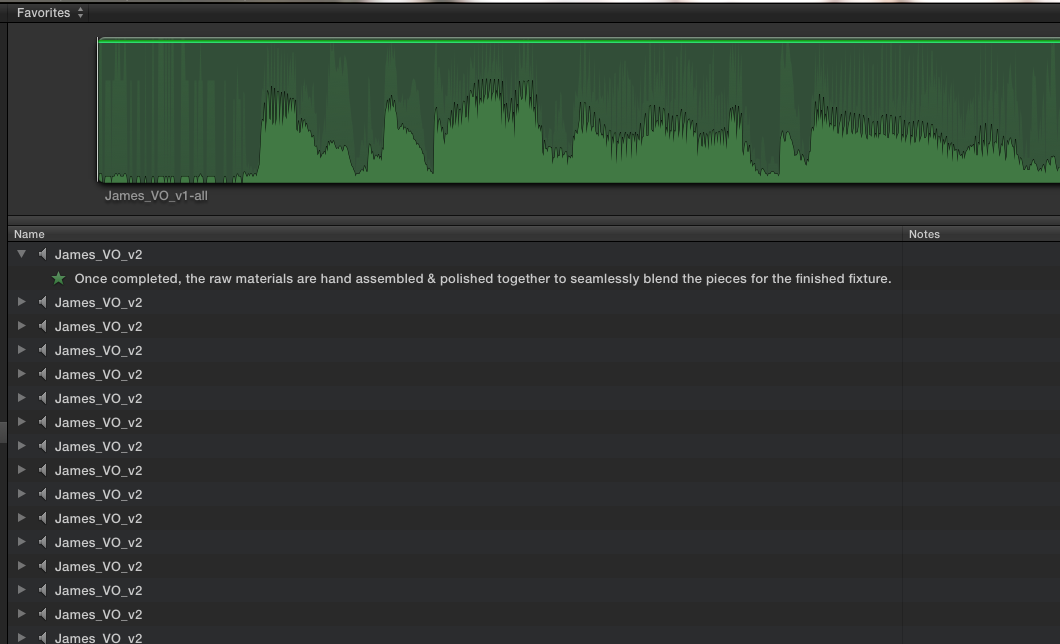
Please Log in to join the conversation.
- Tom Wolsky
-
- Offline
- Moderator
-
30 Jan 2014 16:54 #40173
by Tom Wolsky
Replied by Tom Wolsky on topic Notes for Audio Clips
Select them all. Press the right arrow.
Please Log in to join the conversation.
- SeanyBoy72
-
Topic Author
- Offline
- New Member
-
Less
More
- Posts: 8
- Thank you received: 0
31 Jan 2014 17:20 #40251
by SeanyBoy72
Replied by SeanyBoy72 on topic Notes for Audio Clips
That worked. Thank you again for sharing the knowledge.
Please Log in to join the conversation.
