


- Posts: 87
- Thank you received: 2
3 Post Moderation Rule for New Boarders (25 Jan 2021)
New boarders will have their posts moderated - Don't worry if you cannot see your post immediately.
Record Audio Window Not Working: Anyone else has this problem?
- El Cuajinais
-
 Topic Author
- Offline
- Premium Member
-

Less
More
29 Jan 2014 11:29 #40056
by El Cuajinais
I can't record any voice over audio using the FCPX record audio window. For some reason the Destination pull down does not work for me. It is blank and clicking on it does nothing. It's like the Destination button is "stuck". I've tried both kinds of mics (the mice jack type and the USB type). I can hear myself in both when I check the monitor box, but I don't get the green level bar with either mic. I press Record, the video plays, I can hear my voice through the speakers, but nothing gets recorded.
I've never tried this feature before so I don't know if it was working before the 10.1 upgrade. I'm running 10.1.1. I've already submitted the bug to Apple but was hopeful someone here could help.
Thanks.
I've never tried this feature before so I don't know if it was working before the 10.1 upgrade. I'm running 10.1.1. I've already submitted the bug to Apple but was hopeful someone here could help.
Thanks.
Please Log in to join the conversation.
- ronny courtens
-

- Offline
- Moderator
-

Less
More
- Posts: 4455
- Thank you received: 962
29 Jan 2014 12:48 #40063
by ronny courtens
Replied by ronny courtens on topic Record Audio Window Not Working: Anyone else has this problem?
This sounds familiar. Have you installed Mavericks over an older OS or did you do a clean install (wipe your drive and re-install OS and apps?
- Ronny
- Ronny
Please Log in to join the conversation.
- El Cuajinais
-
Topic Author
- Offline
- Premium Member
-
Less
More
- Posts: 87
- Thank you received: 2
29 Jan 2014 13:25 #40065
by El Cuajinais
Replied by El Cuajinais on topic Record Audio Window Not Working: Anyone else has this problem?
Installed it over my old OS. Oh God please don’t tell me I need to do a clean install of Mavericks!!! If it has to come to that, (after I finish my current project), is a clean install simply a matter wiping the drive and restoring from a time machine backup? Or is there tons of minutia I will need to install and configure one by one?
Please Log in to join the conversation.
- ronny courtens
-
- Offline
- Moderator
-
Less
More
- Posts: 4455
- Thank you received: 962
29 Jan 2014 13:49 #40067
by ronny courtens
Replied by ronny courtens on topic Record Audio Window Not Working: Anyone else has this problem?
We have seen many people lately having issues with different parts of the FCPX UI not responding, and all of these were solved by a clean re-install of the OS.
In fact a good way to check if this is causing your problem is: create a new admin user account and launch FCPX. If the UI is working fine with the new account this means your old user has problems caused by installing Mavs without a clean install and you will have to do this.
If your TM backup is also Mavericks installed over an older OS this will be of little use. You can use Migration Assistant to restore your old settings, as is explained in this thread: www.fcp.co/forum/4-final-cut-pro-x-fcpx/...an-t-switch-to-proxy
- Ronny
In fact a good way to check if this is causing your problem is: create a new admin user account and launch FCPX. If the UI is working fine with the new account this means your old user has problems caused by installing Mavs without a clean install and you will have to do this.
If your TM backup is also Mavericks installed over an older OS this will be of little use. You can use Migration Assistant to restore your old settings, as is explained in this thread: www.fcp.co/forum/4-final-cut-pro-x-fcpx/...an-t-switch-to-proxy
- Ronny
Please Log in to join the conversation.

29 Jan 2014 14:02 #40070
by Seanus
Sean Lander - Editing since 1982 - AVID 1991 - FCP 1999 - FCPX 2011
Replied by Seanus on topic Record Audio Window Not Working: Anyone else has this problem?
There's a destination selector? Then maybe I'm seeing the same issue, though I can record audio.
One thing I've noticed with 10.1 is that audio is always recorded directly into the timeline.
I'm sure this wasn't case previously. I'm not seeing anyway of switching this off?
One thing I've noticed with 10.1 is that audio is always recorded directly into the timeline.
I'm sure this wasn't case previously. I'm not seeing anyway of switching this off?
Sean Lander - Editing since 1982 - AVID 1991 - FCP 1999 - FCPX 2011
Please Log in to join the conversation.
- El Cuajinais
-
Topic Author
- Offline
- Premium Member
-
Less
More
- Posts: 87
- Thank you received: 2
29 Jan 2014 14:03 #40071
by El Cuajinais
Replied by El Cuajinais on topic Record Audio Window Not Working: Anyone else has this problem?
Wow. You’ve been very helpful. I love that I can test whether this will solve the problem before committing the time and effort to a clean install. I will perform the admin account test tonight when I get home. Thank you very much Ronny.ronny courtens wrote: We have seen many people lately having issues with different parts of the FCPX UI not responding, and all of these were solved by a clean re-install of the OS.
In fact a good way to check if this is causing your problem is: create a new admin user account and launch FCPX. If the UI is working fine with the new account this means your old user has problems caused by installing Mavs without a clean install and you will have to do this.
If your TM backup is also Mavericks installed over an older OS this will be of little use. You can use Migration Assistant to restore your old settings, as is explained in this thread: www.fcp.co/forum/4-final-cut-pro-x-fcpx/...an-t-switch-to-proxy
- Ronny
Please Log in to join the conversation.
- ronny courtens
-
- Offline
- Moderator
-
Less
More
- Posts: 4455
- Thank you received: 962
29 Jan 2014 14:08 #40072
by ronny courtens
Replied by ronny courtens on topic Record Audio Window Not Working: Anyone else has this problem?
@ Sean,
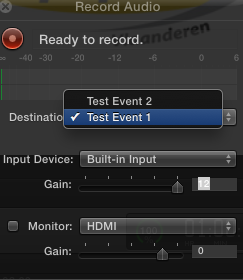
Yes there is a destination selector that lets you choose to which Event in your Library you want to store your recorded audio. Works fine here:
- Ronny
Yes there is a destination selector that lets you choose to which Event in your Library you want to store your recorded audio. Works fine here:
- Ronny
Please Log in to join the conversation.

29 Jan 2014 15:22 #40079
by BenB
Replied by BenB on topic Record Audio Window Not Working: Anyone else has this problem?
Try trashing prefs first, and reinstalling FCPX. I've seen those clear up similar issues lately. If neither works, an fresh OS install may be needed, as Ronny said.
And yes, it has always recorded directing into the active timeline.
And yes, it has always recorded directing into the active timeline.
Please Log in to join the conversation.
