


- Posts: 16
- Thank you received: 1
3 Post Moderation Rule for New Boarders (25 Jan 2021)
New boarders will have their posts moderated - Don't worry if you cannot see your post immediately.
FCPX 10.1 Import: Card Reader v. Camera
- ktc@conwaycorp.net
-
 Topic Author
- Offline
- New Member
-

Less
More
28 Jan 2014 17:11 - 28 Jan 2014 17:26 #39996
by ktc@conwaycorp.net
FCPX 10.1 Import: Card Reader v. Camera was created by ktc@conwaycorp.net
Why? Attached (hopefully) you'll see 4 screen shots of 2 situations.
1. Importing footage from my Canon 7d by connecting a USB cable to the camera.
This gives me no ability to set in/out points on clips. I can't eject the camera and I can't
make a camera archive.
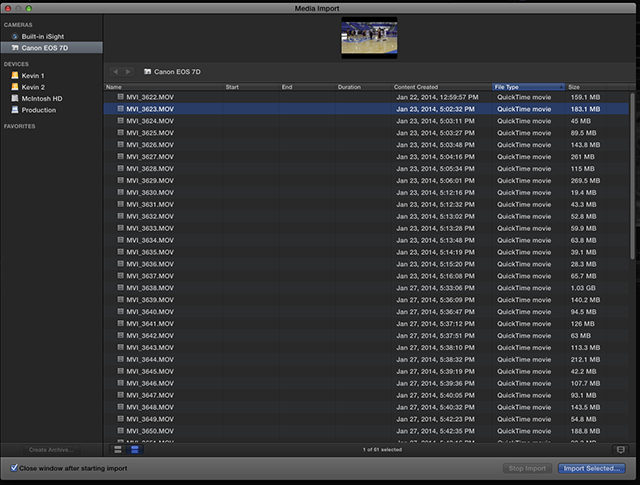
2. Importing the same footage from the same card, this time using a card reader. I can set in/out points, eject and make a camera archive.
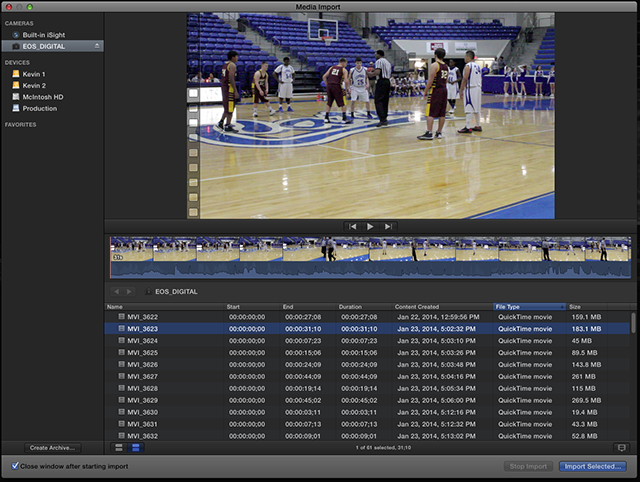
Why the difference? I don't like to remove my card from my camera if I don't have to. I'm always afraid I'll drop it in hot lava or something.
1. Importing footage from my Canon 7d by connecting a USB cable to the camera.
This gives me no ability to set in/out points on clips. I can't eject the camera and I can't
make a camera archive.
2. Importing the same footage from the same card, this time using a card reader. I can set in/out points, eject and make a camera archive.
Why the difference? I don't like to remove my card from my camera if I don't have to. I'm always afraid I'll drop it in hot lava or something.
Last edit: 28 Jan 2014 17:26 by ktc@conwaycorp.net.
Please Log in to join the conversation.
- ronny courtens
-

- Offline
- Moderator
-

Less
More
- Posts: 4455
- Thank you received: 962
28 Jan 2014 18:52 #40010
by ronny courtens
Replied by ronny courtens on topic FCPX 10.1 Import: Card Reader v. Camera
Apparently FCPX does not recognize the camera card structure when you import a card that's in a 7D. It only sees the video files in the folder, and you cannot set in or out points when importing video files from a folder.
When you place the card in a card reader FCPX does recognize the entire card structure as a camera card and it will allow you to set in and out points.
If you really don't want to take the card out of the camera for some reason, but you still wish to set in/outs when importing in FCPX, you can connect the camera to your computer and copy the card from the camera onto your drive. Copy the entire card, not only the files in it. Then launch FCPX and import from the card copy.
- Ronny
When you place the card in a card reader FCPX does recognize the entire card structure as a camera card and it will allow you to set in and out points.
If you really don't want to take the card out of the camera for some reason, but you still wish to set in/outs when importing in FCPX, you can connect the camera to your computer and copy the card from the camera onto your drive. Copy the entire card, not only the files in it. Then launch FCPX and import from the card copy.
- Ronny
Please Log in to join the conversation.

29 Jan 2014 00:16 #40031
by BenB
Replied by BenB on topic FCPX 10.1 Import: Card Reader v. Camera
I have a 7D, that's just how it's built. Some DSLRs are like this, you can only really import properly with a card reader.
Please Log in to join the conversation.

29 Jan 2014 06:12 #40048
by marchyman
Replied by marchyman on topic FCPX 10.1 Import: Card Reader v. Camera
The issue is that the 7D does NOT present the card as a mass storage device to your mac. It instead uses PTP (Picture Transfer Protocol) mode. PTP is a transfer protocol, not a file system. You won't see your 7D in the finder, for example. Some cameras have a menu setting that lets you pick one mode or another. For whatever reason Canon did not add that feature to the 7D.
Please Log in to join the conversation.
- ktc@conwaycorp.net
-
Topic Author
- Offline
- New Member
-
Less
More
- Posts: 16
- Thank you received: 1
29 Jan 2014 19:39 #40106
by ktc@conwaycorp.net
Replied by ktc@conwaycorp.net on topic FCPX 10.1 Import: Card Reader v. Camera
Excellent info marchyman. Thanks.
Please Log in to join the conversation.
