


- Posts: 35
- Thank you received: 1
3 Post Moderation Rule for New Boarders (25 Jan 2021)
New boarders will have their posts moderated - Don't worry if you cannot see your post immediately.
Missing clip warning
- Habernigvideo
-
 Topic Author
- Offline
- Junior Member
-

Less
More
27 Jan 2014 11:41 #39908
by Habernigvideo
Missing clip warning was created by Habernigvideo
I have a library with 2 events, 5 projects and all are showing the yellow warning that clips are offline. I've tried relinking at the project level all the way up to the library level and no clips are listed missing. I have the library on one drive and all the media has been consolidated to a folder on an external drive. I tried trashing preferences as well as deleting all the render files and the yellow warnings still show up. The projects play fine and I'm not getting any red missing clip icons in the event as well.
Has anyone else encountered this? And do these warning icons represent other problems other than missing items?
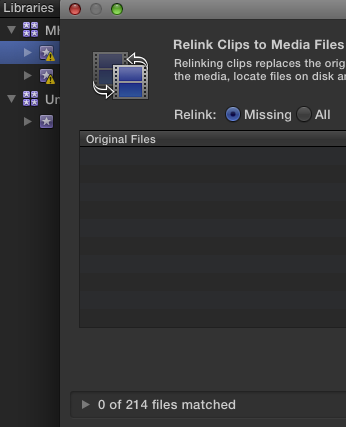
Has anyone else encountered this? And do these warning icons represent other problems other than missing items?
Please Log in to join the conversation.

28 Jan 2014 05:24 #39970
by dgwvideo
Creating history....one edit at a time !
Replied by dgwvideo on topic Missing clip warning
If you have your viewer settings on proxy but have not generated proxy files in the event you will see the yellow triangle alert next to the events. In this case, switching back to optimized/original will use the appropriate media. The inspector info tab will tell you whether or not the selected clip is available as an optimized/original clip or a proxy clip (or both) as designated by the green dot next to it.
The odd thing here is that usually if you are set to proxy but haven't generated proxy files you will get the missing file (media) warning and the project would not play fine as you indicate.
The odd thing here is that usually if you are set to proxy but haven't generated proxy files you will get the missing file (media) warning and the project would not play fine as you indicate.
Creating history....one edit at a time !
Please Log in to join the conversation.
- Darren Roark
-
- Offline
- Platinum Member
-

28 Jan 2014 05:50 #39971
by Darren Roark
Replied by Darren Roark on topic Missing clip warning
This can also happen with multicam or compound clips missing files. Try opening those up and see if anything is offline. For whatever reason, reconnect media won't see those. That could be why your projects still play fine.
Please Log in to join the conversation.

28 Jan 2014 09:17 #39976
by Seamusvfx
Replied by Seamusvfx on topic Missing clip warning
I have the same thing in one of my updated projects, despite all the media being in place and the project playing all the way through the warning triangle persists. I guess it might be a teething issue in 10.1 . Is it causing you any problems apart from the warning?
Please Log in to join the conversation.
- Habernigvideo
-
Topic Author
- Offline
- Junior Member
-
Less
More
- Posts: 35
- Thank you received: 1
28 Jan 2014 10:25 #39981
by Habernigvideo
Replied by Habernigvideo on topic Missing clip warning
Thanks guys, but no proxys, it was all done in Original. There were a couple compounds and a multi cam and they were fine.
With this library, I'm having no trouble editing but I can't copy or move the events to a new library, which is strange. When it was first updated to 10.1, I had a heck of a time trying to consolidate media files to another drive. It would only consolidate about 2/3s of the media leaving about a 1/3 still in the event.
The more I think about it, the more I think most of the problems stem from fcpx updating old projects/events. This library in particular was started in 10.0.3 and the final version was done in 10.0.8, this is just a client coming back for a quick text change. All my other issues with 10.1 have come from old projects and events.
With this library, I'm having no trouble editing but I can't copy or move the events to a new library, which is strange. When it was first updated to 10.1, I had a heck of a time trying to consolidate media files to another drive. It would only consolidate about 2/3s of the media leaving about a 1/3 still in the event.
The more I think about it, the more I think most of the problems stem from fcpx updating old projects/events. This library in particular was started in 10.0.3 and the final version was done in 10.0.8, this is just a client coming back for a quick text change. All my other issues with 10.1 have come from old projects and events.
Please Log in to join the conversation.
