


- Posts: 1
- Thank you received: 0
3 Post Moderation Rule for New Boarders (25 Jan 2021)
New boarders will have their posts moderated - Don't worry if you cannot see your post immediately.
Competent but Complete Noob question about workflow
- soundexile
-
 Topic Author
- Offline
- New Member
-

Less
More
27 Jan 2014 01:18 #39893
by soundexile
Competent but Complete Noob question about workflow was created by soundexile
OK so I migrated to Mac last year and Cubase transfers over no problem there. Check.
Sound Forge for Mac is a joke and they have not translated CD Architect...Bummer. Check
Sony has not translated Vegas to Mac...Another bummer... Check
Tried the trial of FCP X and turned out my first basic video of a performance but am struggling with the workflow. In Vegas I can take my video tracks and line up my audio track then set markers for the songs and region edit and export as separate videos. Can I do something similar in FCP X ? Not to mention the counter-intuitive nature of Projects inside of Events as opposed to the more easier to understand Events inside of a Project...
All help is graciously accepted and thank you.
Sound Forge for Mac is a joke and they have not translated CD Architect...Bummer. Check
Sony has not translated Vegas to Mac...Another bummer... Check
Tried the trial of FCP X and turned out my first basic video of a performance but am struggling with the workflow. In Vegas I can take my video tracks and line up my audio track then set markers for the songs and region edit and export as separate videos. Can I do something similar in FCP X ? Not to mention the counter-intuitive nature of Projects inside of Events as opposed to the more easier to understand Events inside of a Project...
All help is graciously accepted and thank you.
Please Log in to join the conversation.
- ronny courtens
-

- Offline
- Moderator
-

Less
More
- Posts: 4455
- Thank you received: 962
27 Jan 2014 06:17 - 27 Jan 2014 06:26 #39901
by ronny courtens
Replied by ronny courtens on topic Competent but Complete Noob question about workflow
Hi Joe, and welcome.
You have a performance with several songs and you want to export each song separately.
Set an In-point (I) at the start of a song, set an Out-point (O) at the end of it (or use the Range tool to drag a selection). This will mark a Range (yellow box) on the timeline. Then press the Share button to export the range.
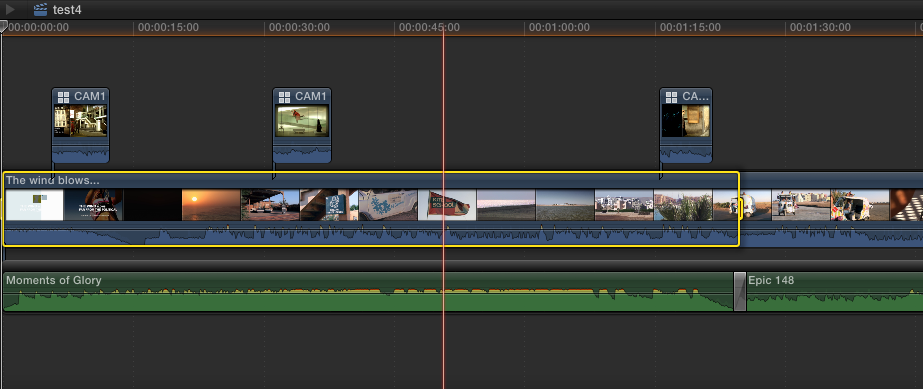
Every clip (or part of a clip) on the timeline within that Range will be included in the exported movie.
When you start using FCPX you may indeed have some trouble getting used to the new terminology. But words are just conventions, and once you get used to the terminology you don't even think about it anymore.
Although FCPX looks simple on the surface it is a very deep and powerful NLE. If you want to work with it on a serious level it is best to get some proper online training, as with any other professional application.
- Ronny
You have a performance with several songs and you want to export each song separately.
Set an In-point (I) at the start of a song, set an Out-point (O) at the end of it (or use the Range tool to drag a selection). This will mark a Range (yellow box) on the timeline. Then press the Share button to export the range.
Every clip (or part of a clip) on the timeline within that Range will be included in the exported movie.
When you start using FCPX you may indeed have some trouble getting used to the new terminology. But words are just conventions, and once you get used to the terminology you don't even think about it anymore.
Although FCPX looks simple on the surface it is a very deep and powerful NLE. If you want to work with it on a serious level it is best to get some proper online training, as with any other professional application.
- Ronny
Last edit: 27 Jan 2014 06:26 by ronny courtens.
Please Log in to join the conversation.

27 Jan 2014 11:53 - 27 Jan 2014 11:56 #39909
by BenB
Replied by BenB on topic Competent but Complete Noob question about workflow
An Event holds Timelines. Everything inside an Event is a Timeline. Each photo and video clip are their own unique Timelnes. Right-click a video in the Browser, select Open In Timelne, poof. Compound Clips are special timelines. Multicam clips are a specialty timeline. Projects are also a special type of timeline.
Also, I find referring to a Production better. A Project is simply a Project Timeline, not the Production. A single film Production can be one or more Libraries. Each Library can hold several Events, which can be used for anything; all media shot on a specific day, or in a specific location, for for a specific scene, etc.
Just like ratings of Favorite and Rejected. Don't get blinded by the terminology, as Ronny said. I know editors who use the terms Green and Red Tags. One I know tags Green for is direct interview shots that are usable, and Red for the cutaways that are usable.
No other NLE has the media management power, flexibility, and ease of use as FCPX.
A good course in FCPX can possibly save you a lot of time in the learning curve. macProVideo, Ripple, and Apple's own "Apple Pro Training Series" books are all about the best quality training on the market.
As an Apple cert'd trainer, the first thing I tell everyone in all of my classes is, "Take everything you've ever learned in any other NLE, especially legacy FCP, and throw it out the window, NOW! We're entering a whole new futuristic universe."
Also, I find referring to a Production better. A Project is simply a Project Timeline, not the Production. A single film Production can be one or more Libraries. Each Library can hold several Events, which can be used for anything; all media shot on a specific day, or in a specific location, for for a specific scene, etc.
Just like ratings of Favorite and Rejected. Don't get blinded by the terminology, as Ronny said. I know editors who use the terms Green and Red Tags. One I know tags Green for is direct interview shots that are usable, and Red for the cutaways that are usable.
No other NLE has the media management power, flexibility, and ease of use as FCPX.
A good course in FCPX can possibly save you a lot of time in the learning curve. macProVideo, Ripple, and Apple's own "Apple Pro Training Series" books are all about the best quality training on the market.
As an Apple cert'd trainer, the first thing I tell everyone in all of my classes is, "Take everything you've ever learned in any other NLE, especially legacy FCP, and throw it out the window, NOW! We're entering a whole new futuristic universe."
Last edit: 27 Jan 2014 11:56 by BenB.
Please Log in to join the conversation.
