


- Posts: 17
- Thank you received: 0
3 Post Moderation Rule for New Boarders (25 Jan 2021)
New boarders will have their posts moderated - Don't worry if you cannot see your post immediately.
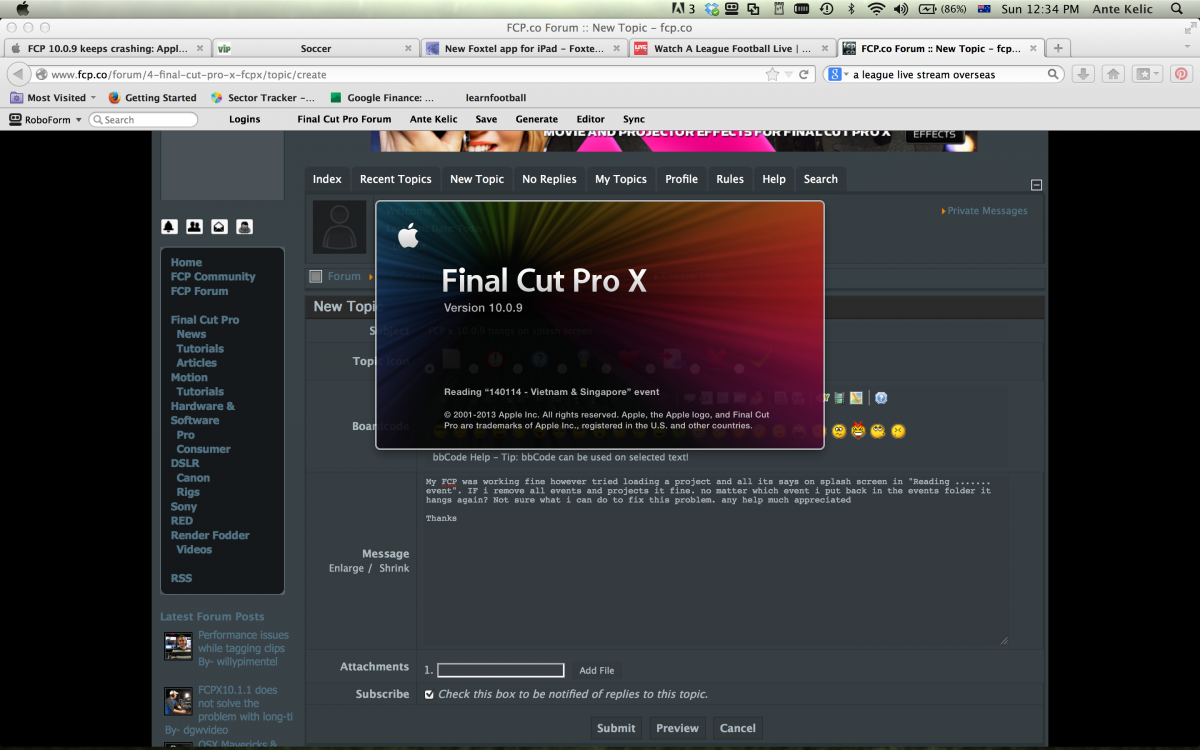
FCP x 10.0.9 hangs on splash screen
26 Jan 2014 05:34 #39819
by akelic
FCP x 10.0.9 hangs on splash screen was created by akelic
My FCP was working fine however tried loading a project and all its says on splash screen in "Reading ....... event". IF i remove all events and projects it fine. no matter which event i put back in the events folder it hangs again? Not sure what i can do to fix this problem. any help much appreciated
Thanks
Thanks
Please Log in to join the conversation.
- ronny courtens
-

- Offline
- Moderator
-

Less
More
- Posts: 4455
- Thank you received: 962
26 Jan 2014 09:13 #39825
by ronny courtens
Replied by ronny courtens on topic FCP x 10.0.9 hangs on splash screen
Hi Ante,
Have you changed anything to your system between the last time FCP was working fine and now?
Was there a crash the last time you shut down FCPX? What OS are you running with 10.0.9?
If you did not change anything to your system, these are the first steps you should take:
1. Check if all your RAM is working. If this is okay:
2. Check the drive that holds your Events.
Never put Events on your system drive and never use external USB2 drives to edit from. If the drive is okay:
3. Refresh your FCPX preferences.
If this does not help: post back with some more information about your hardware (machine, RAM, GPU...)
- Ronny
Have you changed anything to your system between the last time FCP was working fine and now?
Was there a crash the last time you shut down FCPX? What OS are you running with 10.0.9?
If you did not change anything to your system, these are the first steps you should take:
1. Check if all your RAM is working. If this is okay:
2. Check the drive that holds your Events.
Never put Events on your system drive and never use external USB2 drives to edit from. If the drive is okay:
3. Refresh your FCPX preferences.
If this does not help: post back with some more information about your hardware (machine, RAM, GPU...)
- Ronny
Please Log in to join the conversation.
26 Jan 2014 10:55 #39831
by akelic
Replied by akelic on topic FCP x 10.0.9 hangs on splash screen
Hi Ronny
Im running Lion 10.7.5, I have 16GB RAM.
I recreated preferences, it asked me to restore windows and i said yes - still no good.
cant remember a crash on last exit.
Up till now i have been placing all my events and project files on an external USB external drive and it has been running fine.
i try not keep anything on my local drive as i do many projects at a time and run into storage space problems.
if i unplug the usb but have an event in the Movies folder on my hard drive it crashes again.
if i have nothing on my local drive and unplug usb then FCP opens. I then created a new event, imported and item, closed it and re opened and it worked fine.
as soon as i try open another project or event on the local drive or usb it hangs
not sure what to do next
Im running Lion 10.7.5, I have 16GB RAM.
I recreated preferences, it asked me to restore windows and i said yes - still no good.
cant remember a crash on last exit.
Up till now i have been placing all my events and project files on an external USB external drive and it has been running fine.
i try not keep anything on my local drive as i do many projects at a time and run into storage space problems.
if i unplug the usb but have an event in the Movies folder on my hard drive it crashes again.
if i have nothing on my local drive and unplug usb then FCP opens. I then created a new event, imported and item, closed it and re opened and it worked fine.
as soon as i try open another project or event on the local drive or usb it hangs
not sure what to do next
Please Log in to join the conversation.
- ronny courtens
-
- Offline
- Moderator
-
Less
More
- Posts: 4455
- Thank you received: 962
26 Jan 2014 11:13 #39832
by ronny courtens
Replied by ronny courtens on topic FCP x 10.0.9 hangs on splash screen
Thank you for doing these tests. They make clear that there is no problem with the FCPX application itself, which is a good thing.
As your Events have loaded without any problems before and the hanging happens with every Event you are trying to load, I'm suspecting drive issues could be at the root of this. Let's start with the most obvious:
What is the total capacity of your USB drive? And how much space do you have left on that drive?
What is its total capacity of your system drive? And how much space do you have left on it?
- Ronny
As your Events have loaded without any problems before and the hanging happens with every Event you are trying to load, I'm suspecting drive issues could be at the root of this. Let's start with the most obvious:
What is the total capacity of your USB drive? And how much space do you have left on that drive?
What is its total capacity of your system drive? And how much space do you have left on it?
- Ronny
Please Log in to join the conversation.
26 Jan 2014 11:17 #39833
by akelic
Replied by akelic on topic FCP x 10.0.9 hangs on splash screen
USB Drive ITB, 130GB free
MAC HD - 454GB, 107GB Free
MAC HD - 454GB, 107GB Free
Please Log in to join the conversation.
- ronny courtens
-
- Offline
- Moderator
-
Less
More
- Posts: 4455
- Thank you received: 962
26 Jan 2014 12:00 #39837
by ronny courtens
Replied by ronny courtens on topic FCP x 10.0.9 hangs on splash screen
Thank you. The USB drive is very low on capacity. You always should have 15 to 20% drive space left. Anything below that can gradually cause slowdowns or even crashes.
The boot drive is okay for now, but if you put a large Event onto it you will have problems as well.
So as a matter of testing this: do you have any other drive (preferably not an USB drive if that is possible) that has a lot of free space and onto which you can copy one of the problematic Events? Then you could see if the Event opens from this drive or not. If it does, your problem is solved. If it doesn't we can look further.
- Ronny
The boot drive is okay for now, but if you put a large Event onto it you will have problems as well.
So as a matter of testing this: do you have any other drive (preferably not an USB drive if that is possible) that has a lot of free space and onto which you can copy one of the problematic Events? Then you could see if the Event opens from this drive or not. If it does, your problem is solved. If it doesn't we can look further.
- Ronny
Please Log in to join the conversation.

26 Jan 2014 15:05 - 26 Jan 2014 15:08 #39850
by BenB
Replied by BenB on topic FCP x 10.0.9 hangs on splash screen
To drive a point home, just yesterday I was caught off guard.
I have a drive which my Aperture library is on. 4TB drive, just hit 9% free space. My Aperture library got corrupted.
As a test, I deleted it and copied over my backup copy. Opened once, it was fine. When I opened it the second time it was corrupted again.
Repeated the whole experiment, and exact same results, except the library corrupted on the third opening.
Only after I cleared off some files and copied my good library over, would it work on my 4TB drive and not get corrupted. It has been opened lots of times now with no corruption.
So low free space can do damage, not just make your system act funky.
I have a drive which my Aperture library is on. 4TB drive, just hit 9% free space. My Aperture library got corrupted.
As a test, I deleted it and copied over my backup copy. Opened once, it was fine. When I opened it the second time it was corrupted again.
Repeated the whole experiment, and exact same results, except the library corrupted on the third opening.
Only after I cleared off some files and copied my good library over, would it work on my 4TB drive and not get corrupted. It has been opened lots of times now with no corruption.
So low free space can do damage, not just make your system act funky.
Last edit: 26 Jan 2014 15:08 by BenB.
Please Log in to join the conversation.
28 Jan 2014 04:50 #39968
by akelic
Replied by akelic on topic FCP x 10.0.9 hangs on splash screen
i only have USB drives? should i buy a thunderbolt drive instead?
Please Log in to join the conversation.
- ronny courtens
-
- Offline
- Moderator
-
Less
More
- Posts: 4455
- Thank you received: 962
28 Jan 2014 09:25 #39979
by ronny courtens
Replied by ronny courtens on topic FCP x 10.0.9 hangs on splash screen
If your drives are USB2, or your drives are USB3 but you connect them to a USB2 port on the computer, you will experience slow performance when loading large Events, especially from a nearly full drive. And, as Ben pointed out, you may even lose data when working from drives with little or no free space left.
If you have an empty USB drive you could put some Events and their associated Projects from the nearly full drive onto this one to see if this solves your problem. But a Thunderbolt drive will always give better throughput than any USB2 drive.
- Ronny
If you have an empty USB drive you could put some Events and their associated Projects from the nearly full drive onto this one to see if this solves your problem. But a Thunderbolt drive will always give better throughput than any USB2 drive.
- Ronny
Please Log in to join the conversation.
