


- Posts: 233
- Thank you received: 6
3 Post Moderation Rule for New Boarders (25 Jan 2021)
New boarders will have their posts moderated - Don't worry if you cannot see your post immediately.
Audio missing from clip
- damiangrady
-
 Topic Author
- Offline
- Elite Member
-

Less
More
22 Jan 2014 17:52 #39523
by damiangrady
Audio missing from clip was created by damiangrady
Hi there,
I just imported some clips that had been converted to pro res from R3D with sound and a couple of the clips have come into FCP X without any sound.
Strangely, if I Reveal In Finder with one of the offending clips and playback through either quick view or quicklime the audio is there.
Any ideas how this happened and how I fix it?
I just imported some clips that had been converted to pro res from R3D with sound and a couple of the clips have come into FCP X without any sound.
Strangely, if I Reveal In Finder with one of the offending clips and playback through either quick view or quicklime the audio is there.
Any ideas how this happened and how I fix it?
Please Log in to join the conversation.
- ronny courtens
-

- Offline
- Moderator
-

Less
More
- Posts: 4455
- Thank you received: 962
22 Jan 2014 20:02 #39536
by ronny courtens
Replied by ronny courtens on topic Audio missing from clip
Hi Damian,
Do you see any waveforms on the offending clips in the Event?
When you select an offending clip in the Event, do you see any audio channels listed in the Inspector > Audio tab?
- Ronny
Do you see any waveforms on the offending clips in the Event?
When you select an offending clip in the Event, do you see any audio channels listed in the Inspector > Audio tab?
- Ronny
Please Log in to join the conversation.
- damiangrady
-
Topic Author
- Offline
- Elite Member
-
Less
More
- Posts: 233
- Thank you received: 6
22 Jan 2014 20:34 - 22 Jan 2014 20:40 #39546
by damiangrady
Nope. No waveforms and in the inspector there are only tabs for Video/Info/Share
Replied by damiangrady on topic Audio missing from clip
ronny courtens wrote: Hi Damian,
Do you see any waveforms on the offending clips in the Event?
When you select an offending clip in the Event, do you see any audio channels listed in the Inspector > Audio tab?
- Ronny
Nope. No waveforms and in the inspector there are only tabs for Video/Info/Share
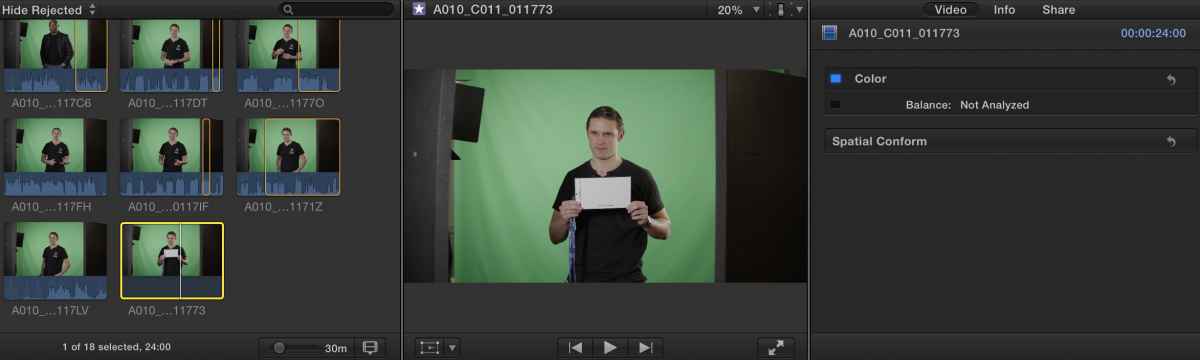
Last edit: 22 Jan 2014 20:40 by damiangrady.
Please Log in to join the conversation.
- ronny courtens
-
- Offline
- Moderator
-
Less
More
- Posts: 4455
- Thank you received: 962
22 Jan 2014 20:45 #39548
by ronny courtens
Replied by ronny courtens on topic Audio missing from clip
Thank you, that eliminates a few probable causes.
What is the video format of the offending clip?
Have you imported your clips into the Library or are they on a different drive?
- Ronny
What is the video format of the offending clip?
Have you imported your clips into the Library or are they on a different drive?
- Ronny
Please Log in to join the conversation.
- damiangrady
-
Topic Author
- Offline
- Elite Member
-
Less
More
- Posts: 233
- Thank you received: 6
22 Jan 2014 20:52 #39549
by damiangrady
Replied by damiangrady on topic Audio missing from clip
The flow was RED R3D to 4k ProRes 422HQ which was imported into a new library created on an external firewire 800 drive (My Passport Studio).
The thing that really baffles me is that the file itself has audio in it which can be confirmed by a quick Reveal In Finder and simply playing the file.
The thing that really baffles me is that the file itself has audio in it which can be confirmed by a quick Reveal In Finder and simply playing the file.
Please Log in to join the conversation.
- ronny courtens
-
- Offline
- Moderator
-
Less
More
- Posts: 4455
- Thank you received: 962
22 Jan 2014 21:10 #39551
by ronny courtens
Replied by ronny courtens on topic Audio missing from clip
Yes, that surprises me as well. I have only seen this happening with files that were in .DV format. ProRes should import without any issues, and other clips of your project are importing correctly.
Try re-importing an offending clip, making sure that none of the Audio options (Analyze..., Separate..., Remove...) is checked in the Import Preferences window.
- Ronny
Try re-importing an offending clip, making sure that none of the Audio options (Analyze..., Separate..., Remove...) is checked in the Import Preferences window.
- Ronny
Please Log in to join the conversation.
- damiangrady
-
Topic Author
- Offline
- Elite Member
-
Less
More
- Posts: 233
- Thank you received: 6
22 Jan 2014 21:13 #39552
by damiangrady
Replied by damiangrady on topic Audio missing from clip
Ah, good idea. I'll try that. Thanks for your help Ronny
Please Log in to join the conversation.
- ronny courtens
-
- Offline
- Moderator
-
Less
More
- Posts: 4455
- Thank you received: 962
22 Jan 2014 21:15 #39553
by ronny courtens
Replied by ronny courtens on topic Audio missing from clip
Keep us updated on this. I have to go now, but I'm sure others will chime in if you have any further problems. Good luck!
- Ronny
- Ronny
Please Log in to join the conversation.
- haysoos123
-
- Offline
- Platinum Member
-

Less
More
- Posts: 402
- Thank you received: 72
24 Jan 2014 01:30 #39681
by haysoos123
Replied by haysoos123 on topic Audio missing from clip
I can confirm that I've had this happen with r3d files converted to ProRes. The only problem is I have no idea what causes it. This happened with a set of supplemental footage that we had from another company shooting a few things. I'm not positive but it's possible they used Red Cine-X to make the prores files for us, so maybe there's some subtle glitch that could happen there. However, the files that I've made with Red Rocket/Red Cine-X have NOT had that happen (yet). It could be they were using an older version, etc.
The strangest thing is that the audio seems ok at first, but then it will spontaneously DISAPPEAR exactly like you have it. If you go to the file in the finder, the audio will still be there. What we did that seems to have fixed it is to pass it through compressor again. It seems to only happen to a few of the clips from the batch, so again, it's very hard to track down what's glitching.
The strangest thing is that the audio seems ok at first, but then it will spontaneously DISAPPEAR exactly like you have it. If you go to the file in the finder, the audio will still be there. What we did that seems to have fixed it is to pass it through compressor again. It seems to only happen to a few of the clips from the batch, so again, it's very hard to track down what's glitching.
Please Log in to join the conversation.
