


- Posts: 233
- Thank you received: 6
3 Post Moderation Rule for New Boarders (25 Jan 2021)
New boarders will have their posts moderated - Don't worry if you cannot see your post immediately.
Importing RED R3D
- damiangrady
-
 Topic Author
- Offline
- Elite Member
-

Less
More
21 Jan 2014 22:45 #39453
by damiangrady
Importing RED R3D was created by damiangrady
Hi there,
Does anyone know the best way to import RED R3D footage into FCP X 10.1.1?
I actually know how to bring it in, the issue I have is when I navigate to a RED RDM folder all I see are the clip folders. In order to see the footage I have to go into each folder to check whether I want to import it or not.
Is there a way FCP X can just scan all of these folders and just show me previews of the R3D files in them instead? A la Premier Pro?
Does anyone know the best way to import RED R3D footage into FCP X 10.1.1?
I actually know how to bring it in, the issue I have is when I navigate to a RED RDM folder all I see are the clip folders. In order to see the footage I have to go into each folder to check whether I want to import it or not.
Is there a way FCP X can just scan all of these folders and just show me previews of the R3D files in them instead? A la Premier Pro?
Please Log in to join the conversation.

21 Jan 2014 23:00 #39456
by Dawar
Replied by Dawar on topic Importing RED R3D
Did you install the RED FCPX plugin ?
www.red.com/downloads/5086c46b17ef0223980000b3
www.red.com/downloads/5086c46b17ef0223980000b3
Please Log in to join the conversation.
- damiangrady
-
Topic Author
- Offline
- Elite Member
-
Less
More
- Posts: 233
- Thank you received: 6
21 Jan 2014 23:20 #39457
by damiangrady
Yep, certainly did.
Replied by damiangrady on topic Importing RED R3D
Dawar wrote: Did you install the RED FCPX plugin ?
www.red.com/downloads/5086c46b17ef0223980000b3
Yep, certainly did.
Please Log in to join the conversation.
- damiangrady
-
Topic Author
- Offline
- Elite Member
-
Less
More
- Posts: 233
- Thank you received: 6
21 Jan 2014 23:22 - 21 Jan 2014 23:25 #39458
by damiangrady
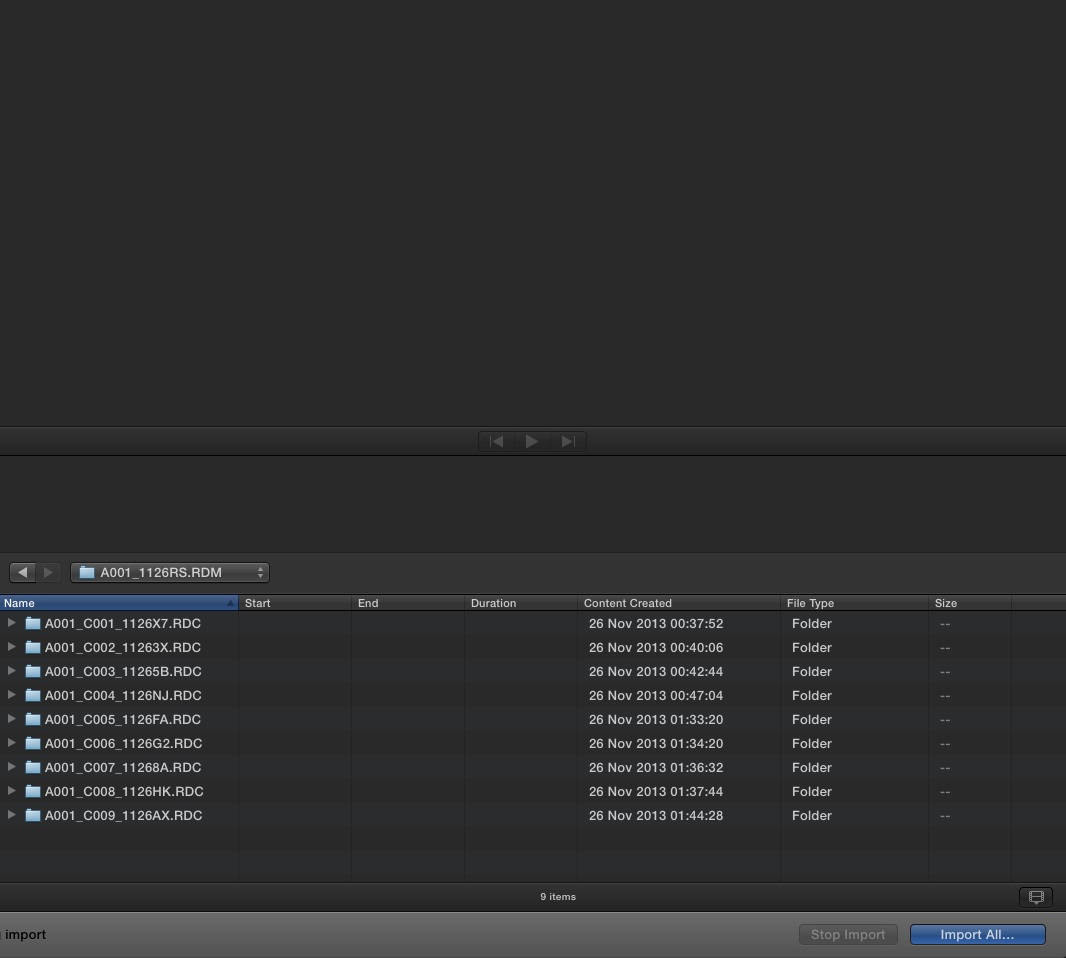
This is what I see in the RDM folder ...
Replied by damiangrady on topic Importing RED R3D
This is what I see in the RDM folder ...
Last edit: 21 Jan 2014 23:25 by damiangrady.
Please Log in to join the conversation.
22 Jan 2014 00:30 #39461
by Dawar
Replied by Dawar on topic Importing RED R3D
I just noticed there's no more filmstrip view in import window 
All I see is that you can select all your folders, and hit right arrow to open them.
All I see is that you can select all your folders, and hit right arrow to open them.
Please Log in to join the conversation.
22 Jan 2014 00:52 #39463
by Dawar
Replied by Dawar on topic Importing RED R3D
I was wrong, there's still thumbnail view, which is available when importing others than .mov files.
Anyway, it doesn't seem available for R3D folders.
Anyway, it doesn't seem available for R3D folders.
Please Log in to join the conversation.
- Disproportionate Pictures
-

- Offline
- Platinum Member
-

Less
More
- Posts: 1433
- Thank you received: 64
22 Jan 2014 04:12 #39473
by Disproportionate Pictures
Replied by Disproportionate Pictures on topic Importing RED R3D
I believe you just hit "Import All" at this level, and FCPX will look into each folder and grab all the R3D files. It will tell you there are some things it can't import (some of the data files in each the folder)- you just hit "ignore" or "ok" when that dialogue pops up and then FCPx will import the clips.
Question for those more knowledgeable than me- after 10.1, do you still need to open up your footage in RedCineX FIRST in order to generate the RMD files that you can then edit in BOTH FCPX and RedCineX?
Question for those more knowledgeable than me- after 10.1, do you still need to open up your footage in RedCineX FIRST in order to generate the RMD files that you can then edit in BOTH FCPX and RedCineX?
Please Log in to join the conversation.

23 Jan 2014 01:52 #39564
by BenB
Replied by BenB on topic Importing RED R3D
The RMD file is created by RedCineX and FCPX in the same folder as the original R3D file. So both should read it fine, even if it is originally created by FCPX. If RedCineX won't read it, that is because RedCineX won't read one created by another app, not an FCPX issue. From what I understand, it should be fine. I've not used RedCineX, as we take our R3D into FCPX, do all our preliminary work there, then go to Resolve.
www.macprovideo.com/hub/final-cut/redcod...final-cut-pro-x-1006
www.macprovideo.com/hub/final-cut/redcod...final-cut-pro-x-1006
Please Log in to join the conversation.
