


- Posts: 479
- Thank you received: 5
3 Post Moderation Rule for New Boarders (25 Jan 2021)
New boarders will have their posts moderated - Don't worry if you cannot see your post immediately.
color presets
20 Jan 2014 19:51 #39354
by parkerhqj
color presets was created by parkerhqj
I'm trying to figure out how to get rid of old color presets under Color Adjustments. First of all, I have no interest in Summer Sun or Dust or any of Apple's presets, but I also want to get rid of my old ones. The only place I can find the presets is in Movie - Final Cut Events - color presets. I deleted the ones I found there but it didn't make any difference and didn't include any of Apple's presets. Am I looking in the wrong place?
thx
thx
Please Log in to join the conversation.
- ronny courtens
-

- Offline
- Moderator
-

Less
More
- Posts: 4455
- Thank you received: 962
20 Jan 2014 22:44 #39368
by ronny courtens
Replied by ronny courtens on topic color presets
Hi Bill,
You will find your custom created color presets in User Library > Application Support > ProApps > Color Presets. Just make sure to re-launch FCPX after having deleted the presets.
The Apple color presets are hidden inside the FCPX app, and I don't encourage deleting anything in there.
- Ronny
You will find your custom created color presets in User Library > Application Support > ProApps > Color Presets. Just make sure to re-launch FCPX after having deleted the presets.
The Apple color presets are hidden inside the FCPX app, and I don't encourage deleting anything in there.
- Ronny
Please Log in to join the conversation.
21 Jan 2014 13:50 #39409
by parkerhqj
Replied by parkerhqj on topic color presets
For the life of me, I can't find these presets under Proapps. I tried Library - Application Support - Pro Apps which gives me Internal Plug Ins but nothing else. Then Users doesn't get me there either. Am I looking in the wrong place?
Please Log in to join the conversation.
- Tommy Campbell
-

- Offline
- Junior Member
-

Less
More
- Posts: 24
- Thank you received: 2
21 Jan 2014 13:58 #39410
by Tommy Campbell
Replied by Tommy Campbell on topic color presets
Make sure you are looking in your user Library folder. Open Finder, hold down the Option key, click go on the Menu Bar and choose Library from the drop downs menu. Then navigate to Application Support/ProApps.
Please Log in to join the conversation.
- ronny courtens
-
- Offline
- Moderator
-
Less
More
- Posts: 4455
- Thank you received: 962
21 Jan 2014 13:58 #39411
by ronny courtens
Replied by ronny courtens on topic color presets
Hey Bill,
It's in User > Library > Application Support > Pro Apps > Color Presets.

The extension is .cboard
- Ronny
It's in User > Library > Application Support > Pro Apps > Color Presets.
The extension is .cboard
- Ronny
Please Log in to join the conversation.
21 Jan 2014 14:02 #39413
by parkerhqj
Replied by parkerhqj on topic color presets
Got it. Thanks guys - I'm being a little dense today.
Please Log in to join the conversation.
- ronny courtens
-
- Offline
- Moderator
-
Less
More
- Posts: 4455
- Thank you received: 962
21 Jan 2014 14:03 #39414
by ronny courtens
Replied by ronny courtens on topic color presets
No sweat, we all have these moments 
- Ronny
- Ronny
Please Log in to join the conversation.
21 Jan 2014 14:05 #39415
by parkerhqj
Replied by parkerhqj on topic color presets
Some more than others if you follow my posts!
One more question about presets. If I delete them and then open a project down the road where I used them, I won't get any missing effect warning will I? I'm a little paranoid about this.
One more question about presets. If I delete them and then open a project down the road where I used them, I won't get any missing effect warning will I? I'm a little paranoid about this.
Please Log in to join the conversation.
- ronny courtens
-
- Offline
- Moderator
-
Less
More
- Posts: 4455
- Thank you received: 962
21 Jan 2014 14:07 #39417
by ronny courtens
Replied by ronny courtens on topic color presets
Excellent question! I don't think you will get a missing effects warning, but you surely will lose the color setting that was applied to the clip. Let me test this for you, will be back in a minute.
- Ronny
- Ronny
Please Log in to join the conversation.
- ronny courtens
-
- Offline
- Moderator
-
Less
More
- Posts: 4455
- Thank you received: 962
21 Jan 2014 14:27 - 21 Jan 2014 14:32 #39421
by ronny courtens
Replied by ronny courtens on topic color presets
I did a test applying my world-famous Ronny Color Preset  to a clip in the timeline:
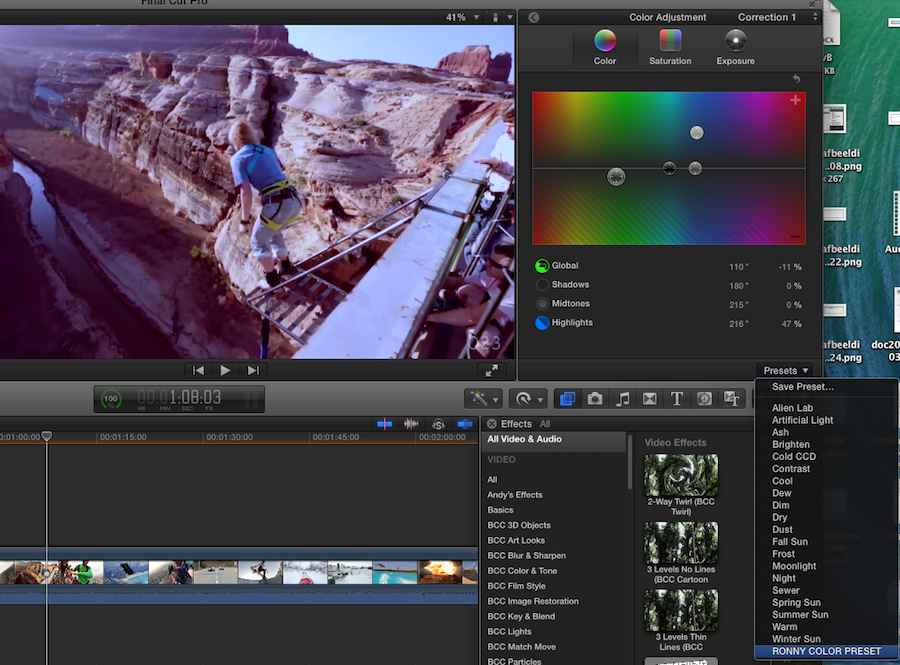
Then I closed FCPX, I deleted the preset from my User Library, emptied the Trash and I opened FCPX again. Although the preset has been deleted the clip still has the preset color correction applied to it:
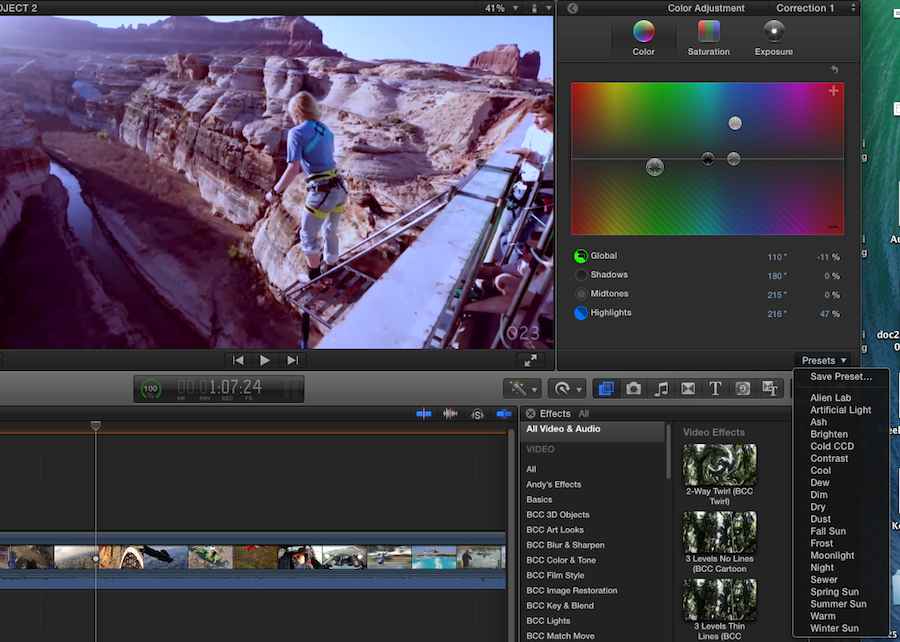
So I think you are good to go, my friend. You won't lose anything.
- Ronny
to a clip in the timeline:
Then I closed FCPX, I deleted the preset from my User Library, emptied the Trash and I opened FCPX again. Although the preset has been deleted the clip still has the preset color correction applied to it:
So I think you are good to go, my friend. You won't lose anything.
- Ronny
Last edit: 21 Jan 2014 14:32 by ronny courtens.
Please Log in to join the conversation.
21 Jan 2014 14:34 #39424
by parkerhqj
Replied by parkerhqj on topic color presets
Thanks Ronny. I appreciate the effort. I guess we could look at presets as something we use on a job to job basis. If you have to open an old project and work on it, it's easy enough to recreate them if you need to. It's a pity fcp throws in their own presets. It means you have to scroll through a bunch of filters to get to your own. No big deal though. thx!
Please Log in to join the conversation.

23 Jan 2014 02:13 - 23 Jan 2014 02:15 #39566
by BenB
Replied by BenB on topic color presets
Personally I'd not trash the presets completely. Right-click them, compress them, trash the originals. FCPX won't recognize the ZIP file, but if you ever need them back, their there. Just a thought.
If a certain forum programmer wrote a script that would help do this, that would be great. Like an Event Manager X for color board presets.
If a certain forum programmer wrote a script that would help do this, that would be great. Like an Event Manager X for color board presets.
Last edit: 23 Jan 2014 02:15 by BenB.
Please Log in to join the conversation.
