


- Posts: 37
- Thank you received: 0
3 Post Moderation Rule for New Boarders (25 Jan 2021)
New boarders will have their posts moderated - Don't worry if you cannot see your post immediately.
Launching compressor 5.1 droplets from FCPX - Show window at startup checkbox now missing?
19 Jan 2014 10:07 #39285
by highab
Launching compressor 5.1 droplets from FCPX - Show window at startup checkbox now missing? was created by highab
Hi I had an automated workflow set up with the previous versions of FCPX and compressor because I'm editing and exporting fairly basic footage every week.... launching the export process about midnight.
So in FCPX I have the on completion file export action set to open a compressor droplet (ProRess422 to "vimeo" 1280x720), which, when completed launches another compressor droplet, processing the 1280x720 to DVD and podcast format, as I've found this to be faster than having all the versions processed from the ProRes422.
Things have been fine for a couple of years, no time lost and one process launching the next while I'm asleep or elsewhere. The only thing I had to do was open the droplet once from finder, just after I'd created it, and uncheck the checkbox for "show window at startup".
I can't find this option now, which means when I woke up and remotely connected to the Mac in question this morning, I had to manually OK the processing of droplet no 2, the one launched when droplet no 1 finished, so launched by compressor/share monitor and not FCPX.
My remote connection is not always great... something to do with the router not working so well or hanging now, so I definitely don't want an extra couple of clicks to do hours apart, somewhere within my export process.
Has anyone else come across this problem or found where they've hidden the checkbox? or found how to get the droplet to not need me to click on OK? The file is there, the settings are OK, it just wants me to say OK before it starts.....
Thanks!
So in FCPX I have the on completion file export action set to open a compressor droplet (ProRess422 to "vimeo" 1280x720), which, when completed launches another compressor droplet, processing the 1280x720 to DVD and podcast format, as I've found this to be faster than having all the versions processed from the ProRes422.
Things have been fine for a couple of years, no time lost and one process launching the next while I'm asleep or elsewhere. The only thing I had to do was open the droplet once from finder, just after I'd created it, and uncheck the checkbox for "show window at startup".
I can't find this option now, which means when I woke up and remotely connected to the Mac in question this morning, I had to manually OK the processing of droplet no 2, the one launched when droplet no 1 finished, so launched by compressor/share monitor and not FCPX.
My remote connection is not always great... something to do with the router not working so well or hanging now, so I definitely don't want an extra couple of clicks to do hours apart, somewhere within my export process.
Has anyone else come across this problem or found where they've hidden the checkbox? or found how to get the droplet to not need me to click on OK? The file is there, the settings are OK, it just wants me to say OK before it starts.....
Thanks!
Please Log in to join the conversation.

19 Jan 2014 18:07 - 19 Jan 2014 18:10 #39312
by BenB
Replied by BenB on topic Launching compressor 5.1 droplets from FCPX - Show window at startup checkbox now missing?
The check box is gone, totally. It launches as an app, and you must double check and approve before manually clicking it to move on.
That said, you have a much more efficient option. Just create a Group in Compressor (rather than Droplets) and use that as a Custom Destination in FCPX. As you said, you're not hanging around waiting for it anyway, just let it run through Compressor.
Or create a Droplet out of that same Group, but you'll have to manually click the Submit button still. Unless you create an Automator script, and have that run after you create your ProRes file.
Would do the same thing, but much more efficiently. I have an article about this coming out at macProVideo over the next few weeks.
That said, you have a much more efficient option. Just create a Group in Compressor (rather than Droplets) and use that as a Custom Destination in FCPX. As you said, you're not hanging around waiting for it anyway, just let it run through Compressor.
Or create a Droplet out of that same Group, but you'll have to manually click the Submit button still. Unless you create an Automator script, and have that run after you create your ProRes file.
Would do the same thing, but much more efficiently. I have an article about this coming out at macProVideo over the next few weeks.
Last edit: 19 Jan 2014 18:10 by BenB.
Please Log in to join the conversation.
21 Jan 2014 18:27 #39440
by highab
Replied by highab on topic Launching compressor 5.1 droplets from FCPX - Show window at startup checkbox now missing?
Thanks for clarifying that the checkbox really isn't there any more.
So are you telling me that from the Share File/Settings dialogue I can
1) export to ProRes422
2) process the ProRes422 to 1280x720 (vimeo)
3) take the 1280x720 file created and export to podcast format and DVD format
all without clicking on any buttons, just by using groups???
At the moment I can see how to create a group in compressor, but not how to set up my workflow.
I can't see how to tell it to automatically open a group and if I did, wouldn't FCPX be opening the ProRes422 and processing that to the 3 different formats if I tell it to open with a group..... (which takes about 10 hours more processing time than when taking the 1280x720 as the input file)
that's where I'm not following the train of thought of the suggestion, or maybe groups are more powerful than I think
So are you telling me that from the Share File/Settings dialogue I can
1) export to ProRes422
2) process the ProRes422 to 1280x720 (vimeo)
3) take the 1280x720 file created and export to podcast format and DVD format
all without clicking on any buttons, just by using groups???
At the moment I can see how to create a group in compressor, but not how to set up my workflow.
I can't see how to tell it to automatically open a group and if I did, wouldn't FCPX be opening the ProRes422 and processing that to the 3 different formats if I tell it to open with a group..... (which takes about 10 hours more processing time than when taking the 1280x720 as the input file)
that's where I'm not following the train of thought of the suggestion, or maybe groups are more powerful than I think
Please Log in to join the conversation.
- haysoos123
-

- Offline
- Platinum Member
-

Less
More
- Posts: 402
- Thank you received: 72
21 Jan 2014 23:54 #39459
by haysoos123
Replied by haysoos123 on topic Launching compressor 5.1 droplets from FCPX - Show window at startup checkbox now missing?
Another way to do it would be to make a bundle and it will do exactly what you want. Just make a bundle with 1) an Export File (your prores master), and 2) and 3) are presets from Compressor.
Here's a better explanation I quickly found:
vimeo.com/60814363
It's one of the more convenient workflow additions of FCPX.
Here's a better explanation I quickly found:
vimeo.com/60814363
It's one of the more convenient workflow additions of FCPX.
Please Log in to join the conversation.
23 Jan 2014 01:59 - 23 Jan 2014 02:05 #39565
by BenB
Replied by BenB on topic Launching compressor 5.1 droplets from FCPX - Show window at startup checkbox now missing?
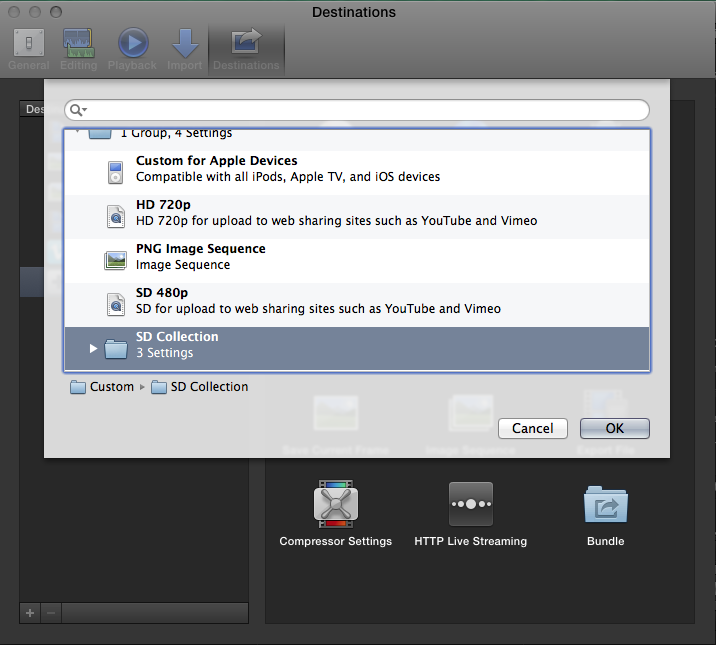
Here you can see that I have access to my Compressor custom group called "SD Collection" when I create a new Destination in FCP X. Simply use the Compressor Settings template.
But to speed things up, you may want to export a ProRes, and specify that it open in Compressor once created, then drop your custom Group on it for transcoding.
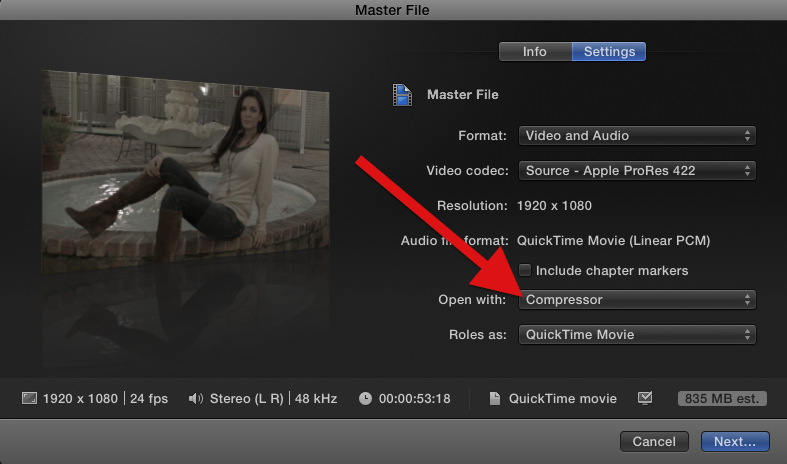
But to speed things up, you may want to export a ProRes, and specify that it open in Compressor once created, then drop your custom Group on it for transcoding.
Last edit: 23 Jan 2014 02:05 by BenB.
Please Log in to join the conversation.
23 Jan 2014 05:10 #39571
by highab
Replied by highab on topic Launching compressor 5.1 droplets from FCPX - Show window at startup checkbox now missing?
Yes I saw that, thanks, but I can't see how to tell it which compressor group to apply automatically without manual input in the open with box of the file share dialogue.
From what you say I'd need to drag and drop settings and then click OK. So I'm faced with a 20min walk each way for a simple click and drag operation if my remote access cuts out because the router hangs, as it does all too frequently at the mo and I'll have lost one night's worth of processing time.
So although many of the compressor changes are welcome, I'vem actually lost a much-needed function.
It would seem, therefore that an applescript to just click on OK on my droplet whenever it's open would be the easier option or at least the most automated one.
Thanks.
From what you say I'd need to drag and drop settings and then click OK. So I'm faced with a 20min walk each way for a simple click and drag operation if my remote access cuts out because the router hangs, as it does all too frequently at the mo and I'll have lost one night's worth of processing time.
So although many of the compressor changes are welcome, I'vem actually lost a much-needed function.
It would seem, therefore that an applescript to just click on OK on my droplet whenever it's open would be the easier option or at least the most automated one.
Thanks.
Please Log in to join the conversation.
23 Jan 2014 12:14 #39608
by highab
Replied by highab on topic Launching compressor 5.1 droplets from FCPX - Show window at startup checkbox now missing?
Hi,I'm in front of the computer again now, trying to test out the different options proposed, but my custom compressor settings don't show up.
FCPX 10.1.1 Compressor 5.1
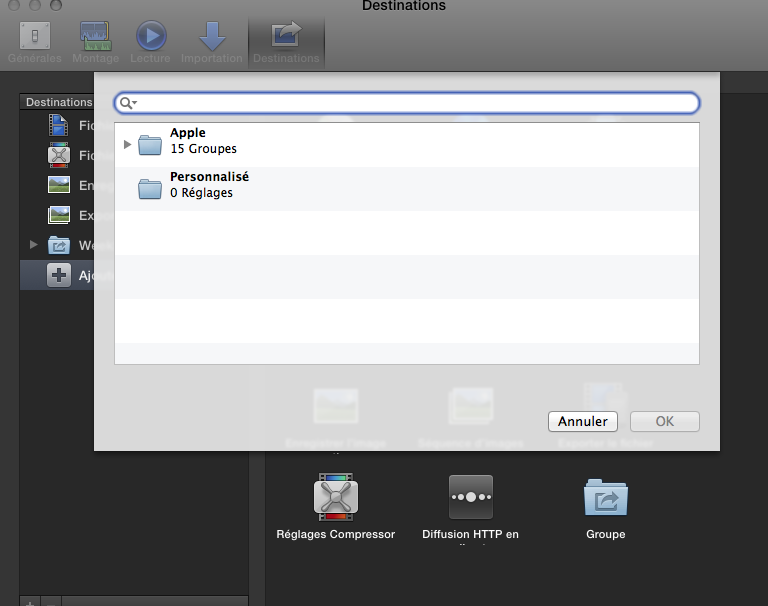
but I do have the custom settings set up.
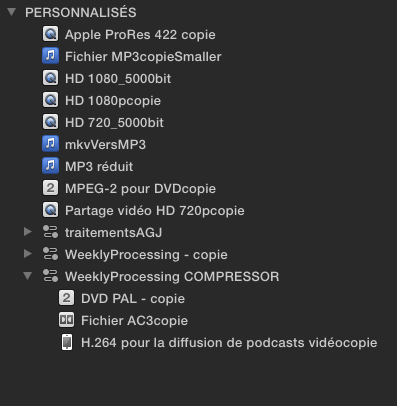
any ideas?
FCPX 10.1.1 Compressor 5.1
but I do have the custom settings set up.
any ideas?
Please Log in to join the conversation.

23 Jan 2014 14:58 - 23 Jan 2014 14:59 #39619
by ddixon
Replied by ddixon on topic Launching compressor 5.1 droplets from FCPX - Show window at startup checkbox now missing?
It may not be your scenario, but I saw this a few months back. I still had Compressor 4 and Compressor 3 on the same computer, with custom presets in both. That seemed to confuse FCPX and it wouldn't show either set. I can't remember now if I fixed it by removing just the v.3 presets or Compressor 3 entirely.
Just a thought...
Just a thought...
Last edit: 23 Jan 2014 14:59 by ddixon.
Please Log in to join the conversation.
23 Jan 2014 15:04 #39620
by highab
Replied by highab on topic Launching compressor 5.1 droplets from FCPX - Show window at startup checkbox now missing?
Thanks -I've no idea... I just did the App Store update. The FCP remover doesn't give me an option of removing minor sub-versions.... only compressor or compressor 4
If I right-click on a file to open with a droplet I have numerous instances of the same droplet inside brackets 4.05, 4.07 and 4.1 on the list, so I presume that that means they're still on the computer somewhere. I would've expected the update process to remove them, though
If I right-click on a file to open with a droplet I have numerous instances of the same droplet inside brackets 4.05, 4.07 and 4.1 on the list, so I presume that that means they're still on the computer somewhere. I would've expected the update process to remove them, though
Please Log in to join the conversation.
23 Jan 2014 15:51 #39622
by ddixon
Replied by ddixon on topic Launching compressor 5.1 droplets from FCPX - Show window at startup checkbox now missing?
Well, in my case it was an older version from Final Cut Studio (v.7) that was still on the hard drive. It still might be worth making sure there are not multiple versions of the presets in the folder. This thread gives more details on how to find those:
www.fcp.co/forum/4-final-cut-pro-x-fcpx/...-fcpx-share-settings
www.fcp.co/forum/4-final-cut-pro-x-fcpx/...-fcpx-share-settings
Please Log in to join the conversation.
- haysoos123
-
- Offline
- Platinum Member
-
Less
More
- Posts: 402
- Thank you received: 72
24 Jan 2014 00:38 - 24 Jan 2014 00:40 #39678
by haysoos123
As I said, you can add an Export File to the bundle (or Groupe in your language version) which will create your master, so there's no reason to export a master file and have it open in Compressor. If the project is rendered, it won't take any more time to create those other versions than it does to use Compressor on a master file.
Replied by haysoos123 on topic Launching compressor 5.1 droplets from FCPX - Show window at startup checkbox now missing?
highab wrote: Yes I saw that, thanks, but I can't see how to tell it which compressor group to apply automatically without manual input in the open with box of the file share dialogue.
As I said, you can add an Export File to the bundle (or Groupe in your language version) which will create your master, so there's no reason to export a master file and have it open in Compressor. If the project is rendered, it won't take any more time to create those other versions than it does to use Compressor on a master file.
Last edit: 24 Jan 2014 00:40 by haysoos123.
Please Log in to join the conversation.
24 Jan 2014 07:30 #39684
by highab
Replied by highab on topic Launching compressor 5.1 droplets from FCPX - Show window at startup checkbox now missing?
Hi, I tried your suggestion with a short clip and its not what I'm looking for.
I'm not creating ALL the other versions from the master file.... only the 1280x720
I then use the 1280x720 to make the DVD and podcast files, which is (or at least was) way quicker than making them from the master file.
I actually have two droplets launched on the on completion action
1) master to 1280x720 after master file export
2)1280 to the other formats after 1280 export.
Maybe I'll try your suggestion with an actual 1,5-hour file when the computers are free sometime to see if things are different now.
FCPX may have be perfectionned a lot since 10.0.0, when I set up my work flow but I like knowing that the first exportation step has worked fairly quickly so that I can relaunch it asap if I have a problem... and close FCPX so that compressor can do its work if its hogging memory or whatever as it sometimes does on my old system.
I like the more detailed info now given in the share monitor interface... which is much clearer and immediately visible than the share file/processing in progress interface, which is only on top if you click on FCPX.
In any case I've written an applescript app that seems to work that checks to see if the droplet window is open every x seconds, and when it is it presses enter and my next step in the processing chain is launched, just as I like it.
Thanks!
I'm not creating ALL the other versions from the master file.... only the 1280x720
I then use the 1280x720 to make the DVD and podcast files, which is (or at least was) way quicker than making them from the master file.
I actually have two droplets launched on the on completion action
1) master to 1280x720 after master file export
2)1280 to the other formats after 1280 export.
Maybe I'll try your suggestion with an actual 1,5-hour file when the computers are free sometime to see if things are different now.
FCPX may have be perfectionned a lot since 10.0.0, when I set up my work flow but I like knowing that the first exportation step has worked fairly quickly so that I can relaunch it asap if I have a problem... and close FCPX so that compressor can do its work if its hogging memory or whatever as it sometimes does on my old system.
I like the more detailed info now given in the share monitor interface... which is much clearer and immediately visible than the share file/processing in progress interface, which is only on top if you click on FCPX.
In any case I've written an applescript app that seems to work that checks to see if the droplet window is open every x seconds, and when it is it presses enter and my next step in the processing chain is launched, just as I like it.
Thanks!
Please Log in to join the conversation.
