


- Posts: 50
- Thank you received: 4
3 Post Moderation Rule for New Boarders (25 Jan 2021)
New boarders will have their posts moderated - Don't worry if you cannot see your post immediately.
Exceptionally slow timeline editing in 10.1
16 Jan 2014 17:43 #39082
by Rvdenmark
Exceptionally slow timeline editing in 10.1 was created by Rvdenmark
Hi everyone
I am currently working on 45 minutes television show in fcpx 10.1. I am experiencing an extremely slow timeline whenever I try to do edits with my mouse ie moving clips around, fading audio etc.
Everything else inside fcpx is super fast. I can skim clips very fast in the events browser and even inside my timeline but as soon I begin moving stuff around in my timeline things are just slow.
I am working of a brand new top spec 27'' iMac with media located on an external Pegasus thunderbolt raid five 18 tb disc. I have awesome thruput and remember everything but timeline adjustments with my mouse is super fast.
I am running mavericks 10.9.1.
Does anyone else experience this issue?
Thanks
I am currently working on 45 minutes television show in fcpx 10.1. I am experiencing an extremely slow timeline whenever I try to do edits with my mouse ie moving clips around, fading audio etc.
Everything else inside fcpx is super fast. I can skim clips very fast in the events browser and even inside my timeline but as soon I begin moving stuff around in my timeline things are just slow.
I am working of a brand new top spec 27'' iMac with media located on an external Pegasus thunderbolt raid five 18 tb disc. I have awesome thruput and remember everything but timeline adjustments with my mouse is super fast.
I am running mavericks 10.9.1.
Does anyone else experience this issue?
Thanks
Please Log in to join the conversation.
- ronny courtens
-

- Offline
- Moderator
-

Less
More
- Posts: 4455
- Thank you received: 962
16 Jan 2014 18:04 #39090
by ronny courtens
Replied by ronny courtens on topic Exceptionally slow timeline editing in 10.1
Some people are indeed experiencing FCPX responsiveness issues, and in most cases it can be related to Mavericks.
When you installed Mavericks, did you install it over Mountain Lion or did you do a clean install (wipe the HDD and install everything fresh)?
If you didn't do a clean install I'm afraid this may be the cause of your issue. One thing you can try is to completely remove FCPX and re-install it again. To do this correctly please read the following document:
support.apple.com/kb/HT5149
If this does not solve the issue you should create a new user account and see if the problem still exists with the new user. Most likely it won't, and in that case I'm afraid a complete clean install of your system is the only solution left.
- Ronny
When you installed Mavericks, did you install it over Mountain Lion or did you do a clean install (wipe the HDD and install everything fresh)?
If you didn't do a clean install I'm afraid this may be the cause of your issue. One thing you can try is to completely remove FCPX and re-install it again. To do this correctly please read the following document:
support.apple.com/kb/HT5149
If this does not solve the issue you should create a new user account and see if the problem still exists with the new user. Most likely it won't, and in that case I'm afraid a complete clean install of your system is the only solution left.
- Ronny
Please Log in to join the conversation.
16 Jan 2014 18:14 #39098
by Rvdenmark
Replied by Rvdenmark on topic Exceptionally slow timeline editing in 10.1
Thank you for a quick reply, Ronny. Your advice and experience is always greatly appreciated.
I am having this issue on several machines. I am working for a large production company and the problem is present on machines delivered by Apple with mavericks already installed.
I have not tried to create a new user account yet. Could you tell me how this is able to affect the performance of fcpx since I really don't understand it?
Also have you any knowledge if a downgrade to 10.9 would be a solution?
I am having this issue on several machines. I am working for a large production company and the problem is present on machines delivered by Apple with mavericks already installed.
I have not tried to create a new user account yet. Could you tell me how this is able to affect the performance of fcpx since I really don't understand it?
Also have you any knowledge if a downgrade to 10.9 would be a solution?
Please Log in to join the conversation.
- ronny courtens
-
- Offline
- Moderator
-
Less
More
- Posts: 4455
- Thank you received: 962
16 Jan 2014 18:27 #39100
by ronny courtens
Replied by ronny courtens on topic Exceptionally slow timeline editing in 10.1
Creating a new user account to see if this fixes FCPX performance issues is just a test to judge if the issue is related to Mavericks or not. Let me explain:
Some people who have installed Mavs over ML have had performance issues in FCPX. These are due to the fact that Mavs installs some preferences and cache files differently than ML, so it does not overwrite some old prefs and caches, which can create prefs or cache conflicts inside Mavs. As FCPX 10.1 heavily depends on the OS for certain functions these conflicts can also affect FCPX performance. When you create a new user you create entirely new preferences and cache files, so you cannot have these conflict issues. That's why we do this test.
Can you confirm that all machines that have this problem have had a clean install of Mavericks?
Could you do the "create new user" test on one machine just so we can be sure that your problem has nothing to do with the OS?
- Ronny
Some people who have installed Mavs over ML have had performance issues in FCPX. These are due to the fact that Mavs installs some preferences and cache files differently than ML, so it does not overwrite some old prefs and caches, which can create prefs or cache conflicts inside Mavs. As FCPX 10.1 heavily depends on the OS for certain functions these conflicts can also affect FCPX performance. When you create a new user you create entirely new preferences and cache files, so you cannot have these conflict issues. That's why we do this test.
Can you confirm that all machines that have this problem have had a clean install of Mavericks?
Could you do the "create new user" test on one machine just so we can be sure that your problem has nothing to do with the OS?
- Ronny
Please Log in to join the conversation.
- MadsLarsenNielsen
-

- Offline
- New Member
-

Less
More
- Posts: 14
- Thank you received: 2
16 Jan 2014 19:15 #39105
by MadsLarsenNielsen
Replied by MadsLarsenNielsen on topic Exceptionally slow timeline editing in 10.1
Hi Ronny,
Actually, they were not delivered with Mavericks. They had Mountain Lion preinstalled.
I know this because I installed them. Hi Ryan
I just spoke with Ryan on the phone and I just can't resist debunking him on this detail.
We ran ML and FCPX 10.0.9 on them until last week upgrading them to Mavericks and FCPX 10.1.
So this could very well be an upgrade issue.
/Mads
Actually, they were not delivered with Mavericks. They had Mountain Lion preinstalled.
I know this because I installed them. Hi Ryan
I just spoke with Ryan on the phone and I just can't resist debunking him on this detail.
We ran ML and FCPX 10.0.9 on them until last week upgrading them to Mavericks and FCPX 10.1.
So this could very well be an upgrade issue.
/Mads
Please Log in to join the conversation.
16 Jan 2014 19:27 #39107
by Rvdenmark
Replied by Rvdenmark on topic Exceptionally slow timeline editing in 10.1
I stand corrected! And I accept my defeat. Mads is right. So guess we'll try a re-install in a VERY near future. 'Cuz 10.1 is killing me right now.
Please Log in to join the conversation.
- ronny courtens
-
- Offline
- Moderator
-
Less
More
- Posts: 4455
- Thank you received: 962
16 Jan 2014 19:45 #39109
by ronny courtens
Replied by ronny courtens on topic Exceptionally slow timeline editing in 10.1
Hey guys,
I'm afraid this is a nasty one.
There are many little things you can try to get things a bit faster, such as repairing permissions, working from new admin accounts... and I can even guide you through some Terminal commands to delete particular hidden files. But in all honesty the only real solution for getting everything running smoothly again is a complete wipe of the boot drive and a clean re-install of your system with Mavs.
I'm sure by now Apple is aware of this issue (just google "FCPX 10.1 slow" and you will see what I mean), but I cannot guess when or if there will be an easy fix. Downgrading to 10.0.9 could work, but I'm afraid there may be other issues with 10.0.9 and Mavs. So I would go for the short pain and do a clean re-install as soon as you can.
People who don't have issues with Mavs/10.1 are very happy they upgraded, but people who do have these issues absolutely wish they hadn't...
- Ronny
I'm afraid this is a nasty one.
There are many little things you can try to get things a bit faster, such as repairing permissions, working from new admin accounts... and I can even guide you through some Terminal commands to delete particular hidden files. But in all honesty the only real solution for getting everything running smoothly again is a complete wipe of the boot drive and a clean re-install of your system with Mavs.
I'm sure by now Apple is aware of this issue (just google "FCPX 10.1 slow" and you will see what I mean), but I cannot guess when or if there will be an easy fix. Downgrading to 10.0.9 could work, but I'm afraid there may be other issues with 10.0.9 and Mavs. So I would go for the short pain and do a clean re-install as soon as you can.
People who don't have issues with Mavs/10.1 are very happy they upgraded, but people who do have these issues absolutely wish they hadn't...
- Ronny
Please Log in to join the conversation.
- Darren Roark
-
- Offline
- Platinum Member
-

16 Jan 2014 23:06 - 16 Jan 2014 23:08 #39129
by Darren Roark
Replied by Darren Roark on topic Exceptionally slow timeline editing in 10.1
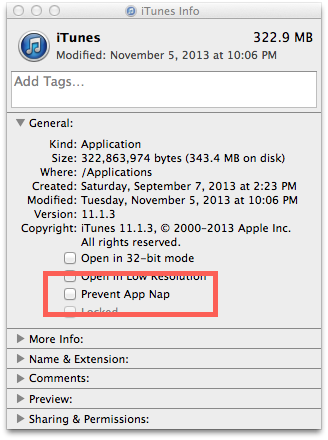
Disabling app nap has helped some people with this. (sounds like Gilbert Gottfried in my head screaming 'Affflaaacc!!)
You just select the FCPX app in your apps folder and get info, then uncheck the box in the photo.
You just select the FCPX app in your apps folder and get info, then uncheck the box in the photo.
Last edit: 16 Jan 2014 23:08 by Darren Roark. Reason: add link
Please Log in to join the conversation.
- ronny courtens
-
- Offline
- Moderator
-
Less
More
- Posts: 4455
- Thank you received: 962
17 Jan 2014 05:16 #39149
by ronny courtens
Replied by ronny courtens on topic Exceptionally slow timeline editing in 10.1
I am testing the update as we speak. I can indeed see better responsiveness with a very large project on this test machine, but I'm not sure if this will solve any of the specific performance issues mentioned here and in other threads. I also have the second beta seed of Mavs 9.2 which I will install today, I will report if this helps in any way.
- Ronny
- Ronny
Please Log in to join the conversation.
