


- Posts: 16
- Thank you received: 0
3 Post Moderation Rule for New Boarders (25 Jan 2021)
New boarders will have their posts moderated - Don't worry if you cannot see your post immediately.
ADVICE needed - FCPX projects --> FCP7 workflow (not X27)
15 Jan 2014 18:02 #38987
by Terraform
Hey all,
I need some sage advice.
I have been working on a huge project for over a year now on location in Bosnia.
All footage has been shot on the 5D mrk3 and c300 cameras.
My FCPX Workflow
While on location I was importing / organizing / syncing / labeling and adding subtitles into FCPX.
I would then create a separate compound clip for all the video from that day, the external audio, and the subtitles. (so that is 3 Compound clips. (see pics below)
Add the TimeCode and right text generators...
Select all and make it all a C. Clip... I did this so nothing would shift.. the Subs would be in sync and the timecode would always be the same no matter how and where the footage was used....
My Question / Challenge
OK so now my producers have found an editor and this editor needs to edit this project in FCP 7.
I am in Chicago they are in Berlin... I will join them in Berlin but want to do as much prep work in the 1.5 months leading up to my travel date here in Chicago.
They have all the footage and FCPX projects and events and now need to get them into FCP 7
the app X to 7 does not import FCPX generators and has some quirks importing text (I am not sure how it will handle my subs as we are just beginning the import / converting process)
What I don't want is to loose all the good work that I have done on my end to be organized and I absolutely NEED the subtitles included with the sync'd footage.
Does anyone have any advice and / or know where I can turn to figure out what to do in this situation?
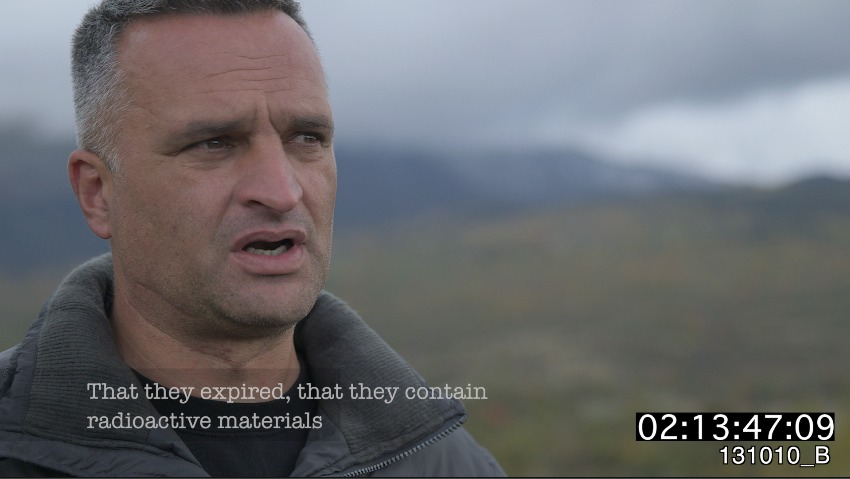
the viewer with subs, timecode, and file stamp
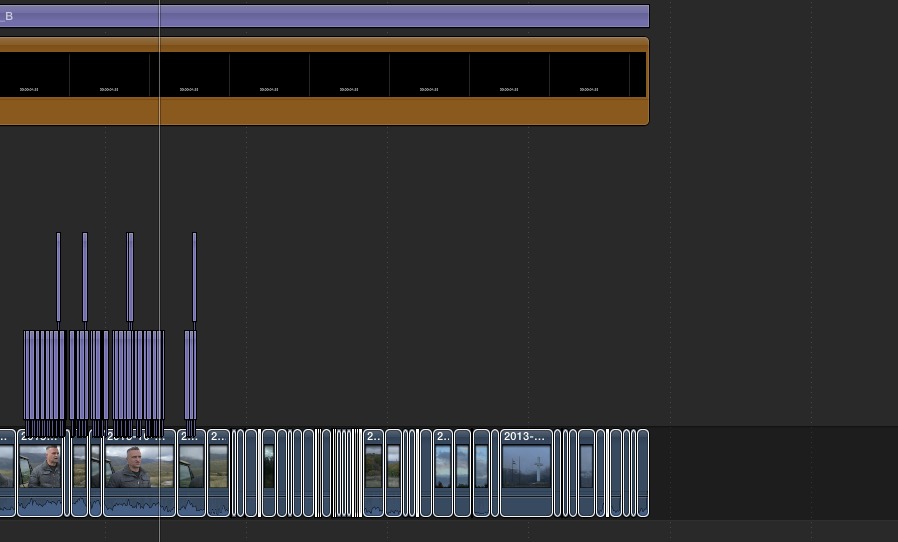
the timeline broken apart
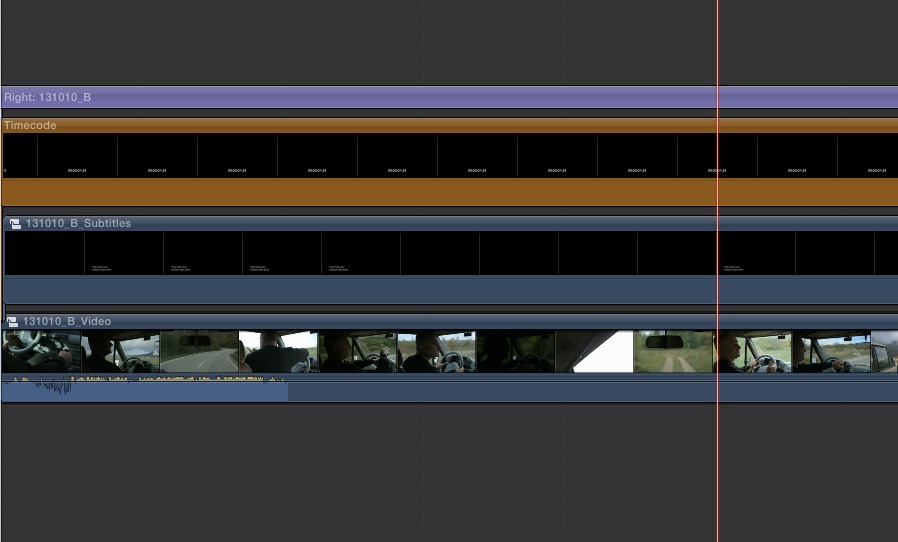
the timeline as compound clips
I need some sage advice.
I have been working on a huge project for over a year now on location in Bosnia.
All footage has been shot on the 5D mrk3 and c300 cameras.
My FCPX Workflow
While on location I was importing / organizing / syncing / labeling and adding subtitles into FCPX.
- - I have each camera in it's own event and project.
- - I have the video synced (using Plural Eyes) with the Zoom audio files.
- - I have added subtitles from my translator using Annotation edit.
- - I have then used the TimeCode generator to give the entire sync'ed, subbed "master timeline" a consistent reference throughout and so I always know exactly where that clip lives in the "master timeline" once I start editing.
- - Lastly I have added the "file name" using the Text "right" generator in FCPX so I always know what day it is.
I would then create a separate compound clip for all the video from that day, the external audio, and the subtitles. (so that is 3 Compound clips. (see pics below)
Add the TimeCode and right text generators...
Select all and make it all a C. Clip... I did this so nothing would shift.. the Subs would be in sync and the timecode would always be the same no matter how and where the footage was used....
My Question / Challenge
OK so now my producers have found an editor and this editor needs to edit this project in FCP 7.
I am in Chicago they are in Berlin... I will join them in Berlin but want to do as much prep work in the 1.5 months leading up to my travel date here in Chicago.
They have all the footage and FCPX projects and events and now need to get them into FCP 7
the app X to 7 does not import FCPX generators and has some quirks importing text (I am not sure how it will handle my subs as we are just beginning the import / converting process)
What I don't want is to loose all the good work that I have done on my end to be organized and I absolutely NEED the subtitles included with the sync'd footage.
Does anyone have any advice and / or know where I can turn to figure out what to do in this situation?
the viewer with subs, timecode, and file stamp
the timeline broken apart
the timeline as compound clips
Please Log in to join the conversation.

15 Jan 2014 18:51 #38993
by BenB
Replied by BenB on topic ADVICE needed - FCPX projects --> FCP7 workflow (not X27)
I don't think those generators will work in FCP legacy versions at all. Even if you just exported as generic Motion projects, FCP 7 will probably not read them. This guy in Berlin needs to learn FCPX, which is really easy. What you want to do is going to be really tough and time consuming.
Xto7 is where you need to start.
Then, you'll have to re-build and re-edit in those generators with versions that will work with FCP 7.
I don't see any way around that.
Xto7 is where you need to start.
Then, you'll have to re-build and re-edit in those generators with versions that will work with FCP 7.
I don't see any way around that.
Please Log in to join the conversation.
15 Jan 2014 18:57 #38997
by Slimmrock
Replied by Slimmrock on topic ADVICE needed - FCPX projects --> FCP7 workflow (not X27)
I would think that hiring an editor that can use FCPX or for the current editor to learn the system would be a lot less hassle than porting across all the projects, if that's possible at all
If they are good, then learning FCPX shouldn't be too much of a job, if they don't want too then that's a sorry state of affairs
If they are good, then learning FCPX shouldn't be too much of a job, if they don't want too then that's a sorry state of affairs
Please Log in to join the conversation.
15 Jan 2014 19:05 #39002
by Terraform
Replied by Terraform on topic ADVICE needed - FCPX projects --> FCP7 workflow (not X27)
Thanks to both of you for your quick responses..
my understanding is they are hesitant due to FCPX's limitations for integration with other professional software...
For instance is there a easy workflow to roundtrip between X and di Vincci's grading software or Pro Tools Audo software?
my understanding is they are hesitant due to FCPX's limitations for integration with other professional software...
For instance is there a easy workflow to roundtrip between X and di Vincci's grading software or Pro Tools Audo software?
Please Log in to join the conversation.
15 Jan 2014 19:07 - 15 Jan 2014 19:07 #39004
by BenB
Replied by BenB on topic ADVICE needed - FCPX projects --> FCP7 workflow (not X27)
X2Pro for XML to ProTools
DaVincie Resolve always was able to read FCPXML natively (though it has a bug currently that is being worked out).
DaVincie Resolve always was able to read FCPXML natively (though it has a bug currently that is being worked out).
Last edit: 15 Jan 2014 19:07 by BenB.
Please Log in to join the conversation.
15 Jan 2014 19:45 #39009
by Terraform
Replied by Terraform on topic ADVICE needed - FCPX projects --> FCP7 workflow (not X27)
thanks for the info links..
I am going to run this up the flagpole
BUT is there reason that you can think of that could hinder a pro workflow for this project?
We will be cutting 2 versions of the film.
one will be a 52 min TV version and one will be a 120 min Theatrical version.
we have 45 days of filming consisting of 200+ hours
Right now I feel that the FCPX structure I have is super organized and ready for editing..
I know they are worried about a post production workflow with FCPX .
I guess my Question to you is if you can think of anything that would hinder this process... I know they are going to push back and I want to be prepared with my defense for FCPX...
thanks!
I am going to run this up the flagpole
BUT is there reason that you can think of that could hinder a pro workflow for this project?
We will be cutting 2 versions of the film.
one will be a 52 min TV version and one will be a 120 min Theatrical version.
we have 45 days of filming consisting of 200+ hours
Right now I feel that the FCPX structure I have is super organized and ready for editing..
I know they are worried about a post production workflow with FCPX .
I guess my Question to you is if you can think of anything that would hinder this process... I know they are going to push back and I want to be prepared with my defense for FCPX...
thanks!
Please Log in to join the conversation.
16 Jan 2014 18:38 #39102
by BenB
Replied by BenB on topic ADVICE needed - FCPX projects --> FCP7 workflow (not X27)
Here are some prime examples of what FCP X is professionally capable of.
www.apple.com/final-cut-pro/in-action/
www.apple.com/final-cut-pro/in-action/
Please Log in to join the conversation.
16 Jan 2014 19:00 #39103
by Terraform
Replied by Terraform on topic ADVICE needed - FCPX projects --> FCP7 workflow (not X27)
-- Actually --
Is there a way to render the generators and subs as an "independent" layer with an alpha transparent background
so basically if they were to import just the synced footage which x27 could handle
and then we placed this subtitle / timecode / file stamp layer above that for reference...
would something like that be possible?
thanks!
Is there a way to render the generators and subs as an "independent" layer with an alpha transparent background
so basically if they were to import just the synced footage which x27 could handle
and then we placed this subtitle / timecode / file stamp layer above that for reference...
would something like that be possible?
thanks!
Please Log in to join the conversation.
- Daniel Rutledge
-

- Offline
- Premium Member
-

- Those that know don't tell, and those that tell don't know.
16 Jan 2014 19:01 #39104
by Daniel Rutledge
Replied by Daniel Rutledge on topic ADVICE needed - FCPX projects --> FCP7 workflow (not X27)
I think that getting your FCPX finished project to work with audio and grading programs will be easier than porting the work you have done already over to 7. There are many workarounds for sharing with Pro Tools and Resolve if the traditional methods don't work.
Another solution would be to get an experienced FCPX editor (like me lol).
If you must send it back to 7, then the solution that presents itself to me is to export two versions of all compound clips. One with subs, tc, etc and one clean. Edit with all of the material that has added info and then relink to the clean version when you have picture lock.
Sounds time consuming and wasteful, but it seems faster than redoing all the work you described.
Another solution would be to get an experienced FCPX editor (like me lol).
If you must send it back to 7, then the solution that presents itself to me is to export two versions of all compound clips. One with subs, tc, etc and one clean. Edit with all of the material that has added info and then relink to the clean version when you have picture lock.
Sounds time consuming and wasteful, but it seems faster than redoing all the work you described.
Please Log in to join the conversation.
- Andreas Kiel
-
- Offline
- Platinum Member
-

Less
More
- Posts: 1077
- Thank you received: 189
16 Jan 2014 19:43 - 16 Jan 2014 19:53 #39108
by Andreas Kiel
Is there a way to render the generators and subs as an "independent" layer with an alpha transparent background
so basically if they were to import just the synced footage which x27 could handle
and then we placed this subtitle / timecode / file stamp layer above that for reference...
would something like that be possible?
thanks!
it's possible, you can use my x-render to do it. but to prepare that you have to put all the "layers" each into it's own project.
so ts a bit tedious.
x-render will create a single frame for each subtitle and an edl which can be be reconnected in fcp.
- andreas
Replied by Andreas Kiel on topic ADVICE needed - FCPX projects --> FCP7 workflow (not X27)
Is there a way to render the generators and subs as an "independent" layer with an alpha transparent background
so basically if they were to import just the synced footage which x27 could handle
and then we placed this subtitle / timecode / file stamp layer above that for reference...
would something like that be possible?
thanks!
it's possible, you can use my x-render to do it. but to prepare that you have to put all the "layers" each into it's own project.
so ts a bit tedious.
x-render will create a single frame for each subtitle and an edl which can be be reconnected in fcp.
- andreas
Last edit: 16 Jan 2014 19:53 by Andreas Kiel.
Please Log in to join the conversation.
