


- Posts: 929
- Thank you received: 131
3 Post Moderation Rule for New Boarders (25 Jan 2021)
New boarders will have their posts moderated - Don't worry if you cannot see your post immediately.
FCP 10.1 - are used media ranges working for you?
14 Jan 2014 23:27 - 15 Jan 2014 16:32 #38906
by tpayton
FCP 10.1 - are used media ranges working for you? was created by tpayton
I've noticed that [strike]marked ranges[/strike] used media ranges are not working at all for me in 10.1. I'm mainly working on updated events from 10.0.9.
How is it working for you?
How is it working for you?
Last edit: 15 Jan 2014 16:32 by peteramwiggins.
Please Log in to join the conversation.
- Tom Wolsky
-

- Offline
- Moderator
-

15 Jan 2014 01:28 #38925
by Tom Wolsky
Replied by Tom Wolsky on topic FCP 10.1 - are marked ranges working for you?
What isn't working? I/O is marking a range. Shift- Cmd -I/O is marked subsequent ranges.
Please Log in to join the conversation.
15 Jan 2014 06:04 #38939
by tpayton
Replied by tpayton on topic FCP 10.1 - are marked ranges working for you?
I'm terribly sorry Tom. I meant to say the new show "used media ranges" feature.
(I wonder if I can edit a topic name....)
(I wonder if I can edit a topic name....)
Please Log in to join the conversation.

15 Jan 2014 06:36 #38941
by BenB
Replied by BenB on topic FCP 10.1 - are marked ranges working for you?
I'm sure you have it enabled in the View menu.
Next, do you have the appropriate timeline active?
That's odd, I haven't seen it not work for anyone yet.
Next, do you have the appropriate timeline active?
That's odd, I haven't seen it not work for anyone yet.
Please Log in to join the conversation.

15 Jan 2014 07:41 #38948
by Pazu
Replied by Pazu on topic FCP 10.1 - are marked ranges working for you?
I've just got the bug for one multicam clip only. I can't also copy/paste attributes from it, so I think the multicam is completely dead but working fine, video speaking... odd. This Bug was already present with 10.0.9.
Otherwise the new function works just fine
Otherwise the new function works just fine
Please Log in to join the conversation.
- Tom Wolsky
-
- Offline
- Moderator
-
15 Jan 2014 10:46 #38956
by Tom Wolsky
Replied by Tom Wolsky on topic FCP 10.1 - are marked ranges working for you?
For some reason that entirely escapes me the used media range display if off by default. You have to manually switch it on, and of course it resets whenever prefs are trashed.
Please Log in to join the conversation.
15 Jan 2014 15:18 - 15 Jan 2014 15:20 #38964
by tpayton
Replied by tpayton on topic FCP 10.1 - are marked ranges working for you?
I maintain 4 machines running FCP 10.1, with 3 different editors and none of them have seen show used ranges working. Case in point:
1. Here is one project ( just did a shift-F) on my iMac at work:
Notice the used ranges are seen in list view, but not on the filmstrip itself.
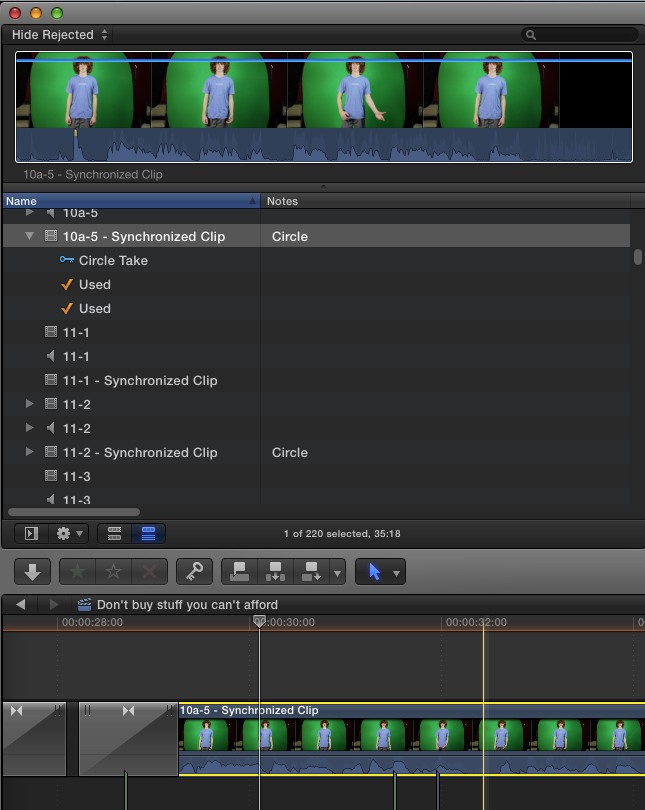
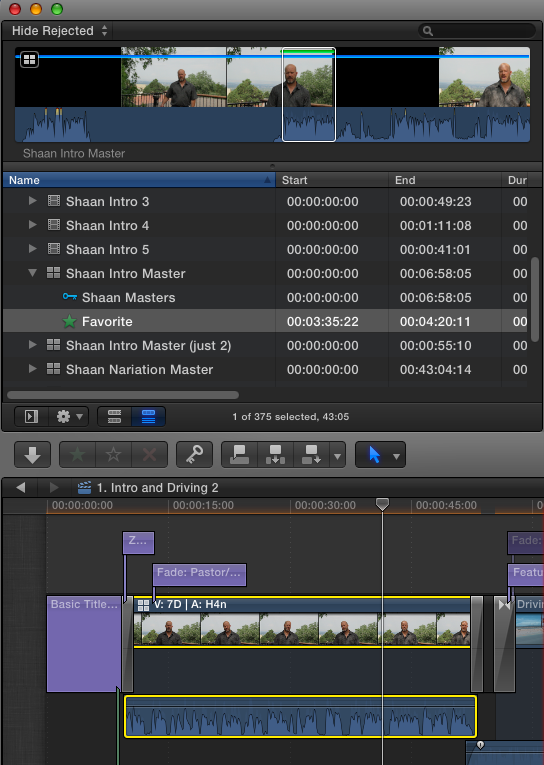
2. And here is another project on my MacBook.
Nothing in list view,or in the list view filmstrip.
3. And another from the MacBook which does work.
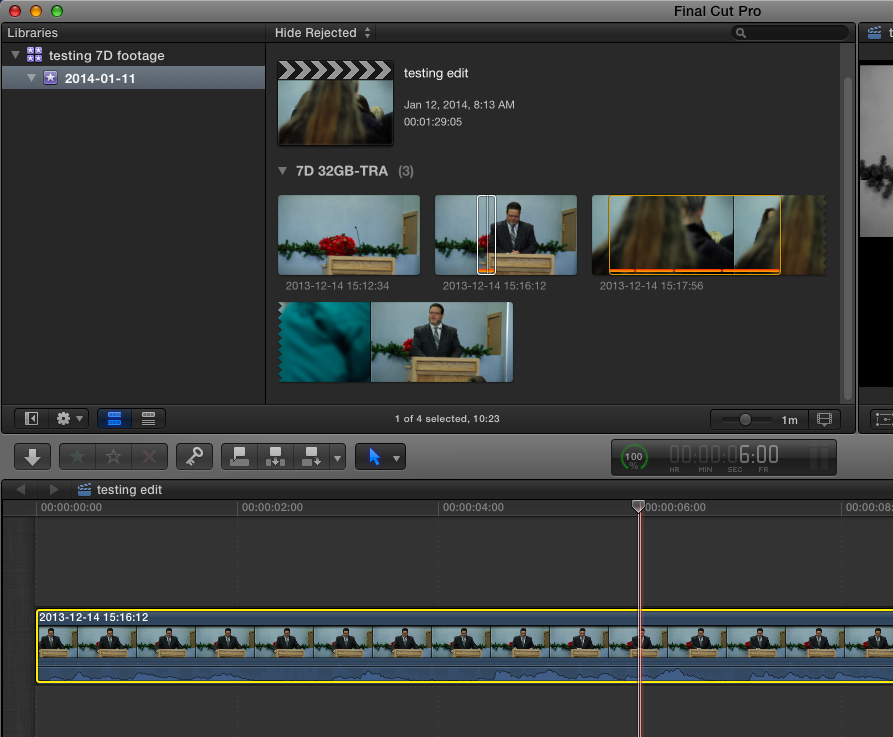
Humm. I think I see a pattern here. It doesn't appear to work at all with Multicam clips. But sorta works with Synchronized clips, but doesn't show it in the filmstrip just in list view.
Can anyone confirm this?
1. Here is one project ( just did a shift-F) on my iMac at work:
Notice the used ranges are seen in list view, but not on the filmstrip itself.
2. And here is another project on my MacBook.
Nothing in list view,or in the list view filmstrip.
3. And another from the MacBook which does work.
Humm. I think I see a pattern here. It doesn't appear to work at all with Multicam clips. But sorta works with Synchronized clips, but doesn't show it in the filmstrip just in list view.
Can anyone confirm this?
Last edit: 15 Jan 2014 15:20 by tpayton.
Please Log in to join the conversation.
15 Jan 2014 15:31 #38965
by tpayton
Replied by tpayton on topic FCP 10.1 - are marked ranges working for you?
BTW. I did a search in the Final Cut Pro manual. No mention of restriction on "Show used ranges".
Please Log in to join the conversation.
15 Jan 2014 15:34 #38966
by tpayton
Replied by tpayton on topic FCP 10.1 - are marked ranges working for you?
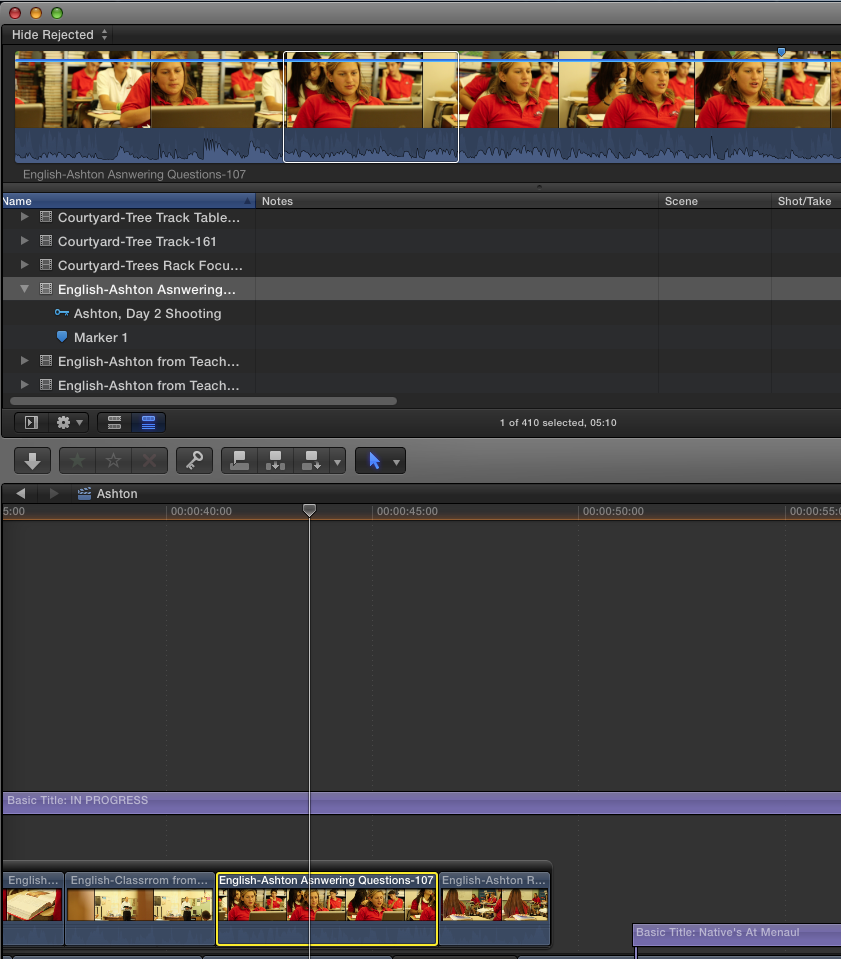
Ahh. Well just when I had a good theory going... Here is a connected clip that is just not synced. B-roll, no marked ranges seen:
(this is on my iMac)
(this is on my iMac)
Please Log in to join the conversation.
15 Jan 2014 15:37 - 15 Jan 2014 15:38 #38967
by tpayton
Replied by tpayton on topic FCP 10.1 - are marked ranges working for you?
Well then I grabbed another b roll clip (after shift-F from the timeline) and did an append edit.
Then the used ranges shows up:
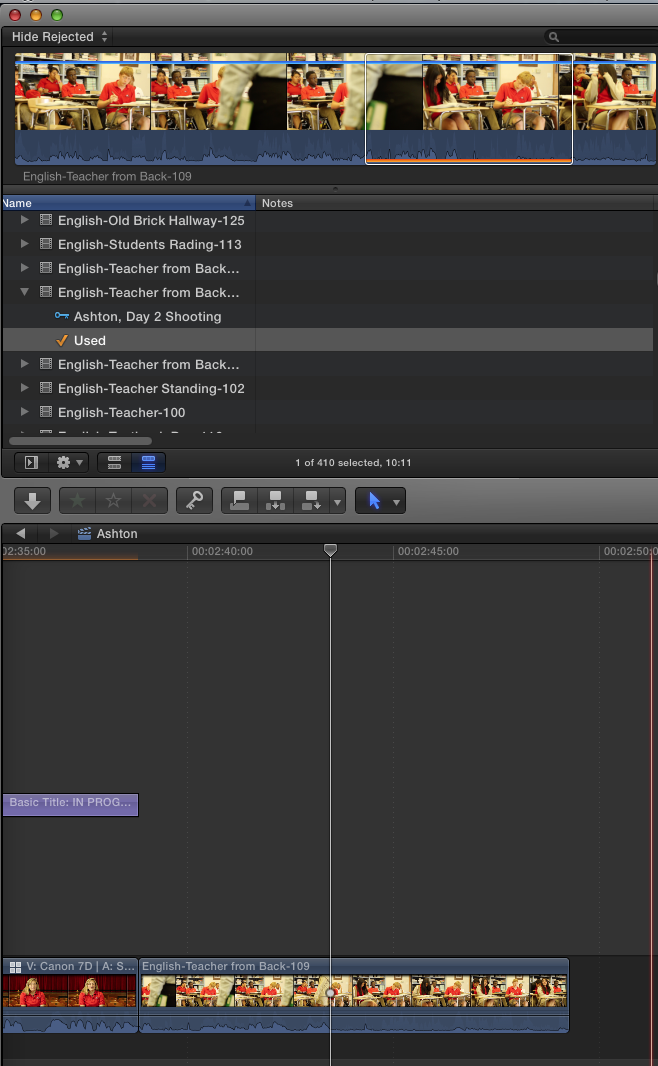
So can anyone confirm that this is working with updated projects, or just new projects?
Then the used ranges shows up:
So can anyone confirm that this is working with updated projects, or just new projects?
Last edit: 15 Jan 2014 15:38 by tpayton.
Please Log in to join the conversation.
15 Jan 2014 16:27 #38979
by BenB
Replied by BenB on topic FCP 10.1 - are marked ranges working for you?
It is working for both updated and new Libraris/Projects for me. Multicam is not supported (that's a complex thing to deal with, assume it will come in the future). Although, I don't trust updated Projects to work properly most of the time, just to be overly cautious.
Please Log in to join the conversation.

15 Jan 2014 19:37 - 15 Jan 2014 19:38 #39006
by Soundwise
Replied by Soundwise on topic FCP 10.1 - are used media ranges working for you?
Synchronized Clips don't show used media for me in filmstrip view. At least they now "Reveal in Browser" right.
Last edit: 15 Jan 2014 19:38 by Soundwise.
Please Log in to join the conversation.
- peteramwiggins
-

- Offline
- Administrator
-

- The Administrator :)
Less
More
- Posts: 1049
- Thank you received: 404
15 Jan 2014 20:19 #39012
by peteramwiggins
Administrator
Replied by peteramwiggins on topic FCP 10.1 - are used media ranges working for you?
I've changed the subject line for you
Administrator
Please Log in to join the conversation.
15 Jan 2014 20:21 #39013
by tpayton
Replied by tpayton on topic FCP 10.1 - are used media ranges working for you?
Thanks!
Peter. Thanks. Can you delete this topic then:
www.fcp.co/forum/4-final-cut-pro-x-fcpx/...s-it-working-for-you
You can probably delete this post too.
Peter. Thanks. Can you delete this topic then:
www.fcp.co/forum/4-final-cut-pro-x-fcpx/...s-it-working-for-you
You can probably delete this post too.
Please Log in to join the conversation.
- ChristopherD
-

- Offline
- New Member
-

Less
More
- Posts: 1
- Thank you received: 0
02 Feb 2014 15:46 - 02 Feb 2014 15:47 #40393
by ChristopherD
Replied by ChristopherD on topic FCP 10.1 - are used media ranges working for you?
I would love to be able to open a Project and see orange highlights for all the clips used in the Project, but this does not appear to be available.
It appears that the Used Media Ranges are only displayed for basic clips in the currently open timeline. So, not only can you not see used clip highlights for clips used in multicam and synchronized clips in the active timeline (as someone else pointed out), but you can't see them for compound clips either.
My current project is built with nested compound clips:
The main Project has 3 main sections, and each is a compound clip. Each of those 3 primary compound clips has several secondary compound clips inside of it. And some of those secondary compound clips have smaller sections I decided to simplify as compound clips.
So the Used Media Ranges view isn't very helpful to me. I can only see what clips are used when I have drilled down so I am inside a compound clip at the lowest level, where there are only basic clips in the timeline.
Am I missing something about the Used Media Ranges?
or...
Am I setting up my project the wrong way? (Am I still stuck in the FPC7 paradigm?)
It appears that the Used Media Ranges are only displayed for basic clips in the currently open timeline. So, not only can you not see used clip highlights for clips used in multicam and synchronized clips in the active timeline (as someone else pointed out), but you can't see them for compound clips either.
My current project is built with nested compound clips:
The main Project has 3 main sections, and each is a compound clip. Each of those 3 primary compound clips has several secondary compound clips inside of it. And some of those secondary compound clips have smaller sections I decided to simplify as compound clips.
So the Used Media Ranges view isn't very helpful to me. I can only see what clips are used when I have drilled down so I am inside a compound clip at the lowest level, where there are only basic clips in the timeline.
Am I missing something about the Used Media Ranges?
or...
Am I setting up my project the wrong way? (Am I still stuck in the FPC7 paradigm?)
Last edit: 02 Feb 2014 15:47 by ChristopherD. Reason: clarification
Please Log in to join the conversation.
02 Feb 2014 17:40 #40394
by wdevn
LLAP,
James
Taipei, Taiwan
Replied by wdevn on topic FCP 10.1 - are marked ranges working for you?
My systems are showing the same bugs as tpayton. Something isn't right.
LLAP,
James
Taipei, Taiwan
Please Log in to join the conversation.
03 Feb 2014 19:11 #40470
by tpayton
Replied by tpayton on topic FCP 10.1 - are marked ranges working for you?
It's a bug. Apple is on it.
Please Log in to join the conversation.
03 Feb 2014 23:12 #40481
by Seanus
Sean Lander - Editing since 1982 - AVID 1991 - FCP 1999 - FCPX 2011
Replied by Seanus on topic FCP 10.1 - are used media ranges working for you?
Yes I can confirm that used media ranges are indeed flaky. Sometimes showing up sometimes not for me.
Sean Lander - Editing since 1982 - AVID 1991 - FCP 1999 - FCPX 2011
Please Log in to join the conversation.
