


- Posts: 479
- Thank you received: 5
3 Post Moderation Rule for New Boarders (25 Jan 2021)
New boarders will have their posts moderated - Don't worry if you cannot see your post immediately.
updating old projects
14 Jan 2014 15:41 #38862
by parkerhqj
updating old projects was created by parkerhqj
I have a big project that I edited on an older computer in fcpx 10.04. My client wants me to incorporate some of those older timelines into one we are currently working on in 10.1. What is the best way for me to do this? My older computer (MacPro 2x2.66 ghz dual-core intel xeon) I don't believe can be upgraded to Maverick.
thx
thx
Please Log in to join the conversation.
- Tom Wolsky
-

- Offline
- Moderator
-

14 Jan 2014 16:22 #38866
by Tom Wolsky
Replied by Tom Wolsky on topic updating old projects
Copy the events and projects to the new machine together with that machine's copy of 10.0.4.
Run 10.0.4 on the new machine and confirm the projects and events run correctly and all the media is correctly connected.
Update the projects and events in 10.1 saving the original projects and events.
Run 10.0.4 on the new machine and confirm the projects and events run correctly and all the media is correctly connected.
Update the projects and events in 10.1 saving the original projects and events.
Please Log in to join the conversation.
14 Jan 2014 18:12 #38871
by parkerhqj
Replied by parkerhqj on topic updating old projects
Thanks Tom. If you don't mind indulging me here ...
So I compressed the app to a zip file. I then copy that and the events and projects to a portable drive. I then copy the app zip file to my other computer. I then open the zip file with the old app in it and open it on the new computer. Then I open the events and projects to make sure everything is in order. Then I close 10.04 and update the events & projects within 10.1. Is that right?
thx
So I compressed the app to a zip file. I then copy that and the events and projects to a portable drive. I then copy the app zip file to my other computer. I then open the zip file with the old app in it and open it on the new computer. Then I open the events and projects to make sure everything is in order. Then I close 10.04 and update the events & projects within 10.1. Is that right?
thx
Please Log in to join the conversation.
- Tom Wolsky
-
- Offline
- Moderator
-
14 Jan 2014 21:58 #38891
by Tom Wolsky
Replied by Tom Wolsky on topic updating old projects
Exactly right.
Please Log in to join the conversation.
14 Jan 2014 23:00 #38902
by parkerhqj
Replied by parkerhqj on topic updating old projects
OK so I discovered something else. I neglected to copy over my Effects, Generators, etc. that I'd created that reside in my Movies folder of my old computer. As a result, I have lots of missing media redness that is actually missing generators (I hope). It doesn't go to the Events or Projects folders. So I'll copy those over too.
Relatedly, I shared an updated Library with another editor (copied over the entire library to an external drive) and thought I had done everything right with her as well, but she couldn't get the timeline to play back at all because (I believe) she doesn't have my timecode reader which I will now send her. She has a new computer with Mavericks and fcpx 10.1. She hasn't installed Motion. Dumb question - can you operate fcpx without Motion since so many of its effects originate there? If I send her my effects, they're not going to work as they're Motion effects, yes? Sorry for sounding so convoluted! thx
Relatedly, I shared an updated Library with another editor (copied over the entire library to an external drive) and thought I had done everything right with her as well, but she couldn't get the timeline to play back at all because (I believe) she doesn't have my timecode reader which I will now send her. She has a new computer with Mavericks and fcpx 10.1. She hasn't installed Motion. Dumb question - can you operate fcpx without Motion since so many of its effects originate there? If I send her my effects, they're not going to work as they're Motion effects, yes? Sorry for sounding so convoluted! thx
Please Log in to join the conversation.

14 Jan 2014 23:38 #38907
by tedtv
Replied by tedtv on topic updating old projects
I have a similar issue but with some deviation from the original post. I have a 10.09 project that was complete and backed up to my external RAID. The primary drives I worked on that contained the older 10.09 Events and Projects have been updated by 10.1. I got a call today to update a project that was not a part of the initial 10.1 update and it resides on my RAID backup. So, I created a new Events and Projects folder on one of my primary drives and then copied the older Events & Projects folders that contain the .fcpevent files, original media, backups, transcoded media, etc. However, when launching FCPX 10.1 it does not detect those older folders.
So, I then proceeded to use File/Open Library/Other. Then select, "Locate," to try and trick or back door the program to allow my older, non-conformed events and projects, to import and get converted. No go.
Any ideas?
So, I then proceeded to use File/Open Library/Other. Then select, "Locate," to try and trick or back door the program to allow my older, non-conformed events and projects, to import and get converted. No go.
Any ideas?
Please Log in to join the conversation.
15 Jan 2014 00:25 - 15 Jan 2014 00:26 #38919
by plysat
Can't sleep? Try this: fcpxpert.net ;-)
Replied by plysat on topic updating old projects
"Any ideas?"
it should work if you created the proper folders. Make an "update" folder. In that folder make a "Final Cut Events" folder and a "Final Cut Projects" folder. Put your original project(s) and event(s) in the proper folders. X should see them when you point it to the "Update" folder...
It's explained here: fcpxpert.net/2013/12/16/fcp-10-1-day-1-tips-for-updating/
Just scroll down to, or search the page for "manual job sets"
it should work if you created the proper folders. Make an "update" folder. In that folder make a "Final Cut Events" folder and a "Final Cut Projects" folder. Put your original project(s) and event(s) in the proper folders. X should see them when you point it to the "Update" folder...
It's explained here: fcpxpert.net/2013/12/16/fcp-10-1-day-1-tips-for-updating/
Just scroll down to, or search the page for "manual job sets"
Can't sleep? Try this: fcpxpert.net ;-)

Last edit: 15 Jan 2014 00:26 by plysat.
Please Log in to join the conversation.
15 Jan 2014 00:30 #38920
by tedtv
Replied by tedtv on topic updating old projects
Wow! Crazy easy. Just missing that one step. Awesome! Thanks so much. I"m in business.
Please Log in to join the conversation.
16 Jan 2014 14:59 #39059
by parkerhqj
Replied by parkerhqj on topic updating old projects
I'm still struggling with my second editor. She has the same library as me and I put the time code reader effects in s drop box for her. She copied all my effects into the Effects folder in the Motion Templates folder of the Movie folder on her computer. The clips are all there, but this is what she sees. Turning off time code reader doesn't solve the problem. It's not clear to me what the red and yellow warnings are referencing. Any ideas?
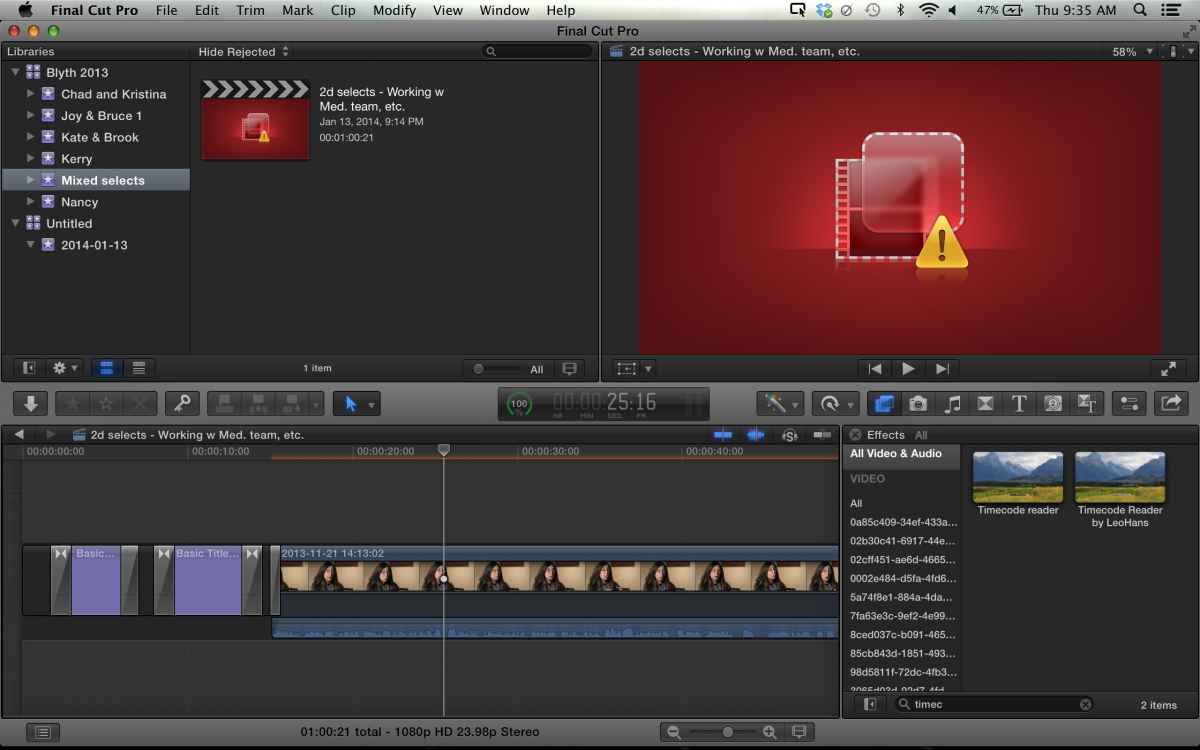
Please Log in to join the conversation.
16 Jan 2014 17:09 #39073
by plysat
Can't sleep? Try this: fcpxpert.net ;-)
Replied by plysat on topic updating old projects
"It's not clear to me what the red and yellow warnings are referencing."
That particular warning means missing effect...
That particular warning means missing effect...
Can't sleep? Try this: fcpxpert.net ;-)
Please Log in to join the conversation.
16 Jan 2014 19:17 #39106
by parkerhqj
Replied by parkerhqj on topic updating old projects
I know, but I sent her the missing effects and it doesn't seem to matter. I'm having her delete the old timecode altogether and see if that makes a difference.
I think this is pretty instructive to people who update to make sure they include all the Effects from their Movie folder on the boot drive. I saw the tutorials and must have missed that!
I think this is pretty instructive to people who update to make sure they include all the Effects from their Movie folder on the boot drive. I saw the tutorials and must have missed that!
Please Log in to join the conversation.
16 Jan 2014 20:53 #39114
by tedtv
Replied by tedtv on topic updating old projects
I"m not sure about your network environment but check the permissions of each folder and sub-folders of the project. All I can think of right now.
Please Log in to join the conversation.
