


- Posts: 33
- Thank you received: 0
3 Post Moderation Rule for New Boarders (25 Jan 2021)
New boarders will have their posts moderated - Don't worry if you cannot see your post immediately.
Canon c100/FCPX FPS Question
14 Jan 2014 14:02 #38851
by Sunne718
Canon c100/FCPX FPS Question was created by Sunne718
I shoot with a Canon C100 i usually shoot in 24p for regular shooting and 60i on images i am going to retime( slow motion etc.)
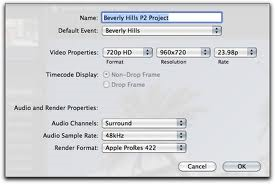
When importing to FCPX what do i set the FPS to in the import window ? (see attached image) Do i change it to what is was shot in? For example 24p if it was shot in 24p?
When importing to FCPX what do i set the FPS to in the import window ? (see attached image) Do i change it to what is was shot in? For example 24p if it was shot in 24p?
Please Log in to join the conversation.
- Tom Wolsky
-

- Offline
- Moderator
-

14 Jan 2014 14:06 #38852
by Tom Wolsky
Replied by Tom Wolsky on topic Canon c100/FCPX FPS Question
That's the project window. Set it to use clip properties. Put in a 24p clip first.
Please Log in to join the conversation.
- ronny courtens
-

- Offline
- Moderator
-
Less
More
- Posts: 4455
- Thank you received: 962
14 Jan 2014 14:11 #38853
by ronny courtens
Replied by ronny courtens on topic Canon c100/FCPX FPS Question
"24p" is actually 23.98p, so your setting is correct. Real 24p is hardly ever used with video.
- Ronny
- Ronny
Please Log in to join the conversation.
14 Jan 2014 14:12 #38854
by Sunne718
Replied by Sunne718 on topic Canon c100/FCPX FPS Question
How about when exporting to get the highest quality?
Please Log in to join the conversation.
- ronny courtens
-
- Offline
- Moderator
-
Less
More
- Posts: 4455
- Thank you received: 962
14 Jan 2014 14:33 #38856
by ronny courtens
Replied by ronny courtens on topic Canon c100/FCPX FPS Question
Exporting 23.98p video as 24p will do nothing to improve the quality of your image. The vast majority of today's cameras record "24p" at 23.98fps because 23.98p (to be more precise 23.976p) is more consistent with legacy video equipment that's in use in NTSC regions. For the rest there is not much difference between the two.
- Ronny
- Ronny
Please Log in to join the conversation.
- sperezrleon
-

- Offline
- Junior Member
-

- No hay mucho que decir... ni siquiera tengo cita favorita :)
Less
More
- Posts: 35
- Thank you received: 1
14 Jan 2014 17:54 #38868
by sperezrleon
Replied by sperezrleon on topic Canon c100/FCPX FPS Question
Just to clarify, not ALL cameras refer to 23.976p as 24p, actually Alexa, Red Epic, C100 and C300 have the option to shut ether 23.976 or true 24p, so not that rare. 
Please Log in to join the conversation.
