


- Posts: 181
- Thank you received: 6
3 Post Moderation Rule for New Boarders (25 Jan 2021)
New boarders will have their posts moderated - Don't worry if you cannot see your post immediately.
Importing some old VHS tapes into FCPX
- mobiletaylor
-
 Topic Author
- Offline
- Elite Member
-

Less
More
13 Jan 2014 23:25 #38831
by mobiletaylor
Importing some old VHS tapes into FCPX was created by mobiletaylor
Is there a way to turn off time code/scene select during the import? I’m trying to import some old tapes through a Canopus ADVC-55. Everything imports, but every time there is a dropped frame or timecode problem FCPX create a new clip. I have a particularly bad tape that is creating clips every few seconds. I’d just like FCPX to record one clip. Is this possible? Another piece of software I should try instead?
Thanks,
JT
Thanks,
JT
Please Log in to join the conversation.

14 Jan 2014 09:28 #38844
by nirna
Replied by nirna on topic Importing some old VHS tapes into FCPX
With my Canopus ADVC-55 I used a software called Vidi, here the link to download (
www.macupdate.com/app/mac/10808/vidi/
), totally free and very easy to use, great results. Vidi exports clips as .dv, very easy to import and edit afterwards in FCPX. Hope this helps.
Please Log in to join the conversation.

14 Jan 2014 14:41 #38857
by aamb
Replied by aamb on topic Importing some old VHS tapes into FCPX
You could try with QuickTime player (vers 10.xx) and choose from FILE - NEW MOVIE RECORDING.
Then choose the device and recording quality (Maximum = device native).
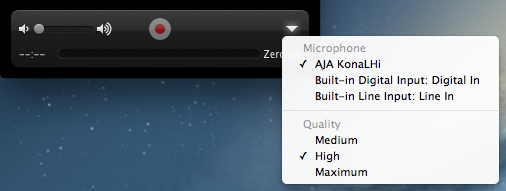
Then choose the device and recording quality (Maximum = device native).
Please Log in to join the conversation.
- mobiletaylor
-
Topic Author
- Offline
- Elite Member
-
Less
More
- Posts: 181
- Thank you received: 6
14 Jan 2014 23:07 #38903
by mobiletaylor
Replied by mobiletaylor on topic Importing some old VHS tapes into FCPX
I'll give that a try. Didn't see it was compatible with Maverick, but I'll try it.
Thanks!
JT
Thanks!
JT
Please Log in to join the conversation.
- mobiletaylor
-
Topic Author
- Offline
- Elite Member
-
Less
More
- Posts: 181
- Thank you received: 6
14 Jan 2014 23:09 #38904
by mobiletaylor
For some reason I can't get Quicktime to record a movie? Just says it is unable to record?
JT
Replied by mobiletaylor on topic Importing some old VHS tapes into FCPX
aamb wrote: You could try with QuickTime player (vers 10.xx) and choose from FILE - NEW MOVIE RECORDING.
Then choose the device and recording quality (Maximum = device native).
For some reason I can't get Quicktime to record a movie? Just says it is unable to record?
JT
Please Log in to join the conversation.
14 Jan 2014 23:48 #38909
by aamb
Replied by aamb on topic Importing some old VHS tapes into FCPX
I'll try with an ADVC100 or DV player...
Please Log in to join the conversation.

15 Jan 2014 00:16 #38918
by tpayton
Replied by tpayton on topic Importing some old VHS tapes into FCPX
What we do is record a VHS tape to DV, and then import the DV into FCP.
However, if you have an old copy of iMovie (not iMovie 10 which is really FCP X) then it should be able to import from your source.
However, if you have an old copy of iMovie (not iMovie 10 which is really FCP X) then it should be able to import from your source.
Please Log in to join the conversation.
- mobiletaylor
-
Topic Author
- Offline
- Elite Member
-
Less
More
- Posts: 181
- Thank you received: 6
15 Jan 2014 20:30 #39016
by mobiletaylor
Replied by mobiletaylor on topic Importing some old VHS tapes into FCPX
OK, had time to experiment with this some more:
QuickTime player doesn’t seem to work for me. If I record from QT using built in iSight camera it works fine. But when I try to record from the ADVC-55 it won’t work. Also, after trying with the ADVC-55 the iSight camera won’t work. So the ADVC-55 is causing some problems. I’m running from a VHS deck to the ADVC-55. From the ADVC-55 to a 400 to 800 cable converter. Then to the Thunderbolt FireWire adapter. Maybe that’s just too much for the iSight camera to handle?
Vidi seems to work just fine with this setup. Also, it seems to work just fine in Maverick. I think I will transfer everything with this program. Thanks for the tip on this!
Although the newest iMove won’t work for me, I did find my older copy of iMove. With version 9 you can change from auto to manual import and it will do just one clip. I would have used this setup, but there seems to be a problem with audio monitoring. Can’t hear anything on import. I looked this up and it appears to be a problem with the older versions of iMovie. I did run an external set of speakers from the VHS deck and could hear everything just fine. So, this is definitely an option as well. Vidi just seems to work so well.
I don’t have the option to go into a DV camera, but i’m sure that would work as well.
I ran a test with iMovie 9 and Vidi. Imported and then converted with streamclip. I couldn’t tell a difference with the footage. The iMovie file may have been a little louder?
My next issue is using the .dv files in FCPX. I seem to be having some trouble with that. I’ll do a new post to ask questions about that.
Thanks again everyone!
JT
QuickTime player doesn’t seem to work for me. If I record from QT using built in iSight camera it works fine. But when I try to record from the ADVC-55 it won’t work. Also, after trying with the ADVC-55 the iSight camera won’t work. So the ADVC-55 is causing some problems. I’m running from a VHS deck to the ADVC-55. From the ADVC-55 to a 400 to 800 cable converter. Then to the Thunderbolt FireWire adapter. Maybe that’s just too much for the iSight camera to handle?
Vidi seems to work just fine with this setup. Also, it seems to work just fine in Maverick. I think I will transfer everything with this program. Thanks for the tip on this!
Although the newest iMove won’t work for me, I did find my older copy of iMove. With version 9 you can change from auto to manual import and it will do just one clip. I would have used this setup, but there seems to be a problem with audio monitoring. Can’t hear anything on import. I looked this up and it appears to be a problem with the older versions of iMovie. I did run an external set of speakers from the VHS deck and could hear everything just fine. So, this is definitely an option as well. Vidi just seems to work so well.
I don’t have the option to go into a DV camera, but i’m sure that would work as well.
I ran a test with iMovie 9 and Vidi. Imported and then converted with streamclip. I couldn’t tell a difference with the footage. The iMovie file may have been a little louder?
My next issue is using the .dv files in FCPX. I seem to be having some trouble with that. I’ll do a new post to ask questions about that.
Thanks again everyone!
JT
Please Log in to join the conversation.
