


- Posts: 222
- Thank you received: 3
3 Post Moderation Rule for New Boarders (25 Jan 2021)
New boarders will have their posts moderated - Don't worry if you cannot see your post immediately.
Events in 10.1 Issue
13 Jan 2014 01:04 - 13 Jan 2014 01:04 #38767
by Rbelfi
Events in 10.1 Issue was created by Rbelfi
I only updated the current project I was working on when I updated to 10.1, all the rest on my current external where completed so I saw no need. All of the finished events show up EXPECT the one I'm working on. When having the external drive I received the media on still plugged in everything shows up as it should, but without it also connected everything is missing. I know when importing now you either choose to leave where everything is or import into event. When I imported this footage originally in 10.0.9 I imported to my own external where the event is located. Now nothing shows up in the hard drive but there is an icon for updated projects and events with nothing available to see in a drop down.
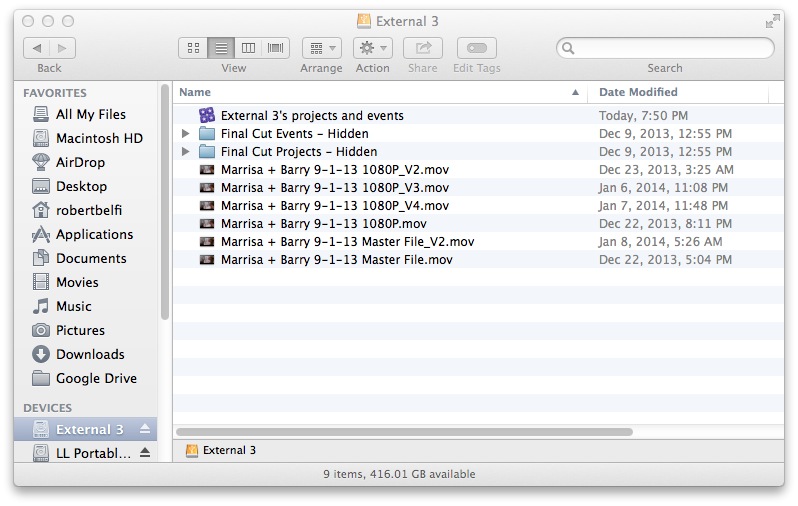
I've attached a screen shot on the finder window of my external. I assume this is due to me updating mid-project. But when I send the shooters drive back I want to make sure I'll still be able to go back and fix something should something arise.
Any ideas would be extremely helpful! Thanks!
I've attached a screen shot on the finder window of my external. I assume this is due to me updating mid-project. But when I send the shooters drive back I want to make sure I'll still be able to go back and fix something should something arise.
Any ideas would be extremely helpful! Thanks!
Last edit: 13 Jan 2014 01:04 by Rbelfi.
Please Log in to join the conversation.
13 Jan 2014 01:14 #38768
by marchyman
Replied by marchyman on topic Events in 10.1 Issue
I'm not sure I understand your question. When you open the library named "External 3's projects and events" do you see the events and project you are looking for? If so what is the issue?
Please Log in to join the conversation.
13 Jan 2014 01:24 #38770
by Rbelfi
Replied by Rbelfi on topic Events in 10.1 Issue
Sorry if I wasn't clear. The only events I can see are the ones I didn't update. The one in question that I've been working on doesn't have a folder anywhere on my external anymore. It does show up in fcpx and only has linked media if I reattached the original drive i receive the media on.
Please Log in to join the conversation.
- ronny courtens
-

- Offline
- Moderator
-

Less
More
- Posts: 4455
- Thank you received: 962
13 Jan 2014 14:14 - 13 Jan 2014 14:17 #38802
by ronny courtens
Replied by ronny courtens on topic Events in 10.1 Issue
If you want to see where the folders are for your updated project: R-click the "External 3's projects and events" Library icon in the Finder and choose 'show package contents'. Inside the Library package you will find your folders for the updated project. But that's not really relevant, as you shouldn't go inside these folders.
You say that your current updated project is linked to the original media on your client's drive. If you want to avoid that your original media get missing when you return the drive to your client: launch FCPX, select the event that contains the linked clips and choose File > Consolidate Event Files.
A window will pop up, in this window you can select different options:
- Consolidate the media into the current Library
This will copy all the media from your client's drive into the Original Media folder of the Event you have selected. As this Event resides inside the Library your media will be copied onto the same drive where your Library is.
- Consolidate the media to a different location (such as a folder on any of your own drives)
This will copy the media from your client's drive to the location or folder you have selected, and your Event will contain links to the media inside this folder.
So you see there is no need to mess inside the Finder folders of a Library, all media management can be done much better and safer from within FCPX.
- Ronny
You say that your current updated project is linked to the original media on your client's drive. If you want to avoid that your original media get missing when you return the drive to your client: launch FCPX, select the event that contains the linked clips and choose File > Consolidate Event Files.
A window will pop up, in this window you can select different options:
- Consolidate the media into the current Library
This will copy all the media from your client's drive into the Original Media folder of the Event you have selected. As this Event resides inside the Library your media will be copied onto the same drive where your Library is.
- Consolidate the media to a different location (such as a folder on any of your own drives)
This will copy the media from your client's drive to the location or folder you have selected, and your Event will contain links to the media inside this folder.
So you see there is no need to mess inside the Finder folders of a Library, all media management can be done much better and safer from within FCPX.
- Ronny
Last edit: 13 Jan 2014 14:17 by ronny courtens.
Please Log in to join the conversation.

13 Jan 2014 16:25 - 13 Jan 2014 16:27 #38815
by BenB
Replied by BenB on topic Events in 10.1 Issue
Careful with word choice Ronny, when consolidating from a Library to an external location, the files are "moved", not copied. As you said, the Library is left with only links. Be very careful of that. Copy and move are very different things.
Last edit: 13 Jan 2014 16:27 by BenB.
Please Log in to join the conversation.
- ronny courtens
-
- Offline
- Moderator
-
Less
More
- Posts: 4455
- Thank you received: 962
13 Jan 2014 17:22 - 13 Jan 2014 17:24 #38817
by ronny courtens
Replied by ronny courtens on topic Events in 10.1 Issue
I respectfully disagree, Ben.
The OP has a Library with links to media on an external drive (his client's drive). My point is that when he consolidates this Library to another drive (his own) the files will get copied to this new drive, and not moved. And of course I have tested this
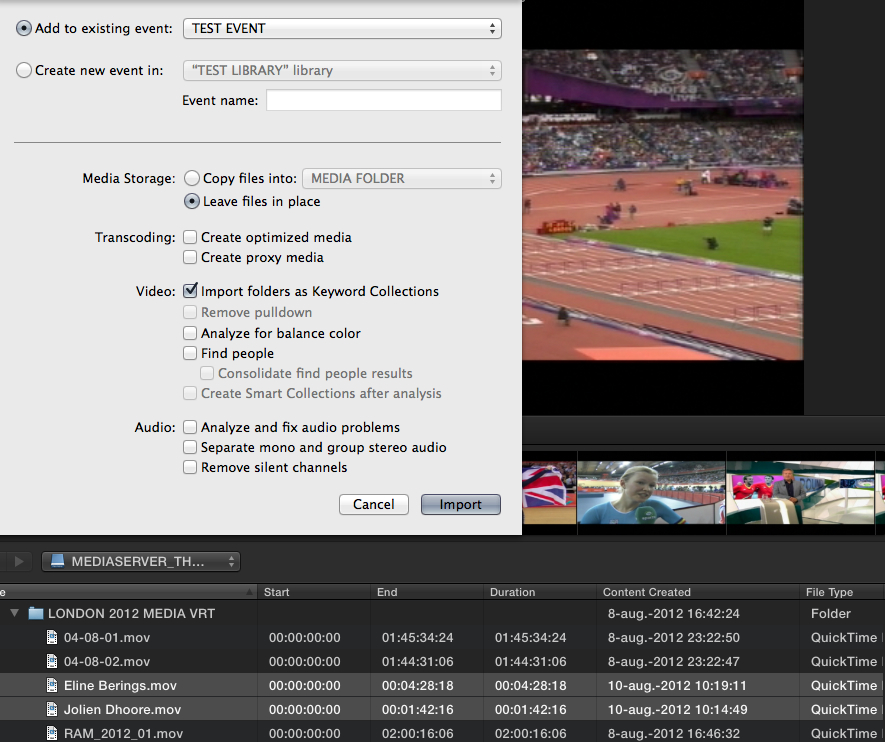
1. I have a Test Library with a Test Event and I import two clips from my 'Mediaserver' drive into the Test Event, making sure to leave the files at their original place:
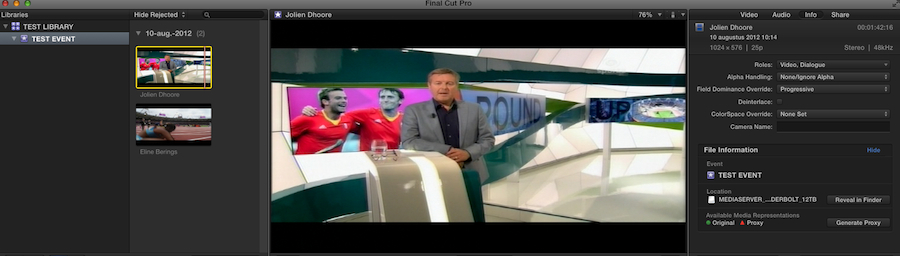
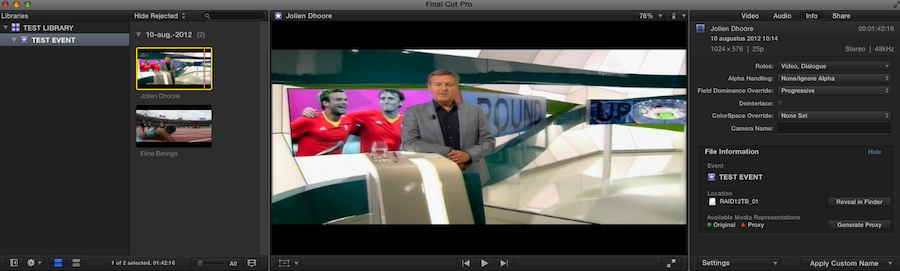
2. Here are the two clips in FCPX, with 'Mediaserver' shown as their location in the Info tab:
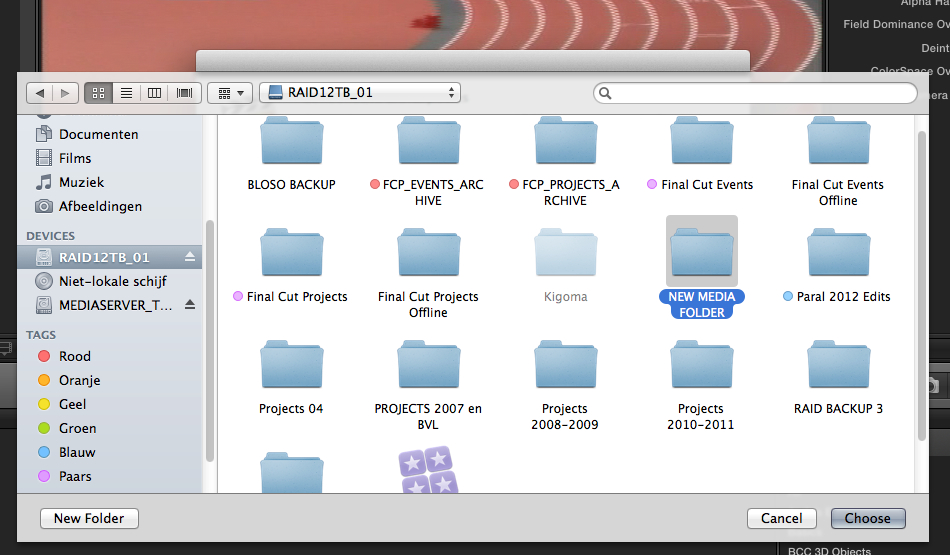
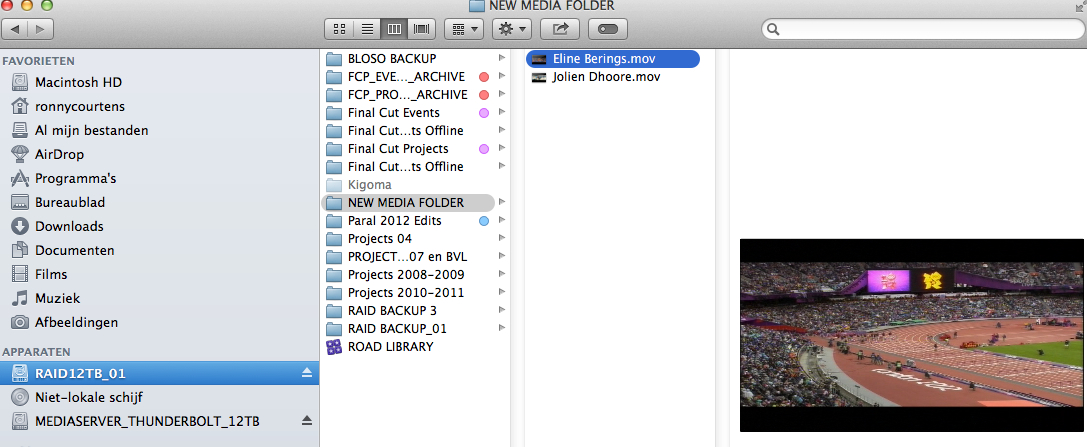
3. Now I consolidate the Library and I choose to store the files in a different location, being the New Media folder on my 'RAID12TB_01' drive:
4. When I re-launch FCPX the clips now show 'RAID12TB_01' as their new location in the Info tab:
5. In Finder I can see that the files are effectively stored inside the New Media folder on the 'RAID12TB_01' drive:
6. And the same files are still on the 'Mediaserver' drive as well:
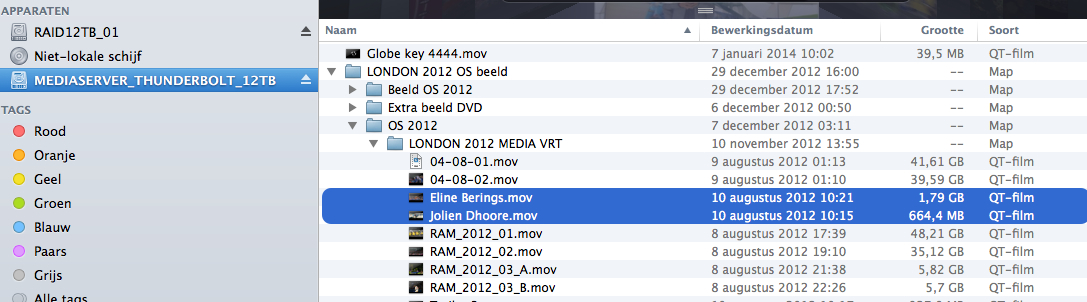
So when you consolidate a Library with external media to another external location, which is what the OP requested, the files get copied and not moved.
- Ronny
The OP has a Library with links to media on an external drive (his client's drive). My point is that when he consolidates this Library to another drive (his own) the files will get copied to this new drive, and not moved. And of course I have tested this
1. I have a Test Library with a Test Event and I import two clips from my 'Mediaserver' drive into the Test Event, making sure to leave the files at their original place:
2. Here are the two clips in FCPX, with 'Mediaserver' shown as their location in the Info tab:
3. Now I consolidate the Library and I choose to store the files in a different location, being the New Media folder on my 'RAID12TB_01' drive:
4. When I re-launch FCPX the clips now show 'RAID12TB_01' as their new location in the Info tab:
5. In Finder I can see that the files are effectively stored inside the New Media folder on the 'RAID12TB_01' drive:
6. And the same files are still on the 'Mediaserver' drive as well:
So when you consolidate a Library with external media to another external location, which is what the OP requested, the files get copied and not moved.
- Ronny
Last edit: 13 Jan 2014 17:24 by ronny courtens.
Please Log in to join the conversation.
- ronny courtens
-
- Offline
- Moderator
-
Less
More
- Posts: 4455
- Thank you received: 962
13 Jan 2014 20:15 #38819
by ronny courtens
Replied by ronny courtens on topic Events in 10.1 Issue
I think you must have mis-read the thread, Ben. We are not talking about consolidating from a Library to an external location. We are talking about consolidating a Library that points to external media from one drive to another one. When you do this the external files will be copied from the original drive onto the other drive, and the simlinks in the Library will point to the copied media on the new drive.
- Ronny
- Ronny
Please Log in to join the conversation.
14 Jan 2014 01:04 #38834
by Rbelfi
Replied by Rbelfi on topic Events in 10.1 Issue
Thank you Ben and Ronny for the helpful advice!
Ronny, what you explained in great detail is exactly what I was looking for. I'm currently let FCPX consolidate as we speak and it was quite simple as you showed. I find myself often knowing what I'd like to do, but not having the slightest clue how to! haha
Thanks again for the help!
Ronny, what you explained in great detail is exactly what I was looking for. I'm currently let FCPX consolidate as we speak and it was quite simple as you showed. I find myself often knowing what I'd like to do, but not having the slightest clue how to! haha
Thanks again for the help!
Please Log in to join the conversation.
14 Jan 2014 01:12 #38835
by Rbelfi
Replied by Rbelfi on topic Events in 10.1 Issue
One last question. I used to saved my exports inside the project folder. Would it still be ok to do that or no? I know early you mentioned it may not be advised to go inside those folders about current projects and events.
Please Log in to join the conversation.
- ronny courtens
-
- Offline
- Moderator
-
Less
More
- Posts: 4455
- Thank you received: 962
14 Jan 2014 07:24 #38841
by ronny courtens
Replied by ronny courtens on topic Events in 10.1 Issue
I think it is better not to put anything inside a Library container that does not belong there. I would create an Exported Projects folder and inside that folder you can put all your exported files per project. That makes it much easier to find an exported file than having to open the Library containers.
- Ronny
- Ronny
Please Log in to join the conversation.
