


- Posts: 22
- Thank you received: 0
3 Post Moderation Rule for New Boarders (25 Jan 2021)
New boarders will have their posts moderated - Don't worry if you cannot see your post immediately.
Yikes, all my media is offline!
- Parallactic-Pictures
-
 Topic Author
- Offline
- Junior Member
-

Less
More
08 Jan 2014 19:13 - 08 Jan 2014 19:15 #38440
by Parallactic-Pictures
Yikes, all my media is offline! was created by Parallactic-Pictures
Hey guys,
I'm sitting in a sound mixing session right now, and the power here just went out while I had my RAID drive plugged in and FCX running. Now, after an hour of trying to get it back, the media won't show up. The projects show up, but everything is offline. When I go to Relink the media, nothing shows up as missing. Yet everything (camera media, audio, etc) is missing.
All of my Events and Projects are on this RAID drive, along with all the original media.
Let me know if anyone can help.
Thanks!
I'm sitting in a sound mixing session right now, and the power here just went out while I had my RAID drive plugged in and FCX running. Now, after an hour of trying to get it back, the media won't show up. The projects show up, but everything is offline. When I go to Relink the media, nothing shows up as missing. Yet everything (camera media, audio, etc) is missing.
All of my Events and Projects are on this RAID drive, along with all the original media.
Let me know if anyone can help.
Thanks!
Last edit: 08 Jan 2014 19:15 by Parallactic-Pictures.
Please Log in to join the conversation.
- Darren Roark
-
- Offline
- Platinum Member
-

08 Jan 2014 19:30 #38443
by Darren Roark
Replied by Darren Roark on topic Yikes, all my media is offline!
Can you find the media on the drive using the finder?
A shot in the dark, can you try exporting an XML of your project and then reimport the XML? That may allow it to relink the files.
A shot in the dark, can you try exporting an XML of your project and then reimport the XML? That may allow it to relink the files.
Please Log in to join the conversation.
- Parallactic-Pictures
-
Topic Author
- Offline
- Junior Member
-
Less
More
- Posts: 22
- Thank you received: 0
08 Jan 2014 19:56 - 08 Jan 2014 20:03 #38450
by Parallactic-Pictures
Replied by Parallactic-Pictures on topic Yikes, all my media is offline!
Yeah, all the media is there on the drive. All 11TBs worth.
I tried the XML trick. It didn't work. I then tried loading my last autobackup (from about 2 hours ago). It took a while to load, but all the Proxies were missing when it did. Furthermore, it brought all my keyword folders (with all 150+ worth of my scenes) into the "Updated Projects" section for some reason.
How anyone else had this problem? My library is a mess now.
I tried the XML trick. It didn't work. I then tried loading my last autobackup (from about 2 hours ago). It took a while to load, but all the Proxies were missing when it did. Furthermore, it brought all my keyword folders (with all 150+ worth of my scenes) into the "Updated Projects" section for some reason.
How anyone else had this problem? My library is a mess now.
Last edit: 08 Jan 2014 20:03 by Parallactic-Pictures.
Please Log in to join the conversation.
- Parallactic-Pictures
-
Topic Author
- Offline
- Junior Member
-
Less
More
- Posts: 22
- Thank you received: 0
08 Jan 2014 20:18 #38463
by Parallactic-Pictures
Replied by Parallactic-Pictures on topic Yikes, all my media is offline!
Here's another annoying thing I'm finding about the new Library structure: When I try to relink media to a project, it won't let me point it to a specific folder because I can't get past the Library portion. Sure, in Finder I can right click the Library and select 'Show Package Contents.' But when FCX is trying to navigate to a folder from the Relink Media option, it doesn't allow you to do that. Hence, I can see all my media that's missing from Finder, but FCX won't let me navigate to it now.
How do I properly Relink to a folder that's within the library?
How do I properly Relink to a folder that's within the library?
Please Log in to join the conversation.
- Darren Roark
-
- Offline
- Platinum Member
-
08 Jan 2014 20:21 #38464
by Darren Roark
Replied by Darren Roark on topic Yikes, all my media is offline!
Do you have any versions saved before the power outage? Under your import prefs is "leave files in place" checked? If it is, open one of the pre power failure versions and see if you can reconstruct that.
This would be worth opening a support ticket with Apple, they do get back to people quickly.
This would be worth opening a support ticket with Apple, they do get back to people quickly.
Please Log in to join the conversation.
- Parallactic-Pictures
-
Topic Author
- Offline
- Junior Member
-
Less
More
- Posts: 22
- Thank you received: 0
08 Jan 2014 23:50 #38497
by Parallactic-Pictures
Replied by Parallactic-Pictures on topic Yikes, all my media is offline!
Yeah, I have Proxies of all my main media. And all other media I leave in its original location, but also import into my Library. So everything is accounted for.
How do I file a ticket with Apple online? Been searching for an hour and can't find a way. Think I just have to call Tech Support, unless anyone else has any ideas?
How do I file a ticket with Apple online? Been searching for an hour and can't find a way. Think I just have to call Tech Support, unless anyone else has any ideas?
Please Log in to join the conversation.
- haysoos123
-
- Offline
- Platinum Member
-
Less
More
- Posts: 402
- Thank you received: 72
09 Jan 2014 00:01 #38498
by haysoos123
Replied by haysoos123 on topic Yikes, all my media is offline!
By "leave in its original location," do you mean you use external media (as opposed to managed media where it copies it into the library)? If so, you should NOT be relinking by selecting media from within your library. They would only be aliases anyway. You should be selecting them from where they are originally. However, you also say that you "import into" your library, which implies that you are using managed media. It's possible to use both kinds in the same library, but I would only do so if there's a good reason for it, otherwise, things will get confusing fast.
Please Log in to join the conversation.
- Parallactic-Pictures
-
Topic Author
- Offline
- Junior Member
-
Less
More
- Posts: 22
- Thank you received: 0
09 Jan 2014 00:07 #38499
by Parallactic-Pictures
Replied by Parallactic-Pictures on topic Yikes, all my media is offline!
For all my main media (call it audio and video from my raws), I do not import / move the footage. Rather, I create Proxies that link back to the original media files (my raws). All of these are on the one RAID drive.
For things like songs that I bring in, images, and anything else, I import them and store a copy of them in my actual Final Cut Event folder.
Does that help?
For things like songs that I bring in, images, and anything else, I import them and store a copy of them in my actual Final Cut Event folder.
Does that help?
Please Log in to join the conversation.
- Darren Roark
-
- Offline
- Platinum Member
-
09 Jan 2014 00:42 #38501
by Darren Roark
Replied by Darren Roark on topic Yikes, all my media is offline!
When you say proxies, I'm assuming you had FCP X create them? Does it generate thumbnails in the events or are they black? Media offline?
What happens if you switch from proxy to original media? It's possible the symlinks may have been corrupted.
Can you post a screen shot of FCP X project timeline and events? Also a screen grab of the finder window of your original media folder as well would be a big help.
What happens if you switch from proxy to original media? It's possible the symlinks may have been corrupted.
Can you post a screen shot of FCP X project timeline and events? Also a screen grab of the finder window of your original media folder as well would be a big help.
Please Log in to join the conversation.
- haysoos123
-
- Offline
- Platinum Member
-
Less
More
- Posts: 402
- Thank you received: 72
09 Jan 2014 00:45 #38502
by haysoos123
Replied by haysoos123 on topic Yikes, all my media is offline!
Ok sounds like you're using external media then, and when you first brought the clips into FCPX, you told it to "leave where they are" and then you had FCPX make proxies from your raw media. Or in version 10.0.9 or earlier, you had the "copy media into libraries" UNCHECKED when you imported which would result in the same thing.
It's very important, when you're trying to relink your library, that you DO NOT try to relink to the generated proxy files. You have to relink to where your raw original files are. So if I understand your problem, when you try to do this, it won't relink them even though they are definitely there? Did you backup library relink ok?
It's very important, when you're trying to relink your library, that you DO NOT try to relink to the generated proxy files. You have to relink to where your raw original files are. So if I understand your problem, when you try to do this, it won't relink them even though they are definitely there? Did you backup library relink ok?
Please Log in to join the conversation.
- haysoos123
-
- Offline
- Platinum Member
-
Less
More
- Posts: 402
- Thank you received: 72
09 Jan 2014 01:02 #38504
by haysoos123
Replied by haysoos123 on topic Yikes, all my media is offline!
Wait, I just read that you're storing files in a Final Cut Event folder. So is that just what you chose to name it, because FCPX no longer uses those folders as special folders for events. Or, are you actually manually putting files by copying into the library (using show contents)? Hope you're not doing that. In any case it would help as Darren suggests to post screens of your setup.
Please Log in to join the conversation.
- Darren Roark
-
- Offline
- Platinum Member
-
09 Jan 2014 01:12 #38505
by Darren Roark
Replied by Darren Roark on topic Yikes, all my media is offline!
Also, what version are you using of FCP X? I was sure you were using 10.1 because you called it your library, but now I'm not sure.
Please Log in to join the conversation.
- Parallactic-Pictures
-
Topic Author
- Offline
- Junior Member
-
Less
More
- Posts: 22
- Thank you received: 0
09 Jan 2014 01:54 #38507
by Parallactic-Pictures
Replied by Parallactic-Pictures on topic Yikes, all my media is offline!
Yeah, I'm on 10.0.1. So everything is in the library bundle.
I've spent some time really trying to research this, and I'm just stumped. My library (when viewed within FCX) shows all of my Keyword collections (for every scene in my film) in the 'Updated Projects' portion now. Which is wrong. These are not projects. They are folders that contain each scene from my film, and they were originally in the Events portion of my library. Now the Events portion is empty.
Another thing I tried to do was load backups of the library, from before the power outage. Those load correctly (meaning, my projects are where they should be and my keyword Scene collections are stored within the event). But still, everything is offline.
When I try to relink the media, it points me to the 'Original Media' portion of my library. So it seems that some of my files might not be proxies and might have been originally brought into the library.
For most of my main timelines, the audio is offline, whereas the video is just black.
Let me know which screenshots I can provide to make this all easier.
Thanks again.
I've spent some time really trying to research this, and I'm just stumped. My library (when viewed within FCX) shows all of my Keyword collections (for every scene in my film) in the 'Updated Projects' portion now. Which is wrong. These are not projects. They are folders that contain each scene from my film, and they were originally in the Events portion of my library. Now the Events portion is empty.
Another thing I tried to do was load backups of the library, from before the power outage. Those load correctly (meaning, my projects are where they should be and my keyword Scene collections are stored within the event). But still, everything is offline.
When I try to relink the media, it points me to the 'Original Media' portion of my library. So it seems that some of my files might not be proxies and might have been originally brought into the library.
For most of my main timelines, the audio is offline, whereas the video is just black.
Let me know which screenshots I can provide to make this all easier.
Thanks again.
Please Log in to join the conversation.
- haysoos123
-
- Offline
- Platinum Member
-
Less
More
- Posts: 402
- Thank you received: 72
09 Jan 2014 21:32 #38599
by haysoos123
Replied by haysoos123 on topic Yikes, all my media is offline!
Is the 'updated projects' portion simply an event itself? If so, you can move it to where you think your actual event is within FCPX. Or, simply rename it to be an event that makes sense.
Since we're still not clear on where your 'original media' folder is, can you post a screencap of your file hierarchy in a finder folder? Also, a screencap of your Relink Files dialogue box where it shows what path it thinks the raw media is in could be helpful.
In the Relink Files dialogue box, you can force relinking your files by clicking on 'All' instead of 'Missing'. Then point to where the original location of your raw media is, NOT inside your library. See if this works.
Also, since you say your proxies may or may not be missing, please put your viewer into 'Original/Optimized' mode and not proxy mode, since this could be misleading as to which files are offline if you have missing proxy files.
Since we're still not clear on where your 'original media' folder is, can you post a screencap of your file hierarchy in a finder folder? Also, a screencap of your Relink Files dialogue box where it shows what path it thinks the raw media is in could be helpful.
In the Relink Files dialogue box, you can force relinking your files by clicking on 'All' instead of 'Missing'. Then point to where the original location of your raw media is, NOT inside your library. See if this works.
Also, since you say your proxies may or may not be missing, please put your viewer into 'Original/Optimized' mode and not proxy mode, since this could be misleading as to which files are offline if you have missing proxy files.
Please Log in to join the conversation.
- Parallactic-Pictures
-
Topic Author
- Offline
- Junior Member
-
Less
More
- Posts: 22
- Thank you received: 0
10 Jan 2014 23:08 #38700
by Parallactic-Pictures
Replied by Parallactic-Pictures on topic Yikes, all my media is offline!
First off, I want to thank both Darren and you, Hatsoos123, for taking the time to help me with this. Apologies for the delay in replying. We're trying to make a crazy festival deadline, so I've been with the sound mixers all week. But let me address and answer each of your specific questions one by one.
<<Is the 'updated projects' portion simply an event itself? If so, you can move it to where you think your actual event is within FCPX. Or, simply rename it to be an event that makes sense.>>
I actually didn't know what 'Updated Projects' really was until you asked this question. When I updated Final Cut to version 10.0.1, I specifically had it update only a handful of projects that I needed to finish and lay off the film I'm working on. When, when it was all done, FCX just organized it all this way. And hence forth, every time I created a new Project, I had to specify where I wanted it to go. It now makes sense that FCX made these updated projects they're own Event. But yeah, they should all be part of my previous event (called 'Starry Eyes.'
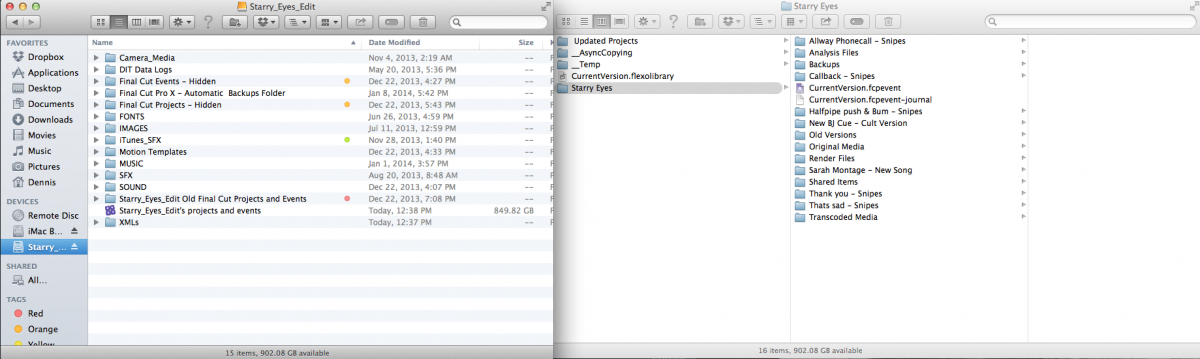
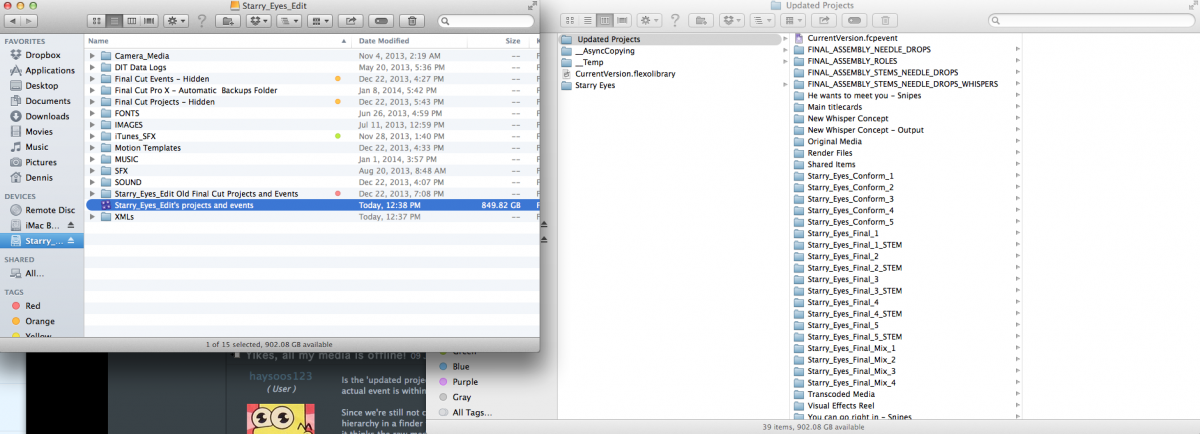
Attached are some screenshots of my file directory, showing how it's laid out. You'll see my Library location, and then the package contents within.
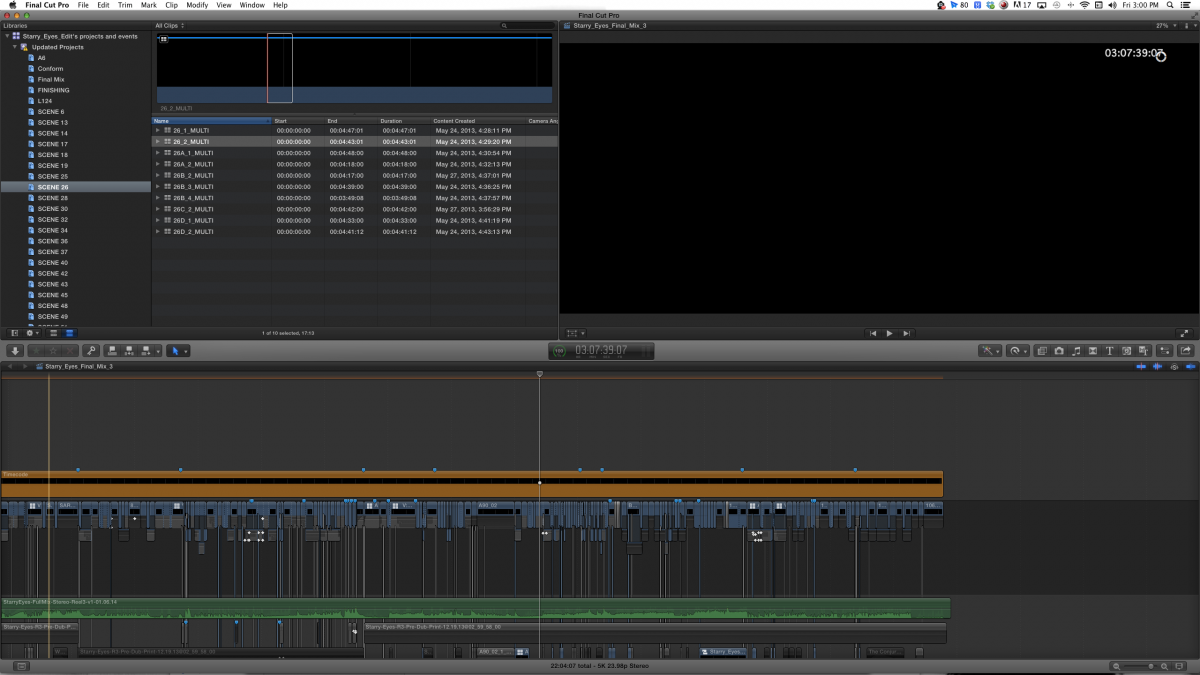
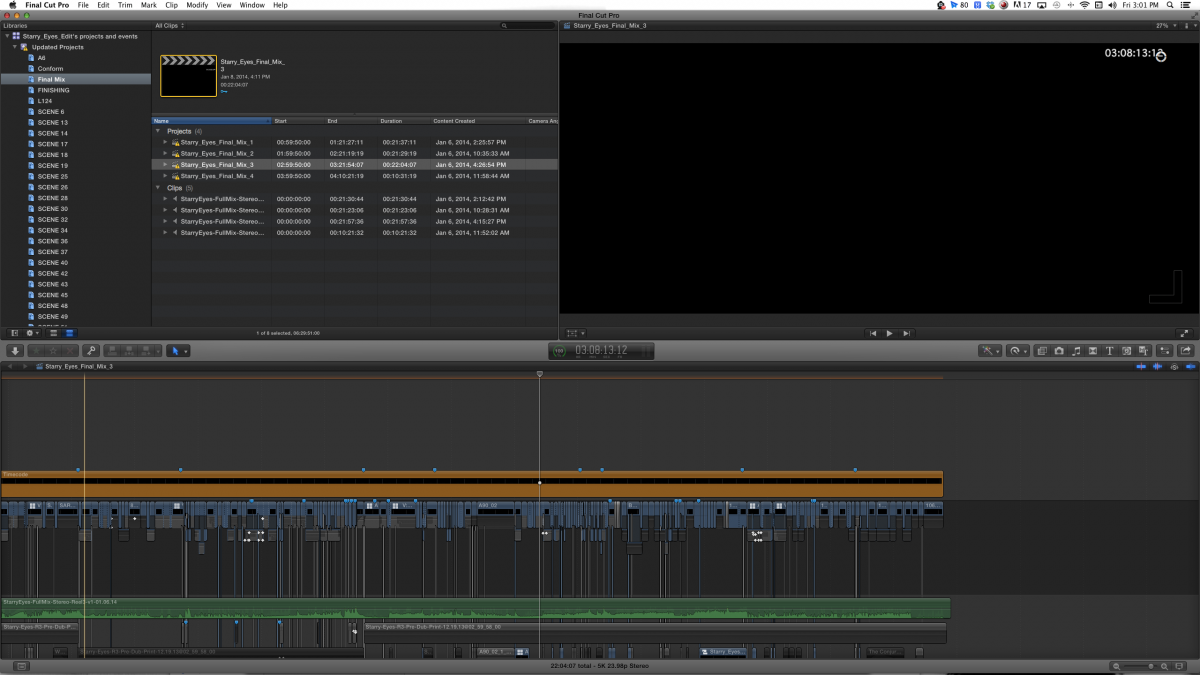
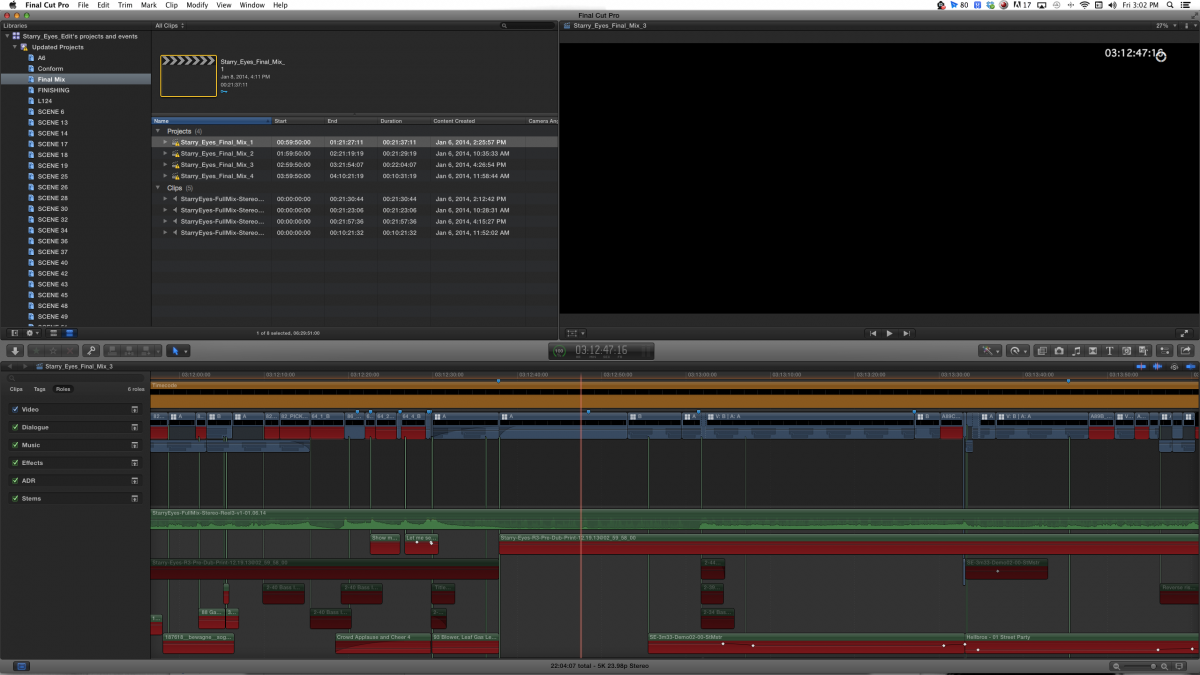
I've also attached two screenshots of what's happening within FCX. You'll see that everything somehow got moved into the Updated Projects event. This includes all my Keyword collections (which contains all my scene clips). All of these clips are just showing up black. (note the viewer window when a clip is selected)
And all of my Projects show the video as black, and all the other elements as red and offline.
<<Since we're still not clear on where your 'original media' folder is, can you post a screencap of your file hierarchy in a finder folder? Also, a screencap of your Relink Files dialogue box where it shows what path it thinks the raw media is in could be helpful.>>
Now that I know that Updated Projects is also an event, I can show you within Finder where my Original Media is. So Screenshot 6 shows the contents of my Original Media folder within the Updated Projects event. Everything in that folder is showing up green and online in FCX right now.
But Screenshot 7 is another case. That's my 'Starry Eyes' event (the primary event I'm trying to fix and reorganize). And there, you'll see the Original Media folder is loaded with wavs and aliases.
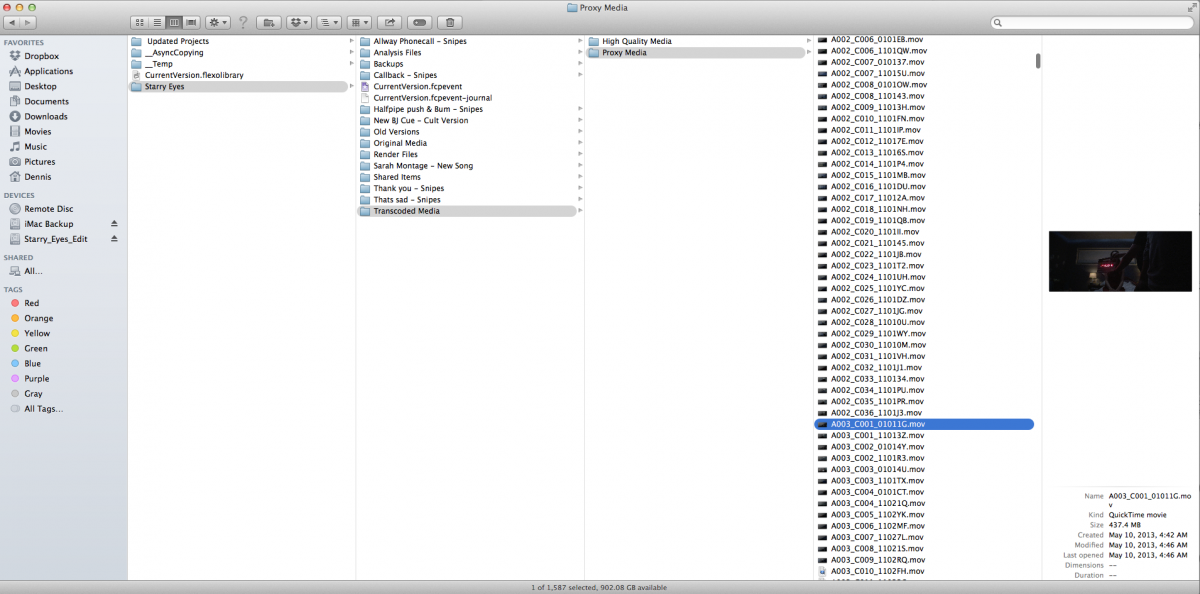
Screenshot 8 is the contents of the Transcoded Media > Proxy Media folder. Which is loaded with all my Proxy mov files. But those are the ones that aren't showing up in FCX.
Running out of places to upload to this post. So I'll continue this in a follow-up post. Stay tuned.
<<Is the 'updated projects' portion simply an event itself? If so, you can move it to where you think your actual event is within FCPX. Or, simply rename it to be an event that makes sense.>>
I actually didn't know what 'Updated Projects' really was until you asked this question. When I updated Final Cut to version 10.0.1, I specifically had it update only a handful of projects that I needed to finish and lay off the film I'm working on. When, when it was all done, FCX just organized it all this way. And hence forth, every time I created a new Project, I had to specify where I wanted it to go. It now makes sense that FCX made these updated projects they're own Event. But yeah, they should all be part of my previous event (called 'Starry Eyes.'
Attached are some screenshots of my file directory, showing how it's laid out. You'll see my Library location, and then the package contents within.
I've also attached two screenshots of what's happening within FCX. You'll see that everything somehow got moved into the Updated Projects event. This includes all my Keyword collections (which contains all my scene clips). All of these clips are just showing up black. (note the viewer window when a clip is selected)
And all of my Projects show the video as black, and all the other elements as red and offline.
<<Since we're still not clear on where your 'original media' folder is, can you post a screencap of your file hierarchy in a finder folder? Also, a screencap of your Relink Files dialogue box where it shows what path it thinks the raw media is in could be helpful.>>
Now that I know that Updated Projects is also an event, I can show you within Finder where my Original Media is. So Screenshot 6 shows the contents of my Original Media folder within the Updated Projects event. Everything in that folder is showing up green and online in FCX right now.
But Screenshot 7 is another case. That's my 'Starry Eyes' event (the primary event I'm trying to fix and reorganize). And there, you'll see the Original Media folder is loaded with wavs and aliases.
Screenshot 8 is the contents of the Transcoded Media > Proxy Media folder. Which is loaded with all my Proxy mov files. But those are the ones that aren't showing up in FCX.
Running out of places to upload to this post. So I'll continue this in a follow-up post. Stay tuned.
Please Log in to join the conversation.
- Parallactic-Pictures
-
Topic Author
- Offline
- Junior Member
-
Less
More
- Posts: 22
- Thank you received: 0
10 Jan 2014 23:15 #38701
by Parallactic-Pictures
Replied by Parallactic-Pictures on topic Yikes, all my media is offline!
<<Also, a screencap of your Relink Files dialogue box where it shows what path it thinks the raw media is in could be helpful.>>
Unfortunately, this is easier said then done. For some reason, the 'Starry Eyes' event in FCX is empty. It has no Projects or Clips in it. Nor any keyword collections (which contain all my SCENES media clips). Yet, in the Finder window, it shows them all there. This must be the session that got corrupted when the power went out.
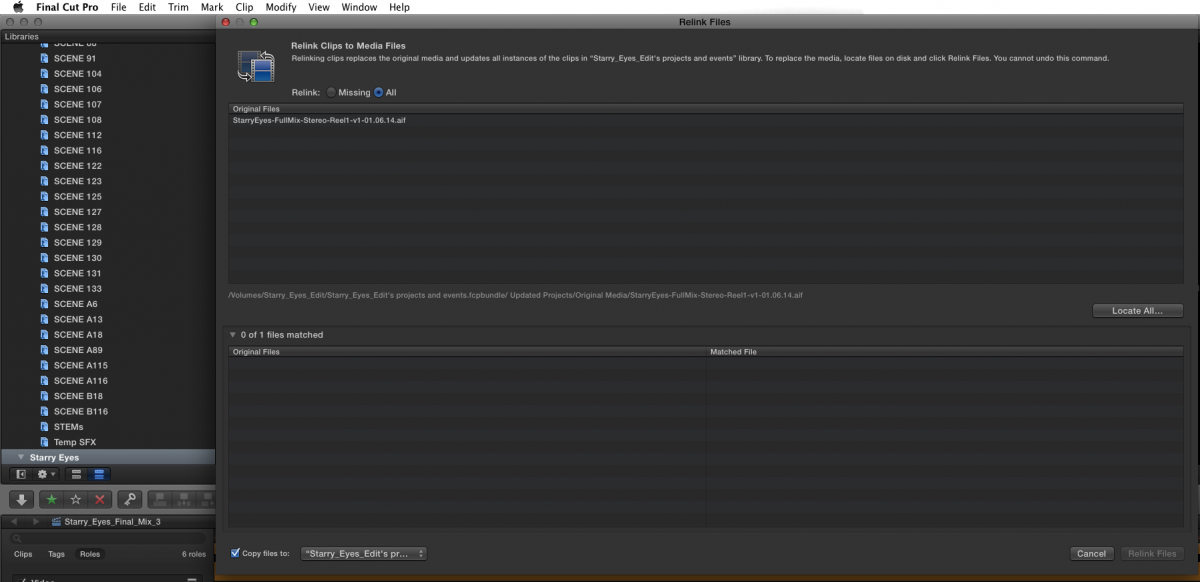
When I select the Event name and go to Relink Files and select 'All', Screenshot 1 is what comes up. Which is so odd. And when I go to 'Missing' nothing comes up. It should be bringing up thousands of files as being missing.
<<Also, since you say your proxies may or may not be missing, please put your viewer into 'Original/Optimized' mode and not proxy mode, since this could be misleading as to which files are offline if you have missing proxy files.>>
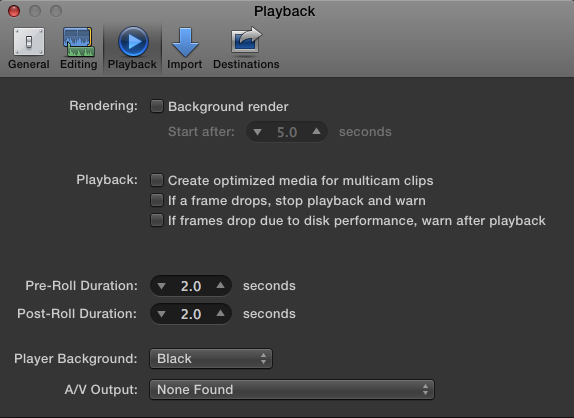
This option seems to have gone away in 10.0.1. Screenshot 2 shows the options I have for Playback.
Thank you in advance for any help you can provide. Looking so forward to getting this resolved.
Unfortunately, this is easier said then done. For some reason, the 'Starry Eyes' event in FCX is empty. It has no Projects or Clips in it. Nor any keyword collections (which contain all my SCENES media clips). Yet, in the Finder window, it shows them all there. This must be the session that got corrupted when the power went out.
When I select the Event name and go to Relink Files and select 'All', Screenshot 1 is what comes up. Which is so odd. And when I go to 'Missing' nothing comes up. It should be bringing up thousands of files as being missing.
<<Also, since you say your proxies may or may not be missing, please put your viewer into 'Original/Optimized' mode and not proxy mode, since this could be misleading as to which files are offline if you have missing proxy files.>>
This option seems to have gone away in 10.0.1. Screenshot 2 shows the options I have for Playback.
Thank you in advance for any help you can provide. Looking so forward to getting this resolved.
Please Log in to join the conversation.
- Darren Roark
-
- Offline
- Platinum Member
-
10 Jan 2014 23:31 #38703
by Darren Roark
Replied by Darren Roark on topic Yikes, all my media is offline!
Just sent you a PM.
Please Log in to join the conversation.
- Parallactic-Pictures
-
Topic Author
- Offline
- Junior Member
-
Less
More
- Posts: 22
- Thank you received: 0
12 Jan 2014 08:17 #38741
by Parallactic-Pictures
Replied by Parallactic-Pictures on topic Yikes, all my media is offline!
Wow, so a big update on this. About an hour after Darren Roark here PMed me, we ended up on the phone. This soon graduated to Skype. And then an hour after that, he was remote accessing my desktop and spending his entire evening helping me try to fix this problem.
This actually turned out to be a three-pronged problem and on night 1 (yes, night 1), he isolated one of the main issues the power surge had caused: Turns out it not only killed the reference to all my Proxies, but also corrupted a lot of the syn links to my RED files. To make the fix go faster, he actually came by my apartment today and spent most of his afternoon working on this with me.
In the end, he completely fixed the problem and I'm now completely set up again and in even better shape than when I started off.
So just a big thanks to you, Darren. Seriously appreciated.
This actually turned out to be a three-pronged problem and on night 1 (yes, night 1), he isolated one of the main issues the power surge had caused: Turns out it not only killed the reference to all my Proxies, but also corrupted a lot of the syn links to my RED files. To make the fix go faster, he actually came by my apartment today and spent most of his afternoon working on this with me.
In the end, he completely fixed the problem and I'm now completely set up again and in even better shape than when I started off.
So just a big thanks to you, Darren. Seriously appreciated.
Please Log in to join the conversation.

12 Jan 2014 16:53 #38756
by AndersM
Replied by AndersM on topic Yikes, all my media is offline!
Good to hear you got it fixed!
Maybe Darren can give a brief explanation on what had to be done in case someone else runs into similar problems?
Maybe Darren can give a brief explanation on what had to be done in case someone else runs into similar problems?
Please Log in to join the conversation.
- Darren Roark
-
- Offline
- Platinum Member
-
12 Jan 2014 20:21 #38758
by Darren Roark
Replied by Darren Roark on topic Yikes, all my media is offline!
In hindsight this could have taken less than an hour. The combination of deleting the media (symlinks) from the library and re-importing all the red files fixed most of it. I will leave out most of the trial and error blundering.
This is a feature film with over 3000 media files, most of them .r3d epic footage and there was a great deal of heavy lifting being done by his iMac.
The first thing I did was make a copy of the library and made a zip copy of the old one. (Minus the render files and media) This way if I botched the whole thing, I could always start over.
Once FCP X was open, I went to the preferences to deselect “copy media to library”.
The first stumbling block was figuring out why FCP X didn’t have any media to relink. Even in proxy mode, it usually will show files to relink with “all files” selected, not the case here. Once it was set to Original Media the files could be relinked. Now we were home free! until..
The big red render bar of death was littering all of the timelines. (can we make BRRBoD happen?) Some shots were perfect, others were fine until some point they went all black. There are photos of a more minor case in this post: www.fcp.co/forum/4-final-cut-pro-x-fcpx/...03-acts-strange#3795
The BRRBoD was caused in part by the 4GB file limit on .r3d files. These were Kubrickianly long takes shot on a Red Epic, so much of the film had shots that went to black as soon as the first 4GB segment of the spanned file ran out. Every library we opened and relinked the .r3d files had the same problem. I trashed the preferences, still the same.
To rule out the .r3d files as being corrupt, I made a new library and imported a bunch of them and put them in a project timeline. They could be played back with no problem whatsoever all the way through. Phew.
I opened up the import window, and selected the camera files folder containing over two thousand .r3d clips, crossed my fingers and waited for FCPX to crunch through the massive pile of files. It worked! Dennis had to relink some of his sound and music files, but other than that he was good to go on the original media side. I could not believe how fast 10.1 could reprocess that many red files. Unbelievable.
For the proxies, we had Ronny Courtens and his well timed post to thank. www.fcp.co/forum/4-final-cut-pro-x-fcpx/...ds-say-no-data#38381
I moved the proxies from the corrupted library to the new fixed version and relinked the media again (not re-import) and most of them were there when switched to proxy mode. The ones that didn’t work, Dennis will need to re-render them, thankfully there didn’t seem to be too many of them.
I had never seen a problem like this before, he had a four drive RAID-5 which seemed to be working fine but could have corrupted the libraries when the drive lost power. There could also be something under the hood that FCP X does to the libraries when they are opened that makes them uniform if they share common media. Again, this is a guess, I could be way off.
I’d like to say it’s always a pleasure to help out on a film I am very excited to see. Dennis is a very talented guy.
This is a feature film with over 3000 media files, most of them .r3d epic footage and there was a great deal of heavy lifting being done by his iMac.
The first thing I did was make a copy of the library and made a zip copy of the old one. (Minus the render files and media) This way if I botched the whole thing, I could always start over.
Once FCP X was open, I went to the preferences to deselect “copy media to library”.
The first stumbling block was figuring out why FCP X didn’t have any media to relink. Even in proxy mode, it usually will show files to relink with “all files” selected, not the case here. Once it was set to Original Media the files could be relinked. Now we were home free! until..
The big red render bar of death was littering all of the timelines. (can we make BRRBoD happen?) Some shots were perfect, others were fine until some point they went all black. There are photos of a more minor case in this post: www.fcp.co/forum/4-final-cut-pro-x-fcpx/...03-acts-strange#3795
The BRRBoD was caused in part by the 4GB file limit on .r3d files. These were Kubrickianly long takes shot on a Red Epic, so much of the film had shots that went to black as soon as the first 4GB segment of the spanned file ran out. Every library we opened and relinked the .r3d files had the same problem. I trashed the preferences, still the same.
To rule out the .r3d files as being corrupt, I made a new library and imported a bunch of them and put them in a project timeline. They could be played back with no problem whatsoever all the way through. Phew.
I opened up the import window, and selected the camera files folder containing over two thousand .r3d clips, crossed my fingers and waited for FCPX to crunch through the massive pile of files. It worked! Dennis had to relink some of his sound and music files, but other than that he was good to go on the original media side. I could not believe how fast 10.1 could reprocess that many red files. Unbelievable.
For the proxies, we had Ronny Courtens and his well timed post to thank. www.fcp.co/forum/4-final-cut-pro-x-fcpx/...ds-say-no-data#38381
I moved the proxies from the corrupted library to the new fixed version and relinked the media again (not re-import) and most of them were there when switched to proxy mode. The ones that didn’t work, Dennis will need to re-render them, thankfully there didn’t seem to be too many of them.
I had never seen a problem like this before, he had a four drive RAID-5 which seemed to be working fine but could have corrupted the libraries when the drive lost power. There could also be something under the hood that FCP X does to the libraries when they are opened that makes them uniform if they share common media. Again, this is a guess, I could be way off.
I’d like to say it’s always a pleasure to help out on a film I am very excited to see. Dennis is a very talented guy.
Please Log in to join the conversation.
