


3 Post Moderation Rule for New Boarders (25 Jan 2021)
New boarders will have their posts moderated - Don't worry if you cannot see your post immediately.
Compound Clip handles


08 Jan 2014 17:01 #38396
by foxytom
Compound Clip handles was created by foxytom
Hi all,
Happy New Year.
I am trying to do a transition between a clip and a compound clip. The compound clip has no room beyond it's in point. The first clip in the compound clip does have room (pre-roll - is it still called that?) but if I lengthen it it merely extends the in point of the whole compound clip, thereby putting the main project out of sync.
All I want is to have some footage before the start of the compound clip (i.e in the dark stripy bit part before the in point.) The would enable me to have a dissolve in the main project. Surely this can be done easily.
Happy New Year.
I am trying to do a transition between a clip and a compound clip. The compound clip has no room beyond it's in point. The first clip in the compound clip does have room (pre-roll - is it still called that?) but if I lengthen it it merely extends the in point of the whole compound clip, thereby putting the main project out of sync.
All I want is to have some footage before the start of the compound clip (i.e in the dark stripy bit part before the in point.) The would enable me to have a dissolve in the main project. Surely this can be done easily.
Please Log in to join the conversation.


08 Jan 2014 18:04 #38409
by BenB
Replied by BenB on topic Compound Clip handles
Not really called "pre-roll", but called "handles". It has no In Point handles (unused media). So, using Command-T won't put a transition in? It should, and automatically trim the Compound clip.
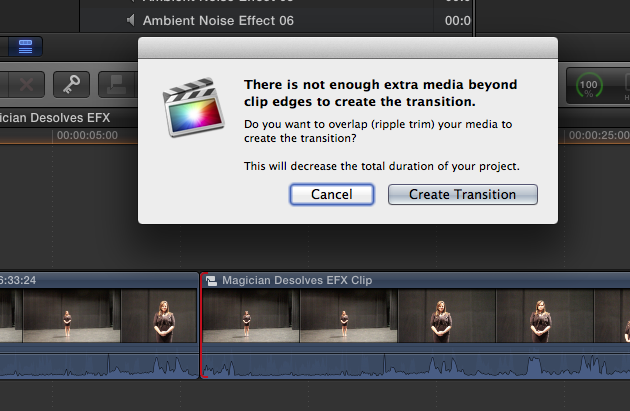
If you need to manually trim, trim the Compound Clip itself, not the clips inside of it directly.
If you need to manually trim, trim the Compound Clip itself, not the clips inside of it directly.
Please Log in to join the conversation.
08 Jan 2014 18:46 #38431
by foxytom
Replied by foxytom on topic Compound Clip handles
Thanks Ben,
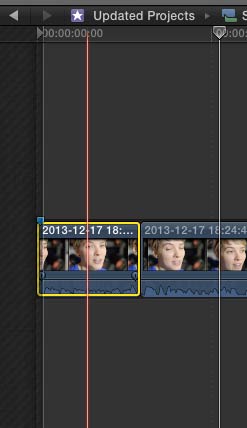
but why should I shorten the project when I have spare footage on the left?
If I try and lengthen the first clip (there is plenty of unused media) the in point of the WHOLE compound clip moves. Surely I can lengthen the first clip BEYOND the in point of the compound clip...
but why should I shorten the project when I have spare footage on the left?
If I try and lengthen the first clip (there is plenty of unused media) the in point of the WHOLE compound clip moves. Surely I can lengthen the first clip BEYOND the in point of the compound clip...
Please Log in to join the conversation.
08 Jan 2014 19:02 - 08 Jan 2014 19:06 #38438
by BenB
Replied by BenB on topic Compound Clip handles
If I am understanding you correctly...
Try this, select the clip on the left (outgoing clip). Right-click, Lift from Storyline. Now, place a cross fade transition on it's tail. How will that ever interact with the clip on the right (incoming clip) if you don't move that incoming clip over to the left at all? If you had handles there, you could trim it out, but you don't have handles there, so you have to move the incoming clip over. Can't create something out of nothing.
Try this, select the clip on the left (outgoing clip). Right-click, Lift from Storyline. Now, place a cross fade transition on it's tail. How will that ever interact with the clip on the right (incoming clip) if you don't move that incoming clip over to the left at all? If you had handles there, you could trim it out, but you don't have handles there, so you have to move the incoming clip over. Can't create something out of nothing.
Last edit: 08 Jan 2014 19:06 by BenB.
Please Log in to join the conversation.

08 Jan 2014 19:39 - 08 Jan 2014 19:40 #38445
by plysat
Can't sleep? Try this: fcpxpert.net ;-)
Replied by plysat on topic Compound Clip handles
If all you're trying to do is get more available media (handles) for the CC, just right click it to open in it's own timeline, extend the head or tail clips beyond the "boundaries" into the grey area. When you go back to your project you'll have as much extra media as you added. Your project timing will not change at all, as you're just modifying the CC.
Be aware that doing this will modify all instances of the CC if there are any others, To prevent this select the CC in the project and choose reference new parent clip from the Clip menu before modifying it. Easy.
Be aware that doing this will modify all instances of the CC if there are any others, To prevent this select the CC in the project and choose reference new parent clip from the Clip menu before modifying it. Easy.
Can't sleep? Try this: fcpxpert.net ;-)
Last edit: 08 Jan 2014 19:40 by plysat.
Please Log in to join the conversation.
08 Jan 2014 20:27 #38467
by foxytom
Replied by foxytom on topic Compound Clip handles
Thanks Plysat and BenB,
Just for everybody's info, the pic above is WITHIN the compound clip and therefore the transition I want is outside the timeline that you see there.
I am trying to extend, as you say plysat, the head clip into the grey area but it just moves the grey area along with the clip.
The only reason that it is extemding into the grey area in the picture at all is because I extended the head clip (which extended the timeline) and then went outside the compound clip into the main timeline and shortened the clip before adding a transition.
Am I making sense?
The answer has to be simpler than my question...
Just for everybody's info, the pic above is WITHIN the compound clip and therefore the transition I want is outside the timeline that you see there.
I am trying to extend, as you say plysat, the head clip into the grey area but it just moves the grey area along with the clip.
The only reason that it is extemding into the grey area in the picture at all is because I extended the head clip (which extended the timeline) and then went outside the compound clip into the main timeline and shortened the clip before adding a transition.
Am I making sense?
The answer has to be simpler than my question...
Please Log in to join the conversation.

08 Jan 2014 20:55 #38473
by Jim
Replied by Jim on topic Compound Clip handles
Here is what I do....open cc in timeline, extend the left side of the first clip 2 seconds, go back to the main timeline and drag the front of the cc clip 2 sec to the right (shorting it)... Now you have a 2 sec handle.
Please Log in to join the conversation.
08 Jan 2014 23:07 #38494
by foxytom
Replied by foxytom on topic Compound Clip handles
...or make it easier with a 2 second slug...
Thanks Jim, I was kind of doing that but was being too moronic to think of extending by a specific time. Thanks for bringing rationality back to my thoughts...
Thanks Jim, I was kind of doing that but was being too moronic to think of extending by a specific time. Thanks for bringing rationality back to my thoughts...
Please Log in to join the conversation.
