


- Posts: 44
- Thank you received: 0
3 Post Moderation Rule for New Boarders (25 Jan 2021)
New boarders will have their posts moderated - Don't worry if you cannot see your post immediately.
Proxies in trash and R3Ds say 'no data'
07 Jan 2014 21:35 #38344
by obardain
Proxies in trash and R3Ds say 'no data' was created by obardain
Hi all,
I wondered if someone might be able to help. I recently used chronosync to copy and verify R3D files to a new drive. The files were already imported into FCPX on the original drive and proxies created. When I relinked the R3Ds on the new drive in FCPX (by highlighting the files in the event and selecting File and Relink Files) thousands of my proxies went offline. I discovered that FCPX had placed them in the trash. It took me weeks to transcode these files so I'm very keen to get them back and not have to retranscode. I'm quite confused about why they have gone offline and why only some of them. I did a verify when I copied the files across and the new files were verified as identical. Does anyone know why this has happened or how I can get my proxy links back? Many thanks.
A second problem has also occurred. Some of my R3D files that I relinked in one event relinked fine. When I closed FCPX and reopened it a whole load of R3Ds no longer show up with video previews but instead have a black screen, with no option to relink and instead of a date in the browser it simply says 'No Data'. I'd be grateful if someone could throw some light on that one too!
I'm currently running FCPX 10.1.
Many thanks for your help.
Best,
Pete
I wondered if someone might be able to help. I recently used chronosync to copy and verify R3D files to a new drive. The files were already imported into FCPX on the original drive and proxies created. When I relinked the R3Ds on the new drive in FCPX (by highlighting the files in the event and selecting File and Relink Files) thousands of my proxies went offline. I discovered that FCPX had placed them in the trash. It took me weeks to transcode these files so I'm very keen to get them back and not have to retranscode. I'm quite confused about why they have gone offline and why only some of them. I did a verify when I copied the files across and the new files were verified as identical. Does anyone know why this has happened or how I can get my proxy links back? Many thanks.
A second problem has also occurred. Some of my R3D files that I relinked in one event relinked fine. When I closed FCPX and reopened it a whole load of R3Ds no longer show up with video previews but instead have a black screen, with no option to relink and instead of a date in the browser it simply says 'No Data'. I'd be grateful if someone could throw some light on that one too!
I'm currently running FCPX 10.1.
Many thanks for your help.
Best,
Pete
Please Log in to join the conversation.
- haysoos123
-

- Offline
- Platinum Member
-

Less
More
- Posts: 402
- Thank you received: 72
08 Jan 2014 01:03 #38358
by haysoos123
Replied by haysoos123 on topic Proxies in trash and R3Ds say 'no data'
Ok, you didn't accidentally try to relink to the proxy files themselves, right? Because that's a recipe for disaster. I only know because a friend of mine did this and it resulted in a lot of weird issues like you describe (blank clips and proxies in the trash). You would have to go back to a backup of your library if so, and just try it again. The fact that FCPX lets you do this without warning is baffling... it should check if you're trying to relink to proxy files by mistake.
Please Log in to join the conversation.
- Scrubelicious
-

- Offline
- Platinum Member
-
Less
More
- Posts: 1228
- Thank you received: 114
08 Jan 2014 08:50 #38368
by Scrubelicious
Replied by Scrubelicious on topic Proxies in trash and R3Ds say 'no data'
Thats what it sounds like, accidental relinked your proxy. Do you recall in what editing mode you where in, Optimized/Original or Proxy. I'em guessing you done this in 10.1? :dry:
Please Log in to join the conversation.
08 Jan 2014 09:22 #38370
by obardain
Replied by obardain on topic Proxies in trash and R3Ds say 'no data'
Thanks very much to you both for your replies.
Yes, I'd just updated to 10.1 and converted my old event files and projects to 10.1 and then did the relink. I thought I'd relinked in original and not proxy but I couldn't swear to it so hopefully that's where I've gone wrong. I'll go back over my steps tonight and report back with my findings. The commercial day job is still being done in FCP7!
Note to apple developers if you happen to be reading - please can you lock down relinking in proxy mode if it is not relevant. It's easily confusing for newcomers like me as it's difficult to work out the linking relationship between proxies and original files.
Thanks all,
Best,
Pete
Yes, I'd just updated to 10.1 and converted my old event files and projects to 10.1 and then did the relink. I thought I'd relinked in original and not proxy but I couldn't swear to it so hopefully that's where I've gone wrong. I'll go back over my steps tonight and report back with my findings. The commercial day job is still being done in FCP7!
Note to apple developers if you happen to be reading - please can you lock down relinking in proxy mode if it is not relevant. It's easily confusing for newcomers like me as it's difficult to work out the linking relationship between proxies and original files.
Thanks all,
Best,
Pete
Please Log in to join the conversation.
- Scrubelicious
-
- Offline
- Platinum Member
-
Less
More
- Posts: 1228
- Thank you received: 114
08 Jan 2014 09:35 #38372
by Scrubelicious
Replied by Scrubelicious on topic Proxies in trash and R3Ds say 'no data'
I think that is the thing when is it not relevant.
If I may ask why did you relink your files?
If I may ask why did you relink your files?
Please Log in to join the conversation.
08 Jan 2014 11:26 #38376
by obardain
Replied by obardain on topic Proxies in trash and R3Ds say 'no data'
Two reasons for relinking files:
1. I needed to do some drive management and consolidate media on drives. Plus we were having performance issues with some drives using R3Ds so I wanted to copy the files to new drives to see if that would perform it. Not ideal after starting a project I know and in future the file structure won't change.
2. There are two editors working on this project with two sets of R3D drives. Once I've sorted out the issues with the original set of drives I'll need to duplicate the project/proxies for the second editor and the R3Ds will need to be relinked again to his set of drives. I'm hoping I won't run into more problems when that happens.
Thanks
P
1. I needed to do some drive management and consolidate media on drives. Plus we were having performance issues with some drives using R3Ds so I wanted to copy the files to new drives to see if that would perform it. Not ideal after starting a project I know and in future the file structure won't change.
2. There are two editors working on this project with two sets of R3D drives. Once I've sorted out the issues with the original set of drives I'll need to duplicate the project/proxies for the second editor and the R3Ds will need to be relinked again to his set of drives. I'm hoping I won't run into more problems when that happens.
Thanks
P
Please Log in to join the conversation.
08 Jan 2014 11:50 #38377
by obardain
Replied by obardain on topic Proxies in trash and R3Ds say 'no data'
Sorry, quick question. I haven't attempted to ever restore a project before in FCPX but I'll read up on it tonight. Does anyone know if I can restore proxy files? Metadata can presumably be restored easily but FCPX has dumped thousands of my proxies into the trash can when I attempted to relink. Can I just dump these files back into the proxy folder and then restore the project to an earlier version and FCPX will see them again or am I forced to retranscode thousands of clips? I'm uncertain of how the linking relationship works with proxies.
Thanks,
Pete
Thanks,
Pete
Please Log in to join the conversation.
- ronny courtens
-

- Offline
- Moderator
-

Less
More
- Posts: 4455
- Thank you received: 962
08 Jan 2014 13:10 - 08 Jan 2014 13:11 #38381
by ronny courtens
Replied by ronny courtens on topic Proxies in trash and R3Ds say 'no data'
Hi Pete,
If the proxy files are still in your trash you can indeed move them back into the Proxy Media folder. If the names of their respective original media files haven't been changed the proxy/original media links should be restored. I just did a little test.
1. I put a proxy file in the Trash and when I re-open FCPX in Proxy mode it shows the Proxy file is missing
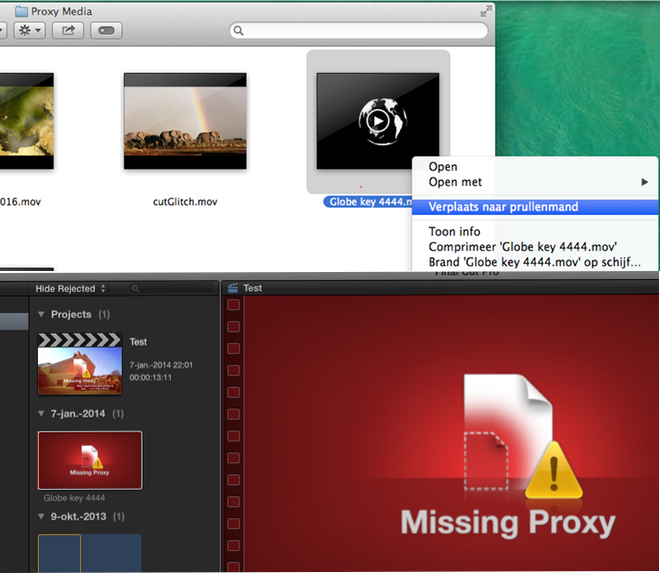
2. I close FCPX and I move the original media file to another drive, then I disconnect that drive. When I re-open FCPX it also tells me that the original media is missing
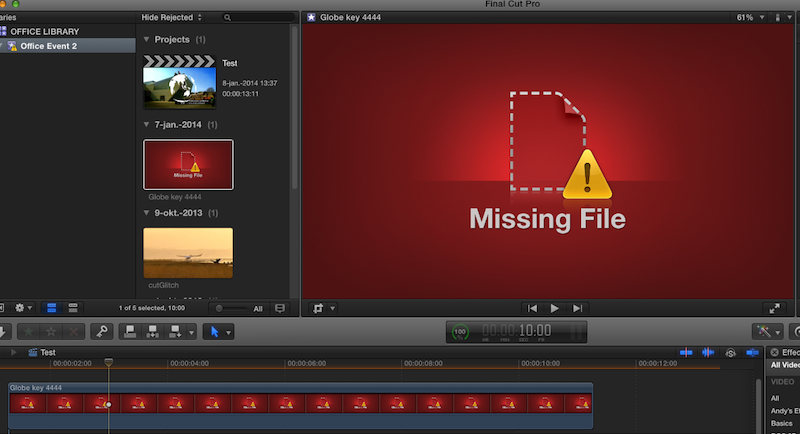
3. I put the Proxy file back from the Trash into the Proxy Media folder, then I re-link the missing original clip in my Event to the file that I have moved onto my other drive (Mediaserver)
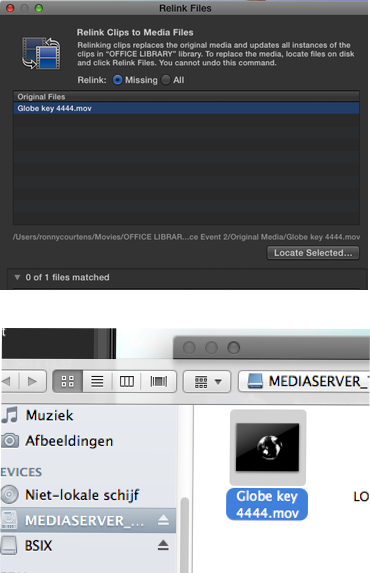
4. I launch FCPX, both my Proxy and Original media are available and I can switch from Proxy to Original mode without a glitch
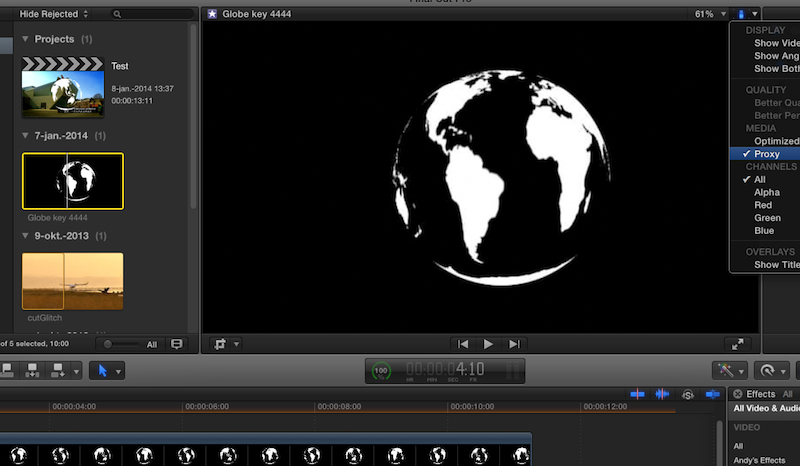
- Ronny
If the proxy files are still in your trash you can indeed move them back into the Proxy Media folder. If the names of their respective original media files haven't been changed the proxy/original media links should be restored. I just did a little test.
1. I put a proxy file in the Trash and when I re-open FCPX in Proxy mode it shows the Proxy file is missing
2. I close FCPX and I move the original media file to another drive, then I disconnect that drive. When I re-open FCPX it also tells me that the original media is missing
3. I put the Proxy file back from the Trash into the Proxy Media folder, then I re-link the missing original clip in my Event to the file that I have moved onto my other drive (Mediaserver)
4. I launch FCPX, both my Proxy and Original media are available and I can switch from Proxy to Original mode without a glitch
- Ronny
Last edit: 08 Jan 2014 13:11 by ronny courtens.
Please Log in to join the conversation.

08 Jan 2014 15:07 #38384
by Soran
Replied by Soran on topic Proxies in trash and R3Ds say 'no data'
Hi Ronny, I'm new to FCPX 10.1 (still using addicted to old habits of FCP 6!)
It's a bit off topic but what is the best method you would recommend for proxy workflow working with fcpx 10.1 in two location (work and home) MBPr early 2013 256GB SSD? preferred workflow 720p ProRes422 ingestion mainly from DSLR 5D
Q1: Ripple training, if I'm not wrong to understand, recommends to keep optimized and proxy media at all time in Libraries for proxy workflows. My proxies alone for single project or library is over 100GB hence mobile editing hampered with the limited size of HD.
Q2: is 720p ProRes422 big for proxy workflow?
Your help is much appreciated,
It's a wonderful forum BTW with many insightful contributions,
Many Thanks!!
It's a bit off topic but what is the best method you would recommend for proxy workflow working with fcpx 10.1 in two location (work and home) MBPr early 2013 256GB SSD? preferred workflow 720p ProRes422 ingestion mainly from DSLR 5D
Q1: Ripple training, if I'm not wrong to understand, recommends to keep optimized and proxy media at all time in Libraries for proxy workflows. My proxies alone for single project or library is over 100GB hence mobile editing hampered with the limited size of HD.
Q2: is 720p ProRes422 big for proxy workflow?
Your help is much appreciated,
It's a wonderful forum BTW with many insightful contributions,
Many Thanks!!
Please Log in to join the conversation.
- ronny courtens
-
- Offline
- Moderator
-
Less
More
- Posts: 4455
- Thank you received: 962
08 Jan 2014 16:00 - 08 Jan 2014 16:02 #38387
by ronny courtens
Replied by ronny courtens on topic Proxies in trash and R3Ds say 'no data'
Hi Kazim, and welcome to the forum.
We are all "new" to FCPX, so don't worry
Q1. At his time Optimized and Proxy media are always stored inside the Libraries, you cannot store them onto a different drive then the one on which you have created the Libraries.
100 GB is quite large for the Proxy media folder of a single project, so you must be using a lot of media inside each Event. If your only worry is to be able to work onto the same projects at home and at the office I would suggest keeping all your Libraries on a decent (Thunderbolt or fast USB3) external drive and just take that drive with you anywhere you wish. Doing this you will always have access to all your media all the time and you will not decrease the performance of your internal SSD drive.
Q2. Your MBP should be able to work with 720p ProRes 422 media without any issues. Of course much depends on the complexity of your projects and the amount of media you are throwing at your system. For multicam projects you will probably need to work in Proxy mode, and if you add lots of effects and titles you may notice some lagging as well. But overall your system is powerful enough. Just don't put any Libraries nor any Original media on the SSD.
- Ronny
We are all "new" to FCPX, so don't worry
Q1. At his time Optimized and Proxy media are always stored inside the Libraries, you cannot store them onto a different drive then the one on which you have created the Libraries.
100 GB is quite large for the Proxy media folder of a single project, so you must be using a lot of media inside each Event. If your only worry is to be able to work onto the same projects at home and at the office I would suggest keeping all your Libraries on a decent (Thunderbolt or fast USB3) external drive and just take that drive with you anywhere you wish. Doing this you will always have access to all your media all the time and you will not decrease the performance of your internal SSD drive.
Q2. Your MBP should be able to work with 720p ProRes 422 media without any issues. Of course much depends on the complexity of your projects and the amount of media you are throwing at your system. For multicam projects you will probably need to work in Proxy mode, and if you add lots of effects and titles you may notice some lagging as well. But overall your system is powerful enough. Just don't put any Libraries nor any Original media on the SSD.
- Ronny
Last edit: 08 Jan 2014 16:02 by ronny courtens.
Please Log in to join the conversation.
- Scrubelicious
-
- Offline
- Platinum Member
-
Less
More
- Posts: 1228
- Thank you received: 114
08 Jan 2014 17:07 - 08 Jan 2014 17:10 #38399
by Scrubelicious
Pete, Ronny already gave you a good step by step solution. Just hit us up if you have any issues or questions.
Replied by Scrubelicious on topic Proxies in trash and R3Ds say 'no data'
You could have just moved the Library over to the better performing drive with all the content.obardain wrote: Two reasons for relinking files:
1. I needed to do some drive management and consolidate media on drives. Plus we were having performance issues with some drives using R3Ds so I wanted to copy the files to new drives to see if that would perform it. Not ideal after starting a project I know and in future the file structure won't change.
The same could have just copied the Library, would have worked. We are loving 10.1 moving Libraries over our workstation makes it much easier then before! Tomorrow going to try only having the R3D on the XSAN. See how that worksobardain wrote: 2. There are two editors working on this project with two sets of R3D drives. Once I've sorted out the issues with the original set of drives I'll need to duplicate the project/proxies for the second editor and the R3Ds will need to be relinked again to his set of drives. I'm hoping I won't run into more problems when that happens.
Thanks
Pete
Pete, Ronny already gave you a good step by step solution. Just hit us up if you have any issues or questions.
Last edit: 08 Jan 2014 17:10 by Scrubelicious.
Please Log in to join the conversation.
- ronny courtens
-
- Offline
- Moderator
-
Less
More
- Posts: 4455
- Thank you received: 962
08 Jan 2014 17:11 #38400
by ronny courtens
Replied by ronny courtens on topic Proxies in trash and R3Ds say 'no data'
You could have just moved the Library over to the better performing drive with all the content.
Absolutely! Moving and copying Libraries (or even parts of them) is a powerful feature that not enough people know about.
- Ronny
Absolutely! Moving and copying Libraries (or even parts of them) is a powerful feature that not enough people know about.
- Ronny
Please Log in to join the conversation.
08 Jan 2014 23:26 #38495
by obardain
Replied by obardain on topic Proxies in trash and R3Ds say 'no data'
Thanks for this. I'm not keeping the original R3D files in the library, only shortcuts that reference the R3Ds externally as there is about 20TB of R3Ds across several drives and I didn't trust fcpx to media manage the files in case anything went wrong. Our two sets of working drives form the entire backup of two years filming at the moment.
Please Log in to join the conversation.
08 Jan 2014 23:34 #38496
by obardain
Replied by obardain on topic Proxies in trash and R3Ds say 'no data'
Thanks all and thanks so much Ronny for posting all those pics for relinking. I've managed to restore my event back to an older version and dropped the proxies back in their folder. The proxies all came online. I switched the project to view the original R3Ds and then relinked the offline files to the new ones that I'd copied to my new drive. Unfortunately FCPX did the same thing and dumped my proxies back in the trash so it doesn't seem to be to do with relinking in proxy mode. It's really odd because nothing has changed with the R3Ds. The RMDs haven't been altered and the media is cloned from the original drive. Very odd. I don't know if it's a bug or if I'm doing something wrong.
Please Log in to join the conversation.
- ronny courtens
-
- Offline
- Moderator
-
Less
More
- Posts: 4455
- Thank you received: 962
09 Jan 2014 01:33 #38506
by ronny courtens
Replied by ronny courtens on topic Proxies in trash and R3Ds say 'no data'
Have you tried putting the proxies back after all original media have been relinked? Does FCPX still trash them?
- Ronny
- Ronny
Please Log in to join the conversation.

09 Jan 2014 02:00 #38509
by BenB
Replied by BenB on topic Proxies in trash and R3Ds say 'no data'
OK, I think the RMD files on your two sets of R3D originals have different settings in them. That would be the only reason FCPX would trash your proxies and/or Optimized versions.
Please Log in to join the conversation.
- Scrubelicious
-
- Offline
- Platinum Member
-
Less
More
- Posts: 1228
- Thank you received: 114
09 Jan 2014 06:21 #38525
by Scrubelicious
As Ben mentioned when relinking the new media Final Cut Pro X most likely want to re-transcode your R3D files. As similar when change for example the color settings.
Why not use the files that are already linked to the project, because you want them in a different location?
Replied by Scrubelicious on topic Proxies in trash and R3Ds say 'no data'
Oh I have no or had a issue having Final Cut Pro X managing the media. Less of a headache. But hat all depends on your workflow.obardain wrote: Thanks for this. I'm not keeping the original R3D files in the library, only shortcuts that reference the R3Ds externally as there is about 20TB of R3Ds across several drives and I didn't trust fcpx to media manage the files in case anything went wrong. Our two sets of working drives form the entire backup of two years filming at the moment.
obardain wrote: Thanks all and thanks so much Ronny for posting all those pics for relinking. I've managed to restore my event back to an older version and dropped the proxies back in their folder. The proxies all came online. I switched the project to view the original R3Ds and then relinked the offline files to the new ones that I'd copied to my new drive. Unfortunately FCPX did the same thing and dumped my proxies back in the trash so it doesn't seem to be to do with relinking in proxy mode. It's really odd because nothing has changed with the R3Ds. The RMDs haven't been altered and the media is cloned from the original drive. Very odd. I don't know if it's a bug or if I'm doing something wrong.
As Ben mentioned when relinking the new media Final Cut Pro X most likely want to re-transcode your R3D files. As similar when change for example the color settings.
Why not use the files that are already linked to the project, because you want them in a different location?
Please Log in to join the conversation.
09 Jan 2014 08:25 #38532
by obardain
Replied by obardain on topic Proxies in trash and R3Ds say 'no data'
Hi, yes putting the original media drive back on and relinking to that also trashes the proxies. The files are identical and absolutely no colour settings or modifications have been made so something else must be going on.
The other problem with duplicating the R3D files via the library to drive set 2 is that when I copied the files from the redmags I copied the redmags to drive set 1 and then copied the redmags to drive set 2 rather than duplicating drive set 1 to drive set 2. The reason for doing this is to minimise the risk of corruption as if any files were corrupted when copying from the redmag to drive set 1 then that corruption would be duplicated to drive set 2. An extra 20TB of storage is out of our budget at the moment to copy the library unfortunately.
At present the only way I can see forward is for each editor to be responsible for making their own proxies and never doing a media move again once they're made. Far from ideal but I'm stumped at the moment as to what's going on.
Thanks,
Pete
The other problem with duplicating the R3D files via the library to drive set 2 is that when I copied the files from the redmags I copied the redmags to drive set 1 and then copied the redmags to drive set 2 rather than duplicating drive set 1 to drive set 2. The reason for doing this is to minimise the risk of corruption as if any files were corrupted when copying from the redmag to drive set 1 then that corruption would be duplicated to drive set 2. An extra 20TB of storage is out of our budget at the moment to copy the library unfortunately.
At present the only way I can see forward is for each editor to be responsible for making their own proxies and never doing a media move again once they're made. Far from ideal but I'm stumped at the moment as to what's going on.
Thanks,
Pete
Please Log in to join the conversation.
09 Jan 2014 08:37 #38534
by BenB
Replied by BenB on topic Proxies in trash and R3Ds say 'no data'
Don't know if this helps, but the trashing of proxies is because the Red settings files are different. When FCPX sees a change in a Raw setting, it trashes proxies and optimized media.
"Redcode Raw In FCP X"
"Redcode Raw In FCP X"
Please Log in to join the conversation.
09 Jan 2014 09:14 #38536
by obardain
Replied by obardain on topic Proxies in trash and R3Ds say 'no data'
Thanks. The strange thing is that the settings have absolutely not been modified by me. Not in FCPX or Redcine X. The rushes haven't had selects pulled, been edited or even viewed since the proxies were created. very odd.
Please Log in to join the conversation.
