




- Posts: 72
- Thank you received: 8
3 Post Moderation Rule for New Boarders (25 Jan 2021)
New boarders will have their posts moderated - Don't worry if you cannot see your post immediately.
Playing around with Surround Sound in FCP X, but how to monitor in real time?
07 Jan 2014 17:56 - 07 Jan 2014 17:57 #38323
by zzchu
I've been experimenting with the FCPX's surround features and was disappointed that I couldn't do any real time monitoring of the surround sound from FCPX when playing on the timeline. I'm connected via the optical out to a JVC SU-DH1 Dolby Headphone surround adapter which accepts TOSLINK
support.jvc.com/consumer/product.jsp?modelId=MODL027291
There is sound coming out via optical on playback on the timeline, but not digital surround. (It could be Dolby Pro logic, but I'm not sure.)
If I export the project formatted for AppleTV, and then play it via the VLC player, I can get digital surround playback. [The JVC indictor will light up that is indeed AC3 5.1 coming out of the Mac].
Anybody have any experiences? Is this is a limitation of a FCPX?
There is sound coming out via optical on playback on the timeline, but not digital surround. (It could be Dolby Pro logic, but I'm not sure.)
If I export the project formatted for AppleTV, and then play it via the VLC player, I can get digital surround playback. [The JVC indictor will light up that is indeed AC3 5.1 coming out of the Mac].
Anybody have any experiences? Is this is a limitation of a FCPX?
Last edit: 07 Jan 2014 17:57 by zzchu.
Please Log in to join the conversation.
- Darren Roark
-

- Offline
- Platinum Member
-

07 Jan 2014 20:29 #38332
by Darren Roark
Replied by Darren Roark on topic Playing around with Surround Sound in FCP X, but how to monitor in real time?
I'm not familiar with that adapter, but it seems to be for headphones only.
If your Mac has an HDMI or sound capable MiniDisplayport and HDMI adapter, you can monitor discrete 5.1 through a surround receiver.
If your Mac has an HDMI or sound capable MiniDisplayport and HDMI adapter, you can monitor discrete 5.1 through a surround receiver.
Please Log in to join the conversation.
07 Jan 2014 20:45 #38335
by zzchu
Replied by zzchu on topic Playing around with Surround Sound in FCP X, but how to monitor in real time?
Okay. So FCPX does not directly pass 5.1 AC3 via the optical output connection on the Mac? The 5.1 is only passed via HDMI to a receiver? That's disappointing.
Please Log in to join the conversation.

07 Jan 2014 21:00 - 07 Jan 2014 21:05 #38338
by BenB
Replied by BenB on topic Playing around with Surround Sound in FCP X, but how to monitor in real time?
I assume you're on a Mac Pro?
Is your Project timeline configure for surround sound audio?
Is your Project timeline configure for surround sound audio?
Last edit: 07 Jan 2014 21:05 by BenB.
Please Log in to join the conversation.
- Darren Roark
-
- Offline
- Platinum Member
-
07 Jan 2014 22:33 - 07 Jan 2014 22:51 #38347
by Darren Roark
The optical audio in the older Mac Pros only supports two discrete audio channels or an encoded 5.1 dolby digital signal. FCP X is spitting out discrete uncompressed audio during timeline playback so you would need an audio interface if you want to hear the individual channels on the fly.
A Decklink mini monitor card from Blackmagic would work well as they get along with FCP X for audio sync during playback. At $150 and handles eight channels of embedded audio it's a great deal.
Replied by Darren Roark on topic Playing around with Surround Sound in FCP X, but how to monitor in real time?
zzchu wrote: Okay. So FCPX does not directly pass 5.1 AC3 via the optical output connection on the Mac? The 5.1 is only passed via HDMI to a receiver? That's disappointing.
The optical audio in the older Mac Pros only supports two discrete audio channels or an encoded 5.1 dolby digital signal. FCP X is spitting out discrete uncompressed audio during timeline playback so you would need an audio interface if you want to hear the individual channels on the fly.
A Decklink mini monitor card from Blackmagic would work well as they get along with FCP X for audio sync during playback. At $150 and handles eight channels of embedded audio it's a great deal.
Last edit: 07 Jan 2014 22:51 by Darren Roark. Reason: adding a thought
Please Log in to join the conversation.
07 Jan 2014 22:54 - 07 Jan 2014 22:56 #38349
by ffg
Replied by ffg on topic Playing around with Surround Sound in FCP X, but how to monitor in real time?
I understand not all Macs support 5.1 from the toslink output.
AC-3 is a compression codec for multichannel sound. AFAIK, FCPX would not output 5.1 in AC-3 form. However, it will replay 5.1 if that's what is in the timeline - it's a question of getting your mac to pass it to the outside world. A multichannel sound card/audio interface would be able to do the DA conversion.
(Wot Darren said while I was typing)
AC-3 is a compression codec for multichannel sound. AFAIK, FCPX would not output 5.1 in AC-3 form. However, it will replay 5.1 if that's what is in the timeline - it's a question of getting your mac to pass it to the outside world. A multichannel sound card/audio interface would be able to do the DA conversion.
(Wot Darren said while I was typing)
Last edit: 07 Jan 2014 22:56 by ffg. Reason: Superfluous waffle
Please Log in to join the conversation.
07 Jan 2014 23:24 - 08 Jan 2014 01:28 #38350
by zzchu
Replied by zzchu on topic Playing around with Surround Sound in FCP X, but how to monitor in real time?
Thanks for the clarification! I actually Googled this question but did not get a definitive answer.
I need a card if I want to monitor this on the fly. Otherwise, I would have to render out a movie to do a sound check and hear the discrete channels.
Of course, after posting this question I just now found a great post on an external site with the same information you have responded with above.
forums.macrumors.com/showpost.php?p=18578417&postcount=2
I need a card if I want to monitor this on the fly. Otherwise, I would have to render out a movie to do a sound check and hear the discrete channels.
Of course, after posting this question I just now found a great post on an external site with the same information you have responded with above.
forums.macrumors.com/showpost.php?p=18578417&postcount=2
Last edit: 08 Jan 2014 01:28 by zzchu. Reason: Added a link.
Please Log in to join the conversation.
- eladberger
-
- Offline
- Junior Member
-

Less
More
- Posts: 34
- Thank you received: 0
13 Nov 2014 17:32 #55938
by eladberger
Replied by eladberger on topic Playing around with Surround Sound in FCP X, but how to monitor in real time?
I'm too looking to mix surround sound in FCP
Does anyone know if possible and how to get 5.1 surround to a headset?
Thanks
Does anyone know if possible and how to get 5.1 surround to a headset?
Thanks
Please Log in to join the conversation.
13 Nov 2014 18:50 - 13 Nov 2014 18:51 #55947
by tpayton
Replied by tpayton on topic Playing around with Surround Sound in FCP X, but how to monitor in real time?
I have done many projects in 5.1 Surround and not had any issues. However, for 5.1 monitoring I have been inexpensive USB audio interfaces (like less than <$50) and I have used analog 5.1 speakers, not optical.
Audio output will be largely plug it in and it works, however, launch Auido Midi Setup for more control. You'll see the channel of your output device and then you can configure your speakers accordingly.
I'm at home at moment at not at my studio, but here are some screen shots to give you an idea:
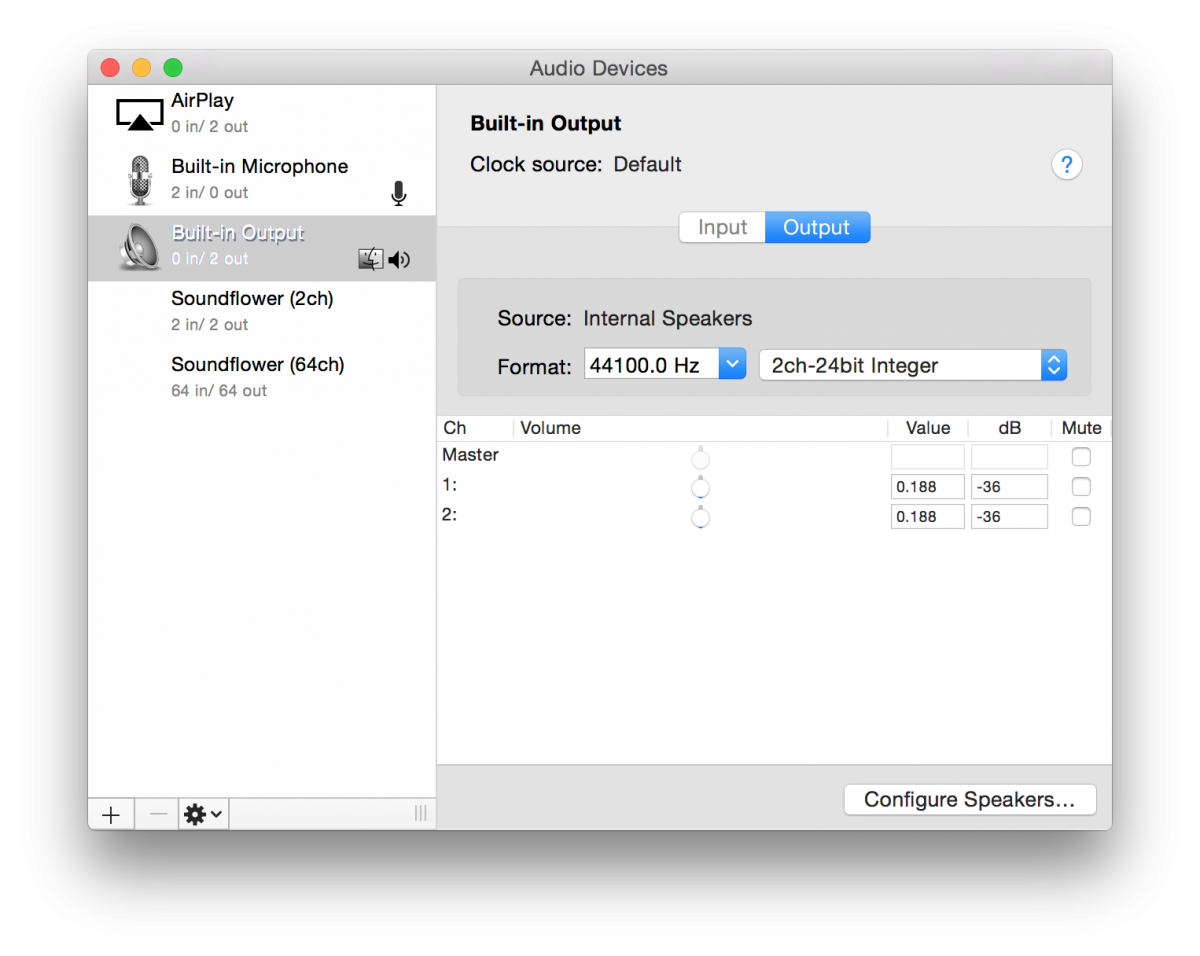
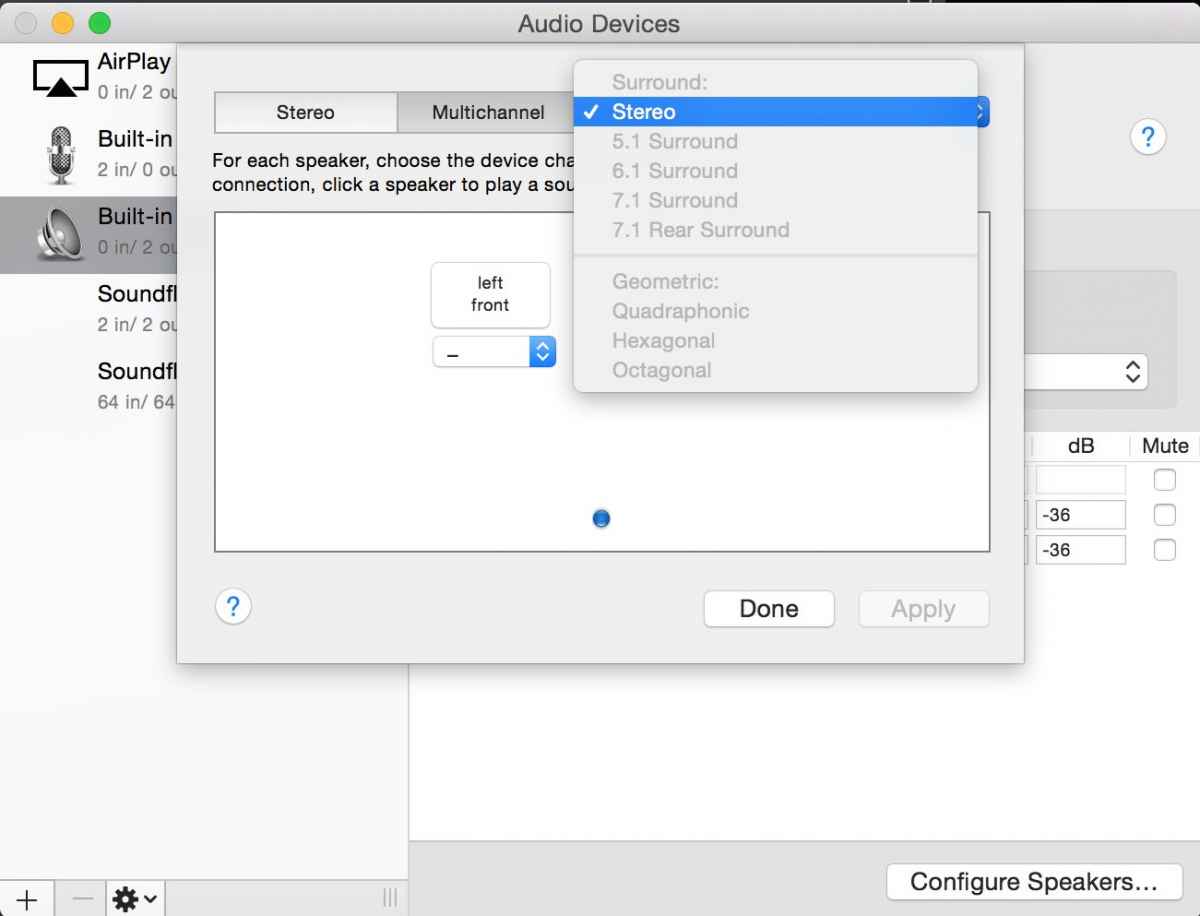
Audio output will be largely plug it in and it works, however, launch Auido Midi Setup for more control. You'll see the channel of your output device and then you can configure your speakers accordingly.
I'm at home at moment at not at my studio, but here are some screen shots to give you an idea:
Last edit: 13 Nov 2014 18:51 by tpayton.
Please Log in to join the conversation.
13 Nov 2014 19:47 - 13 Nov 2014 19:47 #55957
by tpayton
Replied by tpayton on topic Playing around with Surround Sound in FCP X, but how to monitor in real time?
Back at the office. Here is one of the surround interfaces looks like:
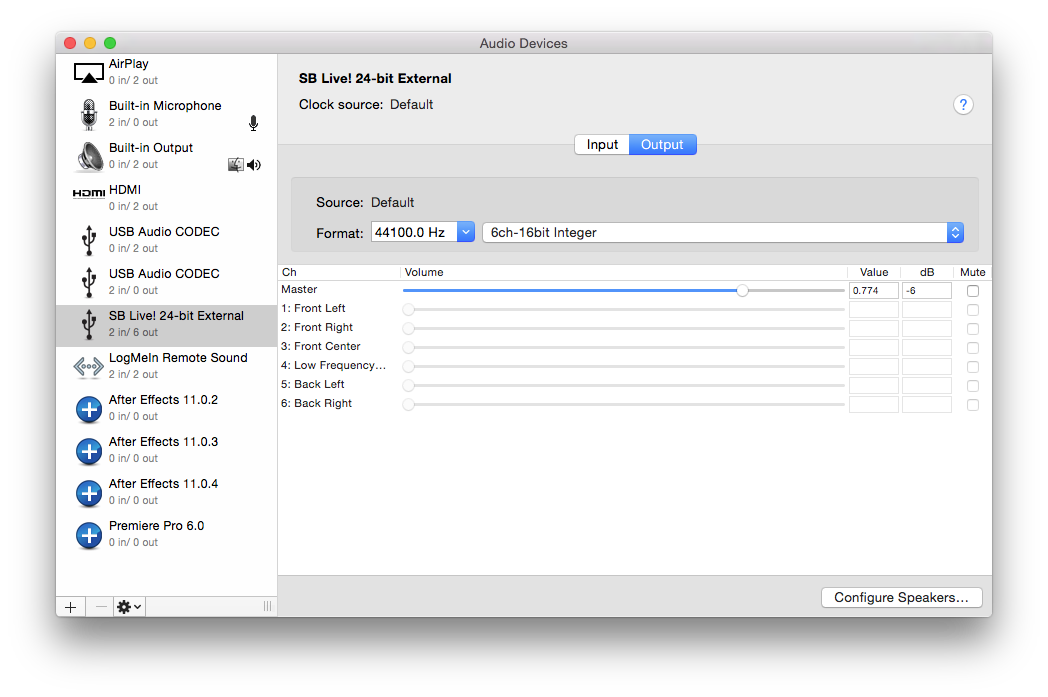
Last edit: 13 Nov 2014 19:47 by tpayton.
Please Log in to join the conversation.
- eladberger
-
- Offline
- Junior Member
-
Less
More
- Posts: 34
- Thank you received: 0
13 Nov 2014 20:39 #55962
by eladberger
Replied by eladberger on topic Playing around with Surround Sound in FCP X, but how to monitor in real time?
Is there any headphone you recommend for 5.1 or do I have to use 6 speakers?
Please Log in to join the conversation.
14 Nov 2014 01:24 #55975
by tpayton
Replied by tpayton on topic Playing around with Surround Sound in FCP X, but how to monitor in real time?
I use the 6 speaker setup. The very nature of surround sound would lead me to believe that it would only be a simulation in headphones, at best. Regardless, I try to have a setup as close as possible to the venue. When doing broadcast work I don't just mix on my JBL studio monitors but also give a listen thought the LCD TV speakers. When doing a project for a theater i was fortune enough to get a bit of time to test, and boy was it different being in the theater that my studio, and depending on where you are sitting in the theater things are very different. In that vein I can't imagine mixing surround with headphones as it is radically different from how your audience with experience your mix.
Regarding the link you shared to that headphone amp, it says in the description "It features Dolby headphone technology to provide 5.1ch surround sound through any set of headphones. " So if I read this correctly it is mixing down to stereo and providing a simulation.
Regarding the link you shared to that headphone amp, it says in the description "It features Dolby headphone technology to provide 5.1ch surround sound through any set of headphones. " So if I read this correctly it is mixing down to stereo and providing a simulation.
Please Log in to join the conversation.
14 Nov 2014 14:12 #56020
by zzchu
Replied by zzchu on topic Playing around with Surround Sound in FCP X, but how to monitor in real time?
With this SB Live box plugged into the USB, you can get real time monitoring from Final Cut Pro X? Can you tell me which model you have?
Please Log in to join the conversation.
14 Nov 2014 14:46 #56025
by tpayton
Replied by tpayton on topic Playing around with Surround Sound in FCP X, but how to monitor in real time?
Actually, any USB surround sound interface for the Mac will work and give you real time feedback from FCPX. Just make sure you have the type of outputs you want:
I don't think the soundblaster is still available, but I have a couple of these as well:
www.amazon.com/Sabrent-USB-SND8-8-Channe...s=usb+surround+sound
I don't think the soundblaster is still available, but I have a couple of these as well:
www.amazon.com/Sabrent-USB-SND8-8-Channe...s=usb+surround+sound
Please Log in to join the conversation.
14 Nov 2014 15:07 #56030
by zzchu
Replied by zzchu on topic Playing around with Surround Sound in FCP X, but how to monitor in real time?
These things sound good and for the price, much less than a PCI card, and worth playing around with.
Do you know if it will output 5.1 via the optical or only via the L,R, C, LS, RS, LFE outputs while playing from FCPX?
Do you know if it will output 5.1 via the optical or only via the L,R, C, LS, RS, LFE outputs while playing from FCPX?
Please Log in to join the conversation.
14 Nov 2014 15:14 #56031
by tpayton
Replied by tpayton on topic Playing around with Surround Sound in FCP X, but how to monitor in real time?
Don't know about surround in optical, I don't have an optical equipment, but the plugs are there.
Here is what it says on the back of the box (I ordered 2 of these and only opened one)
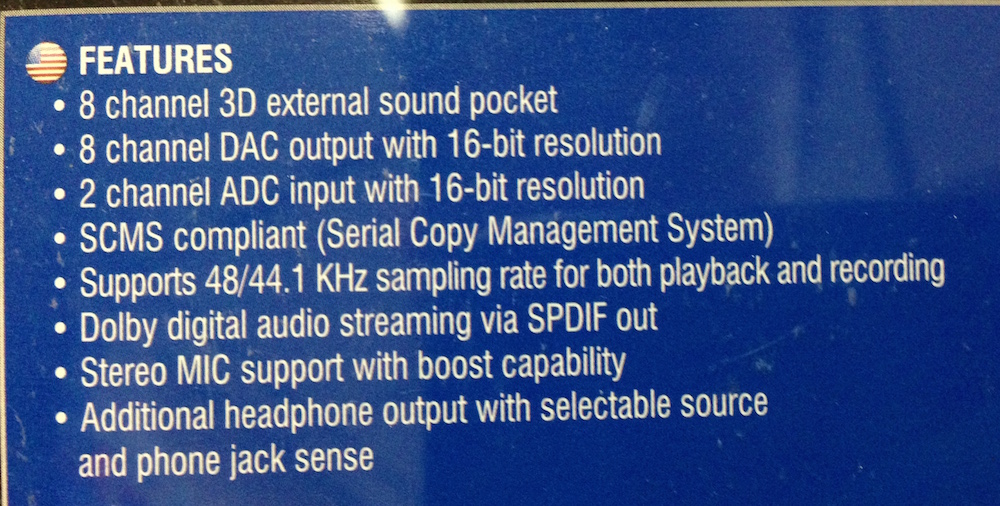
Here is what it says on the back of the box (I ordered 2 of these and only opened one)
Please Log in to join the conversation.
14 Nov 2014 15:34 - 14 Nov 2014 15:36 #56037
by VidGreg
Replied by VidGreg on topic Playing around with Surround Sound in FCP X, but how to monitor in real time?
Just to add to the mix :lol:
I just got a Focusrite 18i20 USB audio interface. It shows up in Audio Midi Set Up and in FCPX shows up for input/output. The Scarlet Mix Control allows you to route to multi-speaker outputs.
So adding an interface that allows 5.1 should work.
Hope this helps, Greg
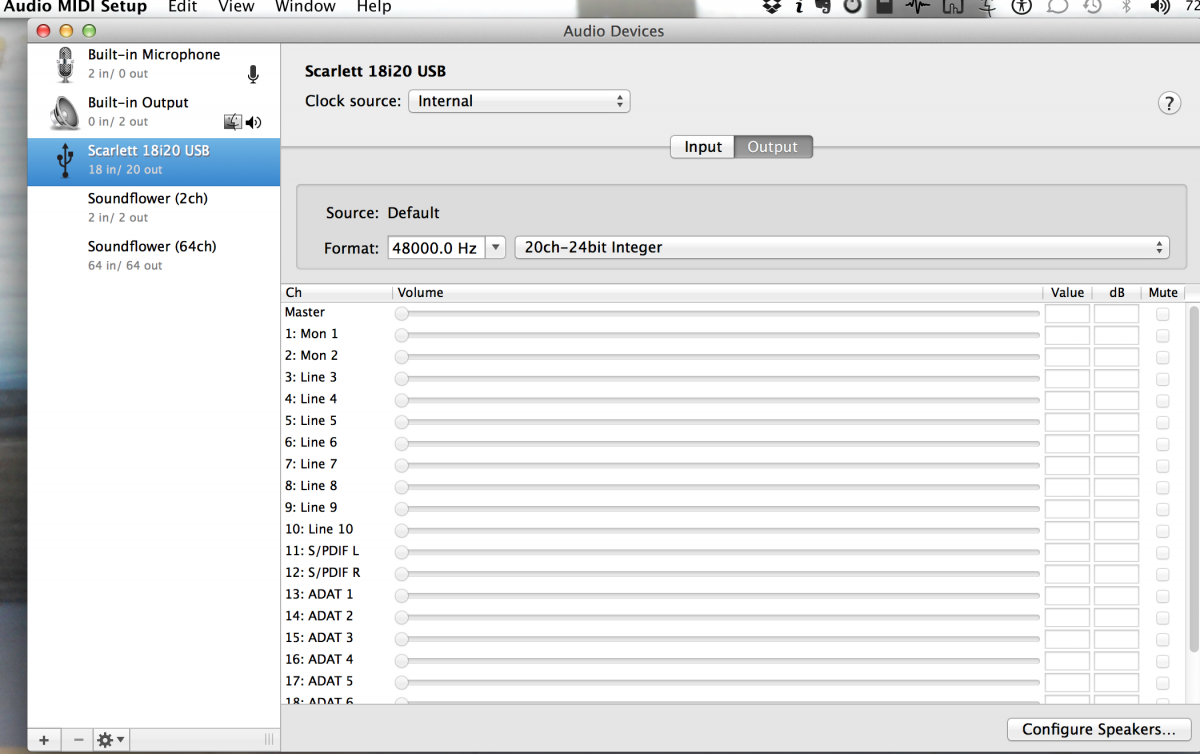
I just got a Focusrite 18i20 USB audio interface. It shows up in Audio Midi Set Up and in FCPX shows up for input/output. The Scarlet Mix Control allows you to route to multi-speaker outputs.
So adding an interface that allows 5.1 should work.
Hope this helps, Greg
Last edit: 14 Nov 2014 15:36 by VidGreg. Reason: Added screen shot
Please Log in to join the conversation.
14 Nov 2014 15:37 - 14 Nov 2014 15:41 #56038
by VidGreg
Replied by VidGreg on topic Playing around with Surround Sound in FCP X, but how to monitor in real time?
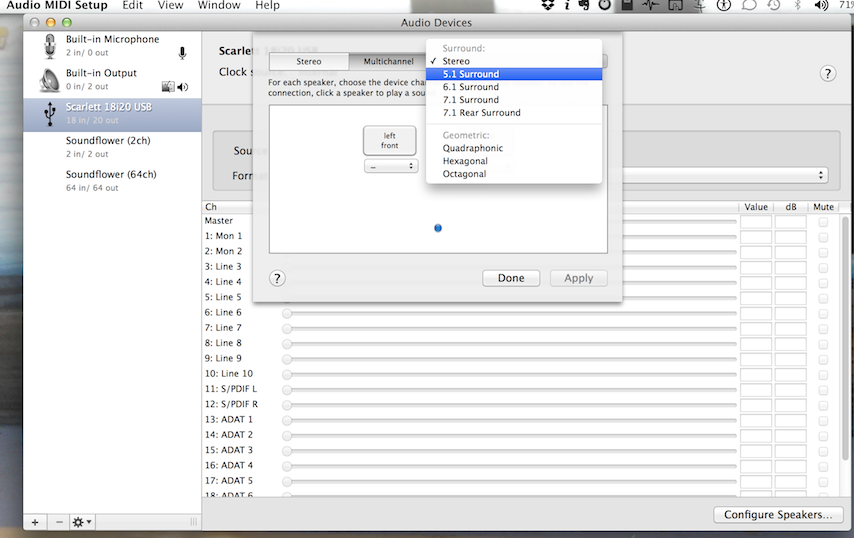
Here is second screenshot
Hope this helps, Greg
Hope this helps, Greg
Last edit: 14 Nov 2014 15:41 by VidGreg. Reason: screen shot
Please Log in to join the conversation.
