


- Posts: 1
- Thank you received: 0
3 Post Moderation Rule for New Boarders (25 Jan 2021)
New boarders will have their posts moderated - Don't worry if you cannot see your post immediately.
Can't expand audio components in FCPX 10.1
07 Jan 2014 17:16 #38313
by KyleMcCon
Can't expand audio components in FCPX 10.1 was created by KyleMcCon
Hi, everyone -- First time asker, longtime follower.
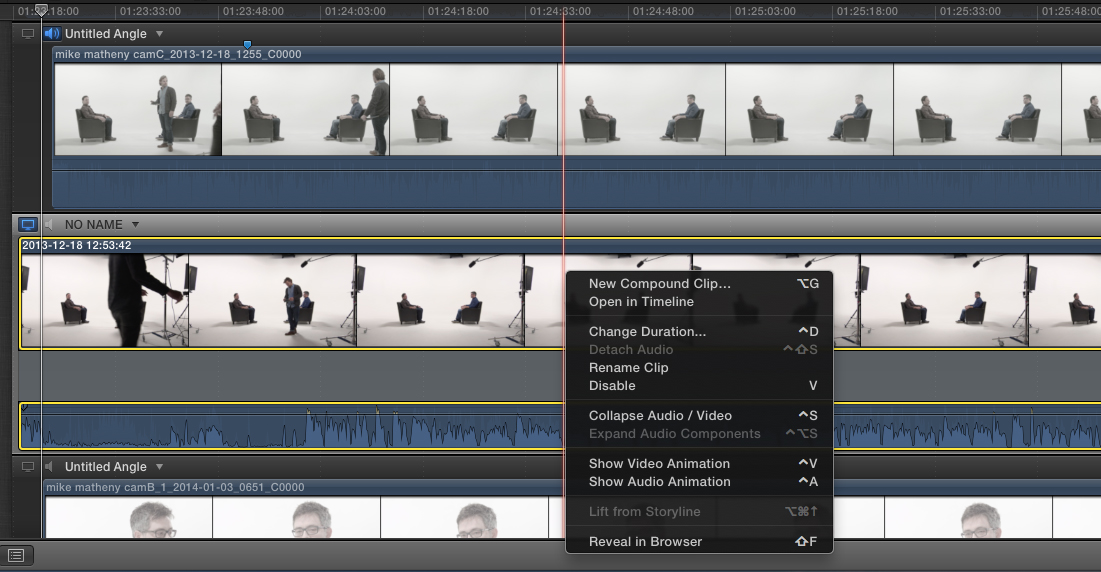
I am unable to expand the audio components on my stereo audio track in FCPX 10.1 multicam. I attached a screenshot. Any ideas?
I am unable to expand the audio components on my stereo audio track in FCPX 10.1 multicam. I attached a screenshot. Any ideas?
Please Log in to join the conversation.
- Tom Wolsky
-

- Offline
- Moderator
-

07 Jan 2014 17:33 #38314
by Tom Wolsky
Replied by Tom Wolsky on topic Can't expand audio components in FCPX 10.1
You can't expand audio components in the multicam editor only in the project.
Please Log in to join the conversation.
- chrisgilesphoto
-

- Offline
- New Member
-

Less
More
- Posts: 18
- Thank you received: 0
10 Sep 2014 20:17 #52516
by chrisgilesphoto
Replied by chrisgilesphoto on topic Can't expand audio components in FCPX 10.1
This is a follow up on an old post. Curious if this feature has changed and if not, what is the logic of only allowing project based separation of audio components vs multicam, ie. individual control of multiple channels.
I have an interview with 2 microphones that I'd like to adjust the volume and settings of each channel. It would be nice to be able to apply a "global" change to this audio instead of having to do it locally in a project.
The native audio file with two channels of audio can not be configured. Once the audio file is put in a multicam, the two channels can be separated, turned off and on but still no adjustment of each channel. It is only when I cut up a bunch of different clips into my project that I can then begin to adjust each channel. And then I guess copy and paste setting throughout the video? I have 5 talking heads per video and 18 videos.
Am I missing something here or is this extremely clunky? What happened to make adjustments upstream and let them trickle down the workflow for more efficiency?
I have an interview with 2 microphones that I'd like to adjust the volume and settings of each channel. It would be nice to be able to apply a "global" change to this audio instead of having to do it locally in a project.
The native audio file with two channels of audio can not be configured. Once the audio file is put in a multicam, the two channels can be separated, turned off and on but still no adjustment of each channel. It is only when I cut up a bunch of different clips into my project that I can then begin to adjust each channel. And then I guess copy and paste setting throughout the video? I have 5 talking heads per video and 18 videos.
Am I missing something here or is this extremely clunky? What happened to make adjustments upstream and let them trickle down the workflow for more efficiency?
Please Log in to join the conversation.
