


- Posts: 402
- Thank you received: 72
3 Post Moderation Rule for New Boarders (25 Jan 2021)
New boarders will have their posts moderated - Don't worry if you cannot see your post immediately.
Proxy media and alpha channel
- haysoos123
-
 Topic Author
- Offline
- Platinum Member
-

Less
More
06 Jan 2014 22:42 #38269
by haysoos123
Proxy media and alpha channel was created by haysoos123
Hey guys,
Not sure why I didn't think of this before, but I thought it would be something the designers thought about when putting in the proxy media workflow. The problem is that we have a bunch of graphics in ProRes4444 with alpha that's supposed to go on top of footage. However, for this particular project, we are using proxy media (created from RED 4k/5k). In proxy mode, FCPX wants to use ALL proxy media, and of course it converts the ProRes4444 graphics with alpha into the prores proxy which seems to kill the alpha. This is the first time I'm relying on proxy media heavily in FCPX and did not anticipate this problem.
How are people dealing with this? Do we have to switch to original media every time we're bumping out a cut? Moreover, we want to be in proxy mode during the cutting process, so it's a huge pain to switch back and forth when cutting with the graphics (to see the timing of the overlay, etc.). Am I overlooking something simple?
thanks.
Not sure why I didn't think of this before, but I thought it would be something the designers thought about when putting in the proxy media workflow. The problem is that we have a bunch of graphics in ProRes4444 with alpha that's supposed to go on top of footage. However, for this particular project, we are using proxy media (created from RED 4k/5k). In proxy mode, FCPX wants to use ALL proxy media, and of course it converts the ProRes4444 graphics with alpha into the prores proxy which seems to kill the alpha. This is the first time I'm relying on proxy media heavily in FCPX and did not anticipate this problem.
How are people dealing with this? Do we have to switch to original media every time we're bumping out a cut? Moreover, we want to be in proxy mode during the cutting process, so it's a huge pain to switch back and forth when cutting with the graphics (to see the timing of the overlay, etc.). Am I overlooking something simple?
thanks.
Please Log in to join the conversation.
07 Jan 2014 08:49 #38287
by Seanus
Sean Lander - Editing since 1982 - AVID 1991 - FCP 1999 - FCPX 2011
Replied by Seanus on topic Proxy media and alpha channel
What I do is create the section in full res and then export it as a movie.
Import that movie and use it with my proxy media. Works just fine but would be a real pain if you had a lot of alpha stuff to do.
Import that movie and use it with my proxy media. Works just fine but would be a real pain if you had a lot of alpha stuff to do.
Sean Lander - Editing since 1982 - AVID 1991 - FCP 1999 - FCPX 2011
Please Log in to join the conversation.
- ronny courtens
-

- Offline
- Moderator
-

Less
More
- Posts: 4455
- Thank you received: 962
07 Jan 2014 09:37 - 07 Jan 2014 09:38 #38288
by ronny courtens
Replied by ronny courtens on topic Proxy media and alpha channel
Normally I don't encourage messing around in the Library structure, but there is a trick you can use to achieve this. We have often done this in earlier versions of FCPX as well.
R-click your Library in the Finder and choose "Show Package Contents". Then in the Event folder open the Transcoded Media > Proxy Media folder and replace the Proxy files created from the 4444 alpha with the original 4444 alpha clips. Launch FCPX and you will have your original 4444 clips in Proxy mode.
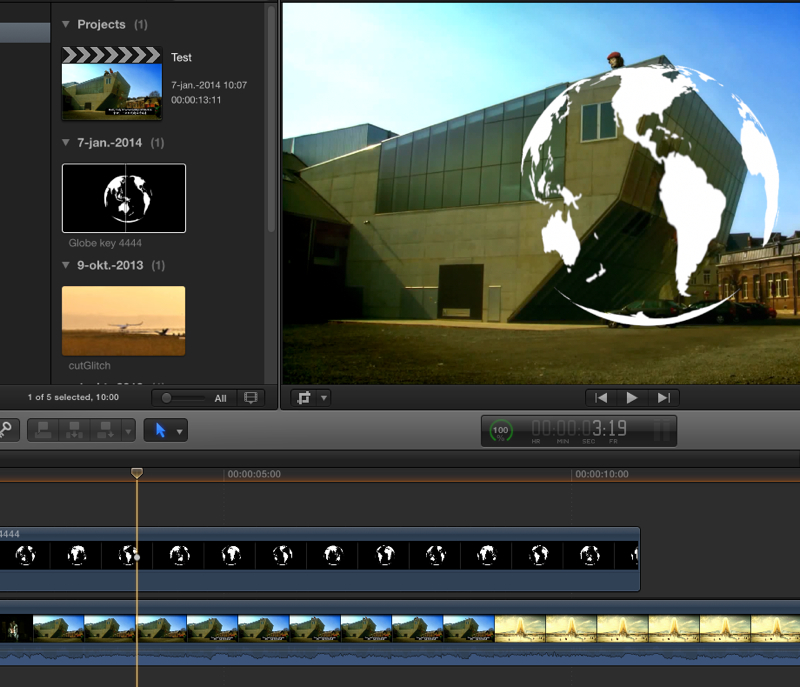
Here I have a few video clips as well as a 4444 clip with alpha. All clips have been transcoded to Proxies. In Original mode the 4444 clip keys over the video clip:
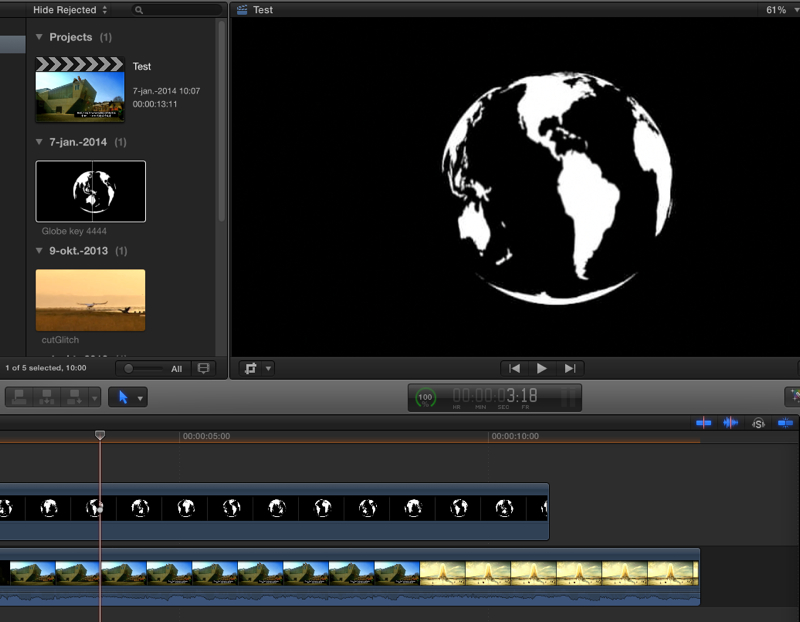
When I switch to Proxy mode I lose the key as the proxy file from the 4444 clip does not retain the alpha channel:
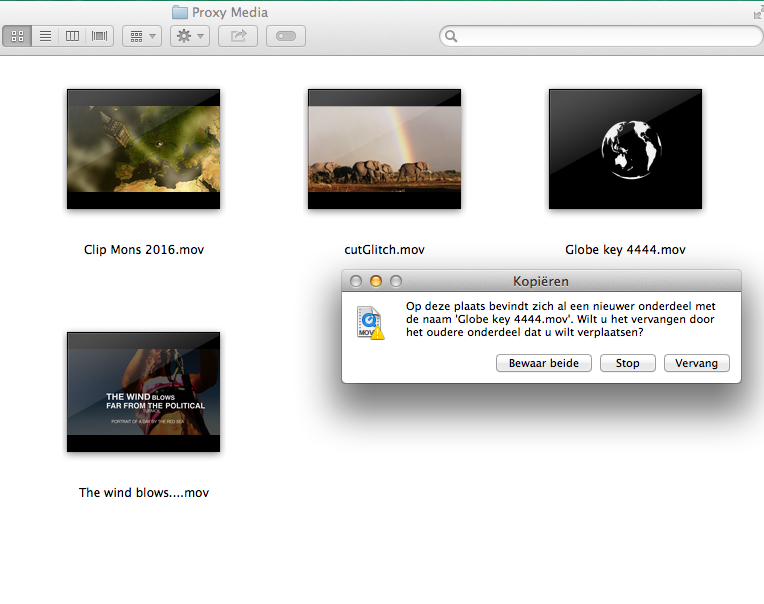
I quit FCPX and in the Library > Event > Optimized Media > Proxy Media folder I replace the 4444 proxy file with the original 4444 file:
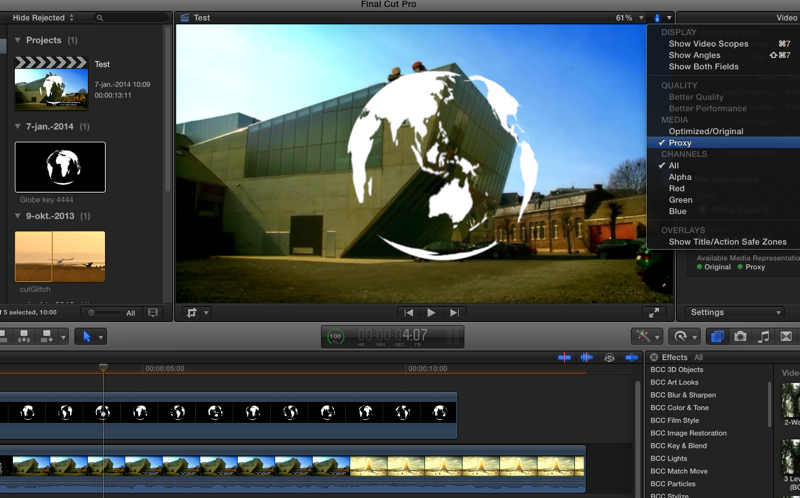
Now when I launch FCPX and enable Proxy mode I have the original 4444 clip instead of a proxy file and I can key it over the video:
- Ronny
R-click your Library in the Finder and choose "Show Package Contents". Then in the Event folder open the Transcoded Media > Proxy Media folder and replace the Proxy files created from the 4444 alpha with the original 4444 alpha clips. Launch FCPX and you will have your original 4444 clips in Proxy mode.
Here I have a few video clips as well as a 4444 clip with alpha. All clips have been transcoded to Proxies. In Original mode the 4444 clip keys over the video clip:
When I switch to Proxy mode I lose the key as the proxy file from the 4444 clip does not retain the alpha channel:
I quit FCPX and in the Library > Event > Optimized Media > Proxy Media folder I replace the 4444 proxy file with the original 4444 file:
Now when I launch FCPX and enable Proxy mode I have the original 4444 clip instead of a proxy file and I can key it over the video:
- Ronny
Last edit: 07 Jan 2014 09:38 by ronny courtens.
Please Log in to join the conversation.
- Andreas Kiel
-
- Offline
- Platinum Member
-
Less
More
- Posts: 1077
- Thank you received: 189
07 Jan 2014 12:37 #38298
by Andreas Kiel
Replied by Andreas Kiel on topic Proxy media and alpha channel
As I don't work with proxies here just a guess.
It's similar to Ronny's suggestion.
If you create a compressor droplet to save half-res files of your 4444 clips (thats finally the thing FCPX does though to 422) you can replace the proxy media with those files and save disc space and gain performance.
As said just an idea.
-Andreas
It's similar to Ronny's suggestion.
If you create a compressor droplet to save half-res files of your 4444 clips (thats finally the thing FCPX does though to 422) you can replace the proxy media with those files and save disc space and gain performance.
As said just an idea.
-Andreas
Please Log in to join the conversation.
- ronny courtens
-
- Offline
- Moderator
-
Less
More
- Posts: 4455
- Thank you received: 962
07 Jan 2014 12:47 #38299
by ronny courtens
Replied by ronny courtens on topic Proxy media and alpha channel
And a good idea as well, especially when you have tons of alpha files to work with and you are on a slow system. Takes some extra time but may be worth it.
- Ronny
- Ronny
Please Log in to join the conversation.
- Andreas Kiel
-
- Offline
- Platinum Member
-
Less
More
- Posts: 1077
- Thank you received: 189
07 Jan 2014 13:16 - 07 Jan 2014 14:03 #38301
by Andreas Kiel
Replied by Andreas Kiel on topic Proxy media and alpha channel
Okay I just did a quick workflow test.
Imported some footage (though not 4444) without creating proxies except for one *.
Quit FCPX
Created the Compressor Setup ProRes 4444 half-res – in my case 960x540 (its kind of shame that there is no option 50% and no user selectable destination folder and name).
Rendered the clips.
Moved them to the Proxy Media folder and renamed them.
Launched FCPX and voila all proxies are there with 4444.
-Andreas
*) I first tried to create the Transcoded Media/Proxy Media folders manually but it didn't work. I've to have a closer look why not.
P.S. Ishould make another app for this
Imported some footage (though not 4444) without creating proxies except for one *.
Quit FCPX
Created the Compressor Setup ProRes 4444 half-res – in my case 960x540 (its kind of shame that there is no option 50% and no user selectable destination folder and name).
Rendered the clips.
Moved them to the Proxy Media folder and renamed them.
Launched FCPX and voila all proxies are there with 4444.
-Andreas
*) I first tried to create the Transcoded Media/Proxy Media folders manually but it didn't work. I've to have a closer look why not.
P.S. Ishould make another app for this
Last edit: 07 Jan 2014 14:03 by Andreas Kiel.
Please Log in to join the conversation.
- haysoos123
-
Topic Author
- Offline
- Platinum Member
-
Less
More
- Posts: 402
- Thank you received: 72
07 Jan 2014 20:04 #38329
by haysoos123
Replied by haysoos123 on topic Proxy media and alpha channel
Thanks, guys, this was very helpful. I guess there isn't a cleaner way to get around this, but the workarounds make sense. I think a feature request is in order... and it simply is a checkbox or automatic detection of whether the footage has alpha, and then it will create proxies in ProRes 4444 with alpha. This seems to me to be a very common scenario when working with proxies.
Please Log in to join the conversation.
- Darren Roark
-
- Offline
- Platinum Member
-
07 Jan 2014 20:19 #38331
by Darren Roark
Replied by Darren Roark on topic Proxy media and alpha channel
What if there was an option to 'revert to original media' for individual shots? That could be a good feature request unless anyone has a better idea.
Please Log in to join the conversation.
- ronny courtens
-
- Offline
- Moderator
-
Less
More
- Posts: 4455
- Thank you received: 962
07 Jan 2014 21:12 - 07 Jan 2014 21:13 #38339
by ronny courtens
Replied by ronny courtens on topic Proxy media and alpha channel
I think that would be a better solution. ProRes Proxy files cannot include an alpha channel and ProRes 4444 cannot be reduced to half-resolution (the codec simply has no medium quality setting). You can make the frame size of a 4444 clip smaller but that's not a good option as this can lead to incorrect alignment when switching back to Original media. So there simply is no way to create a lower quality file from original 4444 media at the same frame size.
The only way to deal with this would be that FCPX recognizes original media that include an alpha channel and that it uses the original media for those clips instead of using the Proxy media when working in Proxy mode.
In fact FCPX already recognizes stills that include an alpha channel: when you convert original still clips to Proxy media it creates JPEG Proxies for stills that don't have an alpha, and it creates PNG Proxies with alpha for stills that do include an alpha channel.
Anyway, I agree that one should be able to work with alpha channels even in Proxy mode, so it's feedback time again
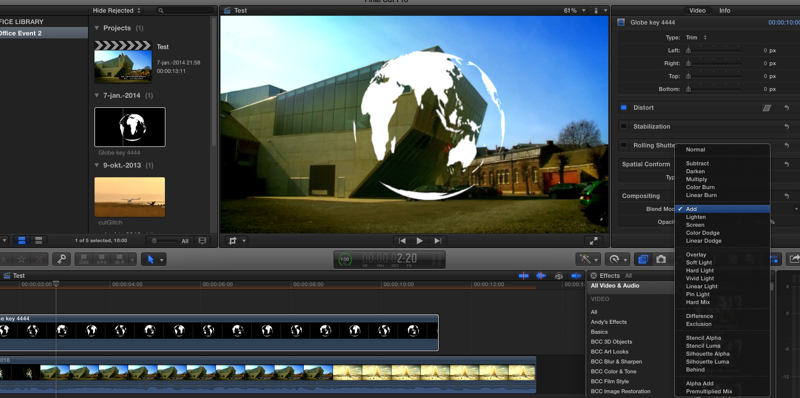
In the meantime you can use the workaround, or you can always key a Proxy clip over another clip by setting it's Blend Mode to "Add" or "Screen". This will allow you to work entirely with Proxy media and to judge the timing and the overlay of the key at the same time.
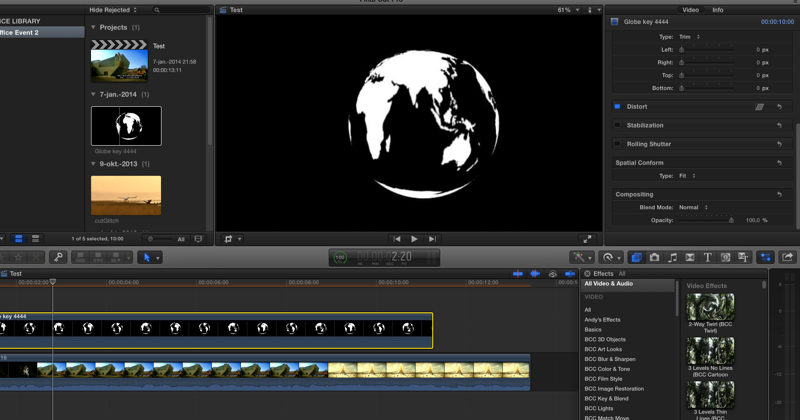
This is a Proxy clip converted from a 4444 clip with alpha when played in Proxy mode: the alpha channel is gone
And this is the same Proxy clip playing in Proxy mode with Blend Mode set to "Add": you get the same result as if you had an alpha channel
- Ronny
The only way to deal with this would be that FCPX recognizes original media that include an alpha channel and that it uses the original media for those clips instead of using the Proxy media when working in Proxy mode.
In fact FCPX already recognizes stills that include an alpha channel: when you convert original still clips to Proxy media it creates JPEG Proxies for stills that don't have an alpha, and it creates PNG Proxies with alpha for stills that do include an alpha channel.
Anyway, I agree that one should be able to work with alpha channels even in Proxy mode, so it's feedback time again
In the meantime you can use the workaround, or you can always key a Proxy clip over another clip by setting it's Blend Mode to "Add" or "Screen". This will allow you to work entirely with Proxy media and to judge the timing and the overlay of the key at the same time.
This is a Proxy clip converted from a 4444 clip with alpha when played in Proxy mode: the alpha channel is gone
And this is the same Proxy clip playing in Proxy mode with Blend Mode set to "Add": you get the same result as if you had an alpha channel
- Ronny
Last edit: 07 Jan 2014 21:13 by ronny courtens.
Please Log in to join the conversation.
- Andreas Kiel
-
- Offline
- Platinum Member
-
Less
More
- Posts: 1077
- Thank you received: 189
08 Jan 2014 09:33 - 08 Jan 2014 09:53 #38371
by Andreas Kiel
Replied by Andreas Kiel on topic Proxy media and alpha channel
Hmm Ronny,
In this case I don't agree.
You can render 4444 files to half-res (for example 1920 x 1080 -> 960 x 540) and they keep the Alpha.
And since they are scaled down exactly 50 percent there is no problem with alignment - at least not more than with standard Proxies created by FCPX.
The "Screen" comp mode will work in your example not in other cases, and you also have to switch the mode once you switch the playback mode.
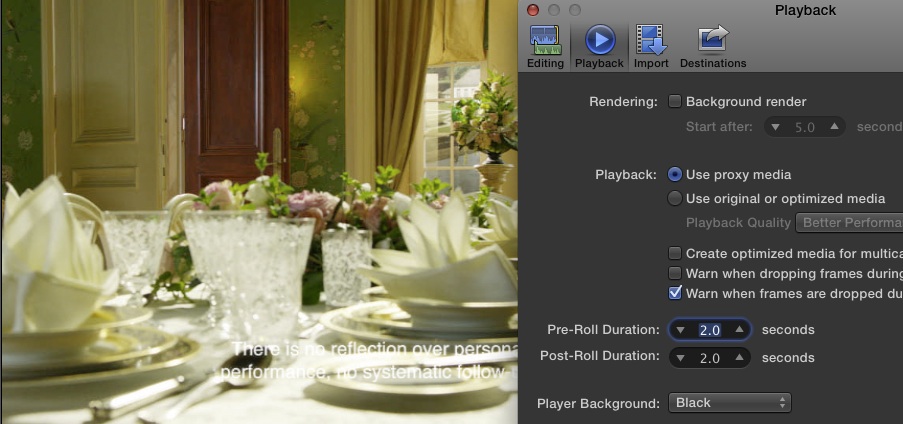
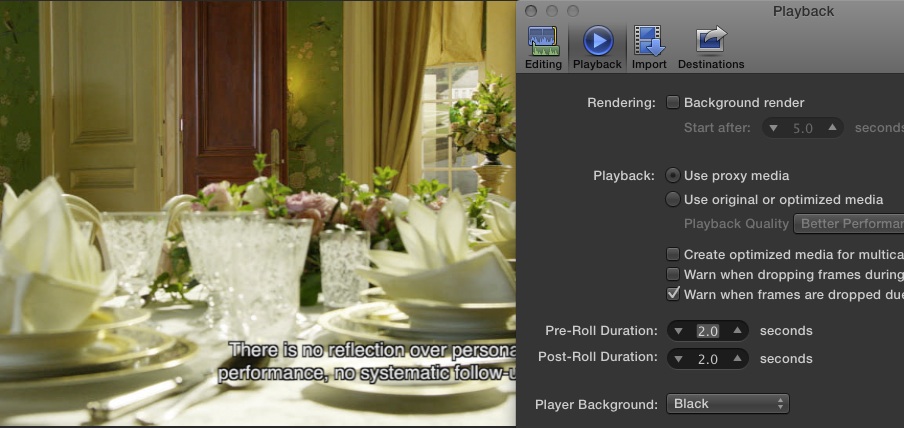
Below a screenshot from 10.0.9 (on this machine I don't have 10.1 - but it behaves the same)
Blend
Alpha
So again it's fairly easy to create your "own" proxies.
Create a compressor droplet. Render all your original media to this own proxy format in the background. Rename them (unfortunately you have to do that because of the new version of Compressor) and drag them to the Proxy Media folder.
That's it.
Anyway I agree that FCPX should handle movies the same way as stills.
-Andreas
In this case I don't agree.
You can render 4444 files to half-res (for example 1920 x 1080 -> 960 x 540) and they keep the Alpha.
And since they are scaled down exactly 50 percent there is no problem with alignment - at least not more than with standard Proxies created by FCPX.
The "Screen" comp mode will work in your example not in other cases, and you also have to switch the mode once you switch the playback mode.
Below a screenshot from 10.0.9 (on this machine I don't have 10.1 - but it behaves the same)
Blend
Alpha
So again it's fairly easy to create your "own" proxies.
Create a compressor droplet. Render all your original media to this own proxy format in the background. Rename them (unfortunately you have to do that because of the new version of Compressor) and drag them to the Proxy Media folder.
That's it.
Anyway I agree that FCPX should handle movies the same way as stills.
-Andreas
Last edit: 08 Jan 2014 09:53 by Andreas Kiel.
Please Log in to join the conversation.
- ronny courtens
-
- Offline
- Moderator
-
Less
More
- Posts: 4455
- Thank you received: 962
08 Jan 2014 10:32 - 08 Jan 2014 10:36 #38375
by ronny courtens
Replied by ronny courtens on topic Proxy media and alpha channel
Hey Andreas,
If you down-size 4444 to exactly 50% I do agree there will be no potential issues and you will have 50% smaller files. But this requires you to calculate the down-size, to convert the files in Compressor, to rename them and to put them into the Proxy Media folder. I think if you have a fairly decent system it's easier to just use the original 4444 files in the Proxy Media folder.
But as I said: I do think your workflow is excellent, especially if you want to add source tc to the "Proxy" media (not only for alpha channel proxies but for any kind of proxy files). We have already worked with proxies from R3D files that we created in an external application (Grinder) to which we have added source tc for off-lining in FCPX Proxy mode. Having tc source visible in off-line is imperative for sending off-line edits for client approval, and using externally created Proxy media works perfectly for this.
So if you would create an app that takes any kind of original media from the Original Media folder, that converts the files to 1/4 res ProRes Proxy (for regular video) or to 1/2 res ProRes 4444 with alpha( for video that includes an alpha channel), that has the option burn-in source tc and that puts the converted files automatically in the Proxy Media folder... I think you could even sell it to Apple
If you down-size 4444 to exactly 50% I do agree there will be no potential issues and you will have 50% smaller files. But this requires you to calculate the down-size, to convert the files in Compressor, to rename them and to put them into the Proxy Media folder. I think if you have a fairly decent system it's easier to just use the original 4444 files in the Proxy Media folder.
But as I said: I do think your workflow is excellent, especially if you want to add source tc to the "Proxy" media (not only for alpha channel proxies but for any kind of proxy files). We have already worked with proxies from R3D files that we created in an external application (Grinder) to which we have added source tc for off-lining in FCPX Proxy mode. Having tc source visible in off-line is imperative for sending off-line edits for client approval, and using externally created Proxy media works perfectly for this.
So if you would create an app that takes any kind of original media from the Original Media folder, that converts the files to 1/4 res ProRes Proxy (for regular video) or to 1/2 res ProRes 4444 with alpha( for video that includes an alpha channel), that has the option burn-in source tc and that puts the converted files automatically in the Proxy Media folder... I think you could even sell it to Apple
Last edit: 08 Jan 2014 10:36 by ronny courtens.
Please Log in to join the conversation.
- Andreas Kiel
-
- Offline
- Platinum Member
-
Less
More
- Posts: 1077
- Thank you received: 189
08 Jan 2014 12:08 #38378
by Andreas Kiel
Replied by Andreas Kiel on topic Proxy media and alpha channel
Hey Ronny,
There are some problems doing that and my workflow description above per se is correct and could be somehow seamlessly integrated into a 10.1 workflow.
The problem is Compressor its slow, buggy and not very flexible.
So here why slow, buggy and not very flexible.
Slow: converting files in a batch to proxy takes about 3 times longer than with the old droplet(s).
Buggy: new droplets some times create movies with kind of "variable frames rates".
not very flexible: as I wrote before you can't create a droplet which scales any source to 50%, need 1 for each size. Also you cannot set custom names (so same for image sequences in FCPX – grrr)
Good thing is that droplets/settings from the previous version of Compressor still work.
I haven't had a look whether the command line features for Compressor are still working. In case they are an app could include the "old" Compressor stuff, check the movie and will select the matching setting.
-Andreas
There are some problems doing that and my workflow description above per se is correct and could be somehow seamlessly integrated into a 10.1 workflow.
The problem is Compressor its slow, buggy and not very flexible.
So here why slow, buggy and not very flexible.
Slow: converting files in a batch to proxy takes about 3 times longer than with the old droplet(s).
Buggy: new droplets some times create movies with kind of "variable frames rates".
not very flexible: as I wrote before you can't create a droplet which scales any source to 50%, need 1 for each size. Also you cannot set custom names (so same for image sequences in FCPX – grrr)
Good thing is that droplets/settings from the previous version of Compressor still work.
I haven't had a look whether the command line features for Compressor are still working. In case they are an app could include the "old" Compressor stuff, check the movie and will select the matching setting.
-Andreas
Please Log in to join the conversation.
- ronny courtens
-
- Offline
- Moderator
-
Less
More
- Posts: 4455
- Thank you received: 962
08 Jan 2014 12:14 - 08 Jan 2014 12:15 #38379
by ronny courtens
Replied by ronny courtens on topic Proxy media and alpha channel
I entirely agree, I have had some bad experiences with the new Compressor as well.
I think your layout is perfect and I will submit feedback to Apple about this Proxy/alpha issue. I am glad to see we are not the only ones having issues with this, so maybe it will get on the priority list one day
- Ronny
I think your layout is perfect and I will submit feedback to Apple about this Proxy/alpha issue. I am glad to see we are not the only ones having issues with this, so maybe it will get on the priority list one day
- Ronny
Last edit: 08 Jan 2014 12:15 by ronny courtens.
Please Log in to join the conversation.
- Andreas Kiel
-
- Offline
- Platinum Member
-
Less
More
- Posts: 1077
- Thank you received: 189
09 Jan 2014 10:09 - 09 Jan 2014 10:15 #38538
by Andreas Kiel
Replied by Andreas Kiel on topic Proxy media and alpha channel
I tried to create a little simple app which uses Ronny's approach just to copy the original media files to the proxy media files.
Good thing is that it even works with symlinks. So the library's size does change only minimal.
Bad thing is that FCPX does handle non standard size/aspect clip in a very strange way.
For those clips the approach doesn't work.
Here some screenshots from a non standard clip
QT Player 7 frames displayed both clips resized to match the capture
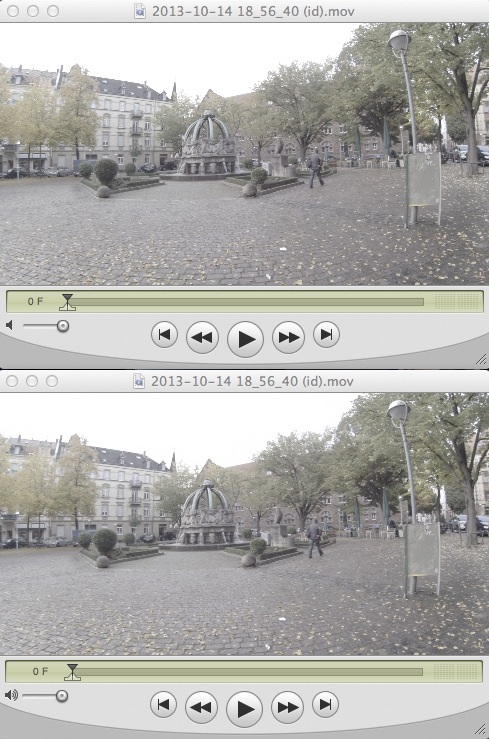
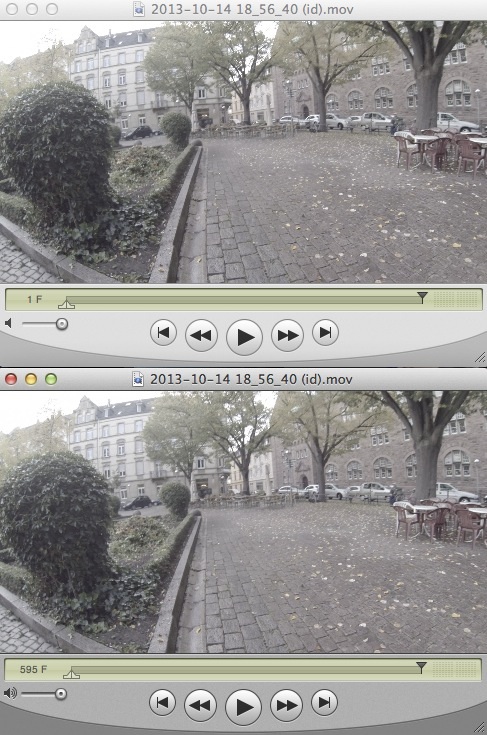
As you see the upper clip (proxy) by display is only one frame long. Displaying TC will give the same result.
Both of them are playing normally.
If you try to relink the new proxy copied from the original media FCPX will tell you that there is a non matching media cause of duration.
So some new fun every day.
-Andreas
Good thing is that it even works with symlinks. So the library's size does change only minimal.
Bad thing is that FCPX does handle non standard size/aspect clip in a very strange way.
For those clips the approach doesn't work.
Here some screenshots from a non standard clip
QT Player 7 frames displayed both clips resized to match the capture
As you see the upper clip (proxy) by display is only one frame long. Displaying TC will give the same result.
Both of them are playing normally.
If you try to relink the new proxy copied from the original media FCPX will tell you that there is a non matching media cause of duration.
So some new fun every day.
-Andreas
Last edit: 09 Jan 2014 10:15 by Andreas Kiel.
Please Log in to join the conversation.
- Andreas Kiel
-
- Offline
- Platinum Member
-
Less
More
- Posts: 1077
- Thank you received: 189
09 Jan 2014 13:43 #38549
by Andreas Kiel
Replied by Andreas Kiel on topic Proxy media and alpha channel
So as said picking up Ronny's idea but only making symlinks are now combined in a little app.
Use it on your risk with some test projects.
Have fun and let me know about results.
-Andreas
www.spherico.com/filmtools/X-Files/X-Proxy.dmg
Use it on your risk with some test projects.
Have fun and let me know about results.
-Andreas
www.spherico.com/filmtools/X-Files/X-Proxy.dmg
Please Log in to join the conversation.
- haysoos123
-
Topic Author
- Offline
- Platinum Member
-
Less
More
- Posts: 402
- Thank you received: 72
09 Jan 2014 18:29 #38575
by haysoos123
Replied by haysoos123 on topic Proxy media and alpha channel
Wow, amazing that you created an app for this! I'll try it out and let you know how it works. Thanks.
Please Log in to join the conversation.
- ronny courtens
-
- Offline
- Moderator
-
Less
More
- Posts: 4455
- Thank you received: 962
09 Jan 2014 20:33 #38593
by ronny courtens
Replied by ronny courtens on topic Proxy media and alpha channel
Hey andreas,
thank You for this app. I am in Spain until sunday but it will be the first thing I try as soon as I get back.
- Ronny
thank You for this app. I am in Spain until sunday but it will be the first thing I try as soon as I get back.
- Ronny
Please Log in to join the conversation.
- Andreas Kiel
-
- Offline
- Platinum Member
-
Less
More
- Posts: 1077
- Thank you received: 189
10 Jan 2014 11:39 - 10 Jan 2014 18:03 #38655
by Andreas Kiel
Replied by Andreas Kiel on topic Proxy media and alpha channel - some help needed
To bring the app to the next level I need some help from you.
As Ronny said an ideal app would scan the library's original media retrieve the format (codec and dimensions) for each clip and creates proxies from there. These are - once transcoding is finished - moved to the proxy media folder.
More or less I have this app. But there is one thing left: figure the codec. This can be a FourCC one or a plain Text – for example "ap4h" or "ProRes 4444".
Unfortunately there are no complete lists of FourCC codes on the web and I haven't found anything in the Apple developer tools right now.
I made a little shell script which spits out the codec type.
It can be downloaded here:
dl.dropboxusercontent.com/u/63959366/getCodec%20runner.zip
Open the app and select one movie with alpha you want to use with the app on a later state.
The app puts the format name to the clipboard, create a new doc in Text edit and press cmd-v.
If the codec is a FourCC one (four characters) paste it and add the human readable name.
Sent your result to me "kiel (at) spherico (dot) com" with subject "codecs".
The more people help the better will be the initial data base for making automatic decisions for proxies.
BTW creating proxies outside from FCPX even could have a speed advantage if you have set up a cluster.
-Andreas
As Ronny said an ideal app would scan the library's original media retrieve the format (codec and dimensions) for each clip and creates proxies from there. These are - once transcoding is finished - moved to the proxy media folder.
More or less I have this app. But there is one thing left: figure the codec. This can be a FourCC one or a plain Text – for example "ap4h" or "ProRes 4444".
Unfortunately there are no complete lists of FourCC codes on the web and I haven't found anything in the Apple developer tools right now.
I made a little shell script which spits out the codec type.
It can be downloaded here:
dl.dropboxusercontent.com/u/63959366/getCodec%20runner.zip
Open the app and select one movie with alpha you want to use with the app on a later state.
The app puts the format name to the clipboard, create a new doc in Text edit and press cmd-v.
If the codec is a FourCC one (four characters) paste it and add the human readable name.
Sent your result to me "kiel (at) spherico (dot) com" with subject "codecs".
The more people help the better will be the initial data base for making automatic decisions for proxies.
BTW creating proxies outside from FCPX even could have a speed advantage if you have set up a cluster.
-Andreas
Last edit: 10 Jan 2014 18:03 by Andreas Kiel.
Please Log in to join the conversation.
- Andreas Kiel
-
- Offline
- Platinum Member
-
Less
More
- Posts: 1077
- Thank you received: 189
15 Jan 2014 12:51 #38960
by Andreas Kiel
Replied by Andreas Kiel on topic Proxy media and alpha channel - some help needed
I've created a new prototype.
Bad thing is that is doesn't work with Compressor 4.1. Apple stopped the command line support.
For all those who still own an older version it seems to work.
Open a library and the app will find all original media data and their settings.
Then you can create proxy media in a batch – all with 50% scale and depending on the alpha in a format that supports alpha. They will be saved in the right folder of the library for each event.
-Andreas
www.spherico.com/filmtools/X-Files/X-Proxy.dmg
Bad thing is that is doesn't work with Compressor 4.1. Apple stopped the command line support.
For all those who still own an older version it seems to work.
Open a library and the app will find all original media data and their settings.
Then you can create proxy media in a batch – all with 50% scale and depending on the alpha in a format that supports alpha. They will be saved in the right folder of the library for each event.
-Andreas
www.spherico.com/filmtools/X-Files/X-Proxy.dmg
Please Log in to join the conversation.

15 Jan 2014 15:41 #38969
by BenB
Replied by BenB on topic Proxy media and alpha channel
Compressor 4.1 actually does still have command line support.
help.apple.com/compressor/mac/4.1/#cpsr9be735f4
help.apple.com/compressor/mac/4.1/#cpsr9be735f4
Please Log in to join the conversation.
