


- Posts: 13
- Thank you received: 0
3 Post Moderation Rule for New Boarders (25 Jan 2021)
New boarders will have their posts moderated - Don't worry if you cannot see your post immediately.
FCPX 10.1 Camera Archive Recovery/Reimport Issue
05 Jan 2014 15:38 #38169
by Craig R
FCPX 10.1 Camera Archive Recovery/Reimport Issue was created by Craig R
Hi Everyone
I have hit a little Issue with FCPX 10.1 and was hoping someone could show me the light.
If I am Editing a project I always make a Camera Archive of the SD Card to archive the Raw camera/cameras Footage using the FCPX camera archive function.
Once I have Finished a Project I like To Archive the Project for when the Client returns with updates or changes down the road.
Normally I delete all the Render Files and Transcoded Media and any Original Ingested Video Files and keep any added Audio files or photos anything imported, I do All this to keep the files sizes down.
If A Client Returns at a later Date I can reload up the Archived Project and then I use the REIMPORT CAMERA/ARCHIVE functions and it imports from my camera Archive I made at the very Start of the project.
reimporting the Original Media Video Files which If I want I can then Transcoded back To Prores 422
In the older versions of FCPX like 10.0.9 the camera archive was placed in a folder called 'Final Cut Camera Archives' and that was where FCPX looked for any camera archive containers.
With 10.1 FCPX just keeps telling me it can't find the Camera Archives files I have even added the Camera Archive to the Favourites but Still FCPX says it can not Find Camera Archive Files.
All I had to make sure in the older Versions of FCPX was that the Camera Archive containers were in the folder 'Final Cut Camera Archives' and it always reimported them no Problem.
How Do I make FCPX 10.1 know where my Final Cut Camera Archive Containers live ?
Thanks
Craig R
I have hit a little Issue with FCPX 10.1 and was hoping someone could show me the light.
If I am Editing a project I always make a Camera Archive of the SD Card to archive the Raw camera/cameras Footage using the FCPX camera archive function.
Once I have Finished a Project I like To Archive the Project for when the Client returns with updates or changes down the road.
Normally I delete all the Render Files and Transcoded Media and any Original Ingested Video Files and keep any added Audio files or photos anything imported, I do All this to keep the files sizes down.
If A Client Returns at a later Date I can reload up the Archived Project and then I use the REIMPORT CAMERA/ARCHIVE functions and it imports from my camera Archive I made at the very Start of the project.
reimporting the Original Media Video Files which If I want I can then Transcoded back To Prores 422
In the older versions of FCPX like 10.0.9 the camera archive was placed in a folder called 'Final Cut Camera Archives' and that was where FCPX looked for any camera archive containers.
With 10.1 FCPX just keeps telling me it can't find the Camera Archives files I have even added the Camera Archive to the Favourites but Still FCPX says it can not Find Camera Archive Files.
All I had to make sure in the older Versions of FCPX was that the Camera Archive containers were in the folder 'Final Cut Camera Archives' and it always reimported them no Problem.
How Do I make FCPX 10.1 know where my Final Cut Camera Archive Containers live ?
Thanks
Craig R
Please Log in to join the conversation.
- Tom Wolsky
-

- Offline
- Moderator
-

05 Jan 2014 15:50 #38170
by Tom Wolsky
Replied by Tom Wolsky on topic FCPX 10.1 Camera Archive Recovery/Reimport Issue
You can't just navigate to where the archive is double click it?
Please Log in to join the conversation.
05 Jan 2014 15:54 #38171
by Craig R
Replied by Craig R on topic FCPX 10.1 Camera Archive Recovery/Reimport Issue
I don't Understand Tom As with the Reimport function it gives you no options to navigate anywhere.
Please Log in to join the conversation.
- Tom Wolsky
-
- Offline
- Moderator
-
05 Jan 2014 15:57 - 05 Jan 2014 15:59 #38173
by Tom Wolsky
Replied by Tom Wolsky on topic FCPX 10.1 Camera Archive Recovery/Reimport Issue
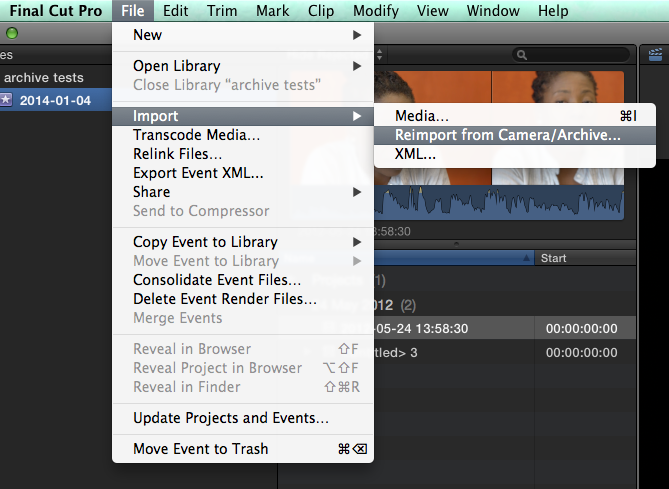
Can you post a screen shot of what you get when you use reimport?
UPDATE: Never mind I think I see what you're getting. Not sure why that's coming up.
UPDATE: Never mind I think I see what you're getting. Not sure why that's coming up.
Last edit: 05 Jan 2014 15:59 by Tom Wolsky.
Please Log in to join the conversation.
- Darren Roark
-

- Offline
- Platinum Member
-

05 Jan 2014 15:58 #38174
by Darren Roark
Replied by Darren Roark on topic FCPX 10.1 Camera Archive Recovery/Reimport Issue
Can you post a screen shot of your screen when you are trying to reimport?
Please Log in to join the conversation.
05 Jan 2014 15:58 #38175
by Craig R
Replied by Craig R on topic FCPX 10.1 Camera Archive Recovery/Reimport Issue
Of Course Tom
Please Log in to join the conversation.
- Tom Wolsky
-
- Offline
- Moderator
-
05 Jan 2014 16:00 - 05 Jan 2014 16:03 #38176
by Tom Wolsky
Replied by Tom Wolsky on topic FCPX 10.1 Camera Archive Recovery/Reimport Issue
And then you get a dialog about not finding a camera archive, is that it?
UPDATE: If there is an existing archive for the media the application immediately relinks the missing files.
UPDATE: If there is an existing archive for the media the application immediately relinks the missing files.
Last edit: 05 Jan 2014 16:03 by Tom Wolsky.
Please Log in to join the conversation.
05 Jan 2014 16:02 - 05 Jan 2014 16:03 #38177
by Craig R
Replied by Craig R on topic FCPX 10.1 Camera Archive Recovery/Reimport Issue
Yes its exactly that.
In the older Versions I only Got that Message if I had Messed up and not moved the Camera Archive Container into the FINAL CUT CAMERA ARCHIVES folder but with 10.1 that folder does not exist any more
In the older Versions I only Got that Message if I had Messed up and not moved the Camera Archive Container into the FINAL CUT CAMERA ARCHIVES folder but with 10.1 that folder does not exist any more
Last edit: 05 Jan 2014 16:03 by Craig R.
Please Log in to join the conversation.
05 Jan 2014 16:15 - 05 Jan 2014 16:17 #38179
by Craig R
Do the existing archives have to be in a folder that FCPX knows about ?
As I have been doing tests about this making camera archive from a sd card importing footage and then deleting the original footage to see if FCPX will Reimport the Footage from the Camera Archive Container.
I thought I had Cracked It but Forgot I still Had the Original SD plug in the computer so FCPX Found the footage without a problem but once unplugged it could not find the Camera Archive
Replied by Craig R on topic FCPX 10.1 Camera Archive Recovery/Reimport Issue
Tom Wolsky wrote: And then you get a dialog about not finding a camera archive, is that it?
UPDATE: If there is an existing archive for the media the application immediately relinks the missing files.
Do the existing archives have to be in a folder that FCPX knows about ?
As I have been doing tests about this making camera archive from a sd card importing footage and then deleting the original footage to see if FCPX will Reimport the Footage from the Camera Archive Container.
I thought I had Cracked It but Forgot I still Had the Original SD plug in the computer so FCPX Found the footage without a problem but once unplugged it could not find the Camera Archive
Last edit: 05 Jan 2014 16:17 by Craig R.
Please Log in to join the conversation.
- Darren Roark
-
- Offline
- Platinum Member
-
05 Jan 2014 16:22 #38180
by Darren Roark
Replied by Darren Roark on topic FCPX 10.1 Camera Archive Recovery/Reimport Issue
Hey Tom, I feel like a bit of a plagiarist!
Please Log in to join the conversation.
- Tom Wolsky
-
- Offline
- Moderator
-
05 Jan 2014 16:22 #38181
by Tom Wolsky
Replied by Tom Wolsky on topic FCPX 10.1 Camera Archive Recovery/Reimport Issue
I've been testing it too, and it seems to be broken. It clearly needs to have a way to point to the archive.
Please Log in to join the conversation.
05 Jan 2014 16:28 - 05 Jan 2014 16:29 #38183
by Craig R
Replied by Craig R on topic FCPX 10.1 Camera Archive Recovery/Reimport Issue
Well That Sucks A lot, As My Last Project has 30 odd Archive Camera Containers and I want a quick easy way to get them back into FCPX.
Thanks Tom for having a look
Wonder if Apple will fixes this issue, as they must know about it
Thanks Tom for having a look
Wonder if Apple will fixes this issue, as they must know about it
Last edit: 05 Jan 2014 16:29 by Craig R.
Please Log in to join the conversation.
05 Jan 2014 16:55 - 05 Jan 2014 16:59 #38185
by Craig R
Replied by Craig R on topic FCPX 10.1 Camera Archive Recovery/Reimport Issue
Found a Kind Of Work Around But Slow Work Around at that.
Firstly you need to enter the Media Import Section find the Camera Archive Container and Click On It so the Clips within are Shown.But Do Not Import anything and then Close the Media Import down.
You can Now use the Import Camera/Archive Function and it finds the Camera Archive Container Fine
You Can Select lots of Camera Archive Containers and if your Project need more than One Camera Archive it will pull the footage in from Different Camera Archive Containers.
If you have lots of Camera Archive Containers Like I do Its Very Slow to Select them All But it does Work
Thanks
Craig R
Firstly you need to enter the Media Import Section find the Camera Archive Container and Click On It so the Clips within are Shown.But Do Not Import anything and then Close the Media Import down.
You can Now use the Import Camera/Archive Function and it finds the Camera Archive Container Fine
You Can Select lots of Camera Archive Containers and if your Project need more than One Camera Archive it will pull the footage in from Different Camera Archive Containers.
If you have lots of Camera Archive Containers Like I do Its Very Slow to Select them All But it does Work
Thanks
Craig R
Last edit: 05 Jan 2014 16:59 by Craig R.
Please Log in to join the conversation.
- Tom Wolsky
-
- Offline
- Moderator
-
05 Jan 2014 17:25 #38189
by Tom Wolsky
Replied by Tom Wolsky on topic FCPX 10.1 Camera Archive Recovery/Reimport Issue
Thanks Craig.
Please Log in to join the conversation.
- Duncan Craig
-
- Offline
- Senior Member
-

- duncancraig.co.uk
05 Jan 2014 17:46 #38192
by Duncan Craig
Replied by Duncan Craig on topic FCPX 10.1 Camera Archive Recovery/Reimport Issue
Is it possible import the footage from the archive almost as you would normally do and then relink it afterwards?
I've never used FCPX's archive tools, I make copies of my media cards onto pairs of USB HDDs.
Partly because that's how I've been doing it pre FCPX, partly because I don't trust FCPX also because what if the footage is needed in another NLE in the future? Is the FCPX keeping all of the original data intact or just the files it needs/understands?
If I needed to rebuild a project in 10.0.9 and earlier I'd reimport the footage into Event then relink it. Easy.
I haven't tested it with 10.1 but it'll work one way or another.
I've never used FCPX's archive tools, I make copies of my media cards onto pairs of USB HDDs.
Partly because that's how I've been doing it pre FCPX, partly because I don't trust FCPX also because what if the footage is needed in another NLE in the future? Is the FCPX keeping all of the original data intact or just the files it needs/understands?
If I needed to rebuild a project in 10.0.9 and earlier I'd reimport the footage into Event then relink it. Easy.
I haven't tested it with 10.1 but it'll work one way or another.
Please Log in to join the conversation.
05 Jan 2014 18:03 - 05 Jan 2014 18:30 #38193
by Craig R
Replied by Craig R on topic FCPX 10.1 Camera Archive Recovery/Reimport Issue
The Way I edit it would not work for me because lets say I have an hour interview and the Client picks different times that they are interested in lets say 10 sections in an hours clip I will only import the selected time Ranges from a paper edit not the whole hours footage.
In the Media Import I use the Multiple Range IN and OUT selection function.
By using the Reimport Function FCPX will know which Multiple Time Range IN and OUT points in the hour clip I have picked and only reimport the wanted footage not the whole hour of Footage.
UPDATE
Great Just Tested 10.1 with Multiple Range Selection import And It Keeps Crashing FCPx Grrrrrr
In the Media Import I use the Multiple Range IN and OUT selection function.
By using the Reimport Function FCPX will know which Multiple Time Range IN and OUT points in the hour clip I have picked and only reimport the wanted footage not the whole hour of Footage.
UPDATE
Great Just Tested 10.1 with Multiple Range Selection import And It Keeps Crashing FCPx Grrrrrr
Last edit: 05 Jan 2014 18:30 by Craig R.
Please Log in to join the conversation.
- Nervebroke
-
- Offline
- Elite Member
-

Less
More
- Posts: 177
- Thank you received: 12
05 Jan 2014 18:29 #38196
by Nervebroke
Replied by Nervebroke on topic FCPX 10.1 Camera Archive Recovery/Reimport Issue
Duncan
You can open a FCPX archive.
Right click on the archive and select show contents. You can then drag the file out to where ever you want to keep it to use in another NLE.
Dave
You can open a FCPX archive.
Right click on the archive and select show contents. You can then drag the file out to where ever you want to keep it to use in another NLE.
Dave
Please Log in to join the conversation.
- Duncan Craig
-
- Offline
- Senior Member
-
- duncancraig.co.uk
05 Jan 2014 19:29 #38199
by Duncan Craig
Replied by Duncan Craig on topic FCPX 10.1 Camera Archive Recovery/Reimport Issue
I just did a test, as I've done things like this with Legacy FCP.
I Imported a few very small ranges, edited them into a timeline with a few effects and layers.
(I used the entire clip durations). Then exported it.
Quit FCPX. Went into the Library and deleted the originals.
Reopened FCPX, it's all missing now of course.
Imported a longer clip which I knew would incorporate the footage used by all the smaller imports I'd imported earlier.
Quit FCPX. Pulled this new original out of the Library.
Launch FCPX and manually relinked each item to the new longer clip and the timeline came back OK.
I checked it against the file I originally exported.
Also the items on the timeline now have footage before after their original range.
So they can be trimmed up and down if needed.
I know this isn't exactly what you need, but it might help someone.
The long form work I do will almost always have a paper edit, but I still grab entire cards and I can start editing with the clips while they are still importing.
Nervebroke, Thanks. I just tried it as it's not something I have ever done.
The archive facility doesn't appear to be CRC/checksum checking the data once the copy is made?
It didn't archive a particular file from an FS100 SD card (some obscure Sony file) I don't know what's it's for but it was missing... Take from that what you will.
Duncan.
I Imported a few very small ranges, edited them into a timeline with a few effects and layers.
(I used the entire clip durations). Then exported it.
Quit FCPX. Went into the Library and deleted the originals.
Reopened FCPX, it's all missing now of course.
Imported a longer clip which I knew would incorporate the footage used by all the smaller imports I'd imported earlier.
Quit FCPX. Pulled this new original out of the Library.
Launch FCPX and manually relinked each item to the new longer clip and the timeline came back OK.
I checked it against the file I originally exported.
Also the items on the timeline now have footage before after their original range.
So they can be trimmed up and down if needed.
I know this isn't exactly what you need, but it might help someone.
The long form work I do will almost always have a paper edit, but I still grab entire cards and I can start editing with the clips while they are still importing.
Nervebroke, Thanks. I just tried it as it's not something I have ever done.
The archive facility doesn't appear to be CRC/checksum checking the data once the copy is made?
It didn't archive a particular file from an FS100 SD card (some obscure Sony file) I don't know what's it's for but it was missing... Take from that what you will.
Duncan.
Please Log in to join the conversation.


24 Jun 2016 17:27 #78108
by tangierc
Replied by tangierc on topic FCPX 10.1 Camera Archive Recovery/Reimport Issue
We don't use the camera archive feature. I am resurrecting a project that I created using a much older version of FCP X. where all of the clip names were imported based on creation date so that is now the name. We're currently on 10.2.3 now.
The reimport feature is tremendously useless with this camera archive limitation. We just backup our cards as folders on drives. Is there any way to use the reimport feature pointing to the folders? So far it hasn't worked. I tried the workaround of using the import window to see the clips first, then using the reimport from camera/ archive feature.
If this doesn't work, then I'll have to manually relink every clip - yikes!
The reimport feature is tremendously useless with this camera archive limitation. We just backup our cards as folders on drives. Is there any way to use the reimport feature pointing to the folders? So far it hasn't worked. I tried the workaround of using the import window to see the clips first, then using the reimport from camera/ archive feature.
If this doesn't work, then I'll have to manually relink every clip - yikes!
Please Log in to join the conversation.
24 Jun 2016 18:31 - 24 Jun 2016 20:32 #78111
by hepler
Ripple just did an episode that I think is what your describing, look for it on youtube or go to rippletraining.com
Replied by hepler on topic FCPX 10.1 Camera Archive Recovery/Reimport Issue
Ripple just did an episode that I think is what your describing, look for it on youtube or go to rippletraining.com
Last edit: 24 Jun 2016 20:32 by hepler.
Please Log in to join the conversation.
