


- Posts: 786
- Thank you received: 21
3 Post Moderation Rule for New Boarders (25 Jan 2021)
New boarders will have their posts moderated - Don't worry if you cannot see your post immediately.
Final Cut 10.1 Libraries
- Jonathan Levin
-
 Topic Author
- Offline
- Platinum Member
-

Less
More
03 Jan 2014 19:21 #38013
by Jonathan Levin
Final Cut 10.1 Libraries was created by Jonathan Levin
I've been testing out FCPX and came to the conclusion with a question:
Is it a bad idea to create a new library for every film project?
I see how the Library stores film projects, media and so on, but that one library file can be gigantic eventually with it housing all film/movie projects. Just to clarify, by projects, I mean entire productions i.e. Jon's big movie, The cat in the Hat, Bukowski- the man the myth, that sort of thing.
So instead of one library for all, why would I not choose to do one separate library for each film? Am I missing something?
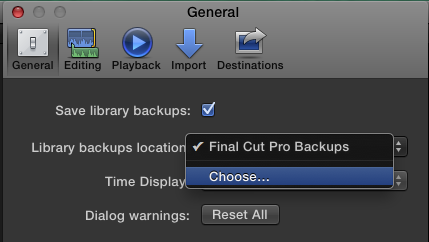
Also, if anyone could explain why my back-ups are not automatically backing up to the desired location selected in the preferences?
With all the testing, I've deleted a bunch of back-up files on my main drive (apps, OS) then moved main library file manually over to second internal drive. Did I screw up some preferences?
None of what I'm doing is anything other than trying to figure out how the structure works. The editing part seems pretty easy compared to this.
My old way of working which really worked for me): Start-up drive OS and apps only.
Second internal drive: Where I set FCP7 to save video import (capture scratch, render, etc) in a folder called "Final Cut stuff"
Somewhere on the drive I would create a folder calling it the title of my film. In that folder reside folders for Photos, Fonts, Music, DVD Studio project for that Film, Disk labels and so on. It is also where the FCP 7 Project file resides. I do understand that the project files contain all sequences in their various permutations, edit, filter info, transitions, etc.
When I started a new film, I'd repeat the above. Pretty simple.
Thank you for your help.
Jonathan
Is it a bad idea to create a new library for every film project?
I see how the Library stores film projects, media and so on, but that one library file can be gigantic eventually with it housing all film/movie projects. Just to clarify, by projects, I mean entire productions i.e. Jon's big movie, The cat in the Hat, Bukowski- the man the myth, that sort of thing.
So instead of one library for all, why would I not choose to do one separate library for each film? Am I missing something?
Also, if anyone could explain why my back-ups are not automatically backing up to the desired location selected in the preferences?
With all the testing, I've deleted a bunch of back-up files on my main drive (apps, OS) then moved main library file manually over to second internal drive. Did I screw up some preferences?
None of what I'm doing is anything other than trying to figure out how the structure works. The editing part seems pretty easy compared to this.
My old way of working which really worked for me): Start-up drive OS and apps only.
Second internal drive: Where I set FCP7 to save video import (capture scratch, render, etc) in a folder called "Final Cut stuff"
Somewhere on the drive I would create a folder calling it the title of my film. In that folder reside folders for Photos, Fonts, Music, DVD Studio project for that Film, Disk labels and so on. It is also where the FCP 7 Project file resides. I do understand that the project files contain all sequences in their various permutations, edit, filter info, transitions, etc.
When I started a new film, I'd repeat the above. Pretty simple.
Thank you for your help.
Jonathan
Please Log in to join the conversation.

03 Jan 2014 19:29 - 03 Jan 2014 19:30 #38019
by BenB
Replied by BenB on topic Final Cut 10.1 Libraries
There is no hard, fast rule that dictates how you use Libraries. Use them how ever you want. Make Library for each production makes sense. Making one huge one to cover several productions makes no sense at all. Hell, make one Library for every scene in your film, and put all of those Libraries inside of a single folder on your hard drive. It is a very flexible system, and how you implement it is totally up to you. But yes, I do one for each film production. Clients I do short works for, I make one for each client, an Event for each short piece I do for them.
Here's my article on Libraries (parts 1 & 2).
Here's my article on Libraries (parts 1 & 2).
Last edit: 03 Jan 2014 19:30 by BenB.
Please Log in to join the conversation.
- ronny courtens
-

- Offline
- Moderator
-

Less
More
- Posts: 4455
- Thank you received: 962
03 Jan 2014 19:36 #38021
by ronny courtens
Replied by ronny courtens on topic Final Cut 10.1 Libraries
Hi Jonathan,
So instead of one library for all, why would I not choose to do one separate library for each film? Am I missing something?
No you are not missing anything, that's exactly what many people do. You can see an FCPX Library as an FCP project, with FCPX Events being similar to FCP bins and FCPX Projects being similar to FCP Sequences.
Also, if anyone could explain why my back-ups are not automatically backing up to the desired location selected in the preferences?
That's not my experience, works fine at our shop. Are you sure the drive you have selected for your Library backups has read+write permissions? Are you able to store the Library backups at the root level of this drive?
- Ronny
So instead of one library for all, why would I not choose to do one separate library for each film? Am I missing something?
No you are not missing anything, that's exactly what many people do. You can see an FCPX Library as an FCP project, with FCPX Events being similar to FCP bins and FCPX Projects being similar to FCP Sequences.
Also, if anyone could explain why my back-ups are not automatically backing up to the desired location selected in the preferences?
That's not my experience, works fine at our shop. Are you sure the drive you have selected for your Library backups has read+write permissions? Are you able to store the Library backups at the root level of this drive?
- Ronny
Please Log in to join the conversation.
- haysoos123
-

- Offline
- Platinum Member
-
Less
More
- Posts: 402
- Thank you received: 72
03 Jan 2014 19:44 #38025
by haysoos123
Replied by haysoos123 on topic Final Cut 10.1 Libraries
Yes, you can use library organization however you see fit. In fact, if you're used to how FCP7 used to do it, you can just think of libraries as project files in FCP7. This is how our shop does it, since we also came from FCP7. The main advantage is of course being able to open and close libraries at will, just like how you could open and close projects in FCP7.
In FCP7, we even used to use some project files kind of like footage "libraries" if we had a client that liked to reuse footage, for example. Or maybe you have a project just full of sounds. All of this is possible with the new library system. Keep in mind that this is most viable if you're not using managed media, since now it will just copy the aliases of clips if you're using footage from different libraries.
Prior to version 10.1 of FCPX, it was already possible to manage media yourself like in FCP7, but they added 'leave files where they are' explicitly now, and you can also copy media back and forth from external sources. Since you already are familiar with how to do this in FCP7, I suggest you replicate your library management in FCPX. This is pretty similar to what we do, i.e., we keep a folder and all assets for a project in there, and the library for the project simply links to those assets.
In FCP7, we even used to use some project files kind of like footage "libraries" if we had a client that liked to reuse footage, for example. Or maybe you have a project just full of sounds. All of this is possible with the new library system. Keep in mind that this is most viable if you're not using managed media, since now it will just copy the aliases of clips if you're using footage from different libraries.
Prior to version 10.1 of FCPX, it was already possible to manage media yourself like in FCP7, but they added 'leave files where they are' explicitly now, and you can also copy media back and forth from external sources. Since you already are familiar with how to do this in FCP7, I suggest you replicate your library management in FCPX. This is pretty similar to what we do, i.e., we keep a folder and all assets for a project in there, and the library for the project simply links to those assets.
Please Log in to join the conversation.
- Jonathan Levin
-
Topic Author
- Offline
- Platinum Member
-
Less
More
- Posts: 786
- Thank you received: 21
03 Jan 2014 19:55 #38030
by Jonathan Levin
Replied by Jonathan Levin on topic Final Cut 10.1 Libraries
Wow! That was fast!!! Thank you so much. At least I know I'm heading the right way.
OK. So I'll create a new "Library for each film or video I make.
As far as the back up situation, I think I found the answer here: www.fcp.co/forum/4-final-cut-pro-x-fcpx/...ithout-copying-media
But can I ask you guys, on the few tests that I have run, my single library is already quite large, about 5.5GB, even though when I imported, I checked "Leave In Place" I know the old FCP & "file was never more than a few MBs. Interestingly, the "back-up one with the date_cst" file on my third HD is only about 1 MB.
Maybe I'll start over with a new test library, import some video that already resides on my HD, see if I did something wrong. Was up till 3:30AM, so maybe a little sleepy.
Thanks so much again!!!!!
JL
OK. So I'll create a new "Library for each film or video I make.
As far as the back up situation, I think I found the answer here: www.fcp.co/forum/4-final-cut-pro-x-fcpx/...ithout-copying-media
But can I ask you guys, on the few tests that I have run, my single library is already quite large, about 5.5GB, even though when I imported, I checked "Leave In Place" I know the old FCP & "file was never more than a few MBs. Interestingly, the "back-up one with the date_cst" file on my third HD is only about 1 MB.
Maybe I'll start over with a new test library, import some video that already resides on my HD, see if I did something wrong. Was up till 3:30AM, so maybe a little sleepy.
Thanks so much again!!!!!
JL
Please Log in to join the conversation.
- Jonathan Levin
-
Topic Author
- Offline
- Platinum Member
-
Less
More
- Posts: 786
- Thank you received: 21
03 Jan 2014 19:59 #38032
by Jonathan Levin
Replied by Jonathan Levin on topic Final Cut 10.1 Libraries
Ben, Thanks for the link. I'll study that. JL
Please Log in to join the conversation.
- haysoos123
-
- Offline
- Platinum Member
-
Less
More
- Posts: 402
- Thank you received: 72
03 Jan 2014 20:17 #38036
by haysoos123
Replied by haysoos123 on topic Final Cut 10.1 Libraries
Libraries also store your renders, proxy and optimized files, so they can get large still if you don't manage that. Unfortunately, there's no way to specify another location to store those things (yet). I would love for them to add this in a future update.
Please Log in to join the conversation.
- Jonathan Levin
-
Topic Author
- Offline
- Platinum Member
-
Less
More
- Posts: 786
- Thank you received: 21
03 Jan 2014 20:40 #38039
by Jonathan Levin
Replied by Jonathan Levin on topic Final Cut 10.1 Libraries
Am I correct to assume there is a way to delete the render files when archiving to save space? I realize that if I work on the project at a future date, I'd ave to re-render.
Please Log in to join the conversation.
- ronny courtens
-
- Offline
- Moderator
-
Less
More
- Posts: 4455
- Thank you received: 962
03 Jan 2014 20:49 - 03 Jan 2014 20:50 #38040
by ronny courtens
Replied by ronny courtens on topic Final Cut 10.1 Libraries
Render Files are never included when you archive Events and Projects into another Library.
Select the Events and Projects you want to archive, then choose File > Copy to Library > New Library. This will be your archive Library. Type a name for the new library, navigate to a location for the new library, and click Save.
Render files will be ignored by default and if you don't want to include any Optimized or Proxy files either in the archive just de-select these options in the window that will appear.
- Ronny
Select the Events and Projects you want to archive, then choose File > Copy to Library > New Library. This will be your archive Library. Type a name for the new library, navigate to a location for the new library, and click Save.
Render files will be ignored by default and if you don't want to include any Optimized or Proxy files either in the archive just de-select these options in the window that will appear.
- Ronny
Last edit: 03 Jan 2014 20:50 by ronny courtens.
Please Log in to join the conversation.
- Jonathan Levin
-
Topic Author
- Offline
- Platinum Member
-
Less
More
- Posts: 786
- Thank you received: 21
03 Jan 2014 21:38 - 03 Jan 2014 21:39 #38046
by Jonathan Levin
Replied by Jonathan Levin on topic Final Cut 10.1 Libraries
Hi Ronny.
Great.
So just to clarify, if I want to archive my feature film "Library" with out render files, I must first have that library open, File>Copy to Library>New Library (called something something archive lets say) and click save to some new location.
I wonder why you there isn't a command to archive library without render files without having to go through the process of making new library? Sort of a Save As kind of thing but with the option to not include renders.
And I'm guessing that you can then burn a DVD, BRD, whatever of the Archived Library file?
It is what it is. Are render files as gi-normous as they were in 7?
Great.
So just to clarify, if I want to archive my feature film "Library" with out render files, I must first have that library open, File>Copy to Library>New Library (called something something archive lets say) and click save to some new location.
I wonder why you there isn't a command to archive library without render files without having to go through the process of making new library? Sort of a Save As kind of thing but with the option to not include renders.
And I'm guessing that you can then burn a DVD, BRD, whatever of the Archived Library file?
It is what it is. Are render files as gi-normous as they were in 7?
Last edit: 03 Jan 2014 21:39 by Jonathan Levin.
Please Log in to join the conversation.
- Tom Wolsky
-

- Offline
- Moderator
-
03 Jan 2014 21:53 #38047
by Tom Wolsky
Replied by Tom Wolsky on topic Final Cut 10.1 Libraries
Use Feedback in the FCP menu.
Please Log in to join the conversation.
- Tom Wolsky
-
- Offline
- Moderator
-
03 Jan 2014 21:56 #38048
by Tom Wolsky
Replied by Tom Wolsky on topic Final Cut 10.1 Libraries
You can select your events and from the File menu use Delete Event Render Files and select projects and then Delete Project Render Files all from inside the application.
Please Log in to join the conversation.
- ronny courtens
-
- Offline
- Moderator
-
Less
More
- Posts: 4455
- Thank you received: 962
03 Jan 2014 22:03 - 03 Jan 2014 22:04 #38051
by ronny courtens
Replied by ronny courtens on topic Final Cut 10.1 Libraries
As Tom says you can make a complete library archive without any render files by first deleting all render files in your Events and projects in the Library and then simply moving the Library file to an archive drive using the Finder. But this archive will include all Optimized and proxy media, which is often not what you want.
Actually I think archiving to a new Library is a pretty decent workflow because it allows you to select which Events and Projects you want to archive and which not, and to decide wether you want to include Optimized and/or Proxy files for each Event and/or Project. Some people create huge Libraries with many Events and Projects inside, and they don't always want to archive all of them at the same time. So I think this workflow gives you every option you require.
Yes, render files are often even bigger than they were in 7, as they are always in ProRes 422 format (if that's the render format you have chosen).
- Ronny
Actually I think archiving to a new Library is a pretty decent workflow because it allows you to select which Events and Projects you want to archive and which not, and to decide wether you want to include Optimized and/or Proxy files for each Event and/or Project. Some people create huge Libraries with many Events and Projects inside, and they don't always want to archive all of them at the same time. So I think this workflow gives you every option you require.
Yes, render files are often even bigger than they were in 7, as they are always in ProRes 422 format (if that's the render format you have chosen).
- Ronny
Last edit: 03 Jan 2014 22:04 by ronny courtens.
Please Log in to join the conversation.
- Jonathan Levin
-
Topic Author
- Offline
- Platinum Member
-
Less
More
- Posts: 786
- Thank you received: 21
03 Jan 2014 22:19 #38055
by Jonathan Levin
Replied by Jonathan Levin on topic Final Cut 10.1 Libraries
Thanks Tom and Ronny.
Yes, I just deleted the render files from my test project, and it went from about 6 GB to 2.5GBand yes I am using ProRes 422 optimize. Those sucker are big.
So I suppose once I do away with the render files as you and Tom have suggested, I could just burn some sort of disk (when done with film) of the Library.
I'll still have to manage the actual archiving of media, video, photos, in the usual way on another drive just like before.
So the Library file is just like the old 7 project file: contains bins (folders) edits and so on and is just linking to the external video and photo and music files. Cool.
I'm getting it.
Anything I ought to know. It would have taken me weeks to figure this out without your help.
I appreciate that!
JL
Yes, I just deleted the render files from my test project, and it went from about 6 GB to 2.5GBand yes I am using ProRes 422 optimize. Those sucker are big.
So I suppose once I do away with the render files as you and Tom have suggested, I could just burn some sort of disk (when done with film) of the Library.
I'll still have to manage the actual archiving of media, video, photos, in the usual way on another drive just like before.
So the Library file is just like the old 7 project file: contains bins (folders) edits and so on and is just linking to the external video and photo and music files. Cool.
I'm getting it.
Anything I ought to know. It would have taken me weeks to figure this out without your help.
I appreciate that!
JL
Please Log in to join the conversation.
- ronny courtens
-
- Offline
- Moderator
-
Less
More
- Posts: 4455
- Thank you received: 962
03 Jan 2014 22:25 #38056
by ronny courtens
Replied by ronny courtens on topic Final Cut 10.1 Libraries
For archiving purposes (i.e. when the edit is signed off and backed up for the future) we never include Optimized media as they only make the archive bigger and we have loads of weekly archives to make. Optimized media can easily be recreated if needed whenever one needs to work on an edit again.
- Ronny
- Ronny
Please Log in to join the conversation.
- Tom Wolsky
-
- Offline
- Moderator
-
03 Jan 2014 22:28 #38057
by Tom Wolsky
Replied by Tom Wolsky on topic Final Cut 10.1 Libraries
Unfortunately there are other files that often fill the library and there is no real to clear except to go into the package and winkle them out. I'd go into each event and dump the peak data and thumbnail files. Dump the project shared folders. Dump the optimized and proxy files. Basically all you want to keep for the archive is the metadata.
Please Log in to join the conversation.
- ronny courtens
-
- Offline
- Moderator
-
Less
More
- Posts: 4455
- Thank you received: 962
03 Jan 2014 22:40 #38059
by ronny courtens
Replied by ronny courtens on topic Final Cut 10.1 Libraries
Correct, Tom. But if you only want to keep the bare metadata you can archive the backup Library file instead. Those files don't include any media at all. The drawback on this is that you always archive the entire Library and you cannot select which Events or Projects you want to include or exclude.
By copying the Events and Projects of a Library into a new archive Library we can choose which parts of the Library we want to archive and we can exclude Render files, Optimized and Proxy media. Peak data and thumbnail files are relatively small compared to the rest, so this works perfectly for us.
- Ronny
By copying the Events and Projects of a Library into a new archive Library we can choose which parts of the Library we want to archive and we can exclude Render files, Optimized and Proxy media. Peak data and thumbnail files are relatively small compared to the rest, so this works perfectly for us.
- Ronny
Please Log in to join the conversation.
- Tom Wolsky
-
- Offline
- Moderator
-
03 Jan 2014 22:44 #38061
by Tom Wolsky
Replied by Tom Wolsky on topic Final Cut 10.1 Libraries
If you copy events into a new library, doesn't it copy optimized and proxies.
What we need is a trigger from backup now that you can use to archive.
What we need is a trigger from backup now that you can use to archive.
Please Log in to join the conversation.
- Jonathan Levin
-
Topic Author
- Offline
- Platinum Member
-
Less
More
- Posts: 786
- Thank you received: 21
03 Jan 2014 22:54 #38063
by Jonathan Levin
Replied by Jonathan Levin on topic Final Cut 10.1 Libraries
Before importing media, I select "leave in place", so the library should contain no media i.e. video, photos etc. if I follow that workflow, correct?
So all the library is doing is "referencing" all those photos, video, music and so on. I suppose if I move the media files where they are when when working on a film, or if I re-name folders, I'd have to "Re-link" the media in FCP. Is this correct? Just like in FCP7?
I need beeeerrrrr...
JL
So all the library is doing is "referencing" all those photos, video, music and so on. I suppose if I move the media files where they are when when working on a film, or if I re-name folders, I'd have to "Re-link" the media in FCP. Is this correct? Just like in FCP7?
I need beeeerrrrr...
JL
Please Log in to join the conversation.
