


- Posts: 66
- Thank you received: 2
3 Post Moderation Rule for New Boarders (25 Jan 2021)
New boarders will have their posts moderated - Don't worry if you cannot see your post immediately.
back up projects without copying media
- KarlSutton
-
 Topic Author
- Offline
- Senior Member
-

Less
More
03 Jan 2014 17:55 #37994
by KarlSutton
back up projects without copying media was created by KarlSutton
In 10.09 I would copy my projects folder and any events that were modified over to another drive each night for my back up. When I updated my Projects & Events the resulting library is 1.8TB. I'd like to be able to back up the "sequences" which I have stored in the "Updated Projects" folder (or whatever that is) without re-copying all the media each time. Any suggestions? Thanks.
Please Log in to join the conversation.

03 Jan 2014 18:36 - 03 Jan 2014 18:37 #38003
by BenB
Replied by BenB on topic back up projects without copying media
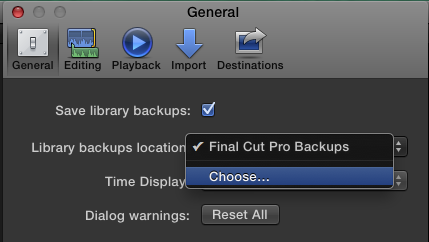
It is being done automatically for you. Just change the location in the Preferences. This backs up the Project database, plus all Events and Projects inside of it. Not media is backed up.
Last edit: 03 Jan 2014 18:37 by BenB.
Please Log in to join the conversation.

03 Jan 2014 18:41 #38004
by wdevn
LLAP,
James
Taipei, Taiwan
Replied by wdevn on topic back up projects without copying media
And the nice thing is you can do this backup of the Library information to Apple's iCloud.
LLAP,
James
Taipei, Taiwan
Please Log in to join the conversation.
- Jonathan Levin
-

- Offline
- Platinum Member
-

Less
More
- Posts: 786
- Thank you received: 21
03 Jan 2014 19:25 #38015
by Jonathan Levin
Replied by Jonathan Levin on topic back up projects without copying media
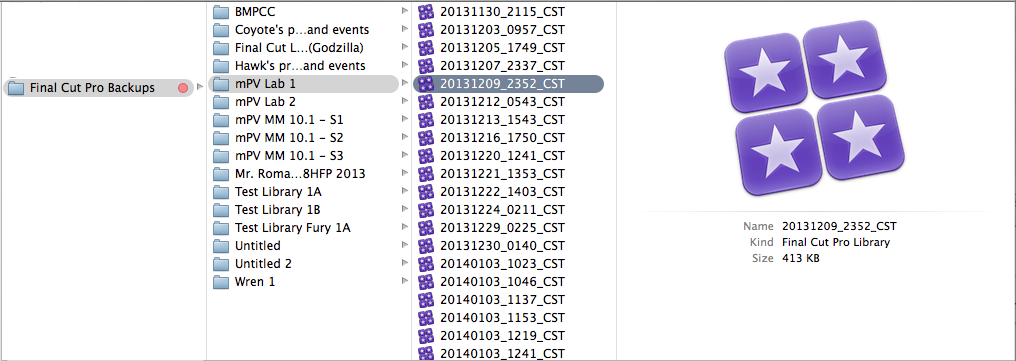
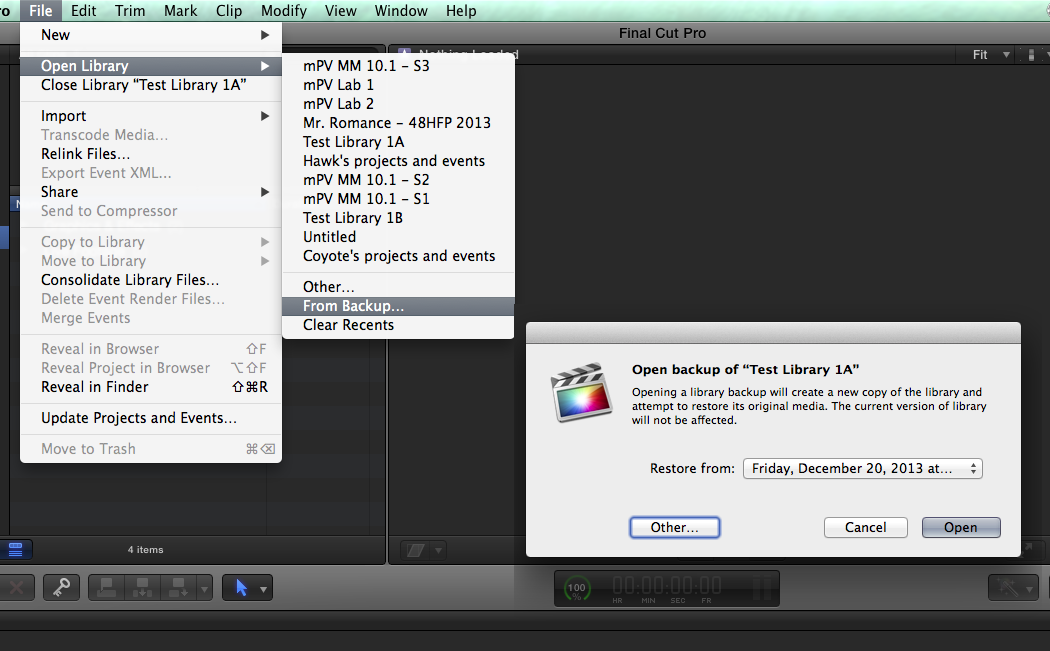
So is the back up file the one that has "YYYYMMDD"_cst?
Please Log in to join the conversation.
- KarlSutton
-
Topic Author
- Offline
- Senior Member
-
Less
More
- Posts: 66
- Thank you received: 2
05 Jan 2014 22:11 #38211
by KarlSutton
Replied by KarlSutton on topic back up projects without copying media
So I'm thinking about using dropbox as my location so the backups appear on our other workstation, but so far I have 2.5GB of backups - how large will this grow?
Cool feature - thank you all for pointing it out.
Cool feature - thank you all for pointing it out.
Please Log in to join the conversation.
06 Jan 2014 10:15 - 06 Jan 2014 10:15 #38233
by Julian
Replied by Julian on topic back up projects without copying media
So let's say I have two locations where I edit (A&B ). Each location has a copy of the same library. Can I have it save backups to the cloud at location A, then go to location B and restore from location A, edit for the day, go back to the location A and then restore from the last backup at location B?
If this does work, what would I do when I add media to the library? What's the best way to sync libraries at two locations?
Right now I'm just transporting a hard drive and it's annoying.
If this does work, what would I do when I add media to the library? What's the best way to sync libraries at two locations?
Right now I'm just transporting a hard drive and it's annoying.
Last edit: 06 Jan 2014 10:15 by Julian.
Please Log in to join the conversation.
- ronny courtens
-

- Offline
- Moderator
-

Less
More
- Posts: 4455
- Thank you received: 962
06 Jan 2014 11:23 - 06 Jan 2014 11:36 #38236
by ronny courtens
Replied by ronny courtens on topic back up projects without copying media
Karl,
If you are using the method described by Ben any individual Library Backup should not take up much space as it is only metadata. Of course if you store your entire backup folder on DropBox, in which a new backup file is created every 15 minutes or so, the total size will grow over time. If this is only for sharing purposes on different workstations you can store all your Library Backups locally and only put the latest ones on DropBox for sharing.
Julian,
Yes you can send your Library Backup files to the cloud and restore your project from the cloud on a different location.
When you work at different geographic locations (i.e. not sharing a central storage) and you add media at one location you will have to make sure the same media also gets to the other location, that's obvious. If the added media are stills, audio or small video clips you can also do this over the cloud, if the media are very large video clips you may have to find another way such as putting them on a transport drive. That's the case with any collaborative workflow.
- Ronny
If you are using the method described by Ben any individual Library Backup should not take up much space as it is only metadata. Of course if you store your entire backup folder on DropBox, in which a new backup file is created every 15 minutes or so, the total size will grow over time. If this is only for sharing purposes on different workstations you can store all your Library Backups locally and only put the latest ones on DropBox for sharing.
Julian,
Yes you can send your Library Backup files to the cloud and restore your project from the cloud on a different location.
When you work at different geographic locations (i.e. not sharing a central storage) and you add media at one location you will have to make sure the same media also gets to the other location, that's obvious. If the added media are stills, audio or small video clips you can also do this over the cloud, if the media are very large video clips you may have to find another way such as putting them on a transport drive. That's the case with any collaborative workflow.
- Ronny
Last edit: 06 Jan 2014 11:36 by ronny courtens.
Please Log in to join the conversation.
- KarlSutton
-
Topic Author
- Offline
- Senior Member
-
Less
More
- Posts: 66
- Thank you received: 2
07 Jan 2014 03:48 #38281
by KarlSutton
SO I tried this as it is essentially the same thing I'm trying to accomplish - having the latest version of the edit on two different workstations. When I tried opening up from the backup from the other machine all of the files were offline & I cannot figure out how to link them to library that contains them?
Replied by KarlSutton on topic back up projects without copying media
ronny courtens wrote: When you work at different geographic locations (i.e. not sharing a central storage) and you add media at one location you will have to make sure the same media also gets to the other location, that's obvious. If the added media are stills, audio or small video clips you can also do this over the cloud, if the media are very large video clips you may have to find another way such as putting them on a transport drive. That's the case with any collaborative workflow.
- Ronny
SO I tried this as it is essentially the same thing I'm trying to accomplish - having the latest version of the edit on two different workstations. When I tried opening up from the backup from the other machine all of the files were offline & I cannot figure out how to link them to library that contains them?
Please Log in to join the conversation.
- ronny courtens
-
- Offline
- Moderator
-
Less
More
- Posts: 4455
- Thank you received: 962
07 Jan 2014 07:52 #38285
by ronny courtens
Replied by ronny courtens on topic back up projects without copying media
When you share projects between different workstations it is best to keep your media external (i.e. out of the Libraries). Either you use a shared storage network, or both workstations must have the same media physically stored on their own drives.
Although sending Library Backup files between workstations is theoretically possible I would not encourage this. It is not officially supported from within FCPX and there are other and better project sharing solutions that don't involve messing around in the Library structure. If you just want to have the latest version of your edit on different workstations, exporting an XML is a much better workflow and XML files are really small. But there are many other options as well.
Here's a detailed overview of the many ways you can share FCPX media and projects across different workstations: www.10dot1.co.uk/content/FCPXInASharedEnvironment_FINAL.pdf
- Ronny
Although sending Library Backup files between workstations is theoretically possible I would not encourage this. It is not officially supported from within FCPX and there are other and better project sharing solutions that don't involve messing around in the Library structure. If you just want to have the latest version of your edit on different workstations, exporting an XML is a much better workflow and XML files are really small. But there are many other options as well.
Here's a detailed overview of the many ways you can share FCPX media and projects across different workstations: www.10dot1.co.uk/content/FCPXInASharedEnvironment_FINAL.pdf
- Ronny
Please Log in to join the conversation.
- KarlSutton
-
Topic Author
- Offline
- Senior Member
-
Less
More
- Posts: 66
- Thank you received: 2
07 Jan 2014 13:49 #38302
by KarlSutton
Replied by KarlSutton on topic back up projects without copying media
Wow that's a great PDF - thanks. I have already done a lot of editing within the library that is a conversion from about 44 events that have media in them (they are converted FCP7 projects)
I still have all of that media (says old projects/old events or something like that)
Is there anyway you can think of to link the new projects and edited converted projects I've created since the 10.09-10.1 conversion to the old media so I can manage the media manually?
I still have all of that media (says old projects/old events or something like that)
Is there anyway you can think of to link the new projects and edited converted projects I've created since the 10.09-10.1 conversion to the old media so I can manage the media manually?
Please Log in to join the conversation.
