


3 Post Moderation Rule for New Boarders (25 Jan 2021)
New boarders will have their posts moderated - Don't worry if you cannot see your post immediately.
Merging Libraries / Events
- PaulieSc
-
 Topic Author
- Offline
- Banned
-

- films. filmmaking. freelance media production. cinema. music. gigs. itunes. spotify. reading. friends. xbox. social networking. gym. swimming. football. mcfc. cookie monster. coke zero. peanut butter. raspberries. cheesecake. cool stuff ... If you've r
Less
More
03 Jan 2014 14:14 #37953
by PaulieSc
Merging Libraries / Events was created by PaulieSc
Hi All
Hopefully not a complex question. I copied a library to external drive to work on while on the road. I'm now wanting to copy it back to my main and much faster work drive in the office.
All media is stored in the library, so in reality I could just copy the whole library back to the work drive. However, it'll take about 2 hours to copy. The only changes are I've created keyword collections, keyworded and favourited clips and started a project. So, is there any easier way to just copy back the metadata changes?
Thanks, Paul
Hopefully not a complex question. I copied a library to external drive to work on while on the road. I'm now wanting to copy it back to my main and much faster work drive in the office.
All media is stored in the library, so in reality I could just copy the whole library back to the work drive. However, it'll take about 2 hours to copy. The only changes are I've created keyword collections, keyworded and favourited clips and started a project. So, is there any easier way to just copy back the metadata changes?
Thanks, Paul
Please Log in to join the conversation.
03 Jan 2014 15:19 #37958
by BenB
Replied by BenB on topic Merging Libraries / Events
Try an XML approach, perhaps?
Please Log in to join the conversation.
- Nervebroke
-
- Offline
- Elite Member
-

Less
More
- Posts: 177
- Thank you received: 12
03 Jan 2014 15:44 - 03 Jan 2014 15:46 #37967
by Nervebroke
Replied by Nervebroke on topic Merging Libraries / Events
If the media is on both drives you could try this. I would only try this if Ben's suggestion did not work.
1. go to your movies folder on your external drive
2. go to Final Cut Pro Back ups
3. click on the library you where working on and select show package contents
4. copy the CurrentVersion.flexolibrary and replace it on your home machine.
Dave
1. go to your movies folder on your external drive
2. go to Final Cut Pro Back ups
3. click on the library you where working on and select show package contents
4. copy the CurrentVersion.flexolibrary and replace it on your home machine.
Dave
Last edit: 03 Jan 2014 15:46 by Nervebroke. Reason: spelling
Please Log in to join the conversation.
- ronny courtens
-

- Offline
- Moderator
-

Less
More
- Posts: 4455
- Thank you received: 962
03 Jan 2014 15:58 - 03 Jan 2014 16:07 #37970
by ronny courtens
Replied by ronny courtens on topic Merging Libraries / Events
Hi Paul,
Ben beat me to the XML solution, but I will add my screenshots
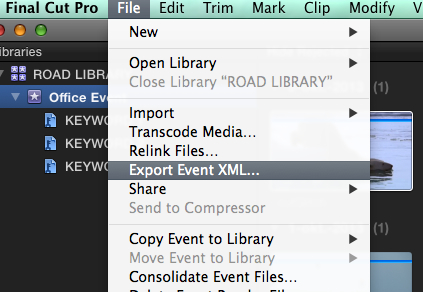
Open FCPX with the external drive connected, open the external drive Library, export an Event XML and put the XML file on your desktop.
Then open your office drive Library, close the external drive Library import the XML file into the office drive Library.
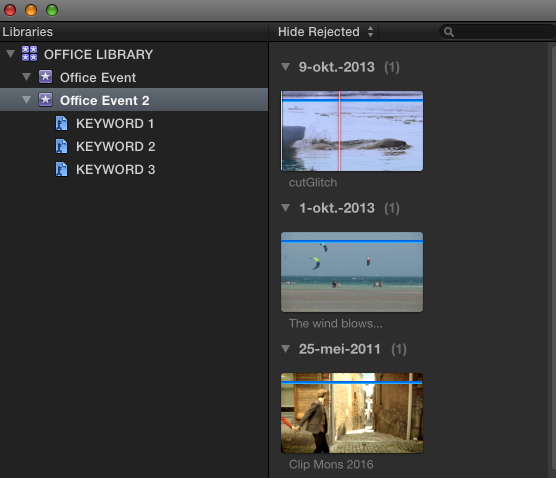
A new Event will be created in the office Library using the media from your office drive and including the tagging you have done on your external drive. After testing the new Event you can delete the non-tagged one if you wish.
Here's a screenshot example:
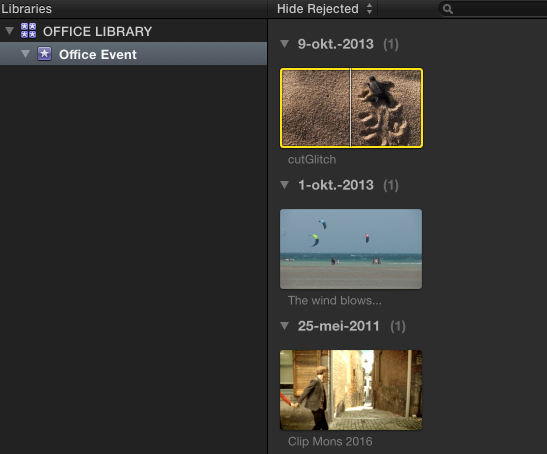
1. Office Library on internal drive with 3 non-tagged clips
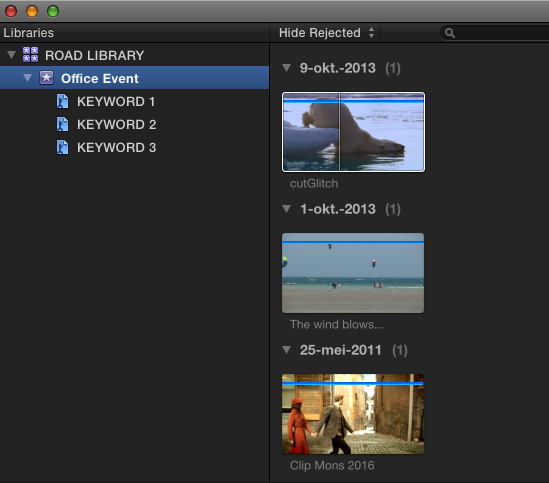
2. Road Library (copy from Office Library on external drive) with the same clips including tags
3. Export Event XML from Road Library
4. Close Road Library and import the XML file into Office Library: a new Event with the tags from the external Library is added to the office Library
The entire process takes less than 30 seconds, no media gets copied.
- Ronny
Ben beat me to the XML solution, but I will add my screenshots
Open FCPX with the external drive connected, open the external drive Library, export an Event XML and put the XML file on your desktop.
Then open your office drive Library, close the external drive Library import the XML file into the office drive Library.
A new Event will be created in the office Library using the media from your office drive and including the tagging you have done on your external drive. After testing the new Event you can delete the non-tagged one if you wish.
Here's a screenshot example:
1. Office Library on internal drive with 3 non-tagged clips
2. Road Library (copy from Office Library on external drive) with the same clips including tags
3. Export Event XML from Road Library
4. Close Road Library and import the XML file into Office Library: a new Event with the tags from the external Library is added to the office Library
The entire process takes less than 30 seconds, no media gets copied.
- Ronny
Last edit: 03 Jan 2014 16:07 by ronny courtens.
Please Log in to join the conversation.
03 Jan 2014 17:53 #37993
by PaulieSc
Replied by PaulieSc on topic Merging Libraries / Events
Thanks Ronny / Ben, that should do the trick once I've resolved a PSD issue ...
Please Log in to join the conversation.
