


3 Post Moderation Rule for New Boarders (25 Jan 2021)
New boarders will have their posts moderated - Don't worry if you cannot see your post immediately.
Totalaly out of synch, HELP!

iMac
Please Log in to join the conversation.

Please Log in to join the conversation.
- Darren Roark
-

- Offline
- Platinum Member
-

Flynnie wrote: Just got the new FCP 10.1. Imported 25 GB of raw footage and for some reason the video is really sped up, but the audio is not. Totally out of synch. Not sure, but may have hit a key by mistake. Trashed footage,emptied trash and re-imported. Same thing all over again. Got a deadline with this project and starting to feel nervous. HELP!!!!!!
iMac
First things first, what is the camera format of your footage? What are the settings of your project? Are all the clips the same format?
One thing to try is to use Quicktime 7 to find out the specs of your footage files. Some video formats are not drag and drop with every NLE. Once you know what you are dealing with we can help you much more.
Please Log in to join the conversation.
Please Log in to join the conversation.
- ronny courtens
-

- Offline
- Moderator
-

- Posts: 4455
- Thank you received: 962
- Ronny
Please Log in to join the conversation.
- ronny courtens
-
- Offline
- Moderator
-
- Posts: 4455
- Thank you received: 962
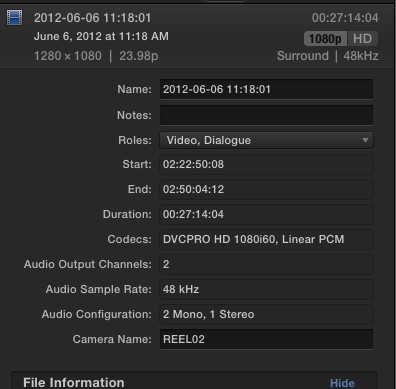
Your recording format was DVCPRO HD at 60i (30 fps), whereas the imported clips seem to have been interpreted as 23,98p (24 fps). This certainly would explain the frame rate issues.
What are your Project settings?
- Ronny
Please Log in to join the conversation.
- Darren Roark
-
- Offline
- Platinum Member
-
You can try making a new library and then import the files using the import window (not drag and drop) and see if it stays in sync. Even better if you made a camera archive or disk image of the P2 cards as they will have the virgin metadata.
Please Log in to join the conversation.
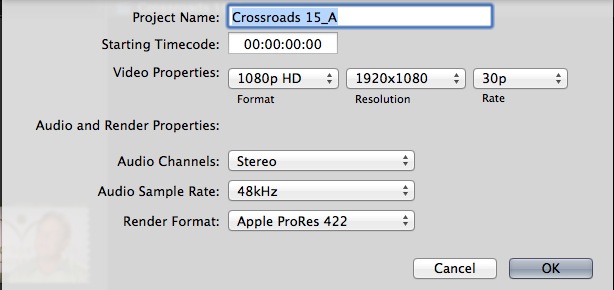
Changed from 1080i/25i to 1080p/30p and everything seemed fine for nano second, but it didn't last. Again, used footage from this external drive in 10.0.8 with no problem. Here are the screen captures of the settings. Do I need to reinstall FCP? Loosing valuable time on this project and starting to freak! Thanks.
Please Log in to join the conversation.
- Darren Roark
-
- Offline
- Platinum Member
-
-Try copying some of the files from the library to another hard drive.
-Close all the open libraries, then make a new one.
-Try importing those files through the import window. (Command-i)
-Make a new project and this time don't select the settings, use automatic and see if the footage plays in sync.
If that doesn't work, I have another solution, but try that first and let me know. The HVX200 version of DVCPROHD is going on ten years old, and I have had funky things happen in 10.0.9 and before with them, don't lose hope, I'm sure it will get sorted.
Please Log in to join the conversation.
Please Log in to join the conversation.
- Darren Roark
-
- Offline
- Platinum Member
-
Did you try the new library test?
Please Log in to join the conversation.
Please Log in to join the conversation.
Please Log in to join the conversation.
- Darren Roark
-
- Offline
- Platinum Member
-
Are the files still MXF files? Or have they been rewrapped to a Quicktime container? If you download QT 7 and open one of them and do 'get info' on one of them I can narrow this down. I'm guessing the file flag may be set wrong, or FCP X is seeing it as the wrong frame rate.
Does transcoding to prores using Compressor work? That would be a last resort as it should be able to handle this natively.
Please Log in to join the conversation.
Please Log in to join the conversation.
Please Log in to join the conversation.
- Darren Roark
-
- Offline
- Platinum Member
-
Does the footage play back normally with your project settings at 23.98? If you need it to be 25 you can render a master first and then speed that up later in X using a 25p timeline. It even automatically pitch corrects your audio. Works great.
Glad it's working now.
Please Log in to join the conversation.
Please Log in to join the conversation.

Please Log in to join the conversation.
