


- Posts: 730
- Thank you received: 26
3 Post Moderation Rule for New Boarders (25 Jan 2021)
New boarders will have their posts moderated - Don't worry if you cannot see your post immediately.
FCPX and Audio Units (not passing validation)
- DmitriZigany
-
 Topic Author
- Offline
- Platinum Member
-

Less
More
01 Jan 2014 14:36 #37792
by DmitriZigany
FCPX and Audio Units (not passing validation) was created by DmitriZigany
Hey!
Since upgrading to FCPX 10.1 there's one (1) audio unit that doesn't pass the validation. AAt start up I get a message saying "Incompatible Audio Units Found".
Is there a way to make that message go away? Can you turn off the AU somewhere or make FCPX try to validate it again? It's very annoying cause the message shows at every start up of FCPX... It's working fine in Logic Pro X so I don't want to throw the actual plug-in away...
Since upgrading to FCPX 10.1 there's one (1) audio unit that doesn't pass the validation. AAt start up I get a message saying "Incompatible Audio Units Found".
Is there a way to make that message go away? Can you turn off the AU somewhere or make FCPX try to validate it again? It's very annoying cause the message shows at every start up of FCPX... It's working fine in Logic Pro X so I don't want to throw the actual plug-in away...
Please Log in to join the conversation.

01 Jan 2014 14:45 #37793
by BenB
Replied by BenB on topic FCPX and Audio Units (not passing validation)
Exactly what plugin is it?
Please Log in to join the conversation.
- DmitriZigany
-
Topic Author
- Offline
- Platinum Member
-
Less
More
- Posts: 730
- Thank you received: 26
01 Jan 2014 15:05 #37796
by DmitriZigany
Replied by DmitriZigany on topic FCPX and Audio Units (not passing validation)
It's a Waves plug-in... I have a bunch of waves plug-ins, but for some reason just this one didn't pass...
Please Log in to join the conversation.
- DmitriZigany
-
Topic Author
- Offline
- Platinum Member
-
Less
More
- Posts: 730
- Thank you received: 26
01 Jan 2014 15:25 #37798
by DmitriZigany
Replied by DmitriZigany on topic FCPX and Audio Units (not passing validation)
Also, one old project using a different waves plug (that is passing the AU validation) is now crashing FCPX.
Seems like FCPX needs an AU managing feature like most DAWs have.
Also, most of the AUs I have and use in Digital Performer and Logic Pro X I have no use for in FCPX so it would be better to turn them off anyway...
Seems like FCPX needs an AU managing feature like most DAWs have.
Also, most of the AUs I have and use in Digital Performer and Logic Pro X I have no use for in FCPX so it would be better to turn them off anyway...
Please Log in to join the conversation.
- ronny courtens
-

- Offline
- Moderator
-

Less
More
- Posts: 4455
- Thank you received: 962
01 Jan 2014 19:07 #37804
by ronny courtens
Replied by ronny courtens on topic FCPX and Audio Units (not passing validation)
Hi Dimitry,
If you are having trouble with some older AU plugins that are not validated by FCPX or that crash FCPX but that you still use in your DAW there is a free utility called AudioUnit Manager with which you can easily disable/enable any AU plugin whenever you want. You can find this utility here:
audio-unit-manager.en.softonic.com/mac/download
The utility looks very much like the AU plugin manager in LogicX and it works just like the (now obsolete) Event Manager X: it moves any temporarily unwanted AU plugins to a "Components (Disabled)" folder that it creates next to the regular Components folder in Library>Audio>Plugins where your AU plugins are stored. When you re-enable a plugin it just moves it back in the Components folder so FCPX or any DAW can see it again.
So if you are having issues with an AU plugin in FCPX, because it's not compatible or still 32-bit, you can use this utility to hide the problematic plugin before you launch FCPX and enable the plugin again when you wish to use it in another application.
I will show you an example on how this works.
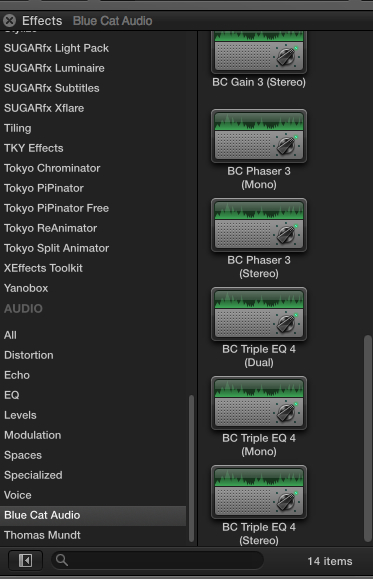
Here I have some Blue Cat Audio AU plugins in FCPX:
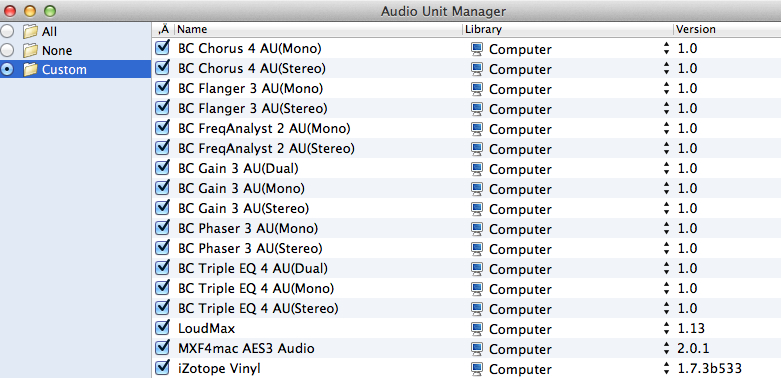
I launch AudioUnit Manager and I see the BlueCat plugins in the plugin list:
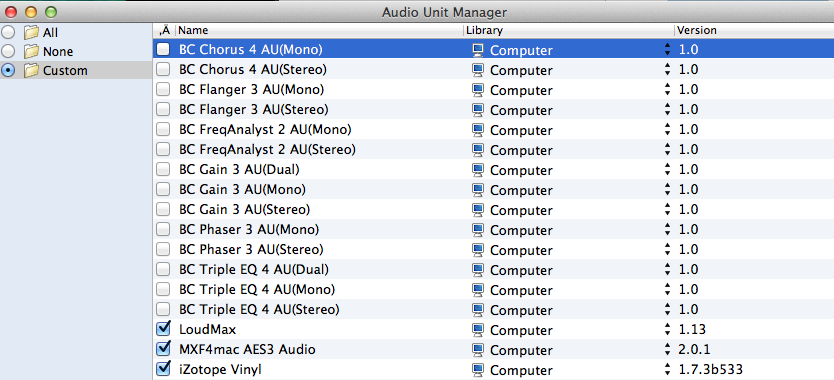
I disable the BlueCat plugins in the list:
The BC plugins are now gone in FCPX, while the other AU plugins such as LoudMax are still there:

When I launch Logic Pro X the BC plugins don't show, but the LoudMax one does.
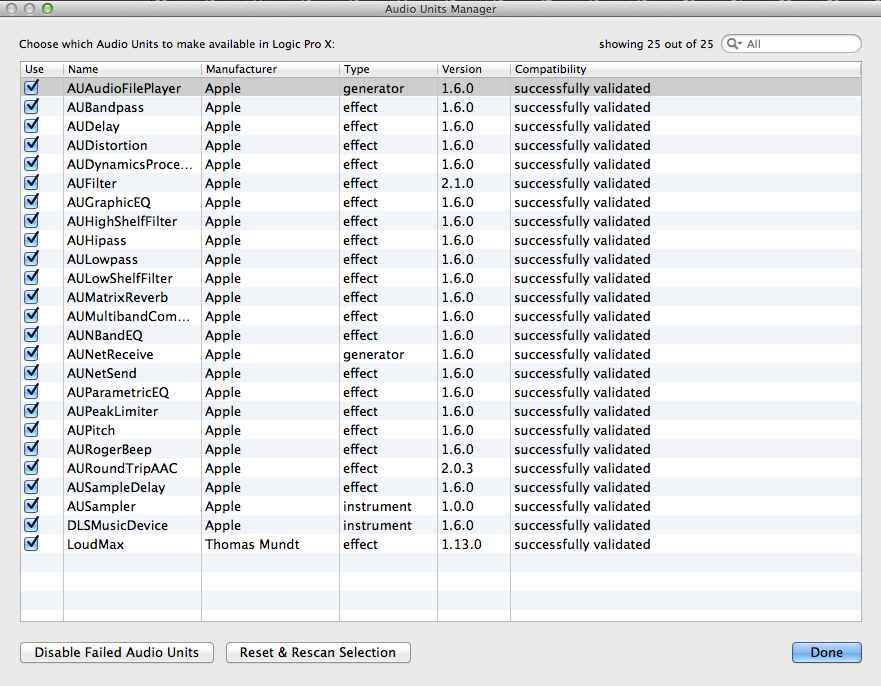
When I enable the BlueCat plugins again in AudioUnit Manager the BC plugins reappear in FCPX, and they appear in Logic X as well:

So you see it is very straightforward and it works well. The only thing you must chek before you use this utility is that your Library>Audio>Plugins folder has read+write permissions enabled for all users (not only admin). If this is not set correctly the utility won't be able to create a "Disabled" folder inside the Plugins folder and it won't work. You can set the read+write permissions in the Plugins folder>Info window.
- Ronny
If you are having trouble with some older AU plugins that are not validated by FCPX or that crash FCPX but that you still use in your DAW there is a free utility called AudioUnit Manager with which you can easily disable/enable any AU plugin whenever you want. You can find this utility here:
audio-unit-manager.en.softonic.com/mac/download
The utility looks very much like the AU plugin manager in LogicX and it works just like the (now obsolete) Event Manager X: it moves any temporarily unwanted AU plugins to a "Components (Disabled)" folder that it creates next to the regular Components folder in Library>Audio>Plugins where your AU plugins are stored. When you re-enable a plugin it just moves it back in the Components folder so FCPX or any DAW can see it again.
So if you are having issues with an AU plugin in FCPX, because it's not compatible or still 32-bit, you can use this utility to hide the problematic plugin before you launch FCPX and enable the plugin again when you wish to use it in another application.
I will show you an example on how this works.
Here I have some Blue Cat Audio AU plugins in FCPX:
I launch AudioUnit Manager and I see the BlueCat plugins in the plugin list:
I disable the BlueCat plugins in the list:
The BC plugins are now gone in FCPX, while the other AU plugins such as LoudMax are still there:
When I launch Logic Pro X the BC plugins don't show, but the LoudMax one does.
When I enable the BlueCat plugins again in AudioUnit Manager the BC plugins reappear in FCPX, and they appear in Logic X as well:
So you see it is very straightforward and it works well. The only thing you must chek before you use this utility is that your Library>Audio>Plugins folder has read+write permissions enabled for all users (not only admin). If this is not set correctly the utility won't be able to create a "Disabled" folder inside the Plugins folder and it won't work. You can set the read+write permissions in the Plugins folder>Info window.
- Ronny
Please Log in to join the conversation.
- DmitriZigany
-
Topic Author
- Offline
- Platinum Member
-
Less
More
- Posts: 730
- Thank you received: 26
02 Jan 2014 03:42 - 02 Jan 2014 03:44 #37818
by DmitriZigany
Replied by DmitriZigany on topic FCPX and Audio Units (not passing validation)
Thanks. However, the way Waves work, is that they have a Waveshell component and it's not possible to disable individual plug-ins in that way (it can be done in Logic's AU Manager)... I updated the plug-ins but same thing. Didn't seem FCPX recognised it as a new version and no re-validations were made. Seems like FCPX just has a hic-up with that one and it would be great to be able to force it to try and re-validate the plug-in. Logic Pro X validates it fine.
Having to disable all waves plug-ins just to avoid the pop-up window and having to click "OK" everytime I start FCPX is just very annoying.
I'm putting "Better Audio Units Management" to my wishlist for future updates of FCPX...
Having to disable all waves plug-ins just to avoid the pop-up window and having to click "OK" everytime I start FCPX is just very annoying.
I'm putting "Better Audio Units Management" to my wishlist for future updates of FCPX...
Last edit: 02 Jan 2014 03:44 by DmitriZigany.
Please Log in to join the conversation.
- ronny courtens
-
- Offline
- Moderator
-
Less
More
- Posts: 4455
- Thank you received: 962
02 Jan 2014 11:10 #37829
by ronny courtens
Replied by ronny courtens on topic FCPX and Audio Units (not passing validation)
Hi Dimitry,
I agree this would be handy.
OTOH being intrigued by your post I just have installed our complete Waves collection on a new FCPX10.1 system at the facility. All plugins got validated and FCPX starts without any warnings. I haven't had the time to test all 412 plugins on this system but a random test shows no issues. This is 10.1 running on Mavs 9.1 with version 9.2 (64-bit) of the Waves plugins.

Maybe a simple re-install of the FCPX app with the latest Waves plugins installed on your system would force FCPX to re-validate them all correctly?
- Ronny
I agree this would be handy.
OTOH being intrigued by your post I just have installed our complete Waves collection on a new FCPX10.1 system at the facility. All plugins got validated and FCPX starts without any warnings. I haven't had the time to test all 412 plugins on this system
but a random test shows no issues. This is 10.1 running on Mavs 9.1 with version 9.2 (64-bit) of the Waves plugins.
Maybe a simple re-install of the FCPX app with the latest Waves plugins installed on your system would force FCPX to re-validate them all correctly?
- Ronny
Please Log in to join the conversation.
- DmitriZigany
-
Topic Author
- Offline
- Platinum Member
-
Less
More
- Posts: 730
- Thank you received: 26
02 Jan 2014 15:52 - 02 Jan 2014 18:56 #37843
by DmitriZigany
Replied by DmitriZigany on topic FCPX and Audio Units (not passing validation)
Thanks!
Yes, maybe I'll try re-install FCPX, thanks for the suggestion!
Your post somewhat proves my suggestion that something just went wrong during the validation process and now it's stuck at that.
What's the best way to uninstall FCPX? (so it forgets things like this)
Yes, maybe I'll try re-install FCPX, thanks for the suggestion!
Your post somewhat proves my suggestion that something just went wrong during the validation process and now it's stuck at that.
What's the best way to uninstall FCPX? (so it forgets things like this)
Last edit: 02 Jan 2014 18:56 by DmitriZigany.
Please Log in to join the conversation.
- ronny courtens
-
- Offline
- Moderator
-
Less
More
- Posts: 4455
- Thank you received: 962
02 Jan 2014 16:40 #37847
by ronny courtens
Replied by ronny courtens on topic FCPX and Audio Units (not passing validation)
I think you were right from the start, something must have gone wrong during validation, and plugins don't get re-scanned at every launch or with every plugin update. A fresh install should invoke re-validation of the plugins. Here's the official paper about re-installing FCPX on Mavericks:
support.apple.com/kb/HT5149
- Ronny
support.apple.com/kb/HT5149
- Ronny
Please Log in to join the conversation.
- DmitriZigany
-
Topic Author
- Offline
- Platinum Member
-
Less
More
- Posts: 730
- Thank you received: 26
04 Jan 2014 14:25 #38105
by DmitriZigany
Replied by DmitriZigany on topic FCPX and Audio Units (not passing validation)
Ok... Now it gets weird... I removed all files suggested by that official paper an re-installed FCPX... It still won't re-validate the AUs! So... AU validation info must reside somewhere else... Cannot find where though!
Please Log in to join the conversation.
- ronny courtens
-
- Offline
- Moderator
-
Less
More
- Posts: 4455
- Thank you received: 962
04 Jan 2014 16:59 - 04 Jan 2014 17:01 #38115
by ronny courtens
Replied by ronny courtens on topic FCPX and Audio Units (not passing validation)
Ouch that's bad news indeed!
Go to user > Library > Caches and trash the com.apple.audiounits.cache file that you see in the AudioUnitCache folder. Also check if there is no other com.apple.audiounits.cache in the Cashes folder. If there is a second one, delete it as well.
Finally go to computer > Library > Caches and check if there is a com.apple.audiounits.cache file inside the AudioUnitCache folder. If there is one, trash it as well and empty the trash.
Then launch FCPX and see if it re-validates your plugins.
- Ronny
Go to user > Library > Caches and trash the com.apple.audiounits.cache file that you see in the AudioUnitCache folder. Also check if there is no other com.apple.audiounits.cache in the Cashes folder. If there is a second one, delete it as well.
Finally go to computer > Library > Caches and check if there is a com.apple.audiounits.cache file inside the AudioUnitCache folder. If there is one, trash it as well and empty the trash.
Then launch FCPX and see if it re-validates your plugins.
- Ronny
Last edit: 04 Jan 2014 17:01 by ronny courtens.
Please Log in to join the conversation.
- DmitriZigany
-
Topic Author
- Offline
- Platinum Member
-
Less
More
- Posts: 730
- Thank you received: 26
04 Jan 2014 18:25 #38118
by DmitriZigany
Replied by DmitriZigany on topic FCPX and Audio Units (not passing validation)
Did Trash the AudioUnits thing from the Caches folder in the user Library... There's none in the Computer Library... didn't help either... Really weird!
Maybe I have to start all over and uninstall everything at the same time, FCPX, Waves and throw away the caches files... gah...
Maybe I have to start all over and uninstall everything at the same time, FCPX, Waves and throw away the caches files... gah...
Please Log in to join the conversation.
- ronny courtens
-
- Offline
- Moderator
-
Less
More
- Posts: 4455
- Thank you received: 962
05 Jan 2014 17:17 #38188
by ronny courtens
Replied by ronny courtens on topic FCPX and Audio Units (not passing validation)
Now that is strange. Have you launched Logic X yet since you have trashed the cache file? Did Logic X re-scan the plugins?
- Ronny
- Ronny
Please Log in to join the conversation.
- nicholasjmjones@gmail.com
-
- Offline
- New Member
-

Less
More
- Posts: 1
- Thank you received: 1
16 Jan 2014 20:15 - 17 Jan 2014 17:56 #39112
by nicholasjmjones@gmail.com
Replied by nicholasjmjones@gmail.com on topic FCPX and Audio Units (not passing validation)
Im having the exact same issue - it began today when I forgot to plug in my USB key with my WAVES licenses. After manually skipping each plugin validation error, every time FCPX launches, it freezes with a large window listing my invalid waves plugins... Iv tried the FCPX troubleshooting provided by apple, reinstalled FCPX, launched Logic X with no issues, manually re-validated each plugin in Logic... Iv also deleted all of the FCP caches and plist files. The issue persists, but it does not occur in a guest user profile...
***Update***
After speaking with AppleCare and Waves, here is the solution:
Quit Final Cut X, if open or not responding
Go to Home > Applications > Waves > Waveshells> RUN “Waves AU Reg Utility 9.2”
Go To ~ Library > Preferences > move this file to the trash: com.apple.audio.infoHelper.plist
(Click GO from the Finder Menu Bar and hold OPTION to reveal the Library)
Restart the computer
Empty The Trash
Re-Launch Final Cut X
(make sure if you have an external authorization key for the plugins that it is plugged in)
*The first launch may take a few minutes, but on the bottom right of the Dock you should be able to see the infoHelper icon bouncing and possibly multiple black icons flashing as Final Cut tries to re-scan for Audio Units
***Update***
After speaking with AppleCare and Waves, here is the solution:
Quit Final Cut X, if open or not responding
Go to Home > Applications > Waves > Waveshells> RUN “Waves AU Reg Utility 9.2”
Go To ~ Library > Preferences > move this file to the trash: com.apple.audio.infoHelper.plist
(Click GO from the Finder Menu Bar and hold OPTION to reveal the Library)
Restart the computer
Empty The Trash
Re-Launch Final Cut X
(make sure if you have an external authorization key for the plugins that it is plugged in)
*The first launch may take a few minutes, but on the bottom right of the Dock you should be able to see the infoHelper icon bouncing and possibly multiple black icons flashing as Final Cut tries to re-scan for Audio Units
Last edit: 17 Jan 2014 17:56 by nicholasjmjones@gmail.com. Reason: Updated information
Please Log in to join the conversation.
04 May 2014 21:13 #45602
by waynekhin
Replied by waynekhin on topic FCPX and Audio Units (not passing validation)
Thank you Ronny for the link to the Utility. It works for me. Just that the AU is the different audio plugin.
Air Musictech ( www.airmusictech.com ) recently updated their Software Synth to version 2.0.2. If you update to this version, you will have "TransfuserFX" causing FCP X startup problem.
I did follow Ronny's suggestion using the utility to disable the plugin. It works for me.
Thank you.
Wayne Khin
Air Musictech ( www.airmusictech.com ) recently updated their Software Synth to version 2.0.2. If you update to this version, you will have "TransfuserFX" causing FCP X startup problem.
I did follow Ronny's suggestion using the utility to disable the plugin. It works for me.
Thank you.
Wayne Khin
Please Log in to join the conversation.
- DmitriZigany
-
Topic Author
- Offline
- Platinum Member
-
Less
More
- Posts: 730
- Thank you received: 26
07 May 2014 22:29 #45757
by DmitriZigany
That did it for me. And just as I expected, the plug-in now passed. Finally I can open FCPX without the annoying window saying that 1 plug-in won't be loaded and having to click ok every time I start the application!
Thanks!
Replied by DmitriZigany on topic FCPX and Audio Units (not passing validation)
THANKS!nicholasjmjones@gmail.com wrote: After speaking with AppleCare and Waves, here is the solution:
Go To ~ Library > Preferences > move this file to the trash: com.apple.audio.infoHelper.plist
That did it for me. And just as I expected, the plug-in now passed. Finally I can open FCPX without the annoying window saying that 1 plug-in won't be loaded and having to click ok every time I start the application!
Thanks!
Please Log in to join the conversation.
11 Jul 2014 20:34 - 11 Jul 2014 21:38 #49712
by dnito
Replied by dnito on topic FCPX and Audio Units (not passing validation)
I am having a similar problem with a slight twist: I have FC7 and Waves 9.0 installed on my MacPro running OS 10.7.5 (I haven't updated because it's been very stable for Logic Pro 9.1.8, my main work horse).
(I should add that I am new to FCP7.)
After launching FCP7, it will scan my plugs and get stuck on 2 waves AU plugins and 1 SoundToys AU plug, but lets me skip them and runs FCP7 for a little bit before crashing. Then, when I restart FCP7 it again gets stuck on the Waves Plugins and on the SoundToys plugin, but this time, after I tell it to skip them, FCP7 freezes on the application icon window. I then have to force quit, trash the preferences and start all over.
Do you think the above fix:
Thanks!!
(I should add that I am new to FCP7.)
After launching FCP7, it will scan my plugs and get stuck on 2 waves AU plugins and 1 SoundToys AU plug, but lets me skip them and runs FCP7 for a little bit before crashing. Then, when I restart FCP7 it again gets stuck on the Waves Plugins and on the SoundToys plugin, but this time, after I tell it to skip them, FCP7 freezes on the application icon window. I then have to force quit, trash the preferences and start all over.
Do you think the above fix:
work for me even though I am running FCP7 and Logic 9.1.8 (I am very hesitant to change anything on my machine since Logic is my bread an butter and I have a stable setup going)?Go To ~ Library > Preferences > move this file to the trash: com.apple.audio.infoHelper.plist
Thanks!!
Last edit: 11 Jul 2014 21:38 by dnito.
Please Log in to join the conversation.
- DmitriZigany
-
Topic Author
- Offline
- Platinum Member
-
Less
More
- Posts: 730
- Thank you received: 26
12 Jul 2014 02:09 - 12 Jul 2014 02:12 #49720
by DmitriZigany
Replied by DmitriZigany on topic FCPX and Audio Units (not passing validation)
Move the file away but save it. If things don't improve or even makes something worse, put it back!
I haven't tried actually using a waves plug-in since the fix. But seems they were very unstable in FCPX. Which is why I feel I plug-in manager would be great, both for audio units and visual plug-ins.
I haven't tried actually using a waves plug-in since the fix. But seems they were very unstable in FCPX. Which is why I feel I plug-in manager would be great, both for audio units and visual plug-ins.
Last edit: 12 Jul 2014 02:12 by DmitriZigany.
Please Log in to join the conversation.
12 Jul 2014 11:49 #49732
by dnito
Replied by dnito on topic FCPX and Audio Units (not passing validation)
Thanks so much for getting back to me.
I don't have that file (com.apple.audio.infoHelper.plist) already on my computer. Do i need to run “Waves AU Reg Utility 9.2" for it to appear? And if I do, does that risk putting my stable Logic setup at risk?
Thanks!!
I don't have that file (com.apple.audio.infoHelper.plist) already on my computer. Do i need to run “Waves AU Reg Utility 9.2" for it to appear? And if I do, does that risk putting my stable Logic setup at risk?
Thanks!!
Please Log in to join the conversation.
01 Mar 2015 04:24 - 01 Mar 2015 04:25 #60626
by maxruehl
Replied by maxruehl on topic FCPX and Audio Units (not passing validation)
Does anyone have any idea why I couldn't create new custom sets within AudioUnit Manager? I click the + to add a new set, but when I quit and restart, the set is gone. The only sets I can have are ALL, NONE and CUSTOM. Changes stick when I alter CUSTOM, but I can't create a new set that will stay. Thanks for any help you can offer.
Last edit: 01 Mar 2015 04:25 by maxruehl.
Please Log in to join the conversation.
