


- Posts: 1228
- Thank you received: 114
3 Post Moderation Rule for New Boarders (25 Jan 2021)
New boarders will have their posts moderated - Don't worry if you cannot see your post immediately.
Warning for using Tapeless Capture in FCPX
- Scrubelicious
-
 Topic Author
- Offline
- Platinum Member
-

Less
More
29 Oct 2011 15:37 #1879
by Scrubelicious
Warning for using Tapeless Capture in FCPX was created by Scrubelicious
We just came a cross this issue when importing Video Files into FCPX. Not sure if this was a bug.
When I get some time I will probably recreate this to see what happens.
Anyways we all know how well DSLR camera name there video clips, not well at all right.
So this is what happened.
We have a started project in FCPX with footage that was all shot on a DSLR (Canon) well today we received some more footage. Our assistant or I like to call the logger
To the new clips from multiple cards and start dumping them into FCPX in the corresponding Event where some clips are already sitting well here it comes. Where sitting cause they are all now offline and gone!
Yup some of the names of the new clips where identical with the previews clips.
This reason why I am not a fan of DSLR workflows. Thank god we do backup first from the Cards before we pass them on to get captured, copied, logged, moved etc...
This incident made us change one stop in our workflow. Instead of using one Event for a project we use it for each tape or card. Until we found out it is a bug or not so good feature in FCPX. A warning wouldn't have hurt FCPX.
When I get some time I will probably recreate this to see what happens.
Anyways we all know how well DSLR camera name there video clips, not well at all right.
So this is what happened.
We have a started project in FCPX with footage that was all shot on a DSLR (Canon) well today we received some more footage. Our assistant or I like to call the logger
To the new clips from multiple cards and start dumping them into FCPX in the corresponding Event where some clips are already sitting well here it comes. Where sitting cause they are all now offline and gone!
Yup some of the names of the new clips where identical with the previews clips.
This reason why I am not a fan of DSLR workflows. Thank god we do backup first from the Cards before we pass them on to get captured, copied, logged, moved etc...
This incident made us change one stop in our workflow. Instead of using one Event for a project we use it for each tape or card. Until we found out it is a bug or not so good feature in FCPX. A warning wouldn't have hurt FCPX.
Please Log in to join the conversation.
- ronny courtens
-

- Offline
- Moderator
-

Less
More
- Posts: 4455
- Thank you received: 962
29 Oct 2011 16:50 #1880
by ronny courtens
Replied by ronny courtens on topic Re: Warning for using Tapeless Capture in FCPX
As it seems many people use FCPX in DSLR workflows. So I find it really surprising that this is the first post I read revealing this issue. We rarely get DSLR media in our shop, so I cannot reproduce the issue right now, but it certainly is a valuable warning you have given here. Thank you for this.
Please Log in to join the conversation.


29 Oct 2011 17:51 #1884
by bongiben
Replied by bongiben on topic Re: Warning for using Tapeless Capture in FCPX
there is a feature to help with tapeless management called make camera archive
also dont use different events for different cards, its just stupid and misses the point of metadata completely
also if you have dslr files you should be able to name the folders they come from on the finder of the mac and then ask it to import keyword collections from folder names. I would say management of the files at a finder level is key to your workflow
and the disrepancy with similar file names seems irrelevant as FCPX renames files when importing, i suggest you get it to copy files over and make proxies etc, leave for an hour or two then come back and cut with the proxies, its a much better workflow until the end when you finish up
if the clips go offline, just reimport from the original location (or camera archive) and it will all instantly jump back online. no need to worry
it might be good you buy the ripple training videos and watch through before posting this as a bug
also dont use different events for different cards, its just stupid and misses the point of metadata completely
also if you have dslr files you should be able to name the folders they come from on the finder of the mac and then ask it to import keyword collections from folder names. I would say management of the files at a finder level is key to your workflow
and the disrepancy with similar file names seems irrelevant as FCPX renames files when importing, i suggest you get it to copy files over and make proxies etc, leave for an hour or two then come back and cut with the proxies, its a much better workflow until the end when you finish up
if the clips go offline, just reimport from the original location (or camera archive) and it will all instantly jump back online. no need to worry
it might be good you buy the ripple training videos and watch through before posting this as a bug
Please Log in to join the conversation.
- Scrubelicious
-
Topic Author
- Offline
- Platinum Member
-
Less
More
- Posts: 1228
- Thank you received: 114
29 Oct 2011 19:37 #1885
by Scrubelicious
We are aware how to recapture footage this is really nothing new to us. lol
The reason why I posted this was not how to do but more a warning or a heads up (as mention could be a bug) that your files might be over written when identical named clips are copied into the same event when using FCPX.
But management of the files at a finder level is the same as suggesting doing the media management as in FCP7 and not let FCPX do its job.
I would also not prefer to use a Event for each card but as you might have read, in this case it's not a prefect world so we had to adjust fire to prevent this to happen again.
Not really big fan of the Camera Archive, we have tested but not that very practical since only FCPX can read the archives.
Replied by Scrubelicious on topic Re: Warning for using Tapeless Capture in FCPX
bongiben wrote: there is a feature to help with tapeless management called make camera archive
also dont use different events for different cards, its just stupid and misses the point of metadata completely
also if you have dslr files you should be able to name the folders they come from on the finder of the mac and then ask it to import keyword collections from folder names. I would say management of the files at a finder level is key to your workflow
and the disrepancy with similar file names seems irrelevant as FCPX renames files when importing, i suggest you get it to copy files over and make proxies etc, leave for an hour or two then come back and cut with the proxies, its a much better workflow until the end when you finish up
if the clips go offline, just reimport from the original location (or camera archive) and it will all instantly jump back online. no need to worry
it might be good you buy the ripple training videos and watch through before posting this as a bug
We are aware how to recapture footage this is really nothing new to us. lol
The reason why I posted this was not how to do but more a warning or a heads up (as mention could be a bug) that your files might be over written when identical named clips are copied into the same event when using FCPX.
But management of the files at a finder level is the same as suggesting doing the media management as in FCP7 and not let FCPX do its job.
I would also not prefer to use a Event for each card but as you might have read, in this case it's not a prefect world so we had to adjust fire to prevent this to happen again.
Not really big fan of the Camera Archive, we have tested but not that very practical since only FCPX can read the archives.
Please Log in to join the conversation.

29 Oct 2011 19:51 #1888
by BenB
Replied by BenB on topic Re: Warning for using Tapeless Capture in FCPX
We shoot with 7D's and never have this problem. As most DSLR users, as de we, set the camera to continuously number, note start numbers over with each card. It's a camera setting. This avoids not only problems like you have, but with archiving records, too.
Please Log in to join the conversation.
- Scrubelicious
-
Topic Author
- Offline
- Platinum Member
-
Less
More
- Posts: 1228
- Thank you received: 114
29 Oct 2011 19:57 #1889
by Scrubelicious
Replied by Scrubelicious on topic Re: Warning for using Tapeless Capture in FCPX
BenB,
your right and thats how it should be done, but we didn't do the shooting.
If we did it wouldn't be H.264 it would have been ProRes with the take a scene numbers from the get go.
As I mentioned this is not about who is doing wrong and not. Its about being careful when using FCPX to import clips from a DSLR. Just giving you guys heads up. Oh yeah always back up your cards before deleting files!
your right and thats how it should be done, but we didn't do the shooting.
If we did it wouldn't be H.264 it would have been ProRes with the take a scene numbers from the get go.
As I mentioned this is not about who is doing wrong and not. Its about being careful when using FCPX to import clips from a DSLR. Just giving you guys heads up. Oh yeah always back up your cards before deleting files!
Please Log in to join the conversation.
29 Oct 2011 20:24 #1891
by BenB
Replied by BenB on topic Re: Warning for using Tapeless Capture in FCPX
I have a PDF I give folks if I'm editing their footage, which pretty much dictates some conditions that must be met for a good edit. I have to know make/model of camera used, I have to have a copy of the script well before I get any footage. Camera must be set for continuous numbering of file names. I need actual cards, or Macintosh Disk Images of the full card.
Disk Images are our friend, and are the best, safest way to backup cards. When I shoot, and hand the cards off to my assistant, she simply makes a disk image of the card, and names them in order "Card 1", "Card 2", etc.
So much can go wrong when you work with someone else's footage. Ugh...
At least with a 7D, you can actually rename the files once they're copied from the card to your hard drive before importing into FCP X. But yeah, that specific situation of yours sucks. I'd go find that camera guy, and kick him in the shins. Or, at least enjoy thinking about it...
Disk Images are our friend, and are the best, safest way to backup cards. When I shoot, and hand the cards off to my assistant, she simply makes a disk image of the card, and names them in order "Card 1", "Card 2", etc.
So much can go wrong when you work with someone else's footage. Ugh...
At least with a 7D, you can actually rename the files once they're copied from the card to your hard drive before importing into FCP X. But yeah, that specific situation of yours sucks. I'd go find that camera guy, and kick him in the shins. Or, at least enjoy thinking about it...
Please Log in to join the conversation.
- Scrubelicious
-
Topic Author
- Offline
- Platinum Member
-
Less
More
- Posts: 1228
- Thank you received: 114
29 Oct 2011 20:26 #1892
by Scrubelicious
Now that sounds like a plan! :woohoo:
Replied by Scrubelicious on topic Re: Warning for using Tapeless Capture in FCPX
BenB wrote: But yeah, that specific situation of yours sucks. I'd go find that camera guy, and kick him in the shins. Or, at least enjoy thinking about it...
Now that sounds like a plan! :woohoo:
Please Log in to join the conversation.
29 Oct 2011 21:32 #1893
by tpayton
Before we throw FCP X under the bus here (not that it doesn't have plenty of problems despite it good points). I'm wondering exactly what happened.
When your assistant dumped the files in, how did he do it? Did he copy them to the Finder folder, or did he actually import them into the Event via FCP X?
Reason being, FCP X already has a way of dealing with multiple files with the same name. It gets an ID to each file so it is looking for that actual ID on a file, not the file name. (I think it gets this from the file system itself, but I could be wrong. Regardless it is unique that that specific file. That is why trying to reconnect to a media file simply based on name doesn't work.)
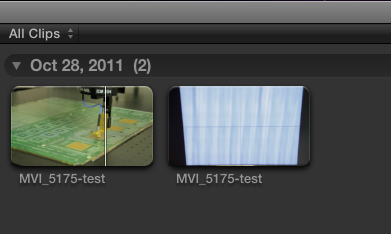
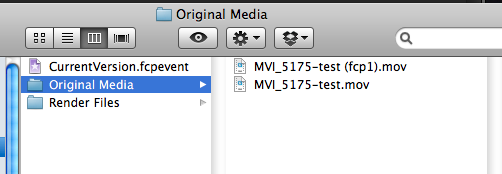
I just did some tests with a shoot from yesterday on a 7D. I renamed a few of the files to have identical names, and imported those into the same event without a problem.
Here is what happened:
Original Files:

FCP X Event Browser
The Resulting Event in the Finder:
Replied by tpayton on topic Re: Warning for using Tapeless Capture in FCPX
the new clips from multiple cards and start dumping them into FCPX in the corresponding Event where some clips are already sitting well here it comes. Where sitting cause they are all now offline and gone!
Yup some of the names of the new clips where identical with the previews clips.
Before we throw FCP X under the bus here (not that it doesn't have plenty of problems despite it good points). I'm wondering exactly what happened.
When your assistant dumped the files in, how did he do it? Did he copy them to the Finder folder, or did he actually import them into the Event via FCP X?
Reason being, FCP X already has a way of dealing with multiple files with the same name. It gets an ID to each file so it is looking for that actual ID on a file, not the file name. (I think it gets this from the file system itself, but I could be wrong. Regardless it is unique that that specific file. That is why trying to reconnect to a media file simply based on name doesn't work.)
I just did some tests with a shoot from yesterday on a 7D. I renamed a few of the files to have identical names, and imported those into the same event without a problem.
Here is what happened:
Original Files:
FCP X Event Browser
The Resulting Event in the Finder:
Please Log in to join the conversation.
- Scrubelicious
-
Topic Author
- Offline
- Platinum Member
-
Less
More
- Posts: 1228
- Thank you received: 114
29 Oct 2011 23:09 #1898
by Scrubelicious
Replied by Scrubelicious on topic Re: Warning for using Tapeless Capture in FCPX
As far as I know all the clips handling was done in FCPX and not in the Finder.
On Monday I will be back in the shop, unless I don't forget I can see to recreate the situation.
On Monday I will be back in the shop, unless I don't forget I can see to recreate the situation.
Please Log in to join the conversation.
29 Oct 2011 23:38 - 29 Oct 2011 23:40 #1900
by BenB
Replied by BenB on topic Re: Warning for using Tapeless Capture in FCPX
I just tested what tpayton did, and can confirm that FCP X has no problems using clips with the same name in the same Event, and I did it with our Canon 7D.
Thus, I am suspicious of how your assistant Imported the files to start with. I suspect he didn't Optimize the files, nor did he check the box do copy the files into the Event folder. If so, when the card is removed, the files will go offline.
In the above scenario, only "SIMS", or link files, are created in the Event folder. Look inside there, see if the files have a little curled arrow in the bottom left of the file icons. That's a link to the original, not the actual file. That's the only thing I can think of that could make all your stuff suddenly go off line... except...
If he only checked off Make Proxy, it'll still look offline until you go into the Preference window and switch playback from original to proxy. Something odd was done during the Import is my suspicion at this point.
Thus, I am suspicious of how your assistant Imported the files to start with. I suspect he didn't Optimize the files, nor did he check the box do copy the files into the Event folder. If so, when the card is removed, the files will go offline.
In the above scenario, only "SIMS", or link files, are created in the Event folder. Look inside there, see if the files have a little curled arrow in the bottom left of the file icons. That's a link to the original, not the actual file. That's the only thing I can think of that could make all your stuff suddenly go off line... except...
If he only checked off Make Proxy, it'll still look offline until you go into the Preference window and switch playback from original to proxy. Something odd was done during the Import is my suspicion at this point.
Last edit: 29 Oct 2011 23:40 by BenB.
Please Log in to join the conversation.
- Scrubelicious
-
Topic Author
- Offline
- Platinum Member
-
Less
More
- Posts: 1228
- Thank you received: 114
02 Nov 2011 19:04 #1957
by Scrubelicious
Replied by Scrubelicious on topic Re: Warning for using Tapeless Capture in FCPX
Well back in the shop....
Anyway our assistant swears that the footage was imported on FCPX level.
It's all fixed now but he did make a screen grab before it was.

Anyway our assistant swears that the footage was imported on FCPX level.
It's all fixed now but he did make a screen grab before it was.
Please Log in to join the conversation.
02 Nov 2011 19:20 #1958
by tpayton
Replied by tpayton on topic Re: Warning for using Tapeless Capture in FCPX
Wierd.
The other odd thing is the durations for those offline clips. Very odd indeed.
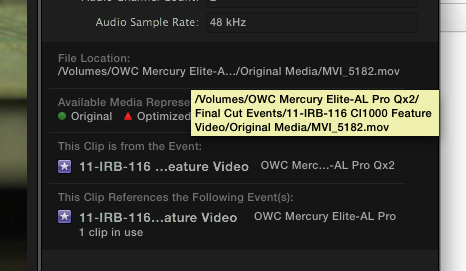
If it happens again you can see the path of the original file in inspector under "show file status". Then hover over the location:
The other odd thing is the durations for those offline clips. Very odd indeed.
If it happens again you can see the path of the original file in inspector under "show file status". Then hover over the location:
Please Log in to join the conversation.
02 Nov 2011 22:24 - 02 Nov 2011 22:39 #1964
by BenB
Replied by BenB on topic Re: Warning for using Tapeless Capture in FCPX
Durations AND created times don't match in the screen shot. That makes no sense, so I'm not ruling out someone just got confused somewhere, but who knows, it could be a bug.
I'm trying, but I can not duplicate this at all. I'm using a Canon 7D.
I'm trying, but I can not duplicate this at all. I'm using a Canon 7D.
Last edit: 02 Nov 2011 22:39 by BenB.
Please Log in to join the conversation.
