


- Posts: 6
- Thank you received: 0
3 Post Moderation Rule for New Boarders (25 Jan 2021)
New boarders will have their posts moderated - Don't worry if you cannot see your post immediately.
Final Cut Pro X Color / Saturation / Expore is not working
31 Dec 2013 14:44 #37730
by Wille
Final Cut Pro X Color / Saturation / Expore is not working was created by Wille
I update my final cut to 10.1, now when i select a clip to edit, and try to adjust exposure or color, it will work only when i push play.. then i need to make a new changes, and again push play to see the effect.. in last version that works in realtime.
some wrong options?
some wrong options?
Please Log in to join the conversation.
- ronny courtens
-

- Offline
- Moderator
-

Less
More
- Posts: 4455
- Thank you received: 962
31 Dec 2013 16:55 #37748
by ronny courtens
Replied by ronny courtens on topic Final Cut Pro X Color / Saturation / Expore is not working
Are you using any scopes when doing your color correction? If so please give some more information about your system and the kind of media you are working on.
If you think it's not a performance issue you can try and delete your FCPX preferences and see if this solves the issue.
- Ronny
If you think it's not a performance issue you can try and delete your FCPX preferences and see if this solves the issue.
- Ronny
Please Log in to join the conversation.
31 Dec 2013 17:07 - 31 Dec 2013 17:08 #37749
by Wille
The problem is in all correction settings, i select the clip and select color correction and anything what i change: saturation (midtones etc) , color , exposure etc it will change in preview window only when i push play.. not in realtime
I use mac mini late 2012 2.3ghz i7, 16gb ram, 256SSD, OSX 10.9.. everything else is working
Replied by Wille on topic Final Cut Pro X Color / Saturation / Expore is not working
Wille wrote: I update my final cut to 10.1, now when i select a clip to edit, and try to adjust exposure or color, it will work only when i push play.. then i need to make a new changes, and again push play to see the effect.. in last version that works in realtime.
some wrong options?
The problem is in all correction settings, i select the clip and select color correction and anything what i change: saturation (midtones etc) , color , exposure etc it will change in preview window only when i push play.. not in realtime
I use mac mini late 2012 2.3ghz i7, 16gb ram, 256SSD, OSX 10.9.. everything else is working
Last edit: 31 Dec 2013 17:08 by Wille.
Please Log in to join the conversation.
- ronny courtens
-
- Offline
- Moderator
-
Less
More
- Posts: 4455
- Thank you received: 962
31 Dec 2013 17:42 #37754
by ronny courtens
Replied by ronny courtens on topic Final Cut Pro X Color / Saturation / Expore is not working
I have just tested this on 2013 i5 mini with only 2 GB RAM, and I can see no issues. It's impressive that FCPX 10.1 runs so well, even on this little machine  So I don't think it's a hardware issue.
Deleting and refreshing your FCPX preferences might solve the problem.
- Ronny
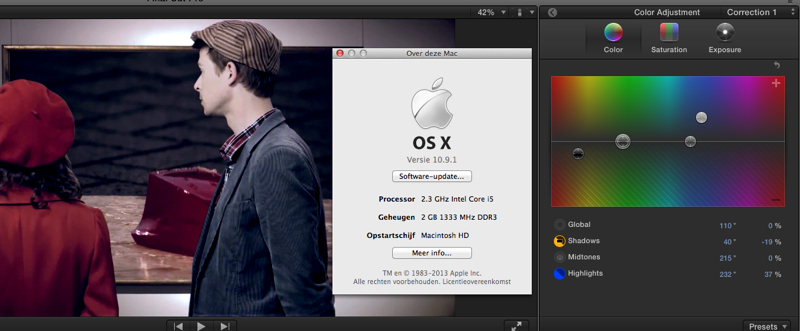
So I don't think it's a hardware issue.Deleting and refreshing your FCPX preferences might solve the problem.
- Ronny
Please Log in to join the conversation.
31 Dec 2013 18:20 #37762
by Wille
Replied by Wille on topic Final Cut Pro X Color / Saturation / Expore is not working
Where are the FCPX preference files?
Please Log in to join the conversation.
- ronny courtens
-
- Offline
- Moderator
-
Less
More
- Posts: 4455
- Thank you received: 962
01 Jan 2014 00:04 #37770
by ronny courtens
Replied by ronny courtens on topic Final Cut Pro X Color / Saturation / Expore is not working
You can delete your preferences manually, to do this read this paper from Apple (number 10):
support.apple.com/kb/ts3893
There's also a free utility that can do it for you, but I haven't tested it with 10.1 and Mavericks yet:
www.digitalrebellion.com/prefman/
- Ronny
support.apple.com/kb/ts3893
There's also a free utility that can do it for you, but I haven't tested it with 10.1 and Mavericks yet:
www.digitalrebellion.com/prefman/
- Ronny
Please Log in to join the conversation.


01 Jan 2014 05:22 #37774
by dgwvideo
Creating history....one edit at a time !
Replied by dgwvideo on topic Final Cut Pro X Color / Saturation / Expore is not working
Ronny
I have used prefs manager with 10.1 and OS 10.9.1 and it seems to work fine. Their website had no update when I last checked so I assumed there are no new preference files in the new FCPX that need to be deleted
I have used prefs manager with 10.1 and OS 10.9.1 and it seems to work fine. Their website had no update when I last checked so I assumed there are no new preference files in the new FCPX that need to be deleted
Creating history....one edit at a time !
Please Log in to join the conversation.
- ronny courtens
-
- Offline
- Moderator
-
Less
More
- Posts: 4455
- Thank you received: 962
01 Jan 2014 11:43 #37784
by ronny courtens
Replied by ronny courtens on topic Final Cut Pro X Color / Saturation / Expore is not working
Hey Dan,
Thanks for this information. I haven't needed this utility for a while, so it's good to know it still works on 10.1/Mavericks.
- Ronny
Thanks for this information. I haven't needed this utility for a while, so it's good to know it still works on 10.1/Mavericks.
- Ronny
Please Log in to join the conversation.
