




- Posts: 57
- Thank you received: 0
3 Post Moderation Rule for New Boarders (25 Jan 2021)
New boarders will have their posts moderated - Don't worry if you cannot see your post immediately.
10.1 crop copy bug?
30 Dec 2013 19:39 #37694
by ulisses
10.1 crop copy bug? was created by ulisses
Hello,
Every time I try to copy a crop (trim) from one clip (cmd+c) and paste the crop in another clip (shift+cmd+v) I get weird results, like clip not showing or trimmed in another position. If I got to inspector and move the crop 1 pixel, the clip shows again.
Both clips are same resolution / format.
I was using only bottom crop (trim) and when pasted I got the clip cropped in all sides, but left/right/top values are 0. Very weird.
Anyone getting this problem?
Thanks,
Ulisses
Every time I try to copy a crop (trim) from one clip (cmd+c) and paste the crop in another clip (shift+cmd+v) I get weird results, like clip not showing or trimmed in another position. If I got to inspector and move the crop 1 pixel, the clip shows again.
Both clips are same resolution / format.
I was using only bottom crop (trim) and when pasted I got the clip cropped in all sides, but left/right/top values are 0. Very weird.
Anyone getting this problem?
Thanks,
Ulisses
Please Log in to join the conversation.
- ronny courtens
-

- Offline
- Moderator
-

Less
More
- Posts: 4455
- Thank you received: 962
31 Dec 2013 16:46 #37745
by ronny courtens
Replied by ronny courtens on topic 10.1 crop copy bug?
Hi Ulisses,
I have tried to reproduce your issue in many ways, but for me this seems to work correctly.
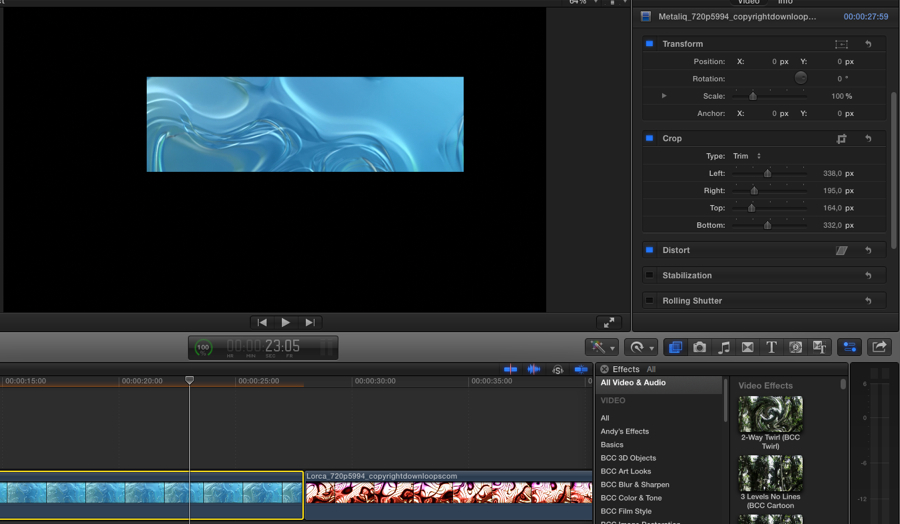
Crop first clip and copy:
Original second clip:
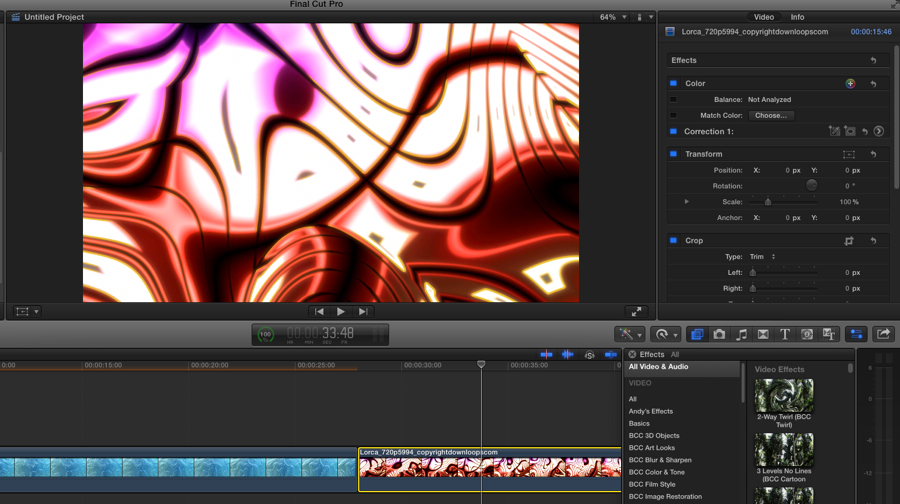
Crop pasted onto second clip:
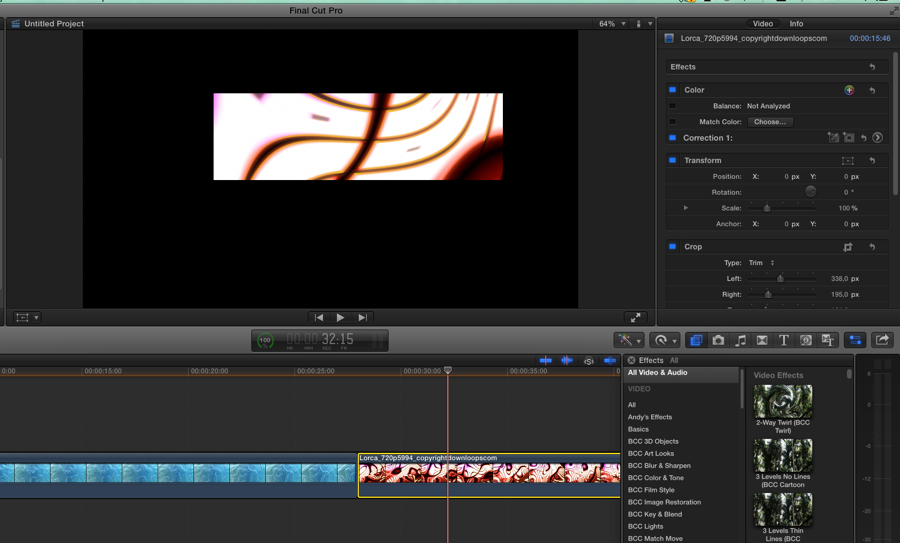
So it doesn't seem a bug to me but an unexpected behavior. Are you sure you re-copy the cropped clip after each change you make before you paste the crop effect onto the second clip?
If you continue to have this problem, deleting your FCPX preferences may help.
- Ronny
I have tried to reproduce your issue in many ways, but for me this seems to work correctly.
Crop first clip and copy:
Original second clip:
Crop pasted onto second clip:
So it doesn't seem a bug to me but an unexpected behavior. Are you sure you re-copy the cropped clip after each change you make before you paste the crop effect onto the second clip?
If you continue to have this problem, deleting your FCPX preferences may help.
- Ronny
Please Log in to join the conversation.
31 Dec 2013 21:38 #37767
by ulisses
Replied by ulisses on topic 10.1 crop copy bug?
Thanks a lot Ronny!
When possible, could you try to do that with clip not in storyline?
In my project I have some layers over a blank, GAP in storyline.
Also, please try to move your first clip to another position and copy/paste the transform with the crop.
Sorry to bother you, but I'm trying to find where is my problem.
Ulisses
When possible, could you try to do that with clip not in storyline?
In my project I have some layers over a blank, GAP in storyline.
Also, please try to move your first clip to another position and copy/paste the transform with the crop.
Sorry to bother you, but I'm trying to find where is my problem.
Ulisses
Please Log in to join the conversation.
- ronny courtens
-
- Offline
- Moderator
-
Less
More
- Posts: 4455
- Thank you received: 962
01 Jan 2014 13:03 - 01 Jan 2014 13:06 #37786
by ronny courtens
Replied by ronny courtens on topic 10.1 crop copy bug?
Hi Ulisses,
Sorry for the late reply, I just woke up from a very late New Year's party
I have done some more testing as you required, and here's what I did:
1. Two connected clips over a gap and another clip in the storyline
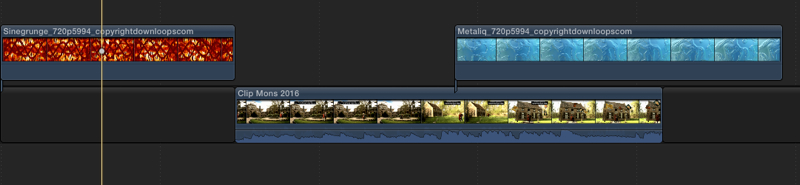
2. Crop (Trim) first clip, then copy clip
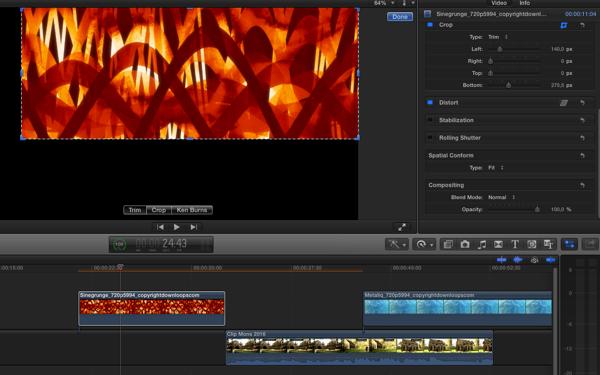
3. Paste Effect (ALT+CMD+V) onto second clip: the crop is applied correctly
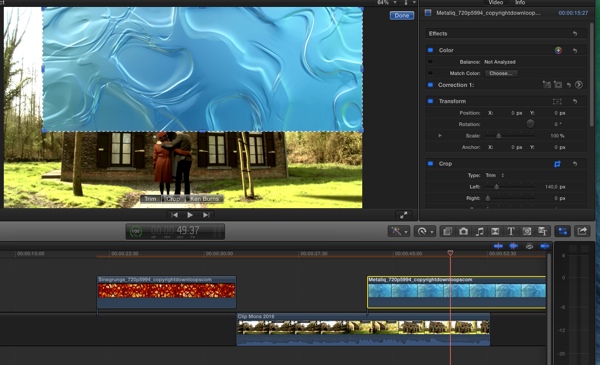
4.Two superimposed connected clips over a gap in the storyline, Crop (Trim) first clip
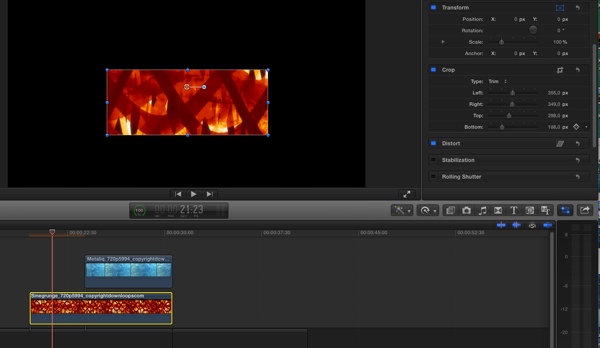
5. Move (Transform) first clip, then copy clip
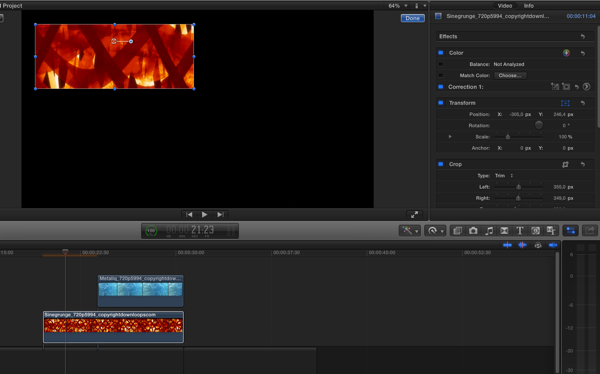
6. Paste Attributes (SHIFT+CMD+V) onto second clip
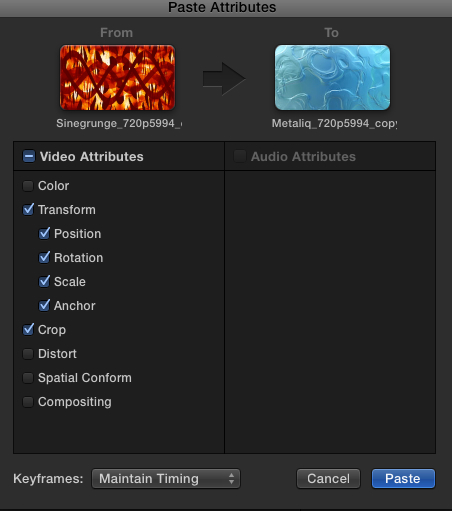
7. Both the crop and the transform parameters are correctly applied to the second clip (I have dropped the Opacity of the second clip to show how both clips are correctly superimposed)
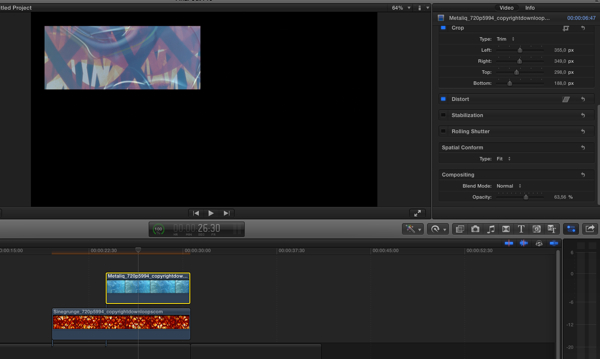
Both the Paste Effects (ALT+MD+V) and the Paste attributes (SHIFT+CMD+V) options seem to work correctly in these tests (FCP10.1 on Mavericks 9.1). If it doesn't work for you since the update you might consider re-installing FCPX or just refreshing the FCPX preferences. This is unexpected behavior, which is often solved by one of these actions.
BTW, looking at your picture: I LOVE your assistant editor from-the-future!
- Ronny
Sorry for the late reply, I just woke up from a very late New Year's party
I have done some more testing as you required, and here's what I did:
1. Two connected clips over a gap and another clip in the storyline
2. Crop (Trim) first clip, then copy clip
3. Paste Effect (ALT+CMD+V) onto second clip: the crop is applied correctly
4.Two superimposed connected clips over a gap in the storyline, Crop (Trim) first clip
5. Move (Transform) first clip, then copy clip
6. Paste Attributes (SHIFT+CMD+V) onto second clip
7. Both the crop and the transform parameters are correctly applied to the second clip (I have dropped the Opacity of the second clip to show how both clips are correctly superimposed)
Both the Paste Effects (ALT+MD+V) and the Paste attributes (SHIFT+CMD+V) options seem to work correctly in these tests (FCP10.1 on Mavericks 9.1). If it doesn't work for you since the update you might consider re-installing FCPX or just refreshing the FCPX preferences. This is unexpected behavior, which is often solved by one of these actions.
BTW, looking at your picture: I LOVE your assistant editor from-the-future!
- Ronny
Last edit: 01 Jan 2014 13:06 by ronny courtens.
Please Log in to join the conversation.
01 Jan 2014 14:28 #37790
by ulisses
Replied by ulisses on topic 10.1 crop copy bug?
Thanks again Ronny and happy new year!
I'll try to delete preferences.
About the robot, that was a production where that remote controlled "Short Circuit movie" robot was dancing with CGI robots.
Ulisses
I'll try to delete preferences.
About the robot, that was a production where that remote controlled "Short Circuit movie" robot was dancing with CGI robots.
Ulisses
Please Log in to join the conversation.
- ronny courtens
-
- Offline
- Moderator
-
Less
More
- Posts: 4455
- Thank you received: 962
01 Jan 2014 14:30 #37791
by ronny courtens
Replied by ronny courtens on topic 10.1 crop copy bug?
Hi Ulisses,
Keep us posted and a very happy New Year to you!
- Ronny
Keep us posted and a very happy New Year to you!
- Ronny
Please Log in to join the conversation.
- haysoos123
-

- Offline
- Platinum Member
-

Less
More
- Posts: 402
- Thank you received: 72
02 Jan 2014 20:20 #37880
by haysoos123
Replied by haysoos123 on topic 10.1 crop copy bug?
I can confirm that I get this bug! It's from a project that has been converted from 10.0.9, and I haven't tested it in a brand-new project to see if it's still there.
In my case, the clips have transform and crop settings, so I copy and paste (SHIFT-CMD-V) and check 'transform' and 'crop' onto the new clip. The new clip will have a strange cropping: it will be cropped a lot more. Scaling and position seemed to carry over properly. The very weird thing is that when I move the slider in crop (bottom crop in my case), back to zero, it will pop back to normal... but only if I move the bottom crop back to zero! If I increase the bottom crop again, it will 'pop' back into the weird crop, even if Left, Right, and Top are all set at zero. The crop type is trim.
One thing I should say about this is that the clips are a strange resolution (400x480 ProRes) because it's video game capture from a Nintendo 3DS. Unfortunately I can't put up screencaps because the trailer isn't released yet. I don't know if the odd size has anything to do with this bug.
The work-around is to just redo the crop and transform numbers in the inspector, but if I had to do this to a ton of clips, it would be a real pain. I can confirm that this copy-paste attribute procedure worked 100% fine in 10.0.9 on this very same project. I did also delete preferences, but that didn't fix it.
In my case, the clips have transform and crop settings, so I copy and paste (SHIFT-CMD-V) and check 'transform' and 'crop' onto the new clip. The new clip will have a strange cropping: it will be cropped a lot more. Scaling and position seemed to carry over properly. The very weird thing is that when I move the slider in crop (bottom crop in my case), back to zero, it will pop back to normal... but only if I move the bottom crop back to zero! If I increase the bottom crop again, it will 'pop' back into the weird crop, even if Left, Right, and Top are all set at zero. The crop type is trim.
One thing I should say about this is that the clips are a strange resolution (400x480 ProRes) because it's video game capture from a Nintendo 3DS. Unfortunately I can't put up screencaps because the trailer isn't released yet. I don't know if the odd size has anything to do with this bug.
The work-around is to just redo the crop and transform numbers in the inspector, but if I had to do this to a ton of clips, it would be a real pain. I can confirm that this copy-paste attribute procedure worked 100% fine in 10.0.9 on this very same project. I did also delete preferences, but that didn't fix it.
Please Log in to join the conversation.
- ronny courtens
-
- Offline
- Moderator
-
Less
More
- Posts: 4455
- Thank you received: 962
02 Jan 2014 20:26 #37882
by ronny courtens
Replied by ronny courtens on topic 10.1 crop copy bug?
Very interesting, thank you for the information. Please test this on a completely new project when you can and if you still experience this behavior send feedback to Apple including your system specs and media info. As you can see on the screenshots I have posted I don't see this issue on our systems, so it could be related to specific frame sizes or specific hardware.
- Ronny
- Ronny
Please Log in to join the conversation.
02 Jan 2014 20:43 - 02 Jan 2014 20:43 #37887
by ulisses
Replied by ulisses on topic 10.1 crop copy bug?
Well, my project is 8000x600 pixels, with prores clips. Its a new project, not from 10.0.9.
After Ronny tests, I created a new HD 1280x720 project, loaded my prores clips and got same crop problem. When crop goes to 0 image shows, crop to 1 image hide.
I deleted FCPX preferences and same thing.
Thanks,
Ulisses
After Ronny tests, I created a new HD 1280x720 project, loaded my prores clips and got same crop problem. When crop goes to 0 image shows, crop to 1 image hide.
I deleted FCPX preferences and same thing.
Thanks,
Ulisses
Last edit: 02 Jan 2014 20:43 by ulisses.
Please Log in to join the conversation.
- haysoos123
-
- Offline
- Platinum Member
-
Less
More
- Posts: 402
- Thank you received: 72
03 Jan 2014 00:22 #37909
by haysoos123
Replied by haysoos123 on topic 10.1 crop copy bug?
Ok Ronny, I have tested quickly on a new project and with some more standard clips. I can still recreate the cropping problems on 1080p 23.976 footage from a C300 (native Canon XF 422 codec). Copying the crop from one clip to another can be inconsistent. In one instance, the crop was ALMOST copied correctly, but was off by 5 pixels (!). These are two different clips with identical properties from the same camera. Very weird.
Also, what I found was that it would only misbehave if I copied the Transform (the checkboxes) AND Crop properties at the same time. It seemed to work fine if I only copied the Crop properties, so that's possible why you didn't see the bug, Ronny.
HOWEVER, I was able to "fix" this copying in a strange way. I found that if I went to the inspector on the clip that I was going to copy the crop TO and changed one of the crop properties (for example, changed bottom crop to some arbitrary number), and then CHANGED IT BACK to zero, then copying a crop and transform to this clip worked fine!
Ulisses, it seems totally inconsistent as to how the weird crop looks... sometimes, it would crop the entire picture so that it's all black, and then if you move the crop to zero, it goes back to normal. Other times, the crop is off by a few pixels.
It seems unlikely that it's tied to hardware since it did the exact same thing on both a 27" iMac (late 2013, GTX 780M 4GB) and a 15" rMBP (2012, GT 650M 1GB).
Also, what I found was that it would only misbehave if I copied the Transform (the checkboxes) AND Crop properties at the same time. It seemed to work fine if I only copied the Crop properties, so that's possible why you didn't see the bug, Ronny.
HOWEVER, I was able to "fix" this copying in a strange way. I found that if I went to the inspector on the clip that I was going to copy the crop TO and changed one of the crop properties (for example, changed bottom crop to some arbitrary number), and then CHANGED IT BACK to zero, then copying a crop and transform to this clip worked fine!
Ulisses, it seems totally inconsistent as to how the weird crop looks... sometimes, it would crop the entire picture so that it's all black, and then if you move the crop to zero, it goes back to normal. Other times, the crop is off by a few pixels.
It seems unlikely that it's tied to hardware since it did the exact same thing on both a 27" iMac (late 2013, GTX 780M 4GB) and a 15" rMBP (2012, GT 650M 1GB).
Please Log in to join the conversation.
03 Jan 2014 02:14 #37919
by plysat
Can't sleep? Try this: fcpxpert.net ;-)
Replied by plysat on topic 10.1 crop copy bug?
Hi, I'd encourage you to send that feedback to Apple, including the workaround, if you haven't already done so. 
Can't sleep? Try this: fcpxpert.net ;-)
Please Log in to join the conversation.
03 Jan 2014 11:56 #37943
by ulisses
Replied by ulisses on topic 10.1 crop copy bug?
Yes, please send a feedback to Apple, I already did that.
Please Log in to join the conversation.
17 Mar 2014 07:12 - 17 Mar 2014 07:26 #42804
by revixi5
Replied by revixi5 on topic 10.1 crop copy bug?
I don't know for you, but in my case, I had to fight with that bug until I notice that it may be related to the fact that my clips were scaled down, so when I was trying to paste the crop settings nothing was happening. In fact, the setting were applied, but FCP seem to (I wonder why) reinterpret the cropping values according to the SCALE value... so... because my clips were scaled down to 50%, I had to double the values of the CROP in order to finally see the result on screen.
I'm still working on the project right now so, If I found new info I'll update the post.
Update : Finally the bug seem to happen not only with the cropping but for other things. In my case, even with the drop shadow effect there is a problem. Same thing, all the values are useless when pasted...
I'm still working on the project right now so, If I found new info I'll update the post.
Update : Finally the bug seem to happen not only with the cropping but for other things. In my case, even with the drop shadow effect there is a problem. Same thing, all the values are useless when pasted...
Last edit: 17 Mar 2014 07:26 by revixi5. Reason: Update
Please Log in to join the conversation.

17 Mar 2014 15:06 #42823
by fcpguru
Replied by fcpguru on topic 10.1 crop copy bug?
I can confirm this bug. It is inconsistent. I noticed it recently on a job with multi cam clips. I was trying to do a Picture in Picture effect, so I would copy the first clip, paste it onto the second. This would cause the clip to disappear because the trim (crop) didn't seem to be independent of the transform control. So I would adjust the settings in the 2nd clip and copy/paste that to the rest of the clips that needed it.
Please Log in to join the conversation.
17 Mar 2014 21:13 #42859
by dkag7
Replied by dkag7 on topic 10.1 crop copy bug?
for me what happens when copy paste attributes with a crop, is in the inspector you can see the crop numbers have pasted correct, but the image itself is not cropped (or cropped different)
even if crop is the only one selected, it still will not paste correct.
kurt
even if crop is the only one selected, it still will not paste correct.
kurt
Please Log in to join the conversation.
18 Mar 2014 04:14 #42889
by Zemzil
Replied by Zemzil on topic 10.1 crop copy bug?
I experienced many crash with canevas croping since 10.1.1, as I isolated the problem :
- it crash only when I use a "mouse/manual" crop in the canevas from a 0/0/0/0 position.
- when I get back in FCP, the image is cropped but "transformed" too, just like if I had move the entire clip
To bypass that bug now I first use crop sliders in the Inspector, THEN moving the portion I choose.
- it crash only when I use a "mouse/manual" crop in the canevas from a 0/0/0/0 position.
- when I get back in FCP, the image is cropped but "transformed" too, just like if I had move the entire clip
To bypass that bug now I first use crop sliders in the Inspector, THEN moving the portion I choose.
Please Log in to join the conversation.
- potterycat
-
- Offline
- New Member
-

Less
More
- Posts: 1
- Thank you received: 0
05 Jun 2014 20:52 #47347
by potterycat

I have the same issue and have had it since I first upgraded. I've just been dealing with it and manually adjusted it.
It looks like there is no solution yet. It is really annoying.
Replied by potterycat on topic 10.1 crop copy bug?
I have the same issue and have had it since I first upgraded. I've just been dealing with it and manually adjusted it.
It looks like there is no solution yet. It is really annoying.
Please Log in to join the conversation.
- ronny courtens
-
- Offline
- Moderator
-
Less
More
- Posts: 4455
- Thank you received: 962
05 Jun 2014 21:05 #47348
by ronny courtens
Replied by ronny courtens on topic 10.1 crop copy bug?
Hi Angela,
This will probably be fixed in the coming update.
- Ronny
This will probably be fixed in the coming update.
- Ronny
Please Log in to join the conversation.
05 Jun 2014 21:35 #47349
by Seanus
Sean Lander - Editing since 1982 - AVID 1991 - FCP 1999 - FCPX 2011
Replied by Seanus on topic 10.1 crop copy bug?
Yes I'm in the same boat. Happens mainly when I'm working with 1080 footage in a 720 project. But it's hit and miss.
One of many bugs Apple needs to address. SOON!
One of many bugs Apple needs to address. SOON!
Sean Lander - Editing since 1982 - AVID 1991 - FCP 1999 - FCPX 2011
Please Log in to join the conversation.
