


- Posts: 10
- Thank you received: 0
3 Post Moderation Rule for New Boarders (25 Jan 2021)
New boarders will have their posts moderated - Don't worry if you cannot see your post immediately.
FCPX Projects not loading but exist in Updated project folder
28 Dec 2013 18:29 - 28 Dec 2013 18:29 #37544
by darkmonne
I'm having an issue in that my project file exists in the updated sparse bundle but when FCP X 10. 1 loads it does not load the projects. However it does load the content of the events, with some of the event files showing up as missing yet when you skim over they play, or when you hit play it plays in preview.
Any suggestions on A. How to get the projects to show again and B. Have the files not show as missing when they are indeed present.
Thanks so much and please let me know else you need to know to answer this question.
Any suggestions on A. How to get the projects to show again and B. Have the files not show as missing when they are indeed present.
Thanks so much and please let me know else you need to know to answer this question.
Last edit: 28 Dec 2013 18:29 by darkmonne. Reason: Changing the icon to a light bulb
Please Log in to join the conversation.

29 Dec 2013 01:23 #37570
by BenB
Replied by BenB on topic FCPX Projects not loading but exist in Updated project folder
First, what sparse bundle are you talking about? The update doesn't make DMGs. Libraries are simply packages (a .flexolibrary package file).
Second, can you give us a screen shot of your Libraires pane?
Your Projects should be inside your Events.
Second, can you give us a screen shot of your Libraires pane?
Your Projects should be inside your Events.
Please Log in to join the conversation.
29 Dec 2013 17:30 #37622
by darkmonne
Replied by darkmonne on topic FCPX Projects not loading but exist in Updated project folder
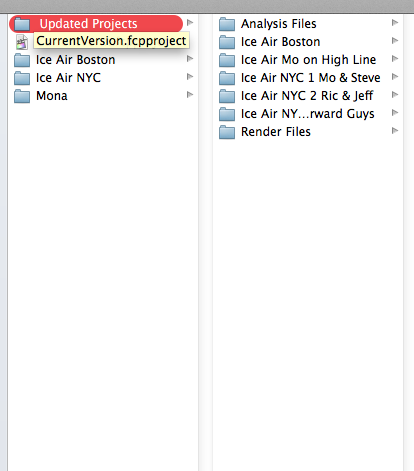
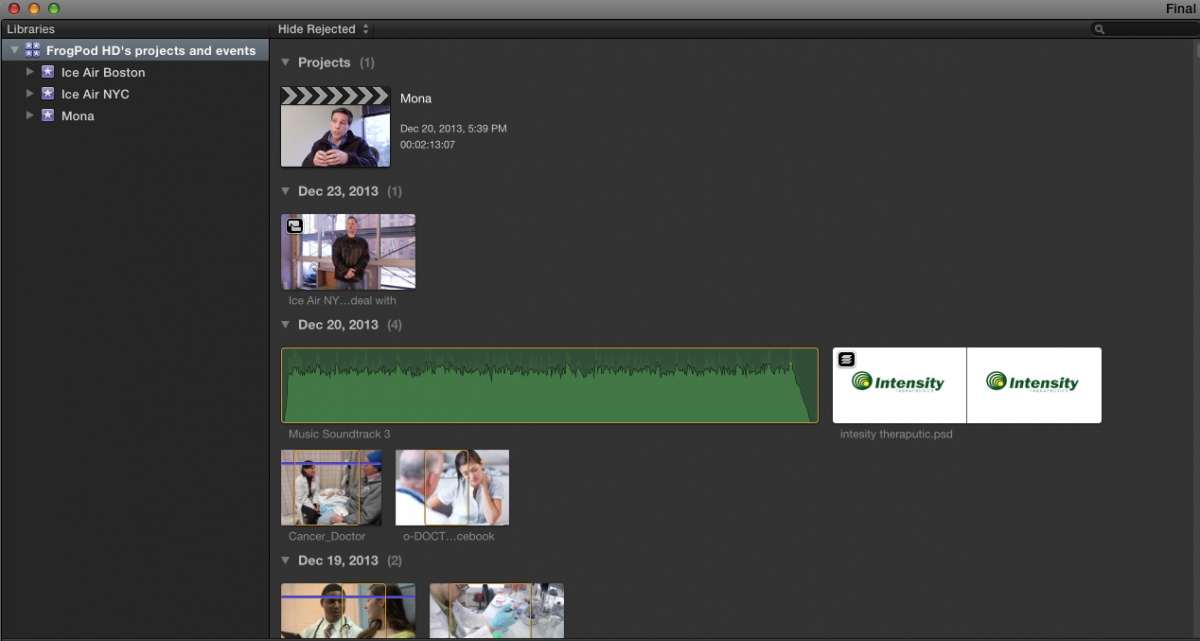
I miss spoke when I said sparse bundle, I meant to say when opening the package contents. I have attached a screen shot of the libraries pan which is only showing one project. But when you look at the other attached image of the updated library folder (inside the package content) which is storing my current projects you can see the folders for them which all have the necessary files I believe. Also I attached an image of a file that is "missing" but when you play it or skim the file does load and play.
Lots of odd things happening, any help would be greatly appreciated.
Lots of odd things happening, any help would be greatly appreciated.
Please Log in to join the conversation.
29 Dec 2013 17:37 - 29 Dec 2013 17:40 #37624
by BenB
Replied by BenB on topic FCPX Projects not loading but exist in Updated project folder
Wow, that is really weird. First of all, you should have NO "CurrentVersion.fcpproject" file at all. Projects now use "CurrenVersion.fcpevent" files in the Library package. Try removing that file temporarily, see what happens. AND fill out the FCP feedback page with this stuff. That is strange indeed.
Last edit: 29 Dec 2013 17:40 by BenB.
Please Log in to join the conversation.
29 Dec 2013 17:40 #37625
by darkmonne
Replied by darkmonne on topic FCPX Projects not loading but exist in Updated project folder
Yeah it is, Apple doesn't have an answer and I'm hoping you all do. This is a current freelance job I'm on and have spent a good two weeks editing the project. So I would rather not start from scratch if this can be solved.
Please Log in to join the conversation.


01 Jan 2014 06:07 #37780
by dgwvideo
Creating history....one edit at a time !
Replied by dgwvideo on topic FCPX Projects not loading but exist in Updated project folder
Have you tried to load a backup of the library. FCPX saves backups while you edit and by default they should be in your Movies folder unless you changed that location in preferences ( or worse if you disabled library backups).
Creating history....one edit at a time !
Please Log in to join the conversation.
05 Jan 2014 20:20 #38201
by darkmonne
Replied by darkmonne on topic FCPX Projects not loading but exist in Updated project folder
Fixed the problem! Thanks for the help!!!
Please Log in to join the conversation.
- ronny courtens
-

- Offline
- Moderator
-

Less
More
- Posts: 4455
- Thank you received: 962
05 Jan 2014 21:30 #38206
by ronny courtens
Replied by ronny courtens on topic FCPX Projects not loading but exist in Updated project folder
Hi Mark,
Glad you got everything working again and thank you for letting us know. Seems the new Library backups in 10.1 do what they're supposed to do. Nice catch, Dan!
- Ronny
Glad you got everything working again and thank you for letting us know. Seems the new Library backups in 10.1 do what they're supposed to do. Nice catch, Dan!
- Ronny
Please Log in to join the conversation.
05 Mar 2014 04:25 #42060
by darkmonne
Replied by darkmonne on topic FCPX Projects not loading but exist in Updated project folder
A great intro by the MacBreak Studio, in which they explain back ups.
www.fcp.co/final-cut-pro/tutorials/1361-...s-in-final-cut-pro-x
Please Log in to join the conversation.
