


- Posts: 4
- Thank you received: 0
3 Post Moderation Rule for New Boarders (25 Jan 2021)
New boarders will have their posts moderated - Don't worry if you cannot see your post immediately.
Audio and Video Syncing Issue
- mrspotter1973
-
 Topic Author
- Offline
- New Member
-

Less
More
27 Dec 2013 15:38 #37414
by mrspotter1973
Audio and Video Syncing Issue was created by mrspotter1973
Hello Everyone -
I am having a video/audio syncing issue. Here is the background
We conduct webinars here at my company. The webinars are done through Go to Webinar using a computer and webcam. The speakers stand in front of the 3rd party webcam (1080p) that is hooked up to the computer that is running the webinar. We then use Camtasia to record the screen, and Go To Webinar to record the audio. Camtasia then renders the video, and then I "produce" it, to turn it into a .mov file. We take the audio and convert it from a .WMV to a .WAV and then import both media into FCP. I was able to manually sync the two, and it runs great. About 17 minutes in however, the video lags for about 2 seconds, and it is thrown out of sync with the audio, resulting in a delay. Is there anyway to fix this? Any help would be most appreciated.
Thank you so much!
I am having a video/audio syncing issue. Here is the background
We conduct webinars here at my company. The webinars are done through Go to Webinar using a computer and webcam. The speakers stand in front of the 3rd party webcam (1080p) that is hooked up to the computer that is running the webinar. We then use Camtasia to record the screen, and Go To Webinar to record the audio. Camtasia then renders the video, and then I "produce" it, to turn it into a .mov file. We take the audio and convert it from a .WMV to a .WAV and then import both media into FCP. I was able to manually sync the two, and it runs great. About 17 minutes in however, the video lags for about 2 seconds, and it is thrown out of sync with the audio, resulting in a delay. Is there anyway to fix this? Any help would be most appreciated.
Thank you so much!
Please Log in to join the conversation.


27 Dec 2013 15:58 #37415
by dgwvideo
Creating history....one edit at a time !
Replied by dgwvideo on topic Audio and Video Syncing Issue
Is there something unusual that happened 17 minutes in, perhaps the camera stopped and when restarted lost sync? Or maybe this was just an incremental sync issue that built up until it became predominant around the 17 minute mark. Either way, using FCP or FCPX you can cut the clip at the point of error, detach the audio and move it to get it back in sync with the video. Depending on how long the clip is you may need to check it further along and repeat this. Once the entire clip is in sync share a master file of the project and you should have a quicktime movie of the corrected clip.
Creating history....one edit at a time !
Please Log in to join the conversation.

27 Dec 2013 16:00 #37416
by MattDavis
Replied by MattDavis on topic Audio and Video Syncing Issue
At a guess, I think we have one device running at a notional 29.97fps ('TV style') and another at 30fps ('computer style') - even if it's audio, there is a sort of time base to it all.
Whilst it shouldn't matter in some respects, when you combine the two time bases together, something's going to break. Because the video lags the audio, I'd say that Camtasia is the 30fps culprit and you'd need to find a way in your edit package to 'conform' the audio from 29.97 to 30 time base.
Just shooting from the hip, here. When I've had this happen before, I'm happy to find a bit of 'room tone' and snip the audio to fit the video, replacing the gaps with the room tone (or 'dead air' in the presentation as nobody seems to provide room tone these days).
Whilst it shouldn't matter in some respects, when you combine the two time bases together, something's going to break. Because the video lags the audio, I'd say that Camtasia is the 30fps culprit and you'd need to find a way in your edit package to 'conform' the audio from 29.97 to 30 time base.
Just shooting from the hip, here. When I've had this happen before, I'm happy to find a bit of 'room tone' and snip the audio to fit the video, replacing the gaps with the room tone (or 'dead air' in the presentation as nobody seems to provide room tone these days).
Please Log in to join the conversation.
- mrspotter1973
-
Topic Author
- Offline
- New Member
-
Less
More
- Posts: 4
- Thank you received: 0
27 Dec 2013 16:01 #37417
by mrspotter1973
Replied by mrspotter1973 on topic Audio and Video Syncing Issue
Thank you for the quick reply. Much faster than the apple discussion boards.
What about incremental moves. I have another video that the audio and video is out of sync by .5 a second. I have detached the audio, but I can't seem to move it by a fraction of a second, which is all I need. Any advice there?
What about incremental moves. I have another video that the audio and video is out of sync by .5 a second. I have detached the audio, but I can't seem to move it by a fraction of a second, which is all I need. Any advice there?
Please Log in to join the conversation.
27 Dec 2013 16:09 #37418
by dgwvideo
Creating history....one edit at a time !
Replied by dgwvideo on topic Audio and Video Syncing Issue
MattDavis has addressed the bigger picture and I suspect he is correct about that. For an immediate fix if detaching the audio works, you should be able to move the audio clip in 1 frame increments if you have the snapping turned off. You could also experiment with retiming the clip to shrink or expand it if it is just a small amount. These can now be entered in numerical form if you are on the 10.1 version. Without knowing how big of a problem, clip size, length, etc. you are dealing with, these are just rough guesses at what might help.
Creating history....one edit at a time !
Please Log in to join the conversation.
27 Dec 2013 16:14 - 27 Dec 2013 16:28 #37419
by MattDavis
Replied by MattDavis on topic Audio and Video Syncing Issue
So you've detached the audio, bladed it into suitable bits, I 'assume' (always a dangerous thing) that your audio is a secondary storyline (it sort of hangs off your primary storyline - the Camtasia video)?
Just using the 'A' arrow tool, zoomed in so I can see video frame boundaries (light shaded part) I can drag the audio round in 1/100th of a frame increments.
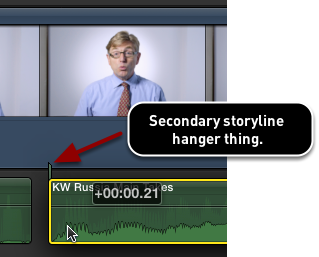
Just using the 'A' arrow tool, zoomed in so I can see video frame boundaries (light shaded part) I can drag the audio round in 1/100th of a frame increments.
Last edit: 27 Dec 2013 16:28 by MattDavis.
Please Log in to join the conversation.
27 Dec 2013 16:20 #37422
by dgwvideo
Creating history....one edit at a time !
Replied by dgwvideo on topic Audio and Video Syncing Issue
Here is a tutorial on using sub frames within fcpx:
www.fcp.co/final-cut-pro/tutorials/1191-...thin-final-cut-pro-x
www.fcp.co/final-cut-pro/tutorials/1191-...thin-final-cut-pro-x
Creating history....one edit at a time !
Please Log in to join the conversation.
- mrspotter1973
-
Topic Author
- Offline
- New Member
-
Less
More
- Posts: 4
- Thank you received: 0
27 Dec 2013 16:53 #37427
by mrspotter1973
Replied by mrspotter1973 on topic Audio and Video Syncing Issue
Okay, i am going to try all of this. thank you
Please Log in to join the conversation.

27 Dec 2013 17:35 #37434
by Soundwise
Replied by Soundwise on topic Audio and Video Syncing Issue
There is no need to detach audio if you need to resync. Use "Open in Timeline"-command to open the clip in it's own timeline.
Please Log in to join the conversation.
- mrspotter1973
-
Topic Author
- Offline
- New Member
-
Less
More
- Posts: 4
- Thank you received: 0
27 Dec 2013 18:01 #37435
by mrspotter1973
Replied by mrspotter1973 on topic Audio and Video Syncing Issue
I probably should have mentioned that the video has no audio of it's own. The audio is only present on the .WAV file
Please Log in to join the conversation.
