


3 Post Moderation Rule for New Boarders (25 Jan 2021)
New boarders will have their posts moderated - Don't worry if you cannot see your post immediately.
BUG list for FCPX 10.1


27 Dec 2013 05:21 #37386
by dgwvideo
Creating history....one edit at a time !
BUG list for FCPX 10.1 was created by dgwvideo
I thought I would start a thread for users to post bugs they identify with the new version of FCPX 10.1
Below is my most recent feedback report to Apple.
FCPX 10.1 Feedback 12-26-13
While editing the first project in 10.1 the following issues have been noted:
1. The media browser populates erratically and sometimes not at all. Sound libraries are missing unless iTunes which may be located on an external disk is connected. No libraries populate unless iTunes can be detected.
2. The photo library in the media browser will not populate.
3. If a custom EQ is applied to a clip (either 8 band or 31 band), once the EQ panel UI is closed and then reopened it does not show the adjustments. The clip retains the adjusted EQ but the panel will not display it. This occurs on a single clip and also when audio attributes are pasted to multiple clips.
4. The color board adjustments made with a MATCH COLOR selection do not retain their adjusted parameter views in the UI.
Below is my most recent feedback report to Apple.
FCPX 10.1 Feedback 12-26-13
While editing the first project in 10.1 the following issues have been noted:
1. The media browser populates erratically and sometimes not at all. Sound libraries are missing unless iTunes which may be located on an external disk is connected. No libraries populate unless iTunes can be detected.
2. The photo library in the media browser will not populate.
3. If a custom EQ is applied to a clip (either 8 band or 31 band), once the EQ panel UI is closed and then reopened it does not show the adjustments. The clip retains the adjusted EQ but the panel will not display it. This occurs on a single clip and also when audio attributes are pasted to multiple clips.
4. The color board adjustments made with a MATCH COLOR selection do not retain their adjusted parameter views in the UI.
Creating history....one edit at a time !
Please Log in to join the conversation.
- clintstuckey
-

- Offline
- New Member
-

Less
More
- Posts: 4
- Thank you received: 0
27 Dec 2013 06:08 #37392
by clintstuckey
Replied by clintstuckey on topic BUG list for FCPX 10.1
I have tiptoed into 10.1 since the changeover only imported a few previous projects and events from Event Manager per suggestions.... wary of bugs...unfortunately I hit a big one. Was curious if anyone else was hitting it...or had a solution. Other than this...really liked using 10.1.
If and when I hit import media... it hangs and crashes... at this point it is happening every time.
It worked once as I imported about 4 hours worth and rough cut a 2 hour piece prior to Christmas, actually finished and burned a DVD. Beyond that it is worthless, just can't get any new media in.
I have tried trashing preferences, and emptying trash. Thereafter tried completely uninstalling FCPX per Apple's instructions and reinstalling - still didn't seem to work.
Every time I hit import...the dreaded beach ball starts spinning.
Really annoying not being able to get any media in. Anyone else seeing this?
If and when I hit import media... it hangs and crashes... at this point it is happening every time.
It worked once as I imported about 4 hours worth and rough cut a 2 hour piece prior to Christmas, actually finished and burned a DVD. Beyond that it is worthless, just can't get any new media in.
I have tried trashing preferences, and emptying trash. Thereafter tried completely uninstalling FCPX per Apple's instructions and reinstalling - still didn't seem to work.
Every time I hit import...the dreaded beach ball starts spinning.
Really annoying not being able to get any media in. Anyone else seeing this?
Please Log in to join the conversation.
- clintstuckey
-
- Offline
- New Member
-
Less
More
- Posts: 4
- Thank you received: 0
27 Dec 2013 08:13 #37395
by clintstuckey
Replied by clintstuckey on topic BUG list for FCPX 10.1
So...tried ejecting all my drives sequentially... did the trick.
FCPX did not like my USB 2.0 Time Machine Drive.
Go figure.
FCPX did not like my USB 2.0 Time Machine Drive.
Go figure.
Please Log in to join the conversation.

27 Dec 2013 13:01 #37404
by BenB
Replied by BenB on topic BUG list for FCPX 10.1
It has always been recommend to turn off TimeMachine when editing in any NLE.
Good idea to share glitches, but please fill out the feedback form, also! Apple does in fact read, track, and catalog those! Very important. Posting here alone won't help Apple, but will help other users.
www.apple.com/feedback/finalcutpro.html
www.apple.com/feedback/motion.html
www.apple.com/feedback/compressor.html
Thanks for starting this thread, good idea.
Good idea to share glitches, but please fill out the feedback form, also! Apple does in fact read, track, and catalog those! Very important. Posting here alone won't help Apple, but will help other users.
www.apple.com/feedback/finalcutpro.html
www.apple.com/feedback/motion.html
www.apple.com/feedback/compressor.html
Thanks for starting this thread, good idea.
Please Log in to join the conversation.
02 Jan 2014 15:57 - 03 Jan 2014 20:02 #37844
by chipgallo
Replied by chipgallo on topic BUG list for FCPX 10.1
Thanks, Clint. I am troubleshooting the AVCHD media optimize issue right now. It occasionally works but often stalls.
[update: I got the optimization process to run by going into Activity Monitor and killing a number of processes. It is a crude work around, but now I can work on the show. I did make a record of what processes were running when it worked and later I can figure out which one has a conflict or doesn't play friendly.]
[update: I got the optimization process to run by going into Activity Monitor and killing a number of processes. It is a crude work around, but now I can work on the show. I did make a record of what processes were running when it worked and later I can figure out which one has a conflict or doesn't play friendly.]
Last edit: 03 Jan 2014 20:02 by chipgallo. Reason: add information
Please Log in to join the conversation.
- ArthurCool
-
- Offline
- New Member
-
Less
More
- Posts: 10
- Thank you received: 0
09 Apr 2015 10:19 #62387
by ArthurCool
Replied by ArthurCool on topic BUG list for FCPX 10.1
Hi Guys,
At the moment I am working on a big project. (The total of the files I need for that project are around 4To)
I am quite often having this issue :
Sometime when I launch FCP X 10.1.4 it comes up very quickly (too quickly) and I noticed its because its not loading all the events of my library but only the last one I was working on. So then, when I want to work on an other event it load all the events and end up stuck loading the last one. I then have no other choice than to Force Quit FCP and relaunch. And then the same thing happen again and again.
Today for instance I have relaunched already 10 times and I always have the same issue... Just can't work.
I don't know what I can do...
Thanks for your help.
All the Best.
Arthur.
At the moment I am working on a big project. (The total of the files I need for that project are around 4To)
I am quite often having this issue :
Sometime when I launch FCP X 10.1.4 it comes up very quickly (too quickly) and I noticed its because its not loading all the events of my library but only the last one I was working on. So then, when I want to work on an other event it load all the events and end up stuck loading the last one. I then have no other choice than to Force Quit FCP and relaunch. And then the same thing happen again and again.
Today for instance I have relaunched already 10 times and I always have the same issue... Just can't work.
I don't know what I can do...
Thanks for your help.
All the Best.
Arthur.
Please Log in to join the conversation.
09 Apr 2015 12:31 #62399
by dgwvideo
Creating history....one edit at a time !
Replied by dgwvideo on topic BUG list for FCPX 10.1
Are you seeing a dialogue appear as FCPX attempts to load the events in your library? If you click the timecode bar when FCPX has launched what information do you see in the background tasks list? Is the app trying to render clip waveforms, or transcoding media? In FCPX preferences, check to see that background render is turned off. 4TB of event data could take some time to properly load depending on the footage type, your import settings, preferences and computer specs. Be sure you are waiting until all this activity either stops or you manually cancel the tasks before trying to do anything else. Please provide more detail to help narrow down your issue.
Creating history....one edit at a time !
Please Log in to join the conversation.
- ArthurCool
-
- Offline
- New Member
-
Less
More
- Posts: 10
- Thank you received: 0
09 Apr 2015 13:48 #62402
by ArthurCool
Replied by ArthurCool on topic BUG list for FCPX 10.1
Thanks for your quick reply.
SO NORMALLY, when FCPX is working properly, it takes a little while to load everything when I open it. Like 1 or 2 minutes. But when there is the bug, it takes only few seconds and then there is the issue I told you about.
So when I open FCP X there is the small opening window that shows up (1st picture) and I can see there is only one event loading before "window layout". (Normally I can see all the events are loading)
Then FCPX Opens and I can look at the files in the event that is opened but as soon as I want to work on it OR load the clips of an other event, FCPX start loading all the other events and get stuck loading the last one (picture2).
All background tasks are OK with "idle", nothing going on.
I have ticked off the render background.
Still same issue.
I tried closing FCP X and turn off computer but it doesn't change anything...
I have this issue every once in a while but normally after re-starting FCPX a few time it works but today impossible. I'm a bit worried.
Thanks for your help.
SO NORMALLY, when FCPX is working properly, it takes a little while to load everything when I open it. Like 1 or 2 minutes. But when there is the bug, it takes only few seconds and then there is the issue I told you about.
So when I open FCP X there is the small opening window that shows up (1st picture) and I can see there is only one event loading before "window layout". (Normally I can see all the events are loading)
Then FCPX Opens and I can look at the files in the event that is opened but as soon as I want to work on it OR load the clips of an other event, FCPX start loading all the other events and get stuck loading the last one (picture2).
All background tasks are OK with "idle", nothing going on.
I have ticked off the render background.
Still same issue.
I tried closing FCP X and turn off computer but it doesn't change anything...
I have this issue every once in a while but normally after re-starting FCPX a few time it works but today impossible. I'm a bit worried.
Thanks for your help.
Please Log in to join the conversation.
- ArthurCool
-
- Offline
- New Member
-
Less
More
- Posts: 10
- Thank you received: 0
09 Apr 2015 13:50 #62403
by ArthurCool
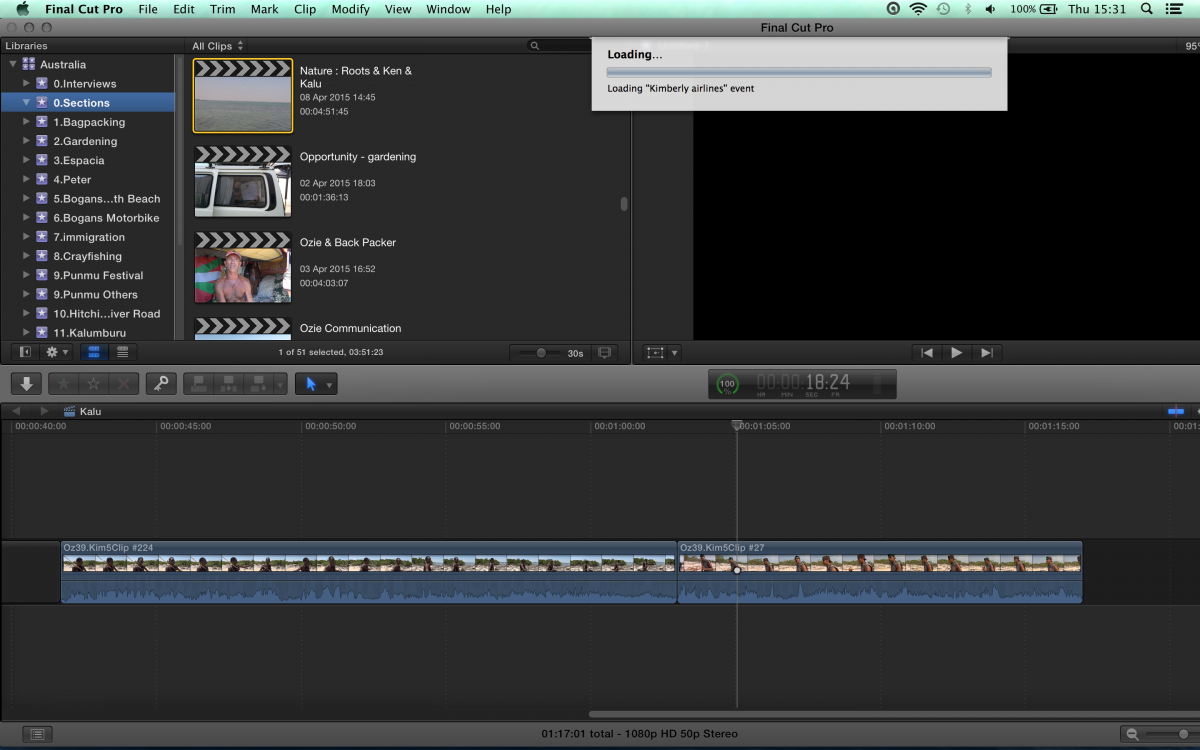
Replied by ArthurCool on topic BUG list for FCPX 10.1
Please Log in to join the conversation.
09 Apr 2015 14:47 #62406
by dgwvideo
Creating history....one edit at a time !
Replied by dgwvideo on topic BUG list for FCPX 10.1
I would suggest selecting the library in question and then deleting all generated files from the menu. Choose all render files, and perhaps also optimized and proxy files if you have any. Be advised that deleting these on a library of that size may take some time when you open them again if you need to transcode the media or re-render anything. But this often helps if there is a corrupted render file in one of the events.
I would then suggest you reboot and try opening FCPX while holding down the Command and Option keys. This will ask if you want to delete the preference files. Select yes and proceed. This process often fixes various FCPX issues. There will be some basic preferences you'll have to reset and FCPX will be in a default state, but you can reload your library and see if your events and projects begin functioning normally.
Without knowing your OS and FCPX versions, media types, etc. I am providing general troubleshooting information.
Note- read the following Apple support document for more info before you proceed.
support.apple.com/en-us/HT203477
I would then suggest you reboot and try opening FCPX while holding down the Command and Option keys. This will ask if you want to delete the preference files. Select yes and proceed. This process often fixes various FCPX issues. There will be some basic preferences you'll have to reset and FCPX will be in a default state, but you can reload your library and see if your events and projects begin functioning normally.
Without knowing your OS and FCPX versions, media types, etc. I am providing general troubleshooting information.
Note- read the following Apple support document for more info before you proceed.
support.apple.com/en-us/HT203477
Creating history....one edit at a time !
Please Log in to join the conversation.
