


- Posts: 6
- Thank you received: 0
3 Post Moderation Rule for New Boarders (25 Jan 2021)
New boarders will have their posts moderated - Don't worry if you cannot see your post immediately.
"Leave files in place" ghosted on Import FCP 10.1
- BlueWaterVA
-
 Topic Author
- Offline
- New Member
-

Less
More
27 Dec 2013 00:12 #37365
by BlueWaterVA
"Leave files in place" ghosted on Import FCP 10.1 was created by BlueWaterVA
Does anyone know what is causing my "Leave files in place" on the import page ghosted. I don't want to copy the files and end up having a duplicate of files on my computer. I am using an SSD for my main Scratch disk and a 7200 rpm 1GB drive for a secondary Scratch.
Please help if you can!
Please help if you can!
Please Log in to join the conversation.
- Tom Wolsky
-

- Offline
- Moderator
-

27 Dec 2013 00:22 #37366
by Tom Wolsky
Replied by Tom Wolsky on topic "Leave files in place" ghosted on Import FCP 10.1
Where are you importing from? File in a folder on your hard drive? Memory card? Camera? If the SSD is the system drive get another fast drive for your media.
Please Log in to join the conversation.
- BlueWaterVA
-
Topic Author
- Offline
- New Member
-
Less
More
- Posts: 6
- Thank you received: 0
27 Dec 2013 00:39 #37368
by BlueWaterVA
Replied by BlueWaterVA on topic "Leave files in place" ghosted on Import FCP 10.1
I copied the files from SDHC to a 7200 rpm drive which I plan to use for holding/storing. My system drive is a SATA 3 7200 rpm 1GB HD. I want to use the SSD strictly for editing, but I want to leave the files on the drive I copied them to.
Does this make sense?
Does this make sense?
Please Log in to join the conversation.
- Tom Wolsky
-
- Offline
- Moderator
-
27 Dec 2013 00:52 #37370
by Tom Wolsky
Replied by Tom Wolsky on topic "Leave files in place" ghosted on Import FCP 10.1
Is this a camera card you copied? You must copy off the card. Please give details or post screen shots of the content. Media from a camera card structure must be copied.
Please Log in to join the conversation.
- BlueWaterVA
-
Topic Author
- Offline
- New Member
-
Less
More
- Posts: 6
- Thank you received: 0
27 Dec 2013 01:17 #37373
by BlueWaterVA
Replied by BlueWaterVA on topic "Leave files in place" ghosted on Import FCP 10.1
Thanks Tom, I'll try that.
Please Log in to join the conversation.
03 Jan 2014 19:03 - 03 Jan 2014 19:08 #38008
by vwarheit
Replied by vwarheit on topic "Leave files in place" ghosted on Import FCP 10.1
I have had the same problem. I've got files copied from source cards (from Canon XF100 and Canon 5D), with new folder names (e.g. "BOSP_120413_Card 1 (5D)"). After (accidentally) upgrading to 10.1 (I bought the software the day after it was released, not realizing I'd bought a brand-new update from the trial software I'd been using), the 'leave files in place' option was greyed out. So I went ahead and copied files over onto my internal hard drive so I could start working. Now, reading advice from Larry Jordan, I'm trying to clean up my library system and move my project/event/library files back onto the hard drive, but I'm unable to import the media without actively copying it - which I certainly don't want to do!
My assumption is that for some reason, FCPX thinks that the hard drive is a camera card. But I don't know what to do to convince it that it's not. Is there something I need to do to the folder structure? Help!
Thanks -
Vanessa
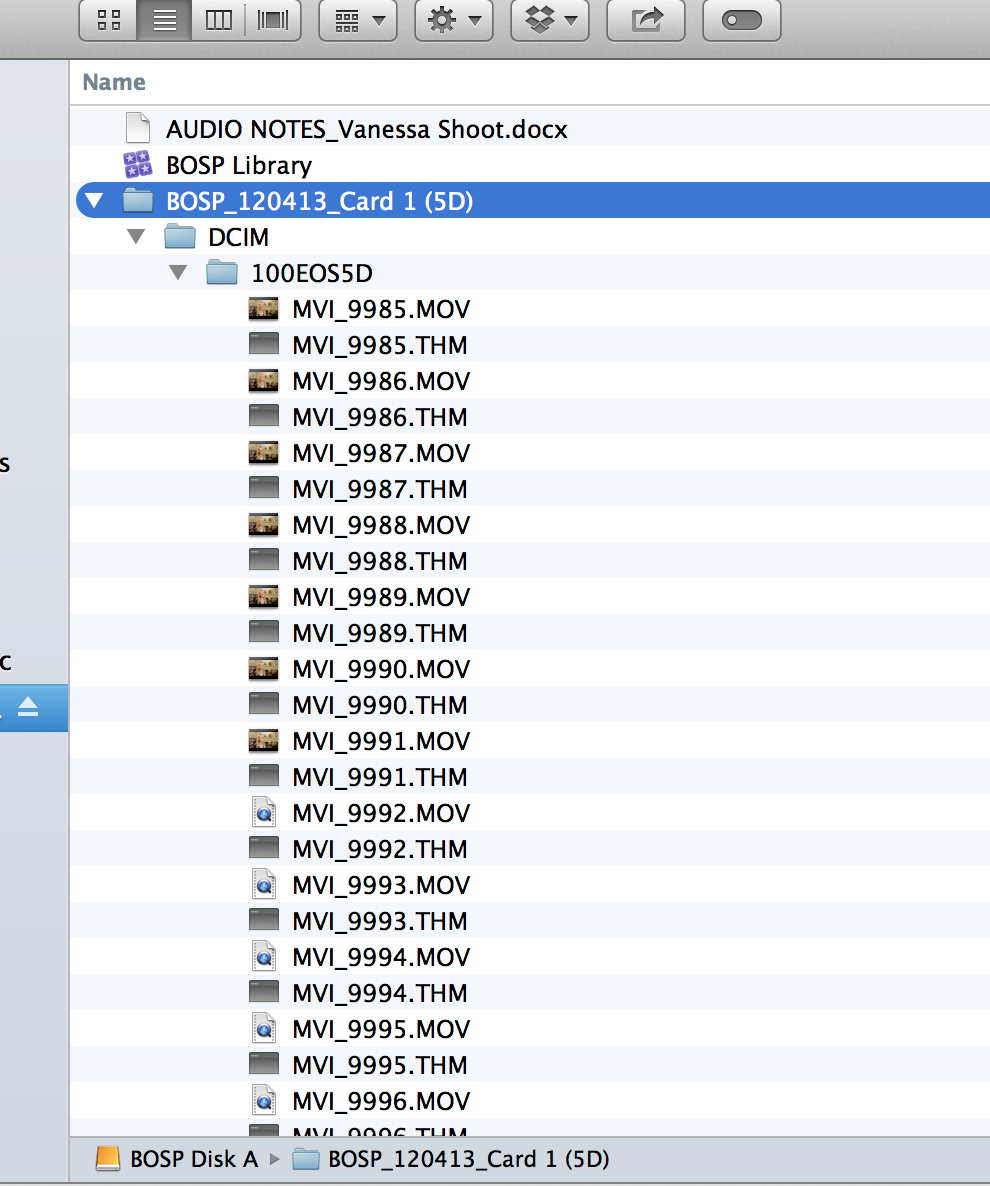
My assumption is that for some reason, FCPX thinks that the hard drive is a camera card. But I don't know what to do to convince it that it's not. Is there something I need to do to the folder structure? Help!
Thanks -
Vanessa
Last edit: 03 Jan 2014 19:08 by vwarheit. Reason: made it easier to read & clarified something
Please Log in to join the conversation.
- Tom Wolsky
-
- Offline
- Moderator
-
03 Jan 2014 19:10 #38010
by Tom Wolsky
Replied by Tom Wolsky on topic "Leave files in place" ghosted on Import FCP 10.1
That's a camera archive. The file must be copied from that location. It doesn't have to be copied into a library, but it must be copied somewhere out of that folder structure. If you move the files out of that folder structure you can import them and leave then where they are. You do however then lose the ability to import ranges.
Please Log in to join the conversation.
03 Jan 2014 19:18 #38011
by vwarheit
Replied by vwarheit on topic "Leave files in place" ghosted on Import FCP 10.1
Hi Tom,
Thanks so much for the quick reply. I see what you mean - so I decided to try to import instead the media I'd already copied off of the external (camera archive) drive. But this copied media is locked up in a library on the hard drive - and I can't seem to import it (i.e. link to it) from a new library. When I go to 'import media' I can't see any of the media inside the library. Any thoughts on how to get at media that's been imported into a library?
My basic issue is that I'm trying to move an already-started event out of one (improperly created) library into a new library, and MOVE the relevant media files to that new library, rather than duplicating them. If you have any insights into how to do this, I will be forever grateful!
Vanessa
Thanks so much for the quick reply. I see what you mean - so I decided to try to import instead the media I'd already copied off of the external (camera archive) drive. But this copied media is locked up in a library on the hard drive - and I can't seem to import it (i.e. link to it) from a new library. When I go to 'import media' I can't see any of the media inside the library. Any thoughts on how to get at media that's been imported into a library?
My basic issue is that I'm trying to move an already-started event out of one (improperly created) library into a new library, and MOVE the relevant media files to that new library, rather than duplicating them. If you have any insights into how to do this, I will be forever grateful!
Vanessa
Please Log in to join the conversation.
- haysoos123
-
- Offline
- Platinum Member
-

Less
More
- Posts: 402
- Thank you received: 72
03 Jan 2014 19:25 #38014
by haysoos123
Replied by haysoos123 on topic "Leave files in place" ghosted on Import FCP 10.1
Not sure, but it's probably because the files are in a structure that looks like a camera card. In this case, it's easy to go into the folder, sort by file type, and just move all the .mov files into an external folder where you're going to be keeping the media (I'm assuming you don't want to use managed media). From that folder, you should be able to import while leaving the files in place. This pretty much makes file management work like FCP7 or Premiere. I prefer this method because it's a lot easier to move libraries around because they don't contain the media, and it's perfect if you're using shared storage and have clients who like to reuse a lot of older footage.
Please Log in to join the conversation.
- Tom Wolsky
-
- Offline
- Moderator
-
03 Jan 2014 19:26 #38017
by Tom Wolsky
Replied by Tom Wolsky on topic "Leave files in place" ghosted on Import FCP 10.1
There is a Move Event function in the File menu.
Please Log in to join the conversation.
03 Jan 2014 20:00 - 03 Jan 2014 20:02 #38033
by vwarheit
Replied by vwarheit on topic "Leave files in place" ghosted on Import FCP 10.1
Thanks Tom and Haysoos!
But the plot thickens...
I used the 'move event' using Tom's miracle pull-down menu, and yes, now the media shows up in the new event! BUT, FCPX is now taking forever - in the background - to move the event. Since my super-fast brand-new MacBookPro is taking a LONG time to do this (5 minutes and it's 7% done), I have a sneaking suspicion that this has not fixed the problem, and that I am simply copying the media rather than linking to it. (I didn't get a media dialogue box when I chose to Move Event.)
UPDATE: Looking at the target drive (now 34% through, 20 minutes later), it seems some media is being copied, while other media is being linked. Ay caramba.
Thoughts?
But the plot thickens...
I used the 'move event' using Tom's miracle pull-down menu, and yes, now the media shows up in the new event! BUT, FCPX is now taking forever - in the background - to move the event. Since my super-fast brand-new MacBookPro is taking a LONG time to do this (5 minutes and it's 7% done), I have a sneaking suspicion that this has not fixed the problem, and that I am simply copying the media rather than linking to it. (I didn't get a media dialogue box when I chose to Move Event.)
UPDATE: Looking at the target drive (now 34% through, 20 minutes later), it seems some media is being copied, while other media is being linked. Ay caramba.
Thoughts?
Last edit: 03 Jan 2014 20:02 by vwarheit. Reason: screen grabs - can't get them to show up
Please Log in to join the conversation.
- haysoos123
-
- Offline
- Platinum Member
-
Less
More
- Posts: 402
- Thank you received: 72
04 Jan 2014 00:27 #38072
by haysoos123
Replied by haysoos123 on topic "Leave files in place" ghosted on Import FCP 10.1
You can just let if finish and then go to file->consolidate event... and you should be able to move them to an external location.
Please Log in to join the conversation.
- Andreas Kiel
-
- Offline
- Platinum Member
-
Less
More
- Posts: 1077
- Thank you received: 189
04 Jan 2014 05:45 - 04 Jan 2014 07:19 #38082
by Andreas Kiel
Replied by Andreas Kiel on topic "Leave files in place" ghosted on Import FCP 10.1
Here is another option - though not really elegant.
Create an intermediate library on the external disk.
Import the parts of the files or the complete files into that one.
Quit FCPX and navigate to that library open it with "Show Package Contents" and move all clips from the Original Media folder into another folder on that drive.
Close the package and reopen FCPX. Now you can import those clips without copying them to your work libraries.
-Andreas
P.S. Here a link for a little shell script app which will open all 'Original Media" folders of a selected library in Finder.
dl.dropboxusercontent.com/u/63959366/fcp...%20View%20Runner.zip
Create an intermediate library on the external disk.
Import the parts of the files or the complete files into that one.
Quit FCPX and navigate to that library open it with "Show Package Contents" and move all clips from the Original Media folder into another folder on that drive.
Close the package and reopen FCPX. Now you can import those clips without copying them to your work libraries.
-Andreas
P.S. Here a link for a little shell script app which will open all 'Original Media" folders of a selected library in Finder.
dl.dropboxusercontent.com/u/63959366/fcp...%20View%20Runner.zip
Last edit: 04 Jan 2014 07:19 by Andreas Kiel.
Please Log in to join the conversation.
14 Oct 2014 16:42 #54099
by ballstadt
Replied by ballstadt on topic "Leave files in place" ghosted on Import FCP 10.1
So, sorry to chime in on an old topic, but I've given up on using Adobe CC as an FCP7 replacement and I'm looking at going to FCPX.
So I have this straight....
I have about 2TB of camera archives, shot with an HMC-150 in AVCHD. They are on a drive called Archive. Complete SD card structures intact.
To utilize the same archive system, I must either:
Am I right?
So I have this straight....
I have about 2TB of camera archives, shot with an HMC-150 in AVCHD. They are on a drive called Archive. Complete SD card structures intact.
To utilize the same archive system, I must either:
- A) Get an additional drive and clone my Archive, then remove all the extra file structure from each and every SD card (over 400 of them), or
 Give up the ability to ever use FCP7 again to rebuild an old project, and still have to remove all the extra file structure from each and every SD card in my Archive.
Am I right?
Please Log in to join the conversation.

14 Oct 2014 18:55 #54105
by BenB
Replied by BenB on topic "Leave files in place" ghosted on Import FCP 10.1
FCPX won't allow files to be kept in place on an SDI card. Why should it? You'd just lose stuff. Applies to camera archives, too. They are backups of your cards, not sources to store working files.
Please Log in to join the conversation.
14 Oct 2014 19:20 #54108
by ballstadt
Replied by ballstadt on topic "Leave files in place" ghosted on Import FCP 10.1
If you reread my post, it specifically says they're copies of my camera archives on a 2TB drive. This is my work drive. I also have a backup automated nightly to a server across campus.
What I said was that I kept the file structures of the cards intact when I copied them to my work drive so that I could Log & Transfer them into FCP7, and this is not allowing me to import them into FCPX while leaving the original media in place.
Thanks for your concern, but I'm not working off SD cards (not SDI cards, either), and I'm not putting my archive at risk.
I've already figured out a solution.
What I said was that I kept the file structures of the cards intact when I copied them to my work drive so that I could Log & Transfer them into FCP7, and this is not allowing me to import them into FCPX while leaving the original media in place.
Thanks for your concern, but I'm not working off SD cards (not SDI cards, either), and I'm not putting my archive at risk.
I've already figured out a solution.
Please Log in to join the conversation.
25 Jan 2016 20:29 #72541
by lizjperl
Replied by lizjperl on topic "Leave files in place" ghosted on Import FCP 10.1
What solution did you figure out? Just trying to import files from my external with "leave in place" option
Please Log in to join the conversation.
