


- Posts: 10
- Thank you received: 0
3 Post Moderation Rule for New Boarders (25 Jan 2021)
New boarders will have their posts moderated - Don't worry if you cannot see your post immediately.
Converting mpeg2 files to prores?
26 Dec 2013 00:38 #37239
by airosol
Converting mpeg2 files to prores? was created by airosol
Hey everyone,
First post for me, but wanted to say thanks in advance to everyone on this forum for all the valuable knowledge I've gleaned here.
Here's the issue: I had some film transferred and instead of giving me prores files as requested, they gave me mpeg 2 files that I had to rip off a dvd. Problem is, I can't find anything other than dubious scamware that claims to convert these files to prores or any other format that is FCPX friendly. I am using final cut pro 10.0.8 and mavericks.
Tried MPEG Streamclip to no avail. Don't have Compressor but wondered if it might work. Or am I missing any other software that people have had success with?
Anyone have any experience with this? I could go back to the guy that digitized this for me, but he's out of town and was hoping for a quicker solution.
Thanks,
Mark
First post for me, but wanted to say thanks in advance to everyone on this forum for all the valuable knowledge I've gleaned here.
Here's the issue: I had some film transferred and instead of giving me prores files as requested, they gave me mpeg 2 files that I had to rip off a dvd. Problem is, I can't find anything other than dubious scamware that claims to convert these files to prores or any other format that is FCPX friendly. I am using final cut pro 10.0.8 and mavericks.
Tried MPEG Streamclip to no avail. Don't have Compressor but wondered if it might work. Or am I missing any other software that people have had success with?
Anyone have any experience with this? I could go back to the guy that digitized this for me, but he's out of town and was hoping for a quicker solution.
Thanks,
Mark
Please Log in to join the conversation.
- Tom Wolsky
-

- Offline
- Moderator
-

26 Dec 2013 00:46 #37240
by Tom Wolsky
Replied by Tom Wolsky on topic Converting mpeg2 files to prores?
Compressor won't do this. You need the latest MPEG Streamclip beta version. It should work perfectly for this.
Please Log in to join the conversation.
26 Dec 2013 01:23 #37241
by airosol
Replied by airosol on topic Converting mpeg2 files to prores?
Thanks for the reply!
I tried this with version 1.9.3b8
I got this message:
You must install the MPEG-2 Playback Component before trying to export MPEG2 files! You can buy it online from Apple:
www.apple.com/quicktime/mpeg2
So I bought it from apple and tried to install it but it says it will only run on an earlier version of the mac system. I'm running 10.8.5.
Any ideas?
Thanks,
Mark
I tried this with version 1.9.3b8
I got this message:
You must install the MPEG-2 Playback Component before trying to export MPEG2 files! You can buy it online from Apple:
www.apple.com/quicktime/mpeg2
So I bought it from apple and tried to install it but it says it will only run on an earlier version of the mac system. I'm running 10.8.5.
Any ideas?
Thanks,
Mark
Please Log in to join the conversation.
26 Dec 2013 01:29 #37242
by airosol
Replied by airosol on topic Converting mpeg2 files to prores?
Hold on....just got it to work. Converting now. That was odd. Don't know what it wouldn't load the Mpeg playback component but it seems to have done it now.
Please Log in to join the conversation.
26 Dec 2013 01:50 #37243
by airosol
Replied by airosol on topic Converting mpeg2 files to prores?
Yes, got that to work. Thanks!
By the way, would you have a recommendation on a format to convert it to prior to prores? If I convert it to h264 I can use 5Drgb to convert to prores, but that seems like an extra lossy step.
Prores doesn't seem to be an option in Streamclip for some reason under quicktime.
I know I've seen it there before when converting h264 files.
Any thoughts on this?
Thanks very much,
Mark
By the way, would you have a recommendation on a format to convert it to prior to prores? If I convert it to h264 I can use 5Drgb to convert to prores, but that seems like an extra lossy step.
Prores doesn't seem to be an option in Streamclip for some reason under quicktime.
I know I've seen it there before when converting h264 files.
Any thoughts on this?
Thanks very much,
Mark
Please Log in to join the conversation.
- Tom Wolsky
-
- Offline
- Moderator
-
26 Dec 2013 02:04 #37245
by Tom Wolsky
Replied by Tom Wolsky on topic Converting mpeg2 files to prores?
It should be there if you downloaded the FCP additional content. It is there for me. Post a screen shot of what you see.
Please Log in to join the conversation.
26 Dec 2013 04:29 - 26 Dec 2013 04:29 #37255
by airosol
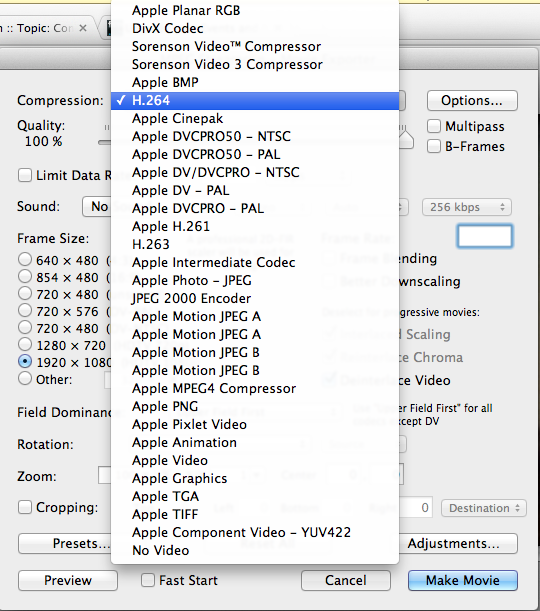
Here's what I'm getting. Also, this is not the machine I have FCP on. I'm using this machine to rip the DVD. Maybe that's the issue?
m
Replied by airosol on topic Converting mpeg2 files to prores?
Here's what I'm getting. Also, this is not the machine I have FCP on. I'm using this machine to rip the DVD. Maybe that's the issue?
m
Last edit: 26 Dec 2013 04:29 by airosol. Reason: Double image post
Please Log in to join the conversation.
- Tom Wolsky
-
- Offline
- Moderator
-
26 Dec 2013 04:35 #37258
by Tom Wolsky
Replied by Tom Wolsky on topic Converting mpeg2 files to prores?
Unless you have Apple pro apps installed you don't get ProRes for production only for playback.
Please Log in to join the conversation.
26 Dec 2013 15:44 #37333
by airosol
Replied by airosol on topic Converting mpeg2 files to prores?
I see. I'll load my FCPX on that machine then as well.
Thanks for all your help!
m
Thanks for all your help!
m
Please Log in to join the conversation.
26 Dec 2013 15:57 #37335
by airosol
Replied by airosol on topic Converting mpeg2 files to prores?
Hey Tom,
So I loaded FCPX on the machine with the DVD reader and still am not getting the prores option in Streamclip. Is there something else I have to do to access that? Is it a streamclip option associated with that program or something that gets loaded behind the scenes when you install FCPX?
Thanks for your time,
Mark
So I loaded FCPX on the machine with the DVD reader and still am not getting the prores option in Streamclip. Is there something else I have to do to access that? Is it a streamclip option associated with that program or something that gets loaded behind the scenes when you install FCPX?
Thanks for your time,
Mark
Please Log in to join the conversation.
- Tom Wolsky
-
- Offline
- Moderator
-
26 Dec 2013 16:11 #37336
by Tom Wolsky
Replied by Tom Wolsky on topic Converting mpeg2 files to prores?
Did you download the additional content from the FCP menu? You should reboot after that.
Please Log in to join the conversation.
26 Dec 2013 16:33 #37337
by airosol
Replied by airosol on topic Converting mpeg2 files to prores?
Bingo!
Thanks very much. I never would have found that.
Many thanks and happy holidays!
m
Thanks very much. I never would have found that.
Many thanks and happy holidays!
m
Please Log in to join the conversation.
