


- Posts: 87
- Thank you received: 5
3 Post Moderation Rule for New Boarders (25 Jan 2021)
New boarders will have their posts moderated - Don't worry if you cannot see your post immediately.
Importing Question
25 Dec 2013 12:41 #37212
by odedh
Importing Question was created by odedh
Hi Everyone,
I have something of what might seem as a silly question so bare with me please
When I import from a Camera Archive, or from a copy of a SD card which resides on my Hard Drive FCPX will not allow me to keep the file in it's place and will create a duplicate of those files inside the Library or in a Folder of my choosing. My question is why do I have to copy the files? and should I delete the camera archive since those "original files" are essentially the same files with the metadata embedded in them.
Since lets say that for a certain project I know I will do a lot of effects and some colour correction on, so I will create optimised media in order to keep the fidelity, I end up having 3 copies of the same card.. the original copy of the card which i manually copied, the "original media" folder and the "optimised media" folder
so what is your workflow and recommendations?
Thanks
I have something of what might seem as a silly question so bare with me please
When I import from a Camera Archive, or from a copy of a SD card which resides on my Hard Drive FCPX will not allow me to keep the file in it's place and will create a duplicate of those files inside the Library or in a Folder of my choosing. My question is why do I have to copy the files? and should I delete the camera archive since those "original files" are essentially the same files with the metadata embedded in them.
Since lets say that for a certain project I know I will do a lot of effects and some colour correction on, so I will create optimised media in order to keep the fidelity, I end up having 3 copies of the same card.. the original copy of the card which i manually copied, the "original media" folder and the "optimised media" folder
so what is your workflow and recommendations?
Thanks
Please Log in to join the conversation.
- ronny courtens
-

- Offline
- Moderator
-

Less
More
- Posts: 4455
- Thank you received: 962
25 Dec 2013 17:42 - 25 Dec 2013 17:49 #37216
by ronny courtens
Replied by ronny courtens on topic Importing Question
Hi Oded,
There are no silly questions, only silly answers
The reasoning behind this is that card folders and camera archives are considered as intermediate media containers, so FCPX will indeed not allow you to keep the media from a camera archive or a camera card in place but will ask you to either store the imported media inside the Library or on an external drive. As you may have found out this process is very quick.
When the importing is done you can delete the intermediate media containers, or you can keep them as extra safety backups on an external drive that you keep away from your system. Should you ever have problems your backups are your best (and often your only) friends for being able to restore your media.
If you keep the original cards or archives and you also create optimized media you will indeed have 3 copies of the same media. Keeping 2 backups of your media is considered as normal by many serious editors, and certainly within large facilities. But if you think you don't really need to keep the optimized media anymore (you can always recreate them whenever you need them) this is what you can do:
Select all the Events in the original Library and choose File > Copy Events to Library > New Library.
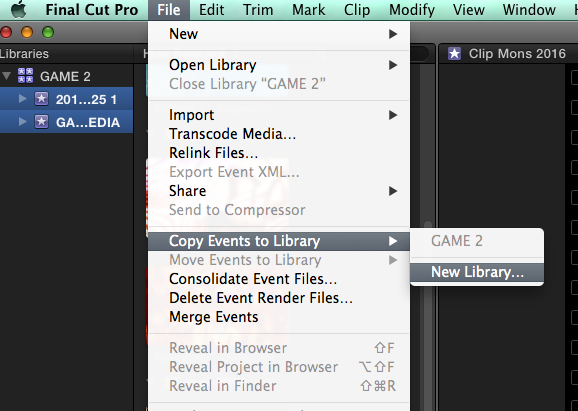
Give the new Library a name and press OK. A window will pop up giving you the option to include Optimized and/or Proxy media or not.
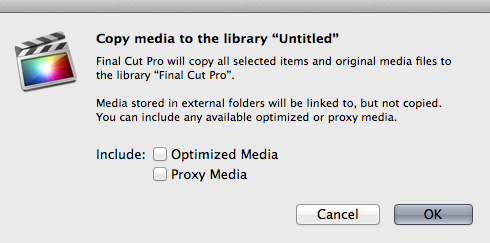
If you choose not to copy these media and you press OK FCPX will create a duplicate of your original Library but without any Optimized or Proxy files. Great for archiving purposes or for making space on your Library drive in case you need to. Render files are never included in a "Copy Event to Library" action, so your duplicate Library will be as lean as can be. When the action is completed you can safely remove the original Library from your Library drive.
Of course all this would be easier if we had an option to just delete Optimized and/or Proxy files right from within FCPX, just as we can do with Render files. I think this will be possible as soon as Apple is sure that people will stop messing around with FCPX media files at Finder level
- Ronny
There are no silly questions, only silly answers
The reasoning behind this is that card folders and camera archives are considered as intermediate media containers, so FCPX will indeed not allow you to keep the media from a camera archive or a camera card in place but will ask you to either store the imported media inside the Library or on an external drive. As you may have found out this process is very quick.
When the importing is done you can delete the intermediate media containers, or you can keep them as extra safety backups on an external drive that you keep away from your system. Should you ever have problems your backups are your best (and often your only) friends for being able to restore your media.
If you keep the original cards or archives and you also create optimized media you will indeed have 3 copies of the same media. Keeping 2 backups of your media is considered as normal by many serious editors, and certainly within large facilities. But if you think you don't really need to keep the optimized media anymore (you can always recreate them whenever you need them) this is what you can do:
Select all the Events in the original Library and choose File > Copy Events to Library > New Library.
Give the new Library a name and press OK. A window will pop up giving you the option to include Optimized and/or Proxy media or not.
If you choose not to copy these media and you press OK FCPX will create a duplicate of your original Library but without any Optimized or Proxy files. Great for archiving purposes or for making space on your Library drive in case you need to. Render files are never included in a "Copy Event to Library" action, so your duplicate Library will be as lean as can be. When the action is completed you can safely remove the original Library from your Library drive.
Of course all this would be easier if we had an option to just delete Optimized and/or Proxy files right from within FCPX, just as we can do with Render files. I think this will be possible as soon as Apple is sure that people will stop messing around with FCPX media files at Finder level
- Ronny
Last edit: 25 Dec 2013 17:49 by ronny courtens.
Please Log in to join the conversation.
26 Dec 2013 08:36 #37284
by odedh
Replied by odedh on topic Importing Question
Thanks Ronny, makes sense. I'm just wondering why if you chose to optimise there isn't an option not to copy the files, like FCP7 log & transfer
Please Log in to join the conversation.
26 Dec 2013 09:12 #37286
by Seamusvfx
Replied by Seamusvfx on topic Importing Question
The reasoning behind this is that card folders and camera archives are considered as intermediate media containers, so FCPX will indeed not allow you to keep the media from a camera archive or a camera card in place but will ask you to either store the imported media inside the Library or on an external drive. As you may have found out this process is very quick.
There's your answer from Ronny's post. You can have the media in a folder on your hard drive as external media, or you can have the media managed in a library, but not in a camera archive. Why? Who knows? FCPX is a lot more complicated than FCP7, and importing is not such a simple matter of adding a path to the media.
There's your answer from Ronny's post. You can have the media in a folder on your hard drive as external media, or you can have the media managed in a library, but not in a camera archive. Why? Who knows? FCPX is a lot more complicated than FCP7, and importing is not such a simple matter of adding a path to the media.
Please Log in to join the conversation.
