


- Posts: 1
- Thank you received: 0
3 Post Moderation Rule for New Boarders (25 Jan 2021)
New boarders will have their posts moderated - Don't worry if you cannot see your post immediately.
FCPX 10.1 Sharing Over Network Question
- Dillon_Mangum
-
 Topic Author
- Offline
- New Member
-

Less
More
20 Dec 2013 00:29 #36607
by Dillon_Mangum
FCPX 10.1 Sharing Over Network Question was created by Dillon_Mangum
Hi all! I searched this entire forum for a while only to find that there are no answers to my questions.
I work with a total of 5 guys who each have their own MacPros and iMacs to work on Football videos that are turned around on a daily basis using FCP7. We have finally decided to upgrade to the latest FCPX 10.1 and are having a hard time figuring out what we should do about our shared storage. I have not been able to find any resources online regarding 10.1 and its ability to share files from one central location onto multiple machines. Our question is: Is there anyway for us to ingest our footage into one central location and somehow be able to access it on each Mac and all be working with the same footage? Two guys are editing, one guy is working on audio, one guy is doing special effects, and the last guy is color correcting as the editors finalize their work. We shoot edit and publish around 5 videos a week so our turnaround time is critical. Like I said, multiple guys are working on a project at the same time. Is this possible with the new FCPX? We would rather work on the same project instead of constantly pulling audio from the audio projects, and pull color corrected footage from a different project.
Thanks in advance!
I work with a total of 5 guys who each have their own MacPros and iMacs to work on Football videos that are turned around on a daily basis using FCP7. We have finally decided to upgrade to the latest FCPX 10.1 and are having a hard time figuring out what we should do about our shared storage. I have not been able to find any resources online regarding 10.1 and its ability to share files from one central location onto multiple machines. Our question is: Is there anyway for us to ingest our footage into one central location and somehow be able to access it on each Mac and all be working with the same footage? Two guys are editing, one guy is working on audio, one guy is doing special effects, and the last guy is color correcting as the editors finalize their work. We shoot edit and publish around 5 videos a week so our turnaround time is critical. Like I said, multiple guys are working on a project at the same time. Is this possible with the new FCPX? We would rather work on the same project instead of constantly pulling audio from the audio projects, and pull color corrected footage from a different project.
Thanks in advance!
Please Log in to join the conversation.
- Tom Wolsky
-

- Offline
- Moderator
-

20 Dec 2013 00:35 #36608
by Tom Wolsky
Replied by Tom Wolsky on topic FCPX 10.1 Sharing Over Network Question
You cannot all access the media simultaneously. You can have a libraries on the shared storage but only one person at a time can access it.
Please Log in to join the conversation.

20 Dec 2013 00:38 - 20 Dec 2013 00:40 #36609
by BenB
Replied by BenB on topic FCPX 10.1 Sharing Over Network Question
Place the media on the shared storage. Then every editor can import to their own Library from there, and tell FCP X to leave the media in place. Then multiple editors can access the same clip at the same time.
You can exchange the Projects via XML if needed.
In FCP 7, you could not all have the same Timeline open at one time, so I'm not sure what is different here.
You can exchange the Projects via XML if needed.
In FCP 7, you could not all have the same Timeline open at one time, so I'm not sure what is different here.
Last edit: 20 Dec 2013 00:40 by BenB.
Please Log in to join the conversation.
- Darren Roark
-
- Offline
- Platinum Member
-

20 Dec 2013 00:48 #36610
by Darren Roark
Replied by Darren Roark on topic FCPX 10.1 Sharing Over Network Question
I just tested opening a library on my NAS, and it gave the warning "Unsupported volume type, select a local or SAN volume"
Is it still SAN only?
Is it still SAN only?
Please Log in to join the conversation.
- Sam Mestman
-

- Offline
- Junior Member
-

Less
More
- Posts: 20
- Thank you received: 9
20 Dec 2013 00:56 #36611
by Sam Mestman
Replied by Sam Mestman on topic FCPX 10.1 Sharing Over Network Question
You can definitely work from the same footage.
The biggest thing people need to understand about this release is to use sym links. KEEP YOUR MEDIA OUT OF YOUR LIBRARY.
If you do that, and every editor uses sym links, you can work seamlessly in a SAN environment without issue... with editors using the exact same media at the same time.
Keep your libraries light. Keep your media elsewhere, and just use the libraries to hold all of your symlinks. If you do that, collaborative editing becomes very easy.
The biggest thing people need to understand about this release is to use sym links. KEEP YOUR MEDIA OUT OF YOUR LIBRARY.
If you do that, and every editor uses sym links, you can work seamlessly in a SAN environment without issue... with editors using the exact same media at the same time.
Keep your libraries light. Keep your media elsewhere, and just use the libraries to hold all of your symlinks. If you do that, collaborative editing becomes very easy.
Please Log in to join the conversation.
20 Dec 2013 02:20 #36628
by BenB
Replied by BenB on topic FCPX 10.1 Sharing Over Network Question
Apple documents state SAN only. yup...
Please Log in to join the conversation.
- Darren Roark
-
- Offline
- Platinum Member
-
20 Dec 2013 02:59 #36630
by Darren Roark
Replied by Darren Roark on topic FCPX 10.1 Sharing Over Network Question
Got it. I was confused by how many reviewers were getting so excited that 'network storage was back'. As far as I knew it was back several versions ago.
Please Log in to join the conversation.
21 Dec 2013 19:11 - 21 Dec 2013 19:11 #36872
by TraiGuzie
Replied by TraiGuzie on topic FCPX 10.1 Sharing Over Network Question
I don't get it. Why does apple add this SAN restriction?
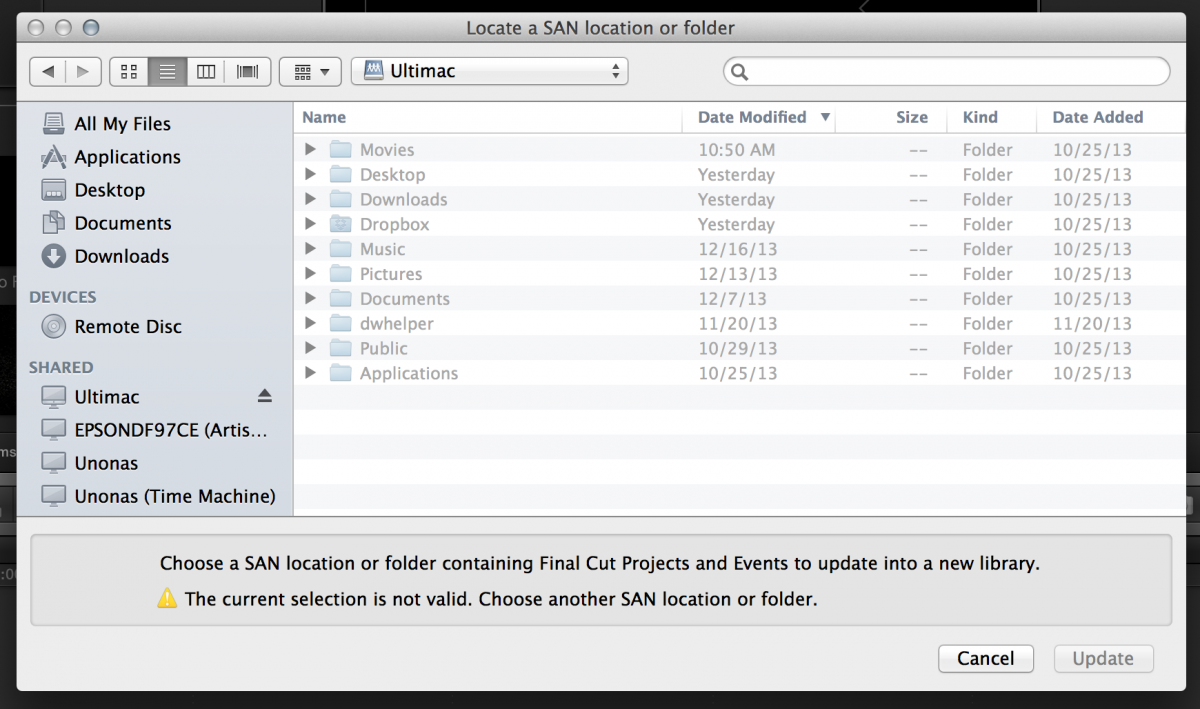
Before 10.1 I could mount Sparse bundles from my iMac on my rMPB and edit away. The new Library format is vastly superior to a the sparse bundle hack, but it won't let me mount libraries over my local home network.
Is there a way to access libraries from one computer to another over wifi?
Before 10.1 I could mount Sparse bundles from my iMac on my rMPB and edit away. The new Library format is vastly superior to a the sparse bundle hack, but it won't let me mount libraries over my local home network.
Is there a way to access libraries from one computer to another over wifi?
Last edit: 21 Dec 2013 19:11 by TraiGuzie. Reason: Clarification
Please Log in to join the conversation.
21 Dec 2013 21:45 #36881
by Vann
Replied by Vann on topic FCPX 10.1 Sharing Over Network Question
FYI...FCPX 10.1 in a shared environment...made possible by the new Library set up...
www.10dot1.co.uk/content/FCPXInASharedEnvironment_FINAL.pdf
www.10dot1.co.uk/content/FCPXInASharedEnvironment_FINAL.pdf
Please Log in to join the conversation.
