


- Posts: 1077
- Thank you received: 189
3 Post Moderation Rule for New Boarders (25 Jan 2021)
New boarders will have their posts moderated - Don't worry if you cannot see your post immediately.
Cut thru
- Andreas Kiel
-
 Topic Author
- Offline
- Platinum Member
-

Less
More
19 Dec 2013 18:59 #36518
by Andreas Kiel
Cut thru was created by Andreas Kiel
Mentioned in the release notes of 10.1
• Through edits displayed on all clip types.
I don't see those
• Join Through Edit command removes bladed cuts to clips in the timeline
Can't find the command
But I only tested for an hour or so.
-Andreas
• Through edits displayed on all clip types.
I don't see those
• Join Through Edit command removes bladed cuts to clips in the timeline
Can't find the command
But I only tested for an hour or so.
-Andreas
Please Log in to join the conversation.
- Tom Wolsky
-

- Offline
- Moderator
-

19 Dec 2013 19:01 #36521
by Tom Wolsky
Replied by Tom Wolsky on topic Cut thru
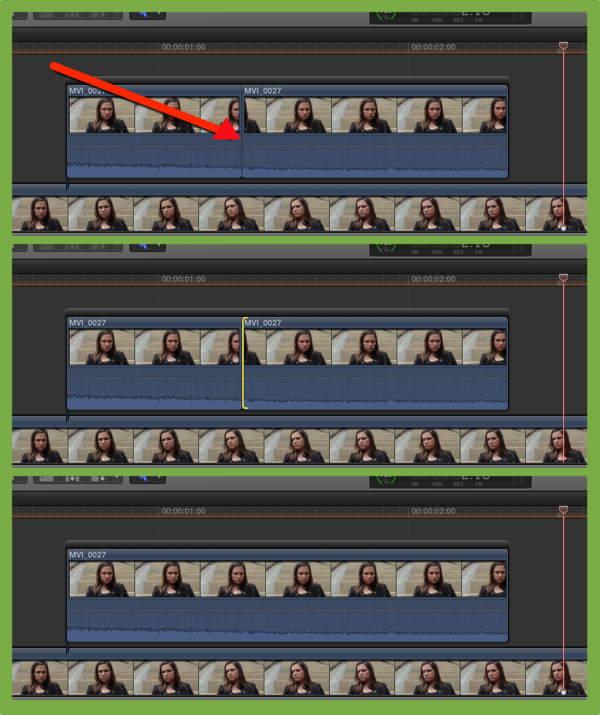
Through edits aren't displayed but they can be deleted.
Please Log in to join the conversation.
- Andreas Kiel
-
Topic Author
- Offline
- Platinum Member
-
Less
More
- Posts: 1077
- Thank you received: 189
19 Dec 2013 19:08 #36524
by Andreas Kiel
Replied by Andreas Kiel on topic Cut thru
So its an initial bug?
Also I can't find way to delete them for any other clips rather those in the primary storyline.
-Andreas
Also I can't find way to delete them for any other clips rather those in the primary storyline.
-Andreas
Please Log in to join the conversation.
- Tom Wolsky
-
- Offline
- Moderator
-
19 Dec 2013 19:12 #36527
by Tom Wolsky
Replied by Tom Wolsky on topic Cut thru
Not working on a secondary storyline?
Please Log in to join the conversation.


- Andreas Kiel
-
Topic Author
- Offline
- Platinum Member
-
Less
More
- Posts: 1077
- Thank you received: 189
19 Dec 2013 22:11 #36584
by Andreas Kiel
Replied by Andreas Kiel on topic Cut thru
Hi Ben,
I think I realize what you showed with the screenshot.
My little timeline it looks different.
When I'm back to machine tomorrow afternoon I'll some test and send some screenshots.
Thanks
Andreas
I think I realize what you showed with the screenshot.
My little timeline it looks different.
When I'm back to machine tomorrow afternoon I'll some test and send some screenshots.
Thanks
Andreas
Please Log in to join the conversation.
- Tom Wolsky
-
- Offline
- Moderator
-
19 Dec 2013 22:30 #36587
by Tom Wolsky
Replied by Tom Wolsky on topic Cut thru
It depends on the media. The dotted line doesn't appear on a generator or title, but the edit can still be deleted.
Please Log in to join the conversation.
20 Dec 2013 01:49 #36621
by BenB
A definite solid line shows up on Titles and Generators, yes. And it is cool you can delete that, too. But if you Blade a Title or Generator, and change one side or the other, then delete the edit line, it all reverts to the settings of the first instance (to the left of the edit point). So watch out for that.
Please Log in to join the conversation.
- Tom Wolsky
-
- Offline
- Moderator
-
20 Dec 2013 01:54 #36622
by Tom Wolsky
Replied by Tom Wolsky on topic Cut thru
Yes. Same happens on a color corrected split. I think that was in same in 7.
Please Log in to join the conversation.
- Andreas Kiel
-
Topic Author
- Offline
- Platinum Member
-
Less
More
- Posts: 1077
- Thank you received: 189
20 Dec 2013 10:43 - 20 Dec 2013 10:47 #36660
by Andreas Kiel
Replied by Andreas Kiel on topic Cut thru
Hi Ben,
I had a look at your screenshot today on a bigger screen.
Now I understand the difference between my questions and your answer (Tom's as well)
You are talking about a secondary storyline.
What I was asking about was having two synched clips connected and making a blade all.
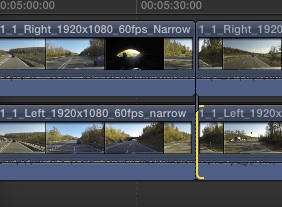
I need to do cause special parts of the (3D stereo) clips need some special treatment.
If the cuts need to be changed the trim mode is tedious.
After I read to changes in 10.1 I was more than happy to find the above mentioned announcements.
The way it works – Tom said - you don't see whether there is a cut thru. But if you know there is a cut thru you can easily delete it. The connected clip will still have the cut.
I can't be deleted.
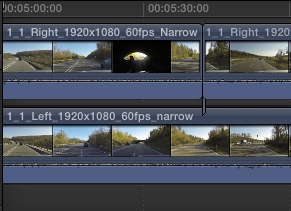
Therefore you have to delete one part of the connected clip and extend it to the correct duration.
Anyway that's way better than before.
- Andreas
P.S. Just realised that the filmstrip view looks different for the two "tracks" – they are matching in the canvas.
Any reason why?
I had a look at your screenshot today on a bigger screen.
Now I understand the difference between my questions and your answer (Tom's as well)
You are talking about a secondary storyline.
What I was asking about was having two synched clips connected and making a blade all.
I need to do cause special parts of the (3D stereo) clips need some special treatment.
If the cuts need to be changed the trim mode is tedious.
After I read to changes in 10.1 I was more than happy to find the above mentioned announcements.
The way it works – Tom said - you don't see whether there is a cut thru. But if you know there is a cut thru you can easily delete it. The connected clip will still have the cut.
I can't be deleted.
Therefore you have to delete one part of the connected clip and extend it to the correct duration.
Anyway that's way better than before.
- Andreas
P.S. Just realised that the filmstrip view looks different for the two "tracks" – they are matching in the canvas.
Any reason why?
Last edit: 20 Dec 2013 10:47 by Andreas Kiel.
Please Log in to join the conversation.
- Andreas Kiel
-
Topic Author
- Offline
- Platinum Member
-
Less
More
- Posts: 1077
- Thank you received: 189
20 Dec 2013 13:17 #36672
by Andreas Kiel
Replied by Andreas Kiel on topic Cut thru
Ben,
I did/tried that workflow with a previous version of one of the projects. And it gave me even more pain and more clicks.
In my case a secondary doesn't make any sense at all.
And as said, now that I've understood how it works (or doesn't work) it's not to bad.
-Andreas
I did/tried that workflow with a previous version of one of the projects. And it gave me even more pain and more clicks.
In my case a secondary doesn't make any sense at all.
And as said, now that I've understood how it works (or doesn't work) it's not to bad.
-Andreas
Please Log in to join the conversation.
- Andreas Kiel
-
Topic Author
- Offline
- Platinum Member
-
Less
More
- Posts: 1077
- Thank you received: 189
20 Dec 2013 14:35 #36696
by Andreas Kiel
Replied by Andreas Kiel on topic Cut thru
I did.
There were problems with resolutions above HDTV.
The thing with these projects I had were that always parts of the continuos clips had to be stabilised "in sync".
Stabilising an hour of continuos video is not an option with any app I know - though I haven't tried Smoke or Nuke.
Using Lock&Load with FCPX finally turned out to be the best compromise.
Except those little pains to figure out where the stab starts and ends and match those to the non stabilised parts - so my question was related to that.
-Andreas
There were problems with resolutions above HDTV.
The thing with these projects I had were that always parts of the continuos clips had to be stabilised "in sync".
Stabilising an hour of continuos video is not an option with any app I know - though I haven't tried Smoke or Nuke.
Using Lock&Load with FCPX finally turned out to be the best compromise.
Except those little pains to figure out where the stab starts and ends and match those to the non stabilised parts - so my question was related to that.
-Andreas
Please Log in to join the conversation.
