


- Posts: 127
- Thank you received: 1
3 Post Moderation Rule for New Boarders (25 Jan 2021)
New boarders will have their posts moderated - Don't worry if you cannot see your post immediately.
outline draw
19 Dec 2013 18:36 #36514
by jayan
outline draw was created by jayan
hai can anybody tell how should i create outline to a photo with keyframes.
(photo is like black for that should draw outline)
(photo is like black for that should draw outline)
Please Log in to join the conversation.
- ronny courtens
-

- Offline
- Moderator
-

Less
More
- Posts: 4455
- Thank you received: 962
19 Dec 2013 20:39 #36554
by ronny courtens
Replied by ronny courtens on topic outline draw
Hi Jayan,
If you don't need to animate the outline:
Add the Stylize > Photo Recall effect to your photo, then in the Inspector set Amount to 100, Style to Classic and Scale to 100%. This will give you a neat white outline around your photo. You also could use the Stylize > Frame effect instead, but I find the Photo Recall effect gives a better looking outline.

If you need to animate the outline:
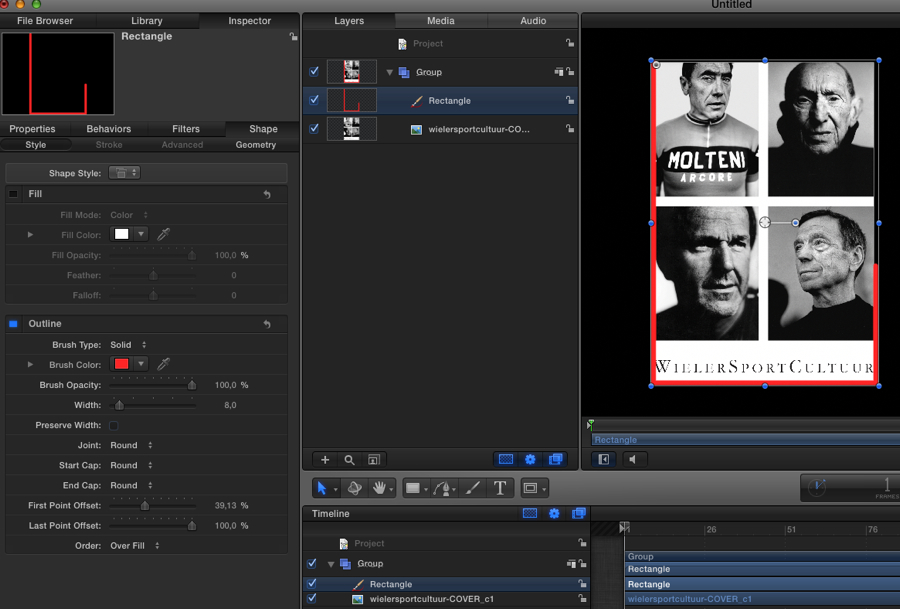
Bring the photo into Motion 5, drag a rectangle around the photo and in the Rectangle Inspector under the Shape tab de-select Fill and select Outline. Pick a color and a width for the Outline, then keyframe the First Point Offset parameter to animate the outline over time.
- Ronny
If you don't need to animate the outline:
Add the Stylize > Photo Recall effect to your photo, then in the Inspector set Amount to 100, Style to Classic and Scale to 100%. This will give you a neat white outline around your photo. You also could use the Stylize > Frame effect instead, but I find the Photo Recall effect gives a better looking outline.
If you need to animate the outline:
Bring the photo into Motion 5, drag a rectangle around the photo and in the Rectangle Inspector under the Shape tab de-select Fill and select Outline. Pick a color and a width for the Outline, then keyframe the First Point Offset parameter to animate the outline over time.
- Ronny
Please Log in to join the conversation.
