


- Posts: 26
- Thank you received: 0
3 Post Moderation Rule for New Boarders (25 Jan 2021)
New boarders will have their posts moderated - Don't worry if you cannot see your post immediately.
Any Control Over Tape Import Clip Names?
17 Dec 2013 20:41 #36223
by Aquaholic
Any Control Over Tape Import Clip Names? was created by Aquaholic
Hello -
Importing from tape shot on a Sony HVR-A1U and unlike previous imports, clip names are coming in chronologically, but not named in any particular order. Here's an example:
2013-12-16 05_10_20 (id).mov
2013-12-16 05_11_53 (id).mov
2013-12-16 05_12_19 (id).mov
2013-12-16 05_19_47 (id).mov
And so on...
Two questions,
1. Is there a way to set clip naming schemes based on first clip imported like: A1 12-16-13 01 so that all subsequent clips are the same sytax, but ending in 02, 03, 04...? That would save a hell of a lot of time renaming clips for different cameras.
2. Any idea what the sytax above represents beyond the date?
Thanks,
sp
Importing from tape shot on a Sony HVR-A1U and unlike previous imports, clip names are coming in chronologically, but not named in any particular order. Here's an example:
2013-12-16 05_10_20 (id).mov
2013-12-16 05_11_53 (id).mov
2013-12-16 05_12_19 (id).mov
2013-12-16 05_19_47 (id).mov
And so on...
Two questions,
1. Is there a way to set clip naming schemes based on first clip imported like: A1 12-16-13 01 so that all subsequent clips are the same sytax, but ending in 02, 03, 04...? That would save a hell of a lot of time renaming clips for different cameras.
2. Any idea what the sytax above represents beyond the date?
Thanks,
sp
Please Log in to join the conversation.
- Tom Wolsky
-

- Offline
- Moderator
-

17 Dec 2013 20:45 #36225
by Tom Wolsky
Replied by Tom Wolsky on topic Any Control Over Tape Import Clip Names?
1. No.
2. Looks like a date/time stamp.
2. Looks like a date/time stamp.
Please Log in to join the conversation.
- Dustin Hoye
-

- Offline
- Junior Member
-

- I can't stand the state of affairs right now but I am too darn busy playing Wii to do anything about it. "Let my armies be the rocks and the trees and the birds in the sky... " [Charlemagne] It's a pirates life for me.
Less
More
- Posts: 34
- Thank you received: 7
17 Dec 2013 21:00 - 17 Dec 2013 21:03 #36227
by Dustin Hoye
Replied by Dustin Hoye on topic Any Control Over Tape Import Clip Names?
Hiya Aqua,
While you may not be able to re-name and sequence on import, you can easily batch re-name and sequence your clips, just like you have there, with the Apply Custom Name feature in FCPX. After you import, as Tom mentioned, those clips you have are/can be sorted in your event browser window (It's easier in List View for this) by Date Imported, Content Created, etc. etc. Use Group and Arrange Clips By to order your group of media the way you'd like.
Then under Apply Custom Name, you can choose preset token chains or set up custom tokens/chains to apply to groups of your clips. I use, for example, Scene_CurrentName_Counter as a blanket naming scheme, prior to doing additional notations in other columns, like Shot, Notes, etc. I have attached a few screen grabs for you.
Hope this helps in the stead of doing it on import.
Cheers,
Dusty
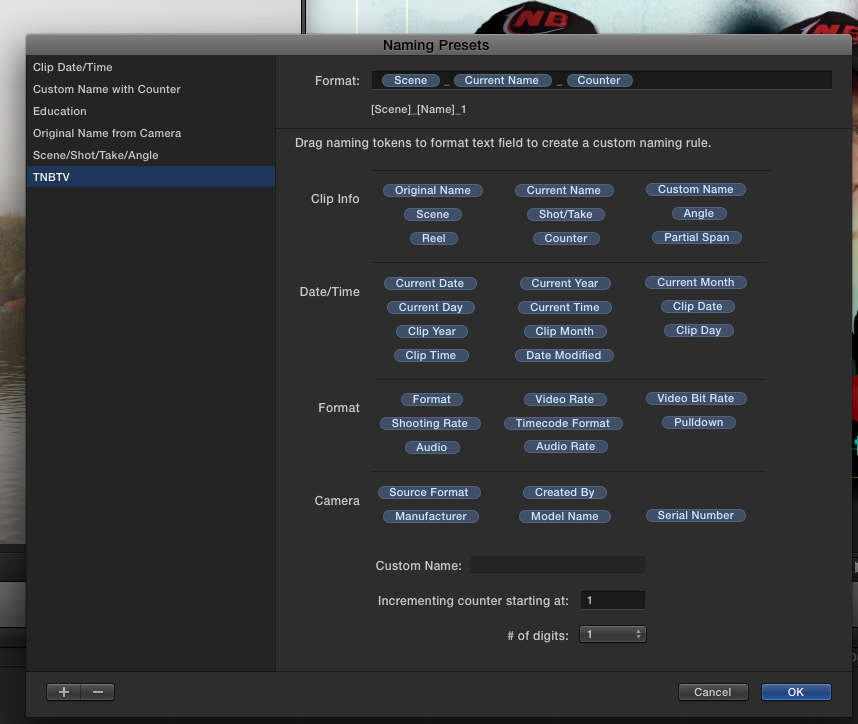
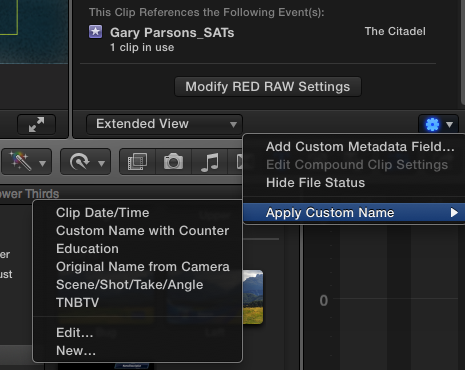
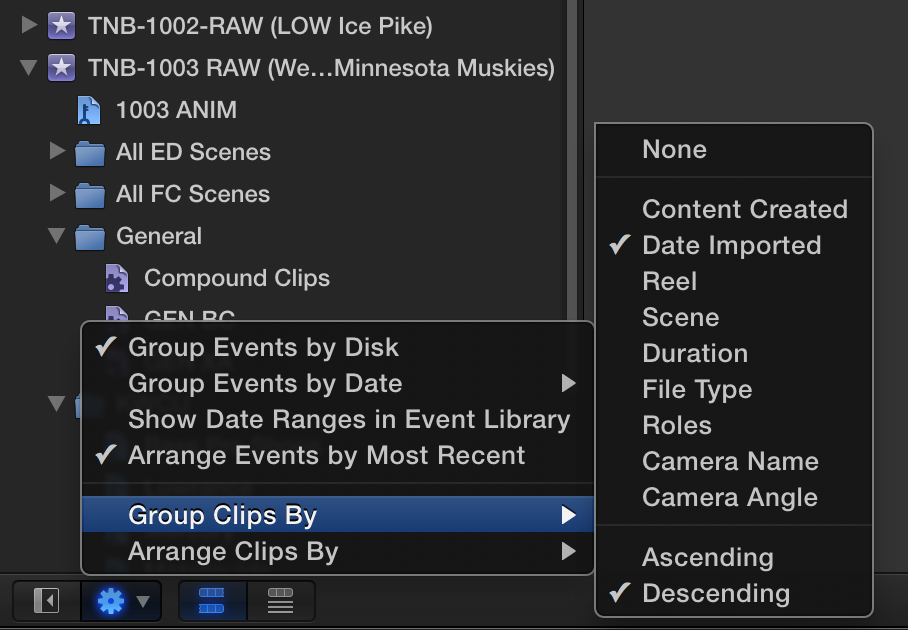
While you may not be able to re-name and sequence on import, you can easily batch re-name and sequence your clips, just like you have there, with the Apply Custom Name feature in FCPX. After you import, as Tom mentioned, those clips you have are/can be sorted in your event browser window (It's easier in List View for this) by Date Imported, Content Created, etc. etc. Use Group and Arrange Clips By to order your group of media the way you'd like.
Then under Apply Custom Name, you can choose preset token chains or set up custom tokens/chains to apply to groups of your clips. I use, for example, Scene_CurrentName_Counter as a blanket naming scheme, prior to doing additional notations in other columns, like Shot, Notes, etc. I have attached a few screen grabs for you.
Hope this helps in the stead of doing it on import.
Cheers,
Dusty
Last edit: 17 Dec 2013 21:03 by Dustin Hoye.
Please Log in to join the conversation.
