


- Posts: 5
- Thank you received: 0
3 Post Moderation Rule for New Boarders (25 Jan 2021)
New boarders will have their posts moderated - Don't worry if you cannot see your post immediately.
Simple Compositing with three connected clips
15 Dec 2013 14:46 #35965
by ulit
Simple Compositing with three connected clips was created by ulit
Hello forum,
I'm trying to show two portrait still images side by side by using alpha masks (one for the left pane, one for the right pane).
My idea is that these mask are used as travel matte, I can scale the images behind them and always receive the same frame that is displayed (in contrast to the scale parameter of Video -> Transform, which always works on the completely processed content after cropping).
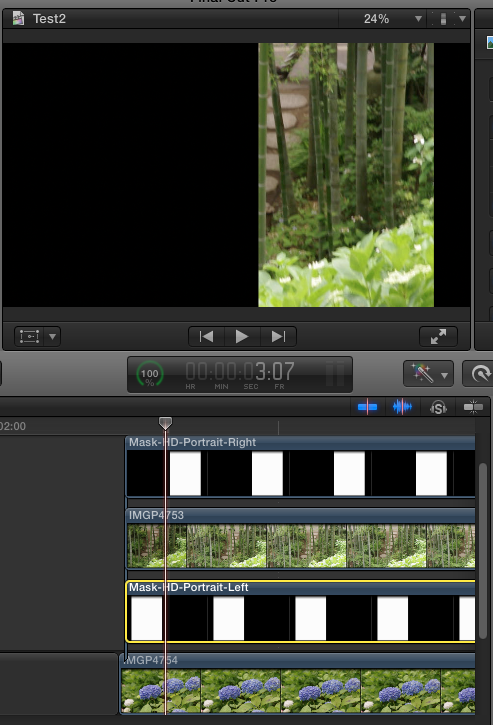
See the first attachment where I use a clip and three connected clips: in my naive approach, I set the blend modes from top to bottom to "Stencil Alpha", "Normal", "Stencil Alpha", "Normal".
This effect works only with the first two lower layers, adding the next two layers on the top gives the depicted result.
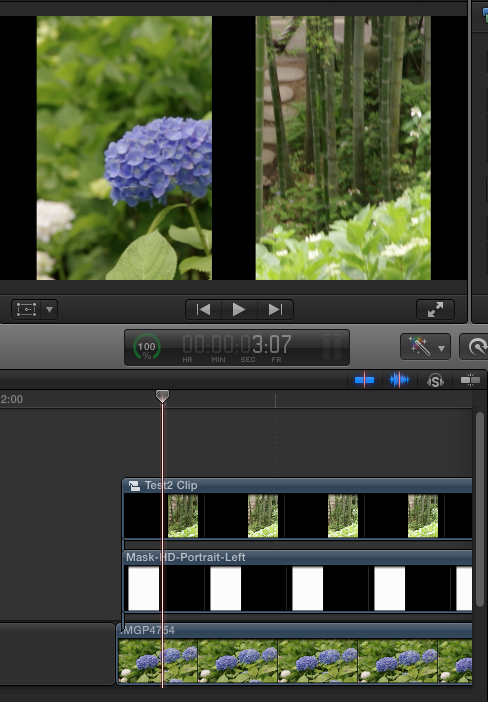
In my second attachment, I've created a compound clip of the two top layers, here I get the desired result.
My question is, if it is possible with FCP X to receive the same result without using compound clips? Or do I better create a template with Motion? This type of compositing will be used several times in my project.
I've attached both alpha masks as well.
Thanks in advance!
Uli
I'm trying to show two portrait still images side by side by using alpha masks (one for the left pane, one for the right pane).
My idea is that these mask are used as travel matte, I can scale the images behind them and always receive the same frame that is displayed (in contrast to the scale parameter of Video -> Transform, which always works on the completely processed content after cropping).
See the first attachment where I use a clip and three connected clips: in my naive approach, I set the blend modes from top to bottom to "Stencil Alpha", "Normal", "Stencil Alpha", "Normal".
This effect works only with the first two lower layers, adding the next two layers on the top gives the depicted result.
In my second attachment, I've created a compound clip of the two top layers, here I get the desired result.
My question is, if it is possible with FCP X to receive the same result without using compound clips? Or do I better create a template with Motion? This type of compositing will be used several times in my project.
I've attached both alpha masks as well.
Thanks in advance!
Uli


Please Log in to join the conversation.

15 Dec 2013 14:56 #35969
by BenB
Replied by BenB on topic Simple Compositing with three connected clips
Two quick and easy ways to do this type of side-by-side effect.
- First, create a template in Motion, use Drop Zones. I have a few on a web site that you can download and open in Motion to check out as good starting points. Look for the ones that talk about "dual clip" and "side by side".
- Second, adjust the Crop parameters in FCP X.
- First, create a template in Motion, use Drop Zones. I have a few on a web site that you can download and open in Motion to check out as good starting points. Look for the ones that talk about "dual clip" and "side by side".
- Second, adjust the Crop parameters in FCP X.
Please Log in to join the conversation.
- Karsten Schlüter
-

- Offline
- Moderator
-

Less
More
- Posts: 3790
- Thank you received: 718
15 Dec 2013 17:19 - 15 Dec 2013 17:20 #35987
by Karsten Schlüter
Replied by Karsten Schlüter on topic Simple Compositing with three connected clips
for 'compositing' stills I'm still using a designated paint-app = Pixelmator.
After prepping the png I handle only one single 'pic' in FCPX.-
… honestly, I don't get it why you're using alpha-masks?
Crop the pic - done.
To apply 'same/same' values, I'd use the 'Paste Attributes'/cmd-shift-v feature…
ceterum censeo:
compounds are evil … :woohoo:
After prepping the png I handle only one single 'pic' in FCPX.-
… honestly, I don't get it why you're using alpha-masks?
Crop the pic - done.
To apply 'same/same' values, I'd use the 'Paste Attributes'/cmd-shift-v feature…
ceterum censeo:
compounds are evil … :woohoo:
Last edit: 15 Dec 2013 17:20 by Karsten Schlüter.
Please Log in to join the conversation.
15 Dec 2013 22:56 #36015
by ulit
Replied by ulit on topic Simple Compositing with three connected clips
Thanks Carsten for your reply!
The alpha masks are useful since then I can scale the image and move within its content and the absolute postion of the crop frame does not change. FCP X's built-in crop effect (both in crop and trim mode) comes first in the processing, the built-in scale effect is added to the cropped result -> absolute positions of the crop frame changes.
The scale and the position within the image content of both panes will be keyframed later (similar to a Ken Burns effect).
The alpha masks are useful since then I can scale the image and move within its content and the absolute postion of the crop frame does not change. FCP X's built-in crop effect (both in crop and trim mode) comes first in the processing, the built-in scale effect is added to the cropped result -> absolute positions of the crop frame changes.
The scale and the position within the image content of both panes will be keyframed later (similar to a Ken Burns effect).
Please Log in to join the conversation.

15 Dec 2013 23:06 #36017
by Seanus
Sean Lander - Editing since 1982 - AVID 1991 - FCP 1999 - FCPX 2011
Replied by Seanus on topic Simple Compositing with three connected clips
Why not just put a color solid over the two images and cut two holes in it with two masks?
Sean Lander - Editing since 1982 - AVID 1991 - FCP 1999 - FCPX 2011
Please Log in to join the conversation.
- Karsten Schlüter
-
- Offline
- Moderator
-
Less
More
- Posts: 3790
- Thank you received: 718
16 Dec 2013 06:26 #36032
by Karsten Schlüter
wowy, lots of action
I guess, Ben's advice, creating an effect-template from Motion is indeed the easiest, fastest and flexible way; two drop-zones, publish the parameters (=you can rig them, in case the movements have to be synched) - done.
… I'm a hobbyist - my 'solutions' are mostly quick'n dirty
(and less elaborated…)
Replied by Karsten Schlüter on topic Simple Compositing with three connected clips
The scale and the position within the image content of both panes will be keyframed later (similar to a Ken Burns effect).
wowy, lots of action
I guess, Ben's advice, creating an effect-template from Motion is indeed the easiest, fastest and flexible way; two drop-zones, publish the parameters (=you can rig them, in case the movements have to be synched) - done.
… I'm a hobbyist - my 'solutions' are mostly quick'n dirty
(and less elaborated…)
Please Log in to join the conversation.

16 Dec 2013 14:41 - 16 Dec 2013 14:42 #36039
by anickt
Replied by anickt on topic Simple Compositing with three connected clips
Why not just build the mask in Photoshop and put it on the top layer with your other clips under it. Transform and crop to suit. You don't have to be real fussy about it that way and it wouldn't take long to set up. Also, no transfer modes or compound clips necessary.
Last edit: 16 Dec 2013 14:42 by anickt. Reason: add info
Please Log in to join the conversation.
- Daniel Rutledge
-

- Offline
- Premium Member
-

- Those that know don't tell, and those that tell don't know.
16 Dec 2013 16:22 #36046
by Daniel Rutledge
Replied by Daniel Rutledge on topic Simple Compositing with three connected clips
If you are doing the same thing multiple times, then a motion generator is the way to go. If you don't feel like you can do the motion template (or if you are not repeating the effect more than two or three times), then you could create the frames with solids and pop them in a compound clip to keep it neat.
Please Log in to join the conversation.
16 Dec 2013 17:47 #36059
by BenB
Replied by BenB on topic Simple Compositing with three connected clips
I just slapped a quick one together. Has all controls for screen position, crop, drop shadows, etc, for two Drop Zones. Drop me a line and I'll email you a copy. Will post it for download in the Templates section later. Just too slammed with tutorial work today to package and upload it. PM me your email. This one is very basic, easy, does what you want.
Please Log in to join the conversation.
30 Dec 2013 21:01 #37696
by ulit
Replied by ulit on topic Simple Compositing with three connected clips
Hello,
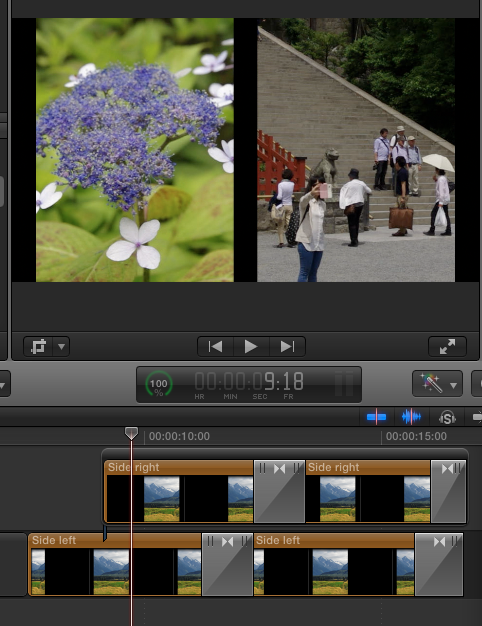
I've developed a simple solution using two generators, one for each side. As shown in the screenshot, each side can filled independently with content and even transitions can be used. The published parameters include the scale and the pan for the drop zone.
Thanks for all replies that helped me in finding a solution!
Best regards,
Uli
I've developed a simple solution using two generators, one for each side. As shown in the screenshot, each side can filled independently with content and even transitions can be used. The published parameters include the scale and the pan for the drop zone.
Thanks for all replies that helped me in finding a solution!
Best regards,
Uli
Please Log in to join the conversation.
