


- Posts: 8
- Thank you received: 1
3 Post Moderation Rule for New Boarders (25 Jan 2021)
New boarders will have their posts moderated - Don't worry if you cannot see your post immediately.
The word 'title' flicks up for a micro-second on an file created for Vimeo
- spuddlington
-
 Topic Author
- Offline
- New Member
-

Less
More
15 Dec 2013 11:42 #35949
by spuddlington
The word 'title' flicks up for a micro-second on an file created for Vimeo was created by spuddlington
Has anyone seen this (or can tell me how to fix it easily?)
I've uploaded two videos to Vimeo now:
example:
vimeo.com/81922469
The word 'title' appears for a microsecond before the video starts. I don't understand because it's not anywhere in FCPX but it *must* be there somewhere. I've tried trimming the first few frames off - but it keeps putting it there. If I find the file in the shared folder - sure enough it has the word 'title' there?!
WHERE IS FCPX creating this 'title' from!?!
Suggestions very welcome.
Kerry
I've uploaded two videos to Vimeo now:
example:
vimeo.com/81922469
The word 'title' appears for a microsecond before the video starts. I don't understand because it's not anywhere in FCPX but it *must* be there somewhere. I've tried trimming the first few frames off - but it keeps putting it there. If I find the file in the shared folder - sure enough it has the word 'title' there?!
WHERE IS FCPX creating this 'title' from!?!
Suggestions very welcome.
Kerry
Please Log in to join the conversation.
- ronny courtens
-

- Offline
- Moderator
-

Less
More
- Posts: 4455
- Thank you received: 962
15 Dec 2013 13:07 #35952
by ronny courtens
Replied by ronny courtens on topic The word 'title' flicks up for a micro-second on an file created for Vimeo
Have you exported your master file from a rendered timeline? If so: delete your Project render files, then export again.
- Ronny
- Ronny
Please Log in to join the conversation.
- Andreas Kiel
-
- Offline
- Platinum Member
-

Less
More
- Posts: 1077
- Thank you received: 189
15 Dec 2013 13:36 - 15 Dec 2013 13:36 #35953
by Andreas Kiel
Replied by Andreas Kiel on topic The word 'title' flicks up for a micro-second on an file created for Vimeo
In addition to that what Ronny said.
Delete all render files from both the event and project. Then render the project again.
I had this kind of issue before in case of sharing things. There seems to be hidden render files or some stuff in the project file which can cause wrong output files.
Re-render seems to overwrite them.
-Andreas
Delete all render files from both the event and project. Then render the project again.
I had this kind of issue before in case of sharing things. There seems to be hidden render files or some stuff in the project file which can cause wrong output files.
Re-render seems to overwrite them.
-Andreas
Last edit: 15 Dec 2013 13:36 by Andreas Kiel.
Please Log in to join the conversation.

15 Dec 2013 14:03 - 15 Dec 2013 14:04 #35956
by BenB
Replied by BenB on topic The word 'title' flicks up for a micro-second on an file created for Vimeo
Also, to be sure, I'd place my playhead at the start of the Rimeline, then use Cmd with the + key to zoom in as much as possible! to search for a one fram title clip.
Or, open the Timeline Index, see it it lists a 1-2 frame title clip.
I'd actually suspect that one frame titles clip, myself.
Or, open the Timeline Index, see it it lists a 1-2 frame title clip.
I'd actually suspect that one frame titles clip, myself.
Last edit: 15 Dec 2013 14:04 by BenB.
Please Log in to join the conversation.
- spuddlington
-
Topic Author
- Offline
- New Member
-
Less
More
- Posts: 8
- Thank you received: 1
15 Dec 2013 14:08 #35958
by spuddlington
Replied by spuddlington on topic The word 'title' flicks up for a micro-second on an file created for Vimeo
I initially deleted the Project's render files - still got the 'title' on an export.
Then I deleted the Project and Event render files and it's still there.
There's not much point in me zooming in - because it's the very first thing you see that says 'title' - and my first frame doesn't say 'title' anywhere.
I'm going to delete all the render files again. Turn off my machine. Then hop on one leg...
Then I deleted the Project and Event render files and it's still there.
There's not much point in me zooming in - because it's the very first thing you see that says 'title' - and my first frame doesn't say 'title' anywhere.
I'm going to delete all the render files again. Turn off my machine. Then hop on one leg...
Please Log in to join the conversation.
15 Dec 2013 14:14 - 15 Dec 2013 14:17 #35961
by BenB
Replied by BenB on topic The word 'title' flicks up for a micro-second on an file created for Vimeo
What is your first clip exactly? Just a QT clip, a template?
Select all, copy, create a new project, paste, see if it vanishes, that will eliminate either the Title word, or the possibility of a render file issue.
Select all, copy, create a new project, paste, see if it vanishes, that will eliminate either the Title word, or the possibility of a render file issue.
Last edit: 15 Dec 2013 14:17 by BenB.
Please Log in to join the conversation.
- ronny courtens
-
- Offline
- Moderator
-
Less
More
- Posts: 4455
- Thank you received: 962
15 Dec 2013 14:16 #35962
by ronny courtens
Replied by ronny courtens on topic The word 'title' flicks up for a micro-second on an file created for Vimeo
If deleting the render files does not help I would do as Ben says: zoom in as much as you can and see if there isn't a 1 frame empty title clip just before the actual title. If your title is inside a compound clip, open the CC in its own timeline to see if you haven't got any unwanted frames inside.
If this doesn't help either: try moving your title clip 1 or 2 frames to the right and see if this solves the issue.
- Ronny
If this doesn't help either: try moving your title clip 1 or 2 frames to the right and see if this solves the issue.
- Ronny
Please Log in to join the conversation.
- spuddlington
-
Topic Author
- Offline
- New Member
-
Less
More
- Posts: 8
- Thank you received: 1
15 Dec 2013 14:21 #35963
by spuddlington
Replied by spuddlington on topic The word 'title' flicks up for a micro-second on an file created for Vimeo
It's absolutely, definitely not a single frame clip. (That would be quite hard to create in any case).
I'm assuming there was a render file I didn't delete from an event... And I'm having another go at that.
I'm assuming there was a render file I didn't delete from an event... And I'm having another go at that.
Please Log in to join the conversation.
- Andreas Kiel
-
- Offline
- Platinum Member
-
Less
More
- Posts: 1077
- Thank you received: 189
15 Dec 2013 14:49 #35966
by Andreas Kiel
Replied by Andreas Kiel on topic The word 'title' flicks up for a micro-second on an file created for Vimeo
Kerry,
Another thing you can do is to export an XML from your project.
This won't help to create a clean out but helps to narrow the error options.
In the XML search for "<text>Title" – if it's there some title with this text is definitively there.
Go to the project browser and look for the first title or do that for compound clips.
-Andreas
Another thing you can do is to export an XML from your project.
This won't help to create a clean out but helps to narrow the error options.
In the XML search for "<text>Title" – if it's there some title with this text is definitively there.
Go to the project browser and look for the first title or do that for compound clips.
-Andreas
Please Log in to join the conversation.
15 Dec 2013 14:50 - 15 Dec 2013 14:51 #35967
by BenB
Replied by BenB on topic The word 'title' flicks up for a micro-second on an file created for Vimeo
As a trainer, I see lots of single frame clips show up in the most unexpected places. If you don't check, you don't "know". Try copying everything into a new Project Timeline, that will fix things up as quickly as possible.
BTW, how are you deleting render files, exactly, that would miss one? I'm just curious.
BTW, how are you deleting render files, exactly, that would miss one? I'm just curious.
Last edit: 15 Dec 2013 14:51 by BenB.
Please Log in to join the conversation.
- spuddlington
-
Topic Author
- Offline
- New Member
-
Less
More
- Posts: 8
- Thank you received: 1
15 Dec 2013 14:55 #35968
by spuddlington
Replied by spuddlington on topic The word 'title' flicks up for a micro-second on an file created for Vimeo
I've exported the XML and sure enough there is nothing with 'title' in there - except the titles!
<clip offset="0s" name="DeborahTracey" duration="153600/30000s" start="108212400/30000s" format="r4" tcFormat="NDF">
<adjust-transform position="55.6339 0" scale="1.13973 1.13973"/>
<video offset="0s" ref="r6" duration="86400s"/>
<title lane="1" offset="9017700/2500s" ref="r7" name="Glow: Showreel" duration="12800/2500s" start="9006000/2500s">
<adjust-crop mode="trim" enabled="0"/>
<text>Showreel</text>
</title>
<title lane="2" offset="9017700/2500s" ref="r7" name="Glow: Deborah Tracey" duration="12800/2500s" start="9006500/2500s">
<adjust-crop mode="trim" enabled="0"/>
<adjust-transform scale="0.984462 0.984462"/>
<text>Deborah Tracey</text>
</title>
And - just to confirm: it's DEFINITELY NOT a single frame clip. It's clearly not that because it only appears as the very first thing that happens - so it's not hidden away inside something else. It would have to be the very first frame of the whole thing - and it's not.
I've deleted all the render files - and it's still there.
(I made a copy of the project - so I might have deleted the wrong render folders.)
<clip offset="0s" name="DeborahTracey" duration="153600/30000s" start="108212400/30000s" format="r4" tcFormat="NDF">
<adjust-transform position="55.6339 0" scale="1.13973 1.13973"/>
<video offset="0s" ref="r6" duration="86400s"/>
<title lane="1" offset="9017700/2500s" ref="r7" name="Glow: Showreel" duration="12800/2500s" start="9006000/2500s">
<adjust-crop mode="trim" enabled="0"/>
<text>Showreel</text>
</title>
<title lane="2" offset="9017700/2500s" ref="r7" name="Glow: Deborah Tracey" duration="12800/2500s" start="9006500/2500s">
<adjust-crop mode="trim" enabled="0"/>
<adjust-transform scale="0.984462 0.984462"/>
<text>Deborah Tracey</text>
</title>
And - just to confirm: it's DEFINITELY NOT a single frame clip. It's clearly not that because it only appears as the very first thing that happens - so it's not hidden away inside something else. It would have to be the very first frame of the whole thing - and it's not.
I've deleted all the render files - and it's still there.
(I made a copy of the project - so I might have deleted the wrong render folders.)
Please Log in to join the conversation.
15 Dec 2013 14:58 - 15 Dec 2013 15:00 #35970
by BenB
Replied by BenB on topic The word 'title' flicks up for a micro-second on an file created for Vimeo
Do not make a copy of the project, create a new blank project, copy and paste the content into the new blank project. Let's see what happens, as this process will eliminate 99% of potential causes in one quick, easy action.
Last edit: 15 Dec 2013 15:00 by BenB.
Please Log in to join the conversation.
- spuddlington
-
Topic Author
- Offline
- New Member
-
Less
More
- Posts: 8
- Thank you received: 1
15 Dec 2013 15:02 #35971
by spuddlington
Replied by spuddlington on topic The word 'title' flicks up for a micro-second on an file created for Vimeo
I made a copy of the project because I had compound clips and I wanted to make copies of the compound clips too. Copy and pasting would have taken quite a while.
Please Log in to join the conversation.
- jjsanderson
-
- Offline
- Elite Member
-

15 Dec 2013 16:57 - 15 Dec 2013 17:14 #35983
by jjsanderson
Replied by jjsanderson on topic The word 'title' flicks up for a micro-second on an file created for Vimeo
A thought: how are you doing your compression for Vimeo? Is it possible you have a 1-frame prepend graphic set up in Compressor/Episode/whatever?
The problem isn't necessarily in FCPX…
[edit: looking at the film on Vimeo, though, that's definitely an FCPX title effect. At first I wondered if it's just in Vimeo's thumbnail, but having downloaded the video file it seems you have something funky going on with your opening slide. The 'Showreel' caption cuts on at frame 4, then the name caption on (and 'Title' off) at frame 8. Zoom in on the start of your timeline, it looks like the captions aren't lined up.]
The problem isn't necessarily in FCPX…
[edit: looking at the film on Vimeo, though, that's definitely an FCPX title effect. At first I wondered if it's just in Vimeo's thumbnail, but having downloaded the video file it seems you have something funky going on with your opening slide. The 'Showreel' caption cuts on at frame 4, then the name caption on (and 'Title' off) at frame 8. Zoom in on the start of your timeline, it looks like the captions aren't lined up.]
Last edit: 15 Dec 2013 17:14 by jjsanderson.
Please Log in to join the conversation.
- spuddlington
-
Topic Author
- Offline
- New Member
-
Less
More
- Posts: 8
- Thank you received: 1
15 Dec 2013 17:15 - 15 Dec 2013 17:20 #35984
by spuddlington
Replied by spuddlington on topic The word 'title' flicks up for a micro-second on an file created for Vimeo
Originally I was using share and then selecting Vimeo.
But I've since been using compressor and saving to the desktop to stop me wasting upload time.
It's very frustrating because it's not even being consistent... See the attached first frames.
In the end I used ffmpeg to get rid of the first second of video... Because I wasted so much time on this problem (which I know I'll have to come back to).
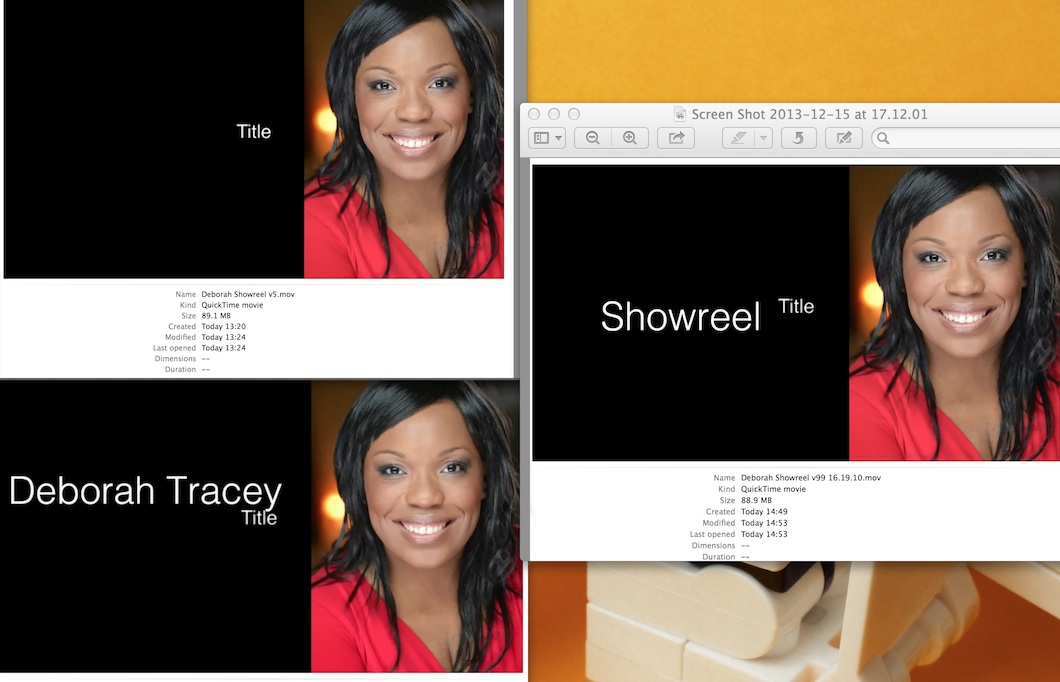
PS For each of the attached shots: I haven't changed ANY edits or clips - just saved it with a different format and/or compression etc.
But I've since been using compressor and saving to the desktop to stop me wasting upload time.
It's very frustrating because it's not even being consistent... See the attached first frames.
In the end I used ffmpeg to get rid of the first second of video... Because I wasted so much time on this problem (which I know I'll have to come back to).
PS For each of the attached shots: I haven't changed ANY edits or clips - just saved it with a different format and/or compression etc.
Last edit: 15 Dec 2013 17:20 by spuddlington.
Please Log in to join the conversation.
- ronny courtens
-
- Offline
- Moderator
-
Less
More
- Posts: 4455
- Thank you received: 962
15 Dec 2013 20:47 #36000
by ronny courtens
Replied by ronny courtens on topic The word 'title' flicks up for a micro-second on an file created for Vimeo
This is a weird issue. Can you tell us what title template you have used?
- Ronny
- Ronny
Please Log in to join the conversation.
- jjsanderson
-
- Offline
- Elite Member
-
15 Dec 2013 23:29 #36020
by jjsanderson
Replied by jjsanderson on topic The word 'title' flicks up for a micro-second on an file created for Vimeo
Is the opening title package a compound clip?
Can you paste a screengrab of the first 12 frames of your project? You're absolutely sure the titles are all lined up on the first frame, that there are no keyframes, and so on?
Can you paste a screengrab of the first 12 frames of your project? You're absolutely sure the titles are all lined up on the first frame, that there are no keyframes, and so on?
Please Log in to join the conversation.
