


- Posts: 11
- Thank you received: 0
3 Post Moderation Rule for New Boarders (25 Jan 2021)
New boarders will have their posts moderated - Don't worry if you cannot see your post immediately.
No importable files warning
13 Dec 2013 03:40 - 13 Dec 2013 03:45 #35759
by Theprince
No importable files warning was created by Theprince
When importing selected clips from the events or projects folder of the external HD a warning appears stating "no importable files, change selection try again" attached is a pic of my screen with warning. What' s going on? Any advice would be much appreciated. I first imported the clips to my macbook from external HD then from the movies events folder tried to import to FCPX.
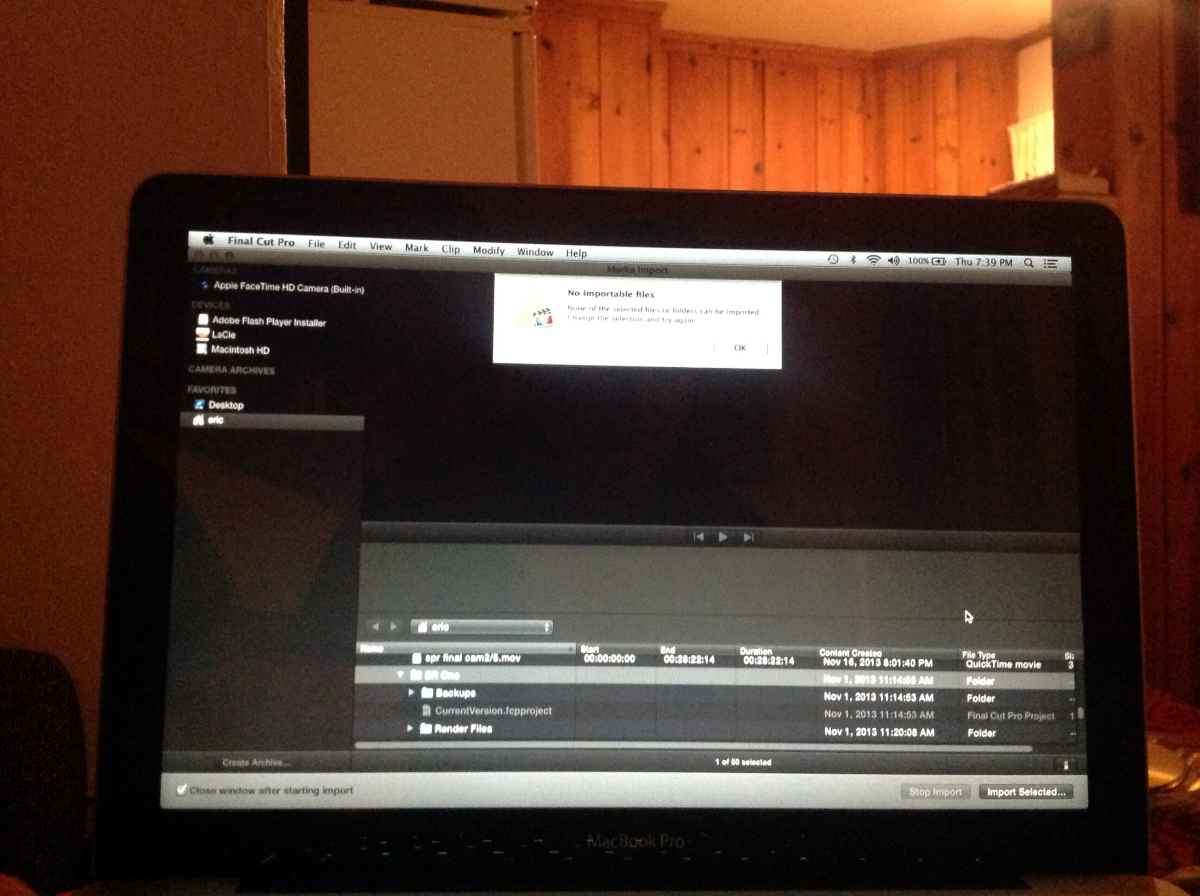
Last edit: 13 Dec 2013 03:45 by Theprince.
Please Log in to join the conversation.
- Tom Wolsky
-

- Offline
- Moderator
-

13 Dec 2013 05:07 #35765
by Tom Wolsky
Replied by Tom Wolsky on topic No importable files warning
What are you trying to import? You can't import and event or a project. They are read by the application and opened by the application. What is going on?
Please Log in to join the conversation.
13 Dec 2013 05:22 #35767
by Theprince
Replied by Theprince on topic No importable files warning
I'm trying to import in FCPX from my HD a project that I had already worked on and was bringing back into FCPX to continue to work on it. I was able to do this with two other projects with no problem. I also had this same warning when I tried to import a shared project from another editor even though we both already had the same event files. It seems to be happening in several different situations. Thank you for your quick response!
Please Log in to join the conversation.
13 Dec 2013 05:34 #35768
by Theprince
Replied by Theprince on topic No importable files warning
Just to be clear here's the chain of events of the shared project.
My co editor and I both copied to our MacBooks from the external HD the event files for the shared project.
He then created and edited the project and shared it with me by copying the project to the HD FC project folder.
I then copied the project from the HD to my macbook FC project folder and then opened it in FCPX and that's where the warning shows.
My co editor and I both copied to our MacBooks from the external HD the event files for the shared project.
He then created and edited the project and shared it with me by copying the project to the HD FC project folder.
I then copied the project from the HD to my macbook FC project folder and then opened it in FCPX and that's where the warning shows.
Please Log in to join the conversation.

13 Dec 2013 05:35 #35769
by Julian
Replied by Julian on topic No importable files warning
You just need to take the main event folder (I think it's titled "br one" or something like that, I can't read it) and then drag it to your final cut event folder, then drag the project to your final cut project folder. It's the same as hiding projects and events like with event manager x,
or just moving them manually as explained in the manual here.
Please Log in to join the conversation.
13 Dec 2013 05:48 #35770
by Theprince
Replied by Theprince on topic No importable files warning
Ok, I just read the manual, it's says to hide the project in hidden folder while restarting FCPX and moving the project back to the FC project folder. Do I understand this correctly? Thank you for your response.
Please Log in to join the conversation.
