


- Posts: 3
- Thank you received: 0
3 Post Moderation Rule for New Boarders (25 Jan 2021)
New boarders will have their posts moderated - Don't worry if you cannot see your post immediately.
fcpx multicam and Mavericks
12 Dec 2013 16:47 #35723
by chrigurn
fcpx multicam and Mavericks was created by chrigurn
Have been trying to start a multi cam project going on my iMac (with Mavericks newly installed) but when I drag the multicam clip from the event to the time line and play the time line, none of the angle views move and there is no blade icon when I hover over the angles.
Yet when I plug the drive with the event into my macbook pro (with Mountain Lion) the exact same project on the timeline works as it should and I can start the multi cam edit.
(I did have an issue with it not creating a multi cam clip but resolved that with the manual name-the-angle workaround)
I have done all the usuals - trashing prefs and even reinstalling FCPX
No one else seems to be having this issue with FCPX, multi cam and Mavericks - so could it be something else stopping it working on my iMac? (the iMac is 6 moths old, icore 7 and 32 GB RAM - both Macs have FCPX 10.0.9) Possibly a plug-in conflict?
Yet when I plug the drive with the event into my macbook pro (with Mountain Lion) the exact same project on the timeline works as it should and I can start the multi cam edit.
(I did have an issue with it not creating a multi cam clip but resolved that with the manual name-the-angle workaround)
I have done all the usuals - trashing prefs and even reinstalling FCPX
No one else seems to be having this issue with FCPX, multi cam and Mavericks - so could it be something else stopping it working on my iMac? (the iMac is 6 moths old, icore 7 and 32 GB RAM - both Macs have FCPX 10.0.9) Possibly a plug-in conflict?
Please Log in to join the conversation.
- Tom Wolsky
-

- Offline
- Moderator
-

12 Dec 2013 16:59 #35724
by Tom Wolsky
Replied by Tom Wolsky on topic fcpx multicam and Mavericks
Dragged the multicam clip to where? What's the project specs? Post a screen shot of what you're doing.
Please Log in to join the conversation.
13 Dec 2013 08:29 #35776
by chrigurn
Replied by chrigurn on topic fcpx multicam and Mavericks
The project is 720 50p and the problem is that when I drag the multi cam clip from the event into the project timeline, then play the project time line, the angle viewers stay static so I can't do a multi cam edit. This is on my Mavericks iMac.
But the exact same event and project works fine on my laptop with Mountain Lion and the the angle viewers do move as the project plays and I can complete a multi cam edit - without any changes from me.
Attached is a screen grab from the problematic iMac. In the image, if I skim the multi cam clip in the event viewer, the angle viewers all move in sync as thy should, but when I play the multi cam clip in the timeline they remain static.
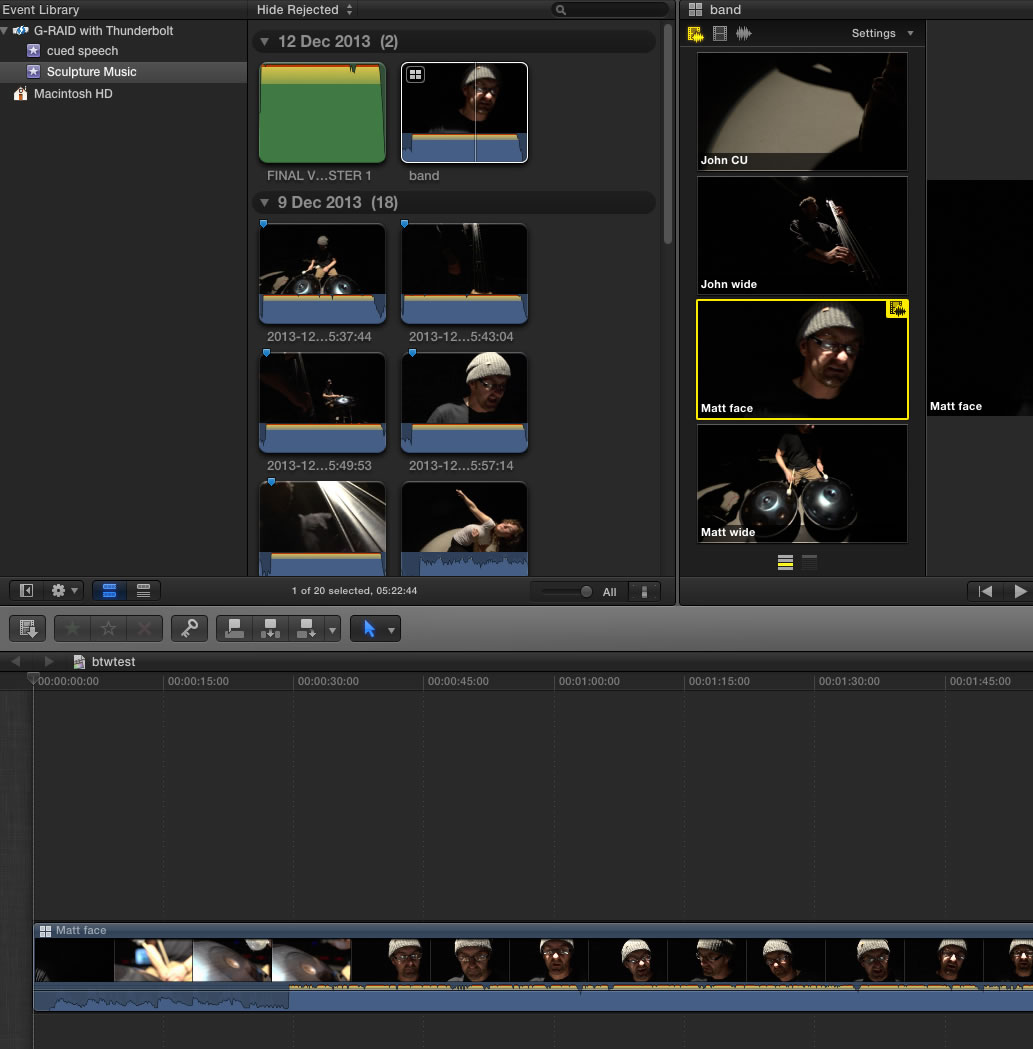
But the exact same event and project works fine on my laptop with Mountain Lion and the the angle viewers do move as the project plays and I can complete a multi cam edit - without any changes from me.
Attached is a screen grab from the problematic iMac. In the image, if I skim the multi cam clip in the event viewer, the angle viewers all move in sync as thy should, but when I play the multi cam clip in the timeline they remain static.
Please Log in to join the conversation.
- jjsanderson
-

- Offline
- Elite Member
-

13 Dec 2013 10:57 #35786
by jjsanderson
Replied by jjsanderson on topic fcpx multicam and Mavericks
That's weird. I've seen behaviour like this, but only very occasionally. Typically when I haven't clicked in the main storyline to bring focus there, or when my drives are bogged down with something else.
Do the angle views update when you skim the clip in the main storyline?
Do the angle views update when you skim the clip in the main storyline?
Please Log in to join the conversation.
13 Dec 2013 14:08 #35801
by chrigurn
Replied by chrigurn on topic fcpx multicam and Mavericks
No, the angle views remain static whether I skim through the storyline or play the storyline. I have also tried moving the event to another drive but with no success. At first I thought it must be an issue with Mavericks ( as it works fine on Mountain Lion) but no one else seems to have reported this problem so it's more likely to be something unique to my set-up.
Please Log in to join the conversation.
