


- Posts: 971
- Thank you received: 46
3 Post Moderation Rule for New Boarders (25 Jan 2021)
New boarders will have their posts moderated - Don't worry if you cannot see your post immediately.
Multicam Issues, serious problems
Less
More
10 Dec 2013 15:21 #35502
by MsJustine

Hi Everyone,
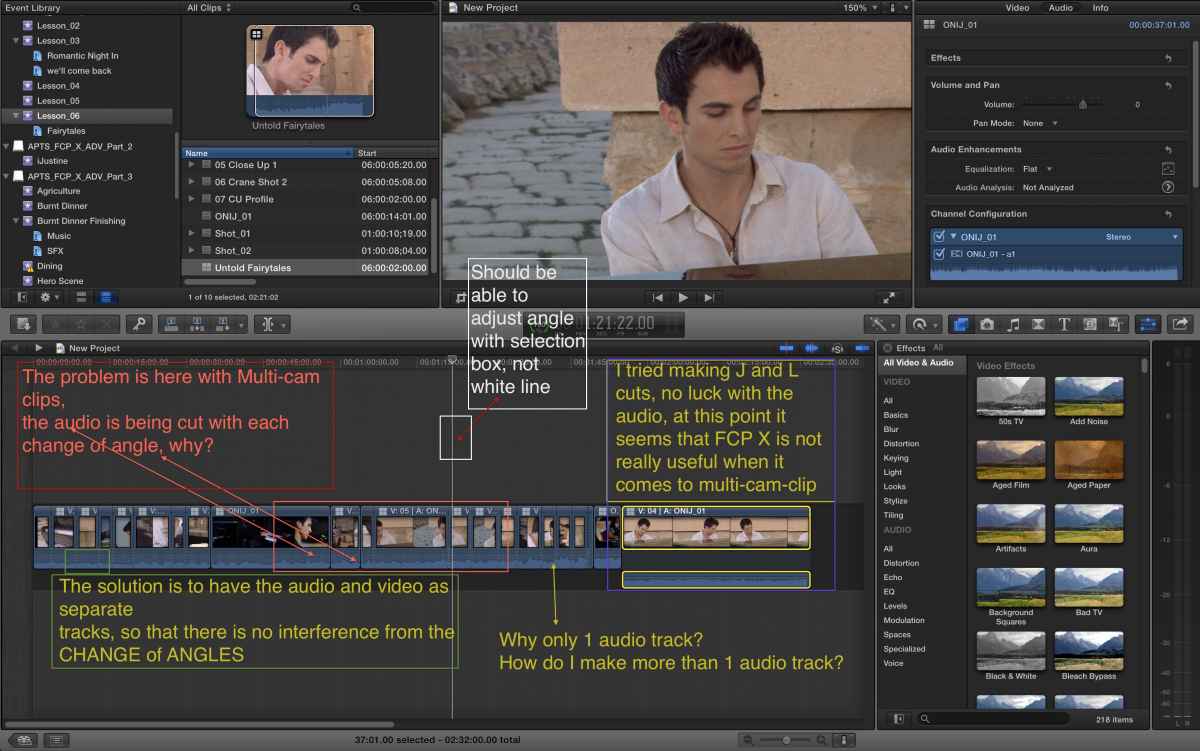
I am a newbie to Final Cut Pro X, and as my graphic attached shows, I have a few concerns, I am really confused with Multi-cam clips, with the audio.
The issue is highlighted in the screen shot, why is the audio being cut when you have 1 reference or monitor track, to me this makes no sense as I would like to make adjustments to the "clips" once edited onto the time line, and yet when I go to do anything to the video, it adjusts the audio, I have posted to the Feedback at Apple. Not sure it will be read!
Maybe it is just me, but it seems that with 10.0.9 Multi-cam clip is really Music video editing, I cannot as I see it at the moment edit a 1 on 1 interview cutting between 2 cameras.
Am I missing something?
Multicam Issues, serious problems was created by MsJustine
Hi Everyone,
I am a newbie to Final Cut Pro X, and as my graphic attached shows, I have a few concerns, I am really confused with Multi-cam clips, with the audio.
The issue is highlighted in the screen shot, why is the audio being cut when you have 1 reference or monitor track, to me this makes no sense as I would like to make adjustments to the "clips" once edited onto the time line, and yet when I go to do anything to the video, it adjusts the audio, I have posted to the Feedback at Apple. Not sure it will be read!
Maybe it is just me, but it seems that with 10.0.9 Multi-cam clip is really Music video editing, I cannot as I see it at the moment edit a 1 on 1 interview cutting between 2 cameras.
Am I missing something?
Please Log in to join the conversation.

10 Dec 2013 16:12 #35522
by Simmie
Replied by Simmie on topic Multicam Issues, serious problems
Open the Angles window:
Window > Viewer Display > Show Angles
Then in the top left of that window you can choose to edit audio and video, video only, or audio only.
Window > Viewer Display > Show Angles
Then in the top left of that window you can choose to edit audio and video, video only, or audio only.
Please Log in to join the conversation.
Less
More
- Posts: 971
- Thank you received: 46
10 Dec 2013 16:17 - 10 Dec 2013 16:29 #35523
by MsJustine
Replied by MsJustine on topic Multicam Issues, serious problems
:S
Thanks for the the prompt reply.
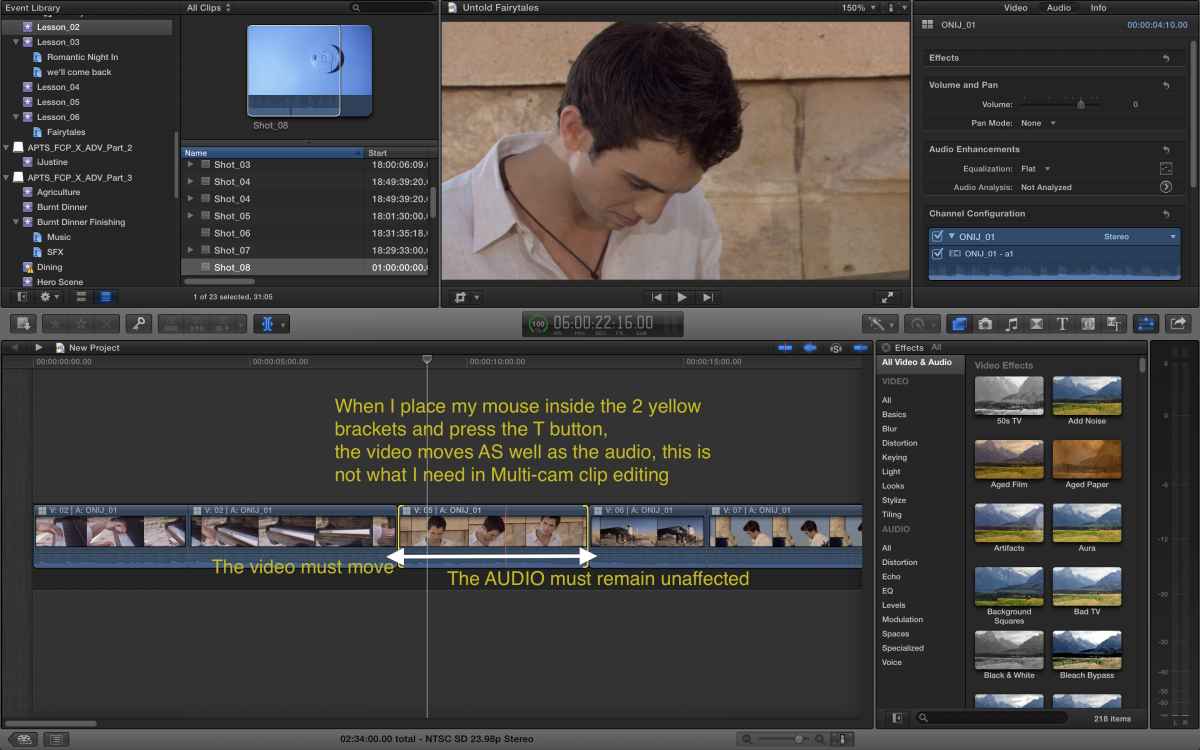
I know how to edit multi-cam clips, that is not in question, the problem is that once the multi-cam clip has played through on the primary storyline, when you come to polish it, you move any edit points, it affects the audio attached.
There seems to me no way of creating a 2 audio track mult-cam clip situation.
That is problem one, problem 2 is when you try and adjust what is visible within a clip on the primary story line in Multi-cam mode, it destroys the audio attached.
At this point Multi-cam Clip is not fit for purpose.
Thanks for the the prompt reply.
I know how to edit multi-cam clips, that is not in question, the problem is that once the multi-cam clip has played through on the primary storyline, when you come to polish it, you move any edit points, it affects the audio attached.
There seems to me no way of creating a 2 audio track mult-cam clip situation.
That is problem one, problem 2 is when you try and adjust what is visible within a clip on the primary story line in Multi-cam mode, it destroys the audio attached.
At this point Multi-cam Clip is not fit for purpose.
Last edit: 10 Dec 2013 16:29 by MsJustine.
Please Log in to join the conversation.
10 Dec 2013 16:36 #35531
by Simmie
Replied by Simmie on topic Multicam Issues, serious problems
If you expand the audio then you can easily edit the video without any effect to the sound. I'm not sure I understand the problem you are having...
Please Log in to join the conversation.
Less
More
- Posts: 971
- Thank you received: 46
10 Dec 2013 16:41 #35532
by MsJustine
Replied by MsJustine on topic Multicam Issues, serious problems
Expand the audio? What does that mean?
I have tried, as explained in the section to the right in my 1st graphic, when you do a J cut, this does not work.
At this point it seems that Multi-cam Clip is not fit for professional use.
Am I the only one that has an issue?
Why is the audio and video in this case linked as 1 combined clip? Surely it has to be separate so that any adjustment does not affect the other, if you move video, leave the audio alone, in FCP X this is not the case.
There is no viable method to disable the audio portion of the Multi-cam Clip.
I have tried, as explained in the section to the right in my 1st graphic, when you do a J cut, this does not work.
At this point it seems that Multi-cam Clip is not fit for professional use.
Am I the only one that has an issue?
Why is the audio and video in this case linked as 1 combined clip? Surely it has to be separate so that any adjustment does not affect the other, if you move video, leave the audio alone, in FCP X this is not the case.
There is no viable method to disable the audio portion of the Multi-cam Clip.
Please Log in to join the conversation.
10 Dec 2013 16:49 #35534
by Simmie
Replied by Simmie on topic Multicam Issues, serious problems
Try this:
Select everything on your primary storyline. Go to:
Clip > Expand audio/video
Change to Trim mode
Edit your multiclip.
Does that work the way you want it to?
Select everything on your primary storyline. Go to:
Clip > Expand audio/video
Change to Trim mode
Edit your multiclip.
Does that work the way you want it to?
Please Log in to join the conversation.
Less
More
- Posts: 971
- Thank you received: 46
10 Dec 2013 16:57 #35538
by MsJustine
Replied by MsJustine on topic Multicam Issues, serious problems
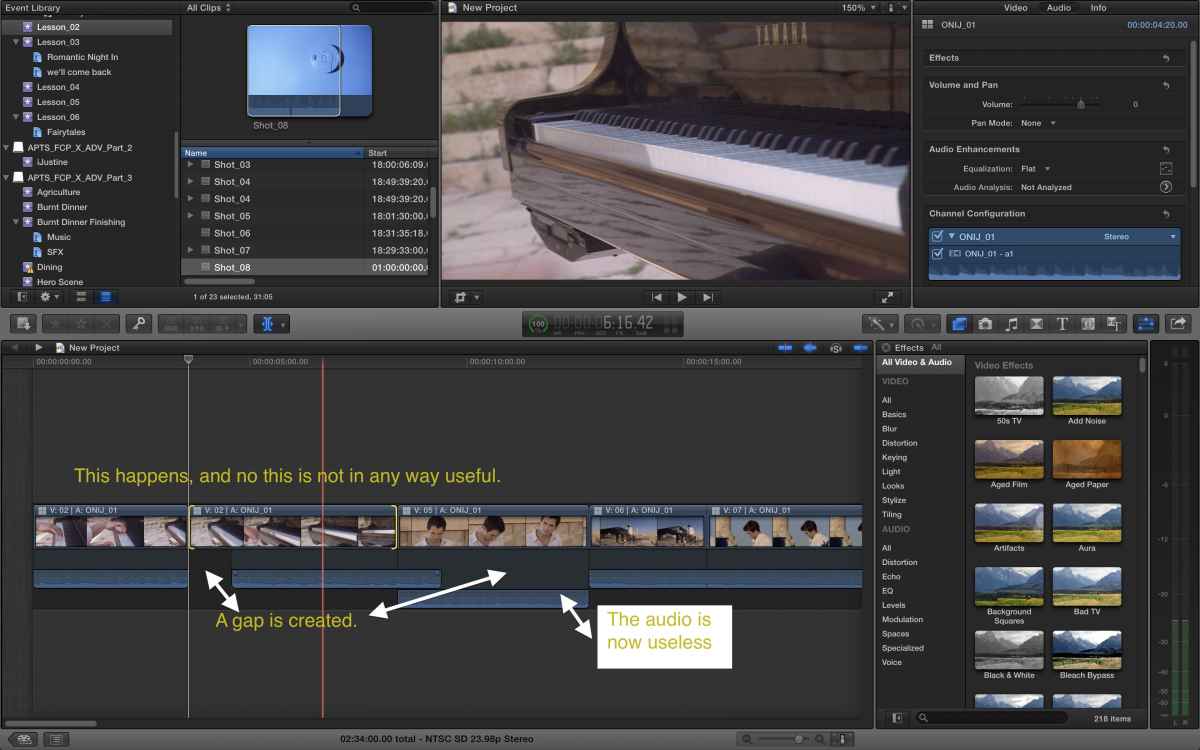
I tried your method, the result is attached.
Is this what you meant?
Is this what you meant?
Please Log in to join the conversation.
10 Dec 2013 17:19 #35542
by Simmie
Replied by Simmie on topic Multicam Issues, serious problems
I'm afraid I can't help you - when I do this as I have described the audio stays where it is, and I can move the video. I only get what you see when I edit without the audio expanded on the next clip. I'm not sure what's going wrong, but this isn't the way I've seen it work.
Please Log in to join the conversation.
- Daniel Rutledge
-

- Offline
- Premium Member
-

- Those that know don't tell, and those that tell don't know.
10 Dec 2013 17:41 #35548
by Daniel Rutledge
Replied by Daniel Rutledge on topic Multicam Issues, serious problems
I use Multicam all the time in many situations. Trust me, it works and is very professional. I say this at the beginning because you seem seem convinced that it is not. There are many excellent FCPX multi cam tutorials available. I am not trying to be dismissive or sarcastic when I say that you should watch one. I get the sense that you have experience editing multi cam in another application. FCPX is very different and hands down the best multi cam tool out there. That being said, let me try to help.
The problem you are having with the trim tool has nothing to do with multi cam. When you have the (T) Trim tool selected and drag in the middle of any clip, it performs a slip or slide (depending on how you have made your selection). If you are trying to roll out the out point of one clip while rolling back the in point of the following clip (or vice versa) you can use the trim tool to select the edit point between clips so that the yellow selection looks kind of like back to back brackets ][ This will leave the audio as is while rolling the edit point back and forth. You must expand audio and video before you do this. If you are doing this to a Multicam clip that has been cut, but no material has been moved, then the select tool automatically does it, no need to change tools. If there is a dotted line between clips, that means that it is continuous through the cut. A solid line means that the clips are not continuous.
Also, I got the sense that you wanted access to multiple audio tracks from the multi cam clip. Right click the clips you want to effect or select all and right click. Choose "Expand Audio Components." At first there may only be one audio layer available, but if you go into the Inspector and click the Audio tab, you will see all the audio tracks listed in the Channel Configuration menu. Check each or all desired tracks.
I really hope this helps. I also really strongly recommend watching a tutorial. FCPX is super easy to use, but is so different from other NLEs that you really must forget what you already know. Once you open yourself to FCPXs way of doing things, you'll find that you spend a lot less time organizing and jumping through software hoops, and more time just being creative. I also want to add that a vast majority of the work I do is in Multicam, and I have worked in FCP 7, Premiere Pro, and Avid Media Composer, and FCPX has THE BEST multi cam tool on the market by miles. This isn't product loyalty speaking. You can do more with this tool (and more easily) than any other multi cam tool.
The problem you are having with the trim tool has nothing to do with multi cam. When you have the (T) Trim tool selected and drag in the middle of any clip, it performs a slip or slide (depending on how you have made your selection). If you are trying to roll out the out point of one clip while rolling back the in point of the following clip (or vice versa) you can use the trim tool to select the edit point between clips so that the yellow selection looks kind of like back to back brackets ][ This will leave the audio as is while rolling the edit point back and forth. You must expand audio and video before you do this. If you are doing this to a Multicam clip that has been cut, but no material has been moved, then the select tool automatically does it, no need to change tools. If there is a dotted line between clips, that means that it is continuous through the cut. A solid line means that the clips are not continuous.
Also, I got the sense that you wanted access to multiple audio tracks from the multi cam clip. Right click the clips you want to effect or select all and right click. Choose "Expand Audio Components." At first there may only be one audio layer available, but if you go into the Inspector and click the Audio tab, you will see all the audio tracks listed in the Channel Configuration menu. Check each or all desired tracks.
I really hope this helps. I also really strongly recommend watching a tutorial. FCPX is super easy to use, but is so different from other NLEs that you really must forget what you already know. Once you open yourself to FCPXs way of doing things, you'll find that you spend a lot less time organizing and jumping through software hoops, and more time just being creative. I also want to add that a vast majority of the work I do is in Multicam, and I have worked in FCP 7, Premiere Pro, and Avid Media Composer, and FCPX has THE BEST multi cam tool on the market by miles. This isn't product loyalty speaking. You can do more with this tool (and more easily) than any other multi cam tool.
Please Log in to join the conversation.
- jjsanderson
-
- Offline
- Elite Member
-

10 Dec 2013 17:48 #35552
by jjsanderson
Replied by jjsanderson on topic Multicam Issues, serious problems
Have you done what Simmie suggested, opened the Angle viewer and selected editing of video only?
Also: if you slip a video edit, you'd expect the audio to stay attached (and in sync) in FCPX. So what you show in your screengrab is exactly what I'd expect to see. Selecting the audio track handles and rolling the audio back to the edit point will work just fine. Alternatively, use the trim tool to select the video edit only, and roll that without affecting the underlying audio - the audio will essentially be a through-edit.
You might want to take a look at the FCPX manual (PDF link), Multicam may be different to what you're familiar with, but it's extremely well done.
The only real caveat is that through edits aren't handled very well (or at all, outside of multicam), and there's no way to rejoin a clip at a through edit. Roll on 10.1…
Also: if you slip a video edit, you'd expect the audio to stay attached (and in sync) in FCPX. So what you show in your screengrab is exactly what I'd expect to see. Selecting the audio track handles and rolling the audio back to the edit point will work just fine. Alternatively, use the trim tool to select the video edit only, and roll that without affecting the underlying audio - the audio will essentially be a through-edit.
You might want to take a look at the FCPX manual (PDF link), Multicam may be different to what you're familiar with, but it's extremely well done.
The only real caveat is that through edits aren't handled very well (or at all, outside of multicam), and there's no way to rejoin a clip at a through edit. Roll on 10.1…
Please Log in to join the conversation.
Less
More
- Posts: 971
- Thank you received: 46
10 Dec 2013 17:55 #35553
by MsJustine
Replied by MsJustine on topic Multicam Issues, serious problems
Thanks, I have watched many tuts and tried everything that has been suggested by others.
That simply does not work, how can I explain this?
I have 1 audio track which is attached to a video track, call it a wide safety shot of a music concert, I use this audio as it is crisp and clean with no breaks, I set up the muti-cam clip with this as the monitoring audio, fine.
When it comes to "cutting, I use the extended mac keyboard, 1 through 9 keys, no problems. It is at the 3rd stage, polish audio, the audio in every circumstance moves when I place the trim tool in the middle of the audio to adjust the video in that section of the clip. I do not want to move the end or anything, just the visible section.
Yes I have, and the manual is for 10.0.6. I have 10.0.9. Apple have yet to publish the 10.0.9 manual.
I find that multi-cam just is hopeless at simple tasks, maybe it is a bug in 10.0.9.
That simply does not work, how can I explain this?
I have 1 audio track which is attached to a video track, call it a wide safety shot of a music concert, I use this audio as it is crisp and clean with no breaks, I set up the muti-cam clip with this as the monitoring audio, fine.
When it comes to "cutting, I use the extended mac keyboard, 1 through 9 keys, no problems. It is at the 3rd stage, polish audio, the audio in every circumstance moves when I place the trim tool in the middle of the audio to adjust the video in that section of the clip. I do not want to move the end or anything, just the visible section.
Yes I have, and the manual is for 10.0.6. I have 10.0.9. Apple have yet to publish the 10.0.9 manual.
I find that multi-cam just is hopeless at simple tasks, maybe it is a bug in 10.0.9.
Please Log in to join the conversation.
Less
More
- Posts: 971
- Thank you received: 46
10 Dec 2013 18:02 #35554
by MsJustine
Replied by MsJustine on topic Multicam Issues, serious problems
Until such time as I see a youtube video of editing in Multi-cam clip mode a 1 on 1 interview, and 2 audio tracks in multi-cam I will not bother with FCP X multi-cam mode.
The manual makes no reference to more than 1 audio track, in fact the manual is very unclear on the process.
I was so hoping FCP X would be more than it is, it is so frustrating, and not a pleasure to use. It refuses to play nicely on my 2013 November rMacbook Pro, dropped frames, lost video thumbnails and beachballing.
JUNK is what I feel FCP X is
The manual makes no reference to more than 1 audio track, in fact the manual is very unclear on the process.
I was so hoping FCP X would be more than it is, it is so frustrating, and not a pleasure to use. It refuses to play nicely on my 2013 November rMacbook Pro, dropped frames, lost video thumbnails and beachballing.
JUNK is what I feel FCP X is
Please Log in to join the conversation.
10 Dec 2013 18:04 #35557
by Seamusvfx
Replied by Seamusvfx on topic Multicam Issues, serious problems
Its not a bug. If you're changing the sync from what is set up in the multicam clip you have to detatch the audio from the clip in the timeline.
Please Log in to join the conversation.
- Daniel Rutledge
-
- Offline
- Premium Member
-
- Those that know don't tell, and those that tell don't know.
10 Dec 2013 18:11 #35558
by Daniel Rutledge
Replied by Daniel Rutledge on topic Multicam Issues, serious problems
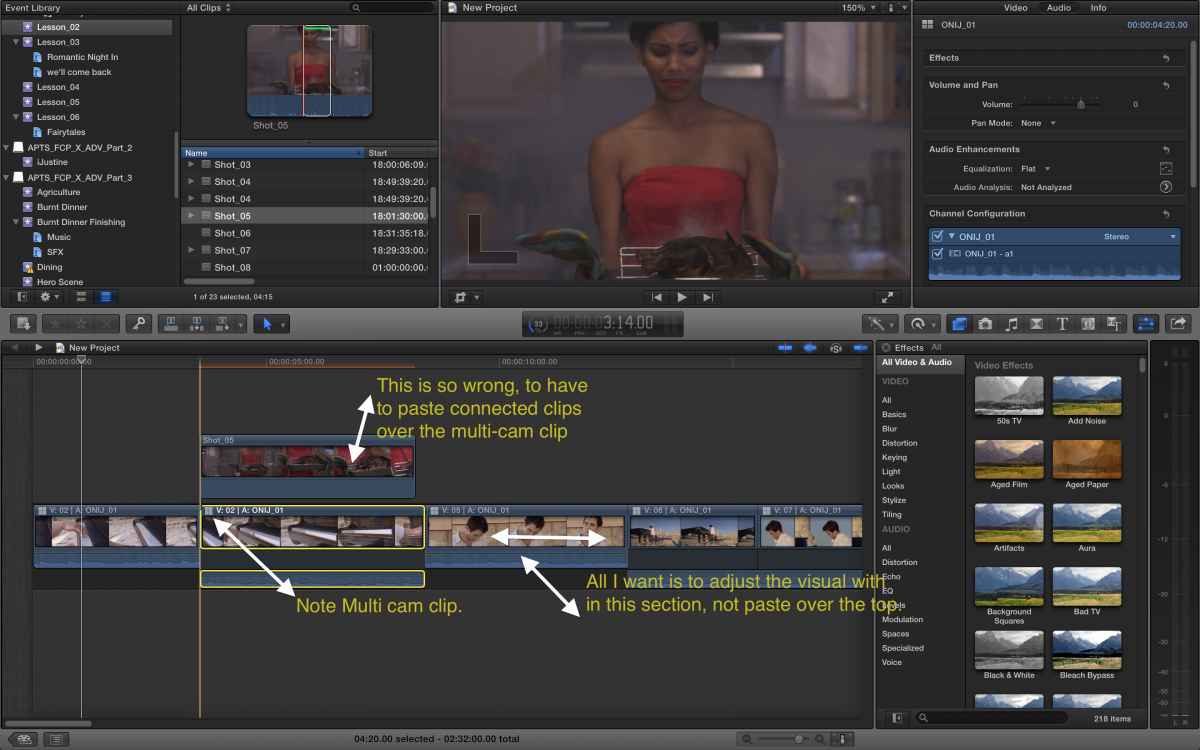
As far as I know this would be the case in any nle with audio linked to video. The solution is to either detach the audio or alt drag a copy of the clip up as a connected clip, silence the audio, and perform the slide on that clip.
You are acting really angry toward us we are just trying to help.
You are acting really angry toward us we are just trying to help.
Please Log in to join the conversation.
Less
More
- Posts: 971
- Thank you received: 46
10 Dec 2013 18:18 #35559
by MsJustine
Replied by MsJustine on topic Multicam Issues, serious problems
I am not angry, disappointed in the inability of a really good piece of software.
There are zero videos on youtube that show how to edit multi-cam in FCP other than music video. I wonder why there are no talking head clips tuts.
Justine
There are zero videos on youtube that show how to edit multi-cam in FCP other than music video. I wonder why there are no talking head clips tuts.
Justine
Please Log in to join the conversation.
10 Dec 2013 18:34 #35560
by Seamusvfx
Replied by Seamusvfx on topic Multicam Issues, serious problems
Here's what's happening. Either fcpx is junk, and everyone on this forum is suffering a prolonged hallucination, or you're not getting it.
While I'm sure you're not the type to come on a forum just to have whinge, I have edited many one to one iv with multiple audio tracks with ease. It's certainly possible.
Do your homework.
While I'm sure you're not the type to come on a forum just to have whinge, I have edited many one to one iv with multiple audio tracks with ease. It's certainly possible.
Do your homework.
Please Log in to join the conversation.
- jjsanderson
-
- Offline
- Elite Member
-
10 Dec 2013 18:45 #35565
by jjsanderson
There are two possible behaviours here, I think:
In both cases, the storyline accurately depicts what's happening, as it happens. Also in both cases, FCPX works to maintain audio clip sync. This is a departure from most other NLEs, which will shift the video but leave the audio in place, thus slipping out of sync.
Trying to interpret your screengrabs, it looks to me like you actively want video clips with out-of-sync audio. There are legitimate uses for that, for example slipping a close-up a few frames to allow an edit beneath it whilst still matching action with in/out frames. In that circumstance I absolutely would use a connected clip (video-only). I don't see why that's a bad thing.
FCPX multicam isn't perfect. In particular, the app doesn't really mark through edits, and once audio is detached there's no feedback for how far it's been slipped. However, many of us are using FCPX multicam heavily, and the consensus seems to be that it's absolutely best-in-class. Personally, I much prefer it to Premiere or FCP7's implementations.
As for system performance: if you're dropping frames on a 2013 MacBook Pro, you're either taxing your graphics performance with filters or (more likely) hitting drive performance limits. Neither is really an FCPX issue.
Replied by jjsanderson on topic Multicam Issues, serious problems
MsJustine wrote: It is at the 3rd stage, polish audio, the audio in every circumstance moves when I place the trim tool in the middle of the audio to adjust the video in that section of the clip. I do not want to move the end or anything, just the visible section.
There are two possible behaviours here, I think:
- If the clip has audio expanded (shift+S), using the trim tool to slip the video will slip the attached audio to keep it in sync. However, the audio duration will not change, resulting in a gap at one end of the clip and an overlap at the other. These will have to be closed by hand (ie. by selecting the audio handles and rolling the audio edit point
- If the clip audio is not expanded, using the trim tool to slip the clip will slip both audio and video, keeping both audio and video edit points intact.
In both cases, the storyline accurately depicts what's happening, as it happens. Also in both cases, FCPX works to maintain audio clip sync. This is a departure from most other NLEs, which will shift the video but leave the audio in place, thus slipping out of sync.
Trying to interpret your screengrabs, it looks to me like you actively want video clips with out-of-sync audio. There are legitimate uses for that, for example slipping a close-up a few frames to allow an edit beneath it whilst still matching action with in/out frames. In that circumstance I absolutely would use a connected clip (video-only). I don't see why that's a bad thing.
FCPX multicam isn't perfect. In particular, the app doesn't really mark through edits, and once audio is detached there's no feedback for how far it's been slipped. However, many of us are using FCPX multicam heavily, and the consensus seems to be that it's absolutely best-in-class. Personally, I much prefer it to Premiere or FCP7's implementations.
As for system performance: if you're dropping frames on a 2013 MacBook Pro, you're either taxing your graphics performance with filters or (more likely) hitting drive performance limits. Neither is really an FCPX issue.
Please Log in to join the conversation.
10 Dec 2013 18:51 - 10 Dec 2013 18:52 #35568
by Soundwise
Replied by Soundwise on topic Multicam Issues, serious problems
Here's one Sam Mestman's workflow tut on Audio Component's editing. Also some multicam stuff after 11:40.
Last edit: 10 Dec 2013 18:52 by Soundwise.
Please Log in to join the conversation.
- Daniel Rutledge
-
- Offline
- Premium Member
-
- Those that know don't tell, and those that tell don't know.
10 Dec 2013 18:54 #35571
by Daniel Rutledge
Replied by Daniel Rutledge on topic Multicam Issues, serious problems
I'm still not 100% clear on what you're trying to do, but I would say that Multicam clips behave almost identically to regular clips. So I think that the problems you are having seem to come from a lack of understanding how FCPX works. As someone coming from FCP 7, I can tell you that you need to forget about some of the complaints you made early on. "there should be more than one track" "should be able to change angles with selection circle" "It's wrong to have to paste a copy" etc. You have to accept that it works differently, and for me better. A lot of what you use from legacy programs isn't necessarily worth keeping.
Let me try again.
If you want to extend the in and out point of a clip, then use the select tool for independent clips or the trim tool for continuous clips. When you select the in point of a clip the selection should look like this [ when you select the out point it should look like this ] if you want to change the duration of a clip without effecting the in and out points of neighboring clips, this is how you do it. If you want to roll edit ( i.e. extend the in point while shortening the duration of the preceding clip) then your selection should look like this ][ If you want the audio on any clips involved to be effected, then leave the Audio/Video collapsed. If you want to leave the audio alone then you expand Audio/Video. If you want to slip or slide the video it looks like this [clip] or ]clip[ For that you should copy as a connected clip, if you want the audio to remain as is and effect only the video.
I hope this helps. You really have to try and accept FCPX for what it is, otherwise it is like being mad at a duck because it's not a chicken
Let me try again.
If you want to extend the in and out point of a clip, then use the select tool for independent clips or the trim tool for continuous clips. When you select the in point of a clip the selection should look like this [ when you select the out point it should look like this ] if you want to change the duration of a clip without effecting the in and out points of neighboring clips, this is how you do it. If you want to roll edit ( i.e. extend the in point while shortening the duration of the preceding clip) then your selection should look like this ][ If you want the audio on any clips involved to be effected, then leave the Audio/Video collapsed. If you want to leave the audio alone then you expand Audio/Video. If you want to slip or slide the video it looks like this [clip] or ]clip[ For that you should copy as a connected clip, if you want the audio to remain as is and effect only the video.
I hope this helps. You really have to try and accept FCPX for what it is, otherwise it is like being mad at a duck because it's not a chicken
Please Log in to join the conversation.
- jjsanderson
-
- Offline
- Elite Member
-
10 Dec 2013 19:11 #35572
by jjsanderson
Replied by jjsanderson on topic Multicam Issues, serious problems
[quote="Daniel Rutledge" post=35571You really have to try and accept FCPX for what it is, otherwise it is like being mad at a duck because it's not a chicken[/quote]
Damn dirty ducks!

Damn dirty ducks!
Please Log in to join the conversation.
