


- Posts: 4
- Thank you received: 0
3 Post Moderation Rule for New Boarders (25 Jan 2021)
New boarders will have their posts moderated - Don't worry if you cannot see your post immediately.
Banding
10 Dec 2013 14:59 #35491
by msrigby
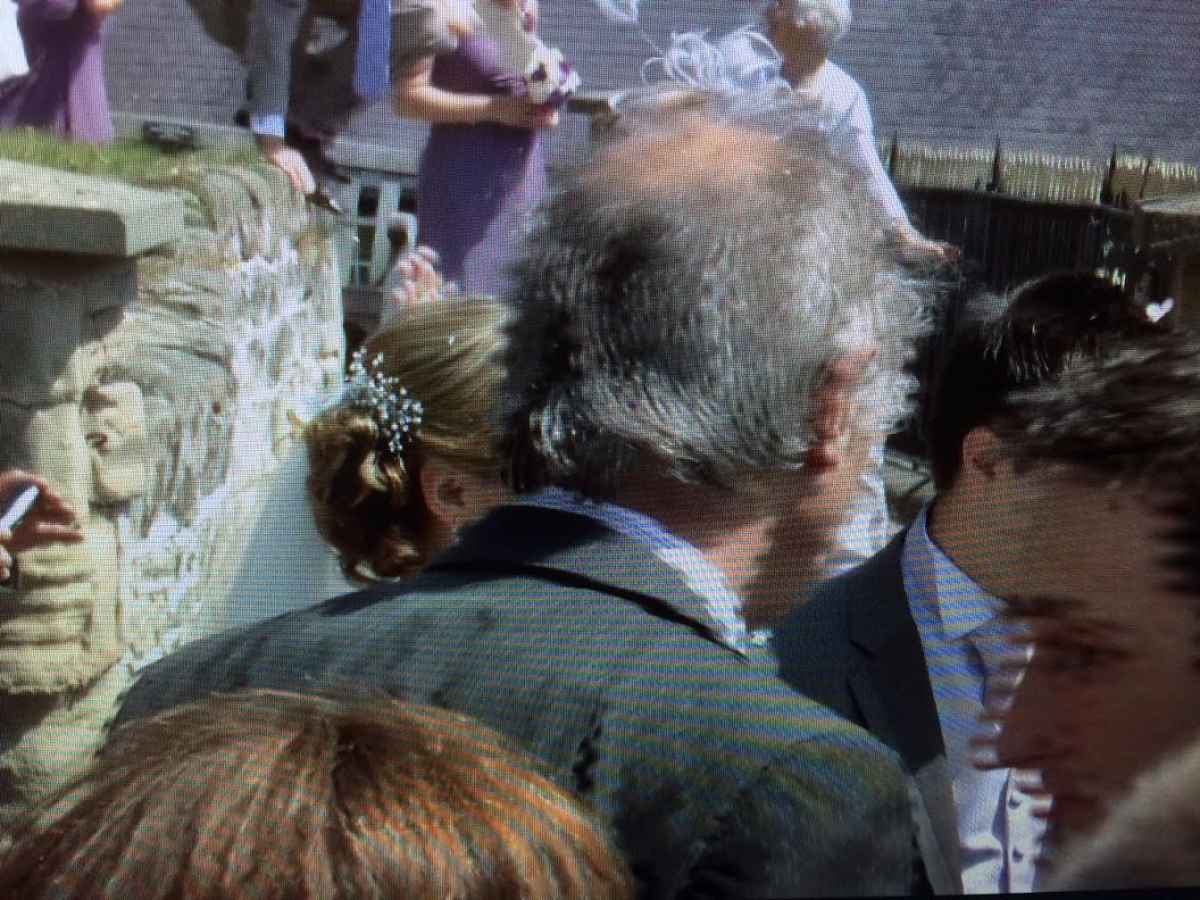
I've been working on my wedding video for some time now and recorded it with my panasonic hand held 920X in 1080p, it looks fantastic when its in the timeline but when I come to exporting the file it comes up with some really strange banding. It might be something that i'm missing or being completely stupid about, but when I make the video window smaller it distorts the image even more! I've been told the best settings are H.264 and thats exactly what I used?!
Attached is exactly what i'm talking about.
Thanks if anyone can help me!
Attached is exactly what i'm talking about.
Thanks if anyone can help me!
Please Log in to join the conversation.
10 Dec 2013 15:00 - 10 Dec 2013 15:11 #35492
by msrigby
For some reason its not allowing me to post the picture up either... So, basically the video in certain areas has banding going across making the video really blurry. Features are undistinctive, and its very frustrating. I will try to attach some photos as soon as I can. But does anyone know what a solution would be? It's not lighting banding or anything like that.
Last edit: 10 Dec 2013 15:11 by msrigby.
Please Log in to join the conversation.
- Russ Haskell
-

- Offline
- Elite Member
-

Less
More
- Posts: 176
- Thank you received: 24
10 Dec 2013 15:26 #35506
by Russ Haskell
Replied by Russ Haskell on topic Banding
Just guessing that it might be a field order setting problem.
Did you let Final Cut determine the project properties automatically from the first clip or are they custom settings?
Also, you could take the range tool and select a short section of the timeline and export it as a Pro Res master file to see whether the problems appear in that teat as well.
Russ
Did you let Final Cut determine the project properties automatically from the first clip or are they custom settings?
Also, you could take the range tool and select a short section of the timeline and export it as a Pro Res master file to see whether the problems appear in that teat as well.
Russ
Please Log in to join the conversation.
- Andreas Kiel
-
- Offline
- Platinum Member
-

Less
More
- Posts: 1077
- Thank you received: 189
10 Dec 2013 15:31 #35510
by Andreas Kiel
Replied by Andreas Kiel on topic Banding
Most often it happens because of color space limitations.
Just try the old fashioned way: add some grain.
- Andreas
Just try the old fashioned way: add some grain.
- Andreas
Please Log in to join the conversation.
- jjsanderson
-
- Offline
- Elite Member
-
10 Dec 2013 17:27 #35544
by jjsanderson
Replied by jjsanderson on topic Banding
If it looks OK in the timeline and you only see banding (posterisation?) in the H.264 export... that's probably a bitrate issue.
- What are your export settings?
- Can you export a Master File from FCPX (ProRes 422)? How does that look? If it's good, try compressing from that.
- What are your export settings?
- Can you export a Master File from FCPX (ProRes 422)? How does that look? If it's good, try compressing from that.
Please Log in to join the conversation.
11 Dec 2013 15:28 #35663
by msrigby
I don't recall making any changes and just let FCPX do them automatically. I've tried the footage and exported in various different files (ProRes422, HD422.. and a couple others) but they all seem to give me the same results... a really banding. But it only seems to happen during movement or if someone is passing through the shot?!? It doesn't sound like, to me anyway, that it is a exporting problem if i'm getting the same problems on each... does it?
Please Log in to join the conversation.
- Daniel Rutledge
-
- Offline
- Premium Member
-

- Those that know don't tell, and those that tell don't know.
11 Dec 2013 15:49 #35664
by Daniel Rutledge
Replied by Daniel Rutledge on topic Banding
I think I may have an answer. It looks like field order reversal, but it probably is not. If the footage and project are interlaced and you export an interlaced video and then try to playback on your computer's progressive monitor, then you get this interlacing issue on playback. If you drag the exported file back into FCPX, it will probably play back fine, as FCPX can compensate for this and Quicktime doesn't seem to. If I am right, and your footage and project are 1080i, then you can overcome this by creating a new project and create custom video properties. Choose 1080p, 1920x1080, and whatever the native frame rate is. Go in the original project, select all and copy. Then go to the new custom project and paste. Then export a master from there. If you don't need a master, then you can force progressive by exporting through compressor and making the correct adjustments. And… there are probably 20 other ways to do it. I hope that I am correct and that this solves the problem.
Please Log in to join the conversation.
- Russ Haskell
-
- Offline
- Elite Member
-
Less
More
- Posts: 176
- Thank you received: 24
11 Dec 2013 16:17 #35666
by Russ Haskell
Replied by Russ Haskell on topic Banding
Well, according tohttp://shop.panasonic.com/shop/model/HC-X920K, this camera only shoots progressive. Possibly it's progressive in an interlaced steam. I was asking about project settings because I wondered whether somehow the project was set to interlaced in custom settings or whether FCPX might be reading the clips as interlaced.
With your project open, take a look at the Info pane in the Inspector. How does it report the project (at the very top) – 1080P or 1080i?
Russ
With your project open, take a look at the Info pane in the Inspector. How does it report the project (at the very top) – 1080P or 1080i?
Russ
Please Log in to join the conversation.
- jjsanderson
-
- Offline
- Elite Member
-
11 Dec 2013 17:35 #35668
by jjsanderson
Replied by jjsanderson on topic Banding
Definitely looking in the right place with the footage being interlaced - that indeed looks like classic interlace tearing.
The X920K certainly can shoot progressive, but it's not immediately obvious from the specs that it always does so. Is there any way to check what the camera settings were? (though previous posters are right, checking the media in FCPX is more important).
The X920K certainly can shoot progressive, but it's not immediately obvious from the specs that it always does so. Is there any way to check what the camera settings were? (though previous posters are right, checking the media in FCPX is more important).
Please Log in to join the conversation.
- jjsanderson
-
- Offline
- Elite Member
-
12 Dec 2013 15:11 #35717
by jjsanderson
Replied by jjsanderson on topic Banding
If the footage is 1080i that's OK (not ideal perhaps, but OK). You just need to deinterlace somewhere. Typically you'd edit in a 1080i project, and deinterlace during compression.
If you have Compressor (or another tool) you could take the existing ProRes output and compress from that, making sure to choose one of the deinterlace methods.
If you have Compressor (or another tool) you could take the existing ProRes output and compress from that, making sure to choose one of the deinterlace methods.
Please Log in to join the conversation.
