


- Posts: 6
- Thank you received: 0
3 Post Moderation Rule for New Boarders (25 Jan 2021)
New boarders will have their posts moderated - Don't worry if you cannot see your post immediately.
Text effect. (Appearing behind moving object)
- RedChalice
-
 Topic Author
- Offline
- New Member
-

Less
More
07 Dec 2013 20:22 #35278
by RedChalice
Text effect. (Appearing behind moving object) was created by RedChalice
Does anyone know how to create this with text? .. As a person or object moves across the frame, text would appear as if hidden behind. The letters would appear smoothly one after the other as the subject uncovers the word.
The example below is at :54 seconds
The example below is at :54 seconds
Please Log in to join the conversation.
- Nervebroke
-
- Offline
- Elite Member
-

Less
More
- Posts: 177
- Thank you received: 12
07 Dec 2013 20:35 #35279
by Nervebroke
Replied by Nervebroke on topic Text effect. (Appearing behind moving object)
My best guess is to do it in Motion 5 with one of the text behaviors. There are lots of free and paid tutorials out there that will help you learn. In this case Google is your friend. 
Please Log in to join the conversation.

07 Dec 2013 20:51 #35281
by BenB
Replied by BenB on topic Text effect. (Appearing behind moving object)
Not a text behavior, but an animated mask.
I have a tutorial here.
I also have one on
animating lines
that adds information. You could do it in FCP X with the Slice X plugin, too. You simply create a shape mask, and keyframe (animate) the points of that shape, or the position of the shape as a whole.
Once you learn to create a shape, use the Point Editor tool, Keyframe, and use that animated shape as the source of a Mask, it really is pretty easy. It sounds like more than it is.
Once you learn to create a shape, use the Point Editor tool, Keyframe, and use that animated shape as the source of a Mask, it really is pretty easy. It sounds like more than it is.
Please Log in to join the conversation.
- RedChalice
-
Topic Author
- Offline
- New Member
-
Less
More
- Posts: 6
- Thank you received: 0
07 Dec 2013 21:05 #35283
by RedChalice
Replied by RedChalice on topic Text effect. (Appearing behind moving object)
Ben, your advice is really appreciated. It does seem overwhelming reading the process, but at least I know what to begin learning.
Please Log in to join the conversation.
07 Dec 2013 21:28 #35286
by BenB
Replied by BenB on topic Text effect. (Appearing behind moving object)
Don't be intimidated, work along with the tutorials, once you walk through it, you'll see it is not that big of a deal. It only seems that way the first time. After that, its pretty easy.
Please Log in to join the conversation.
- Nervebroke
-
- Offline
- Elite Member
-
Less
More
- Posts: 177
- Thank you received: 12
07 Dec 2013 23:30 - 07 Dec 2013 23:31 #35288
by Nervebroke
Replied by Nervebroke on topic Text effect. (Appearing behind moving object)
I just did a down and dirty one in Motion 5. You can do it with the "text animation" behavior and the "type on" behavior. As with FCPX and Motion there are several ways to get the same results. I am not very good at using masks. I guess that I should brush up on them. Ben thanks for the links as I will revisit them.
Dave
Dave
Last edit: 07 Dec 2013 23:31 by Nervebroke. Reason: Because I can not type
Please Log in to join the conversation.

08 Dec 2013 18:08 - 08 Dec 2013 19:48 #35323
by CMessineo
Replied by CMessineo on topic Text effect. (Appearing behind moving object)
This is really easy to do. 9 times our of 10 I find I can do this right inside FCP X (no need for Motion). Often just keyframing the crop (on the text layer) will do this - especially if the object passing in front of the text is fairly straight.
Last edit: 08 Dec 2013 19:48 by CMessineo.
Please Log in to join the conversation.
- Nervebroke
-
- Offline
- Elite Member
-
Less
More
- Posts: 177
- Thank you received: 12
08 Dec 2013 18:37 #35324
by Nervebroke
Replied by Nervebroke on topic Text effect. (Appearing behind moving object)
Like I said before, there is more than one way to skin a cat. 
Now there are 3 examples of how to do the same thing.
This community is wonderful!
Now there are 3 examples of how to do the same thing.
This community is wonderful!
Please Log in to join the conversation.
08 Dec 2013 19:49 #35328
by CMessineo
So true. I teach FCP X and there are so many different ways to accomplish the same effect - it can be a bit overwhelming at times. But at least we have communities like this to help each other out!
Replied by CMessineo on topic Text effect. (Appearing behind moving object)
Nervebroke wrote: Like I said before, there is more than one way to skin a cat.
Now there are 3 examples of how to do the same thing.
This community is wonderful!
So true. I teach FCP X and there are so many different ways to accomplish the same effect - it can be a bit overwhelming at times. But at least we have communities like this to help each other out!
Please Log in to join the conversation.
20 Apr 2014 22:31 - 20 Apr 2014 22:32 #44825
by Endoh935
Replied by Endoh935 on topic Text effect. (Appearing behind moving object)
CMessineo> i've been trying to figure out this effect on fcpx without using motion 5 (which i have) for ages..you sir are awesome.
Last edit: 20 Apr 2014 22:32 by Endoh935. Reason: typo
Please Log in to join the conversation.

21 Apr 2014 04:42 #44832
by tpayton
Replied by tpayton on topic Text effect. (Appearing behind moving object)
A whole bunch of ways to do this. If you have a high contrast subject in the foreground you could use a luma key to cover the text. Then animate either a trim or mask of the text to roughly match the foreground.
Please Log in to join the conversation.
21 Apr 2014 15:05 - 21 Apr 2014 15:11 #44843
by tpayton
Replied by tpayton on topic Text effect. (Appearing behind moving object)
Here is a luma key of the last shot:
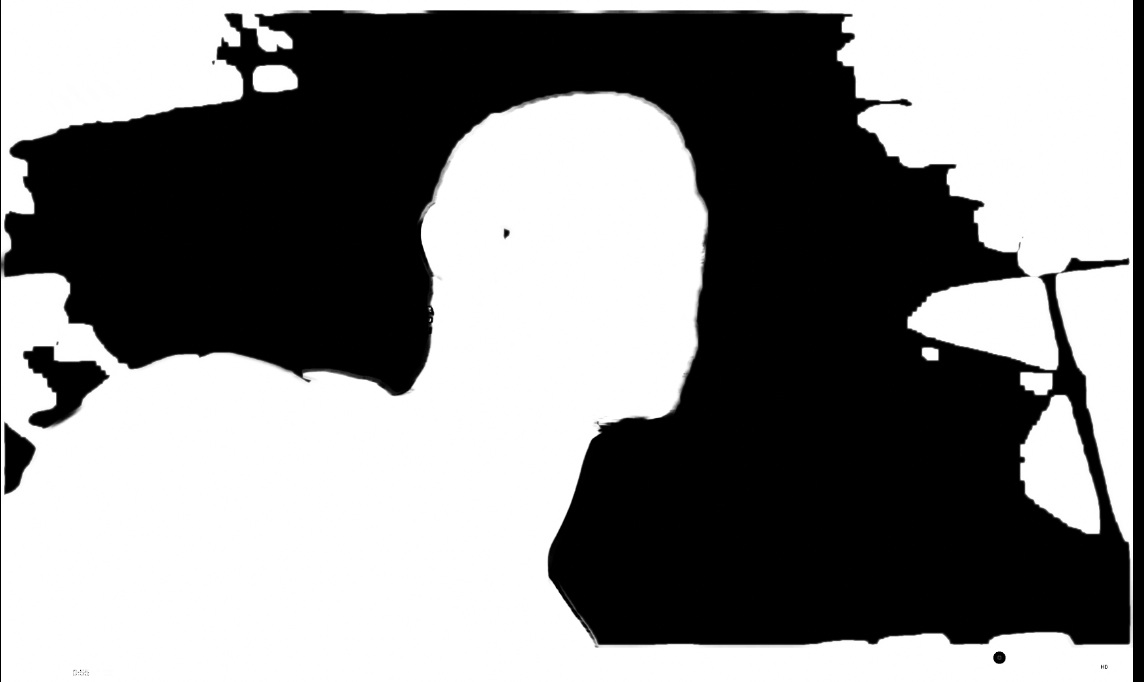
Just garbage matt that up, pop some text behind and you are done.
Just garbage matt that up, pop some text behind and you are done.
Last edit: 21 Apr 2014 15:11 by tpayton.
Please Log in to join the conversation.
21 Apr 2014 15:12 #44844
by CMessineo
Replied by CMessineo on topic Text effect. (Appearing behind moving object)
I'm glad I could help!
Please Log in to join the conversation.
23 Apr 2014 02:46 - 23 Apr 2014 02:47 #44949
by Endoh935
Replied by Endoh935 on topic Text effect. (Appearing behind moving object)
TPayton >> I like what you're saying, but i don't quite get what you're saying..do you have a video tutorial.
Last edit: 23 Apr 2014 02:47 by Endoh935. Reason: typo
Please Log in to join the conversation.
