


- Posts: 87
- Thank you received: 3
3 Post Moderation Rule for New Boarders (25 Jan 2021)
New boarders will have their posts moderated - Don't worry if you cannot see your post immediately.
FCPX will not import Camera Archives created in FCPX
03 Dec 2013 17:08 #35080
by BobKrist
FCPX will not import Camera Archives created in FCPX was created by BobKrist
I'm trying to access some footage from a couple of years ago on a project for which I created Final Cut Archives from my AVCHD camera's SD cards. But Final Cut tells me it can't read them. Any ideas why the program is telling me it can't access Camera Archives that it created itself?
I've never been comfortable with these program specific Camera Archives, and have since found a program that copies the AVCHD card structure in its entirety, and it's much better. But I do have some older projects that are backed up with FCPX Camera Archives, and it looks like my discomfort with this format was not without cause.
Any ideas? Thanks in advance! Bob Krist
I've never been comfortable with these program specific Camera Archives, and have since found a program that copies the AVCHD card structure in its entirety, and it's much better. But I do have some older projects that are backed up with FCPX Camera Archives, and it looks like my discomfort with this format was not without cause.
Any ideas? Thanks in advance! Bob Krist
Please Log in to join the conversation.
- Tom Wolsky
-

- Offline
- Moderator
-

03 Dec 2013 17:44 #35083
by Tom Wolsky
Replied by Tom Wolsky on topic FCPX will not import Camera Archives created in FCPX
Where are the archives located? Do they appear in the Archives section of the Import window's sidebar?
Please Log in to join the conversation.

03 Dec 2013 17:44 #35084
by Topher5
Replied by Topher5 on topic FCPX will not import Camera Archives created in FCPX
If you can't get FCP to get the Archive to be recognized try...
CLIPWRAP
To bring it in
Easily rewrap HDV (m2t) and AVCHD (mts, m2ts) files into QuickTime movies
Faster than transcoding
No generation loss
Support for all the popular editing formats (ProRes, DNxHD, etc)
and non-linear editors (Final Cut Pro, FCPX, Avid Media Composer,
Adobe Premiere Pro, Apple iMovie)
Free Trial here
www.divergentmedia.com/clipwrap
CLIPWRAP
To bring it in
Easily rewrap HDV (m2t) and AVCHD (mts, m2ts) files into QuickTime movies
Faster than transcoding
No generation loss
Support for all the popular editing formats (ProRes, DNxHD, etc)
and non-linear editors (Final Cut Pro, FCPX, Avid Media Composer,
Adobe Premiere Pro, Apple iMovie)
Free Trial here
www.divergentmedia.com/clipwrap
Please Log in to join the conversation.
03 Dec 2013 17:47 - 03 Dec 2013 17:48 #35085
by Topher5
Replied by Topher5 on topic FCPX will not import Camera Archives created in FCPX
Okay what this does is...
I grabbed the AVCHD, MTS files off a card and I losted the card structure, so FCP goes What is this stuff.
ClipWrap allows you to rewrap them into a .mov file quickly without transcoding which would add generational loss.
It saved my butt.
I grabbed the AVCHD, MTS files off a card and I losted the card structure, so FCP goes What is this stuff.
ClipWrap allows you to rewrap them into a .mov file quickly without transcoding which would add generational loss.
It saved my butt.
Last edit: 03 Dec 2013 17:48 by Topher5.
Please Log in to join the conversation.
03 Dec 2013 17:54 #35086
by BobKrist
Replied by BobKrist on topic FCPX will not import Camera Archives created in FCPX
Tom: They're on a storage drive, in a folder called Camera Archives, and in this case, in a subfolder called Baja. I can't get drag them over to the Camera Archive column, and the archives themselves are grayed out and not able to be imported. Where should I put them to be recognized? Thanks, Bob
Please Log in to join the conversation.
03 Dec 2013 17:56 #35087
by BobKrist
Replied by BobKrist on topic FCPX will not import Camera Archives created in FCPX
Topher: Thanks, I'm familiar with and have Clipwrap, but it doesn't recognize FCPX Camera Archives...it's great, as you point out, for .MTS files, but the Archives appear to be FCPX specific.
Please Log in to join the conversation.
- Tom Wolsky
-
- Offline
- Moderator
-
03 Dec 2013 18:07 #35088
by Tom Wolsky
Replied by Tom Wolsky on topic FCPX will not import Camera Archives created in FCPX
They must be in a folder called Final Cut Camera Archives at the root level of the media drive (or in Movies) and they cannot be in subfolders unfortunately.
Please Log in to join the conversation.
- Gabriel Spaulding
-

- Offline
- Senior Member
-

- I am becoming.
Less
More
- Posts: 41
- Thank you received: 4
03 Dec 2013 18:17 #35091
by Gabriel Spaulding
Replied by Gabriel Spaulding on topic FCPX will not import Camera Archives created in FCPX
At the Finder level, deleting the '.fcparch' file extension will basically un-package the contents and return them to the state they were in when they were copied from the camera card. Final Cut Pro X and/or ClipWrap will be able to read and/or convert these files.
Please Log in to join the conversation.
03 Dec 2013 18:18 #35092
by BobKrist
Replied by BobKrist on topic FCPX will not import Camera Archives created in FCPX
Brilliant Tom, just taking them out of the sub folder and putting them into a folder of that name did the trick. Many thanks, Bob
Please Log in to join the conversation.
- jjsanderson
-
- Offline
- Elite Member
-

03 Dec 2013 18:20 #35093
by jjsanderson
Replied by jjsanderson on topic FCPX will not import Camera Archives created in FCPX
Tom's right, your archive isn't in the place FCPX requires.
Note that you can right-click on a Camera Archive in the Finder - it's a regular OS X package, so 'Show Package Contents' is available. You should be able to get to the .mts files that way.
Note that you can right-click on a Camera Archive in the Finder - it's a regular OS X package, so 'Show Package Contents' is available. You should be able to get to the .mts files that way.
Please Log in to join the conversation.
- LintelFilms
-
- Offline
- New Member
-

Less
More
- Posts: 11
- Thank you received: 1
24 Oct 2014 20:13 #54761
by LintelFilms
Replied by LintelFilms on topic FCPX will not import Camera Archives created in FCPX
Hi, I'm new here but having a similar problem. I've created a few camera archives from my BMPCC SD card (using FCPX). When I open the FCPX import window and navigate to the archive (now in a folder named "Final Cut Camera Archives" on the root folder of my media drive after reading the above) I can see the video files listed but only the first video is displayed or imported no matter which file I select.
I can't see or find a "Camera Archive" heading in the browser window (i.e. top left of import window)
If I delete the ".fcparch" extension as suggested above it all works as normal, but I'd rather not have to do this.
FCP 10.1.3
Anyone got any ideas?
Thanks, Matt
I can't see or find a "Camera Archive" heading in the browser window (i.e. top left of import window)
If I delete the ".fcparch" extension as suggested above it all works as normal, but I'd rather not have to do this.
FCP 10.1.3
Anyone got any ideas?
Thanks, Matt
Please Log in to join the conversation.
- Tom Wolsky
-
- Offline
- Moderator
-
24 Oct 2014 23:37 #54769
by Tom Wolsky
Replied by Tom Wolsky on topic FCPX will not import Camera Archives created in FCPX
.
Please Log in to join the conversation.

24 Oct 2014 23:43 #54771
by lichinho
Replied by lichinho on topic FCPX will not import Camera Archives created in FCPX
I went to look inside an FCP X camera archive (in Finder, control-click and choose Show Package Contents).
I was under the wrong impression that it was an exact copy of the camera card, but it was not.
It also contained a file called FCArchMetadata.plist
I can think of a way to fool FCP X into accepting the problematic archive:
Change the file extension to something other than the current .fcarch, or better yet, delete the extension completely - this will allow FCP X to open the folder and it will treat is as a camera card - with the possibility of importing selected ranges, like from a card or archive.
The .fcarch filename extension is usually hidden, but if you select the file and Get Info (Cmd-I), you can edit the complete name in the Get Info window. You may be asked "Do you really want to remove the extension .fcarch?" Click Remove.
I was under the wrong impression that it was an exact copy of the camera card, but it was not.
It also contained a file called FCArchMetadata.plist
I can think of a way to fool FCP X into accepting the problematic archive:
Change the file extension to something other than the current .fcarch, or better yet, delete the extension completely - this will allow FCP X to open the folder and it will treat is as a camera card - with the possibility of importing selected ranges, like from a card or archive.
The .fcarch filename extension is usually hidden, but if you select the file and Get Info (Cmd-I), you can edit the complete name in the Get Info window. You may be asked "Do you really want to remove the extension .fcarch?" Click Remove.
Please Log in to join the conversation.

25 Oct 2014 02:35 #54773
by cseeman
Replied by cseeman on topic FCPX will not import Camera Archives created in FCPX
Matt,
I posted this issue months ago. Also reported to Apple. It's not fixed yet. If's been broken through the las few FCPX, OS, BMPCC firmware updates. Not only did it break but I found that all my previous BMPCC camera archives which had been good, also went bad. For me the issue is specific to BMPCC. Archives from other cameras are fine such as from my consumer toy Canon Vixia. I believe something specific to the BMPCC archive .plist is at issue or, FCPX can't read it after creating it.
I posted this issue months ago. Also reported to Apple. It's not fixed yet. If's been broken through the las few FCPX, OS, BMPCC firmware updates. Not only did it break but I found that all my previous BMPCC camera archives which had been good, also went bad. For me the issue is specific to BMPCC. Archives from other cameras are fine such as from my consumer toy Canon Vixia. I believe something specific to the BMPCC archive .plist is at issue or, FCPX can't read it after creating it.
Please Log in to join the conversation.
25 Oct 2014 03:05 - 25 Oct 2014 03:13 #54774
by cseeman
Replied by cseeman on topic FCPX will not import Camera Archives created in FCPX
As you can see, the metadata for duration, start, end are all the same.
If you were to click on the clips they all show video for the first clip only.
That first clip is the only clip that imports.
Yes you can see the time stamp and file size is different for each clip.
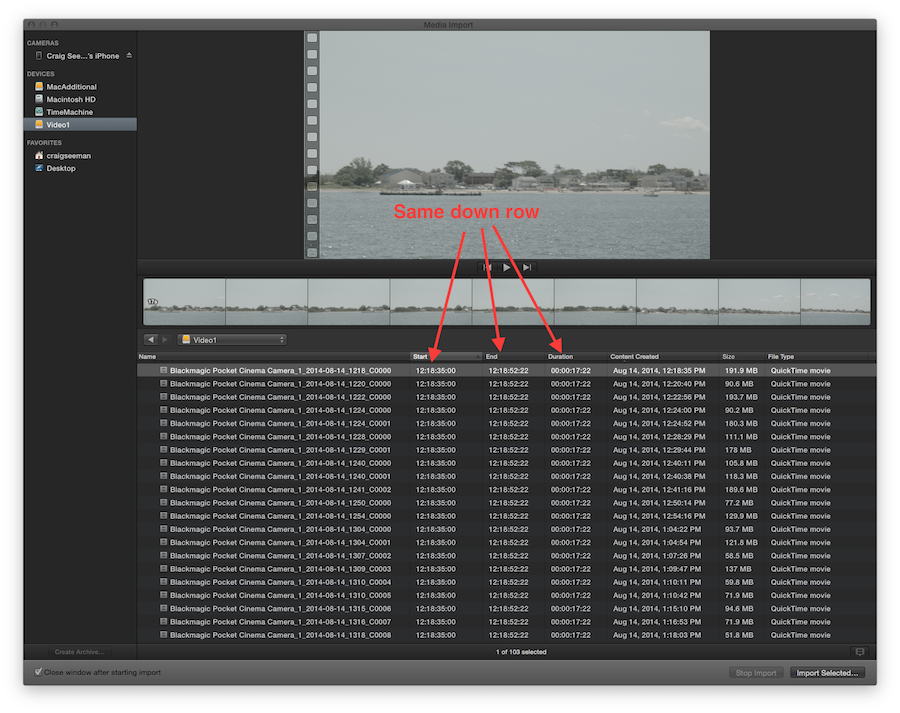
If you were to click on the clips they all show video for the first clip only.
That first clip is the only clip that imports.
Yes you can see the time stamp and file size is different for each clip.
Last edit: 25 Oct 2014 03:13 by cseeman.
Please Log in to join the conversation.
25 Oct 2014 03:17 - 25 Oct 2014 11:17 #54775
by cseeman
Replied by cseeman on topic FCPX will not import Camera Archives created in FCPX
Found the original thread from July on BMPCC FCPX Camera Archives.
www.fcp.co/forum/4-final-cut-pro-x-fcpx/...maged?start=20#50213
www.fcp.co/forum/4-final-cut-pro-x-fcpx/...maged?start=20#50213
Last edit: 25 Oct 2014 11:17 by cseeman.
Please Log in to join the conversation.
- LintelFilms
-
- Offline
- New Member
-
Less
More
- Posts: 11
- Thank you received: 1
25 Oct 2014 08:49 #54783
by LintelFilms
Replied by LintelFilms on topic FCPX will not import Camera Archives created in FCPX
Thanks very much Craig, this is good to know. I'll probably just use disk utility for my Pocket archives (or delete the .fcarch extension). It's not a big deal, but good to know it's a known bug rather than an issue with my workflow.
Please Log in to join the conversation.
- LintelFilms
-
- Offline
- New Member
-
Less
More
- Posts: 11
- Thank you received: 1
25 Oct 2014 08:50 - 25 Oct 2014 08:56 #54784
by LintelFilms
Replied by LintelFilms on topic FCPX will not import Camera Archives created in FCPX
.
Last edit: 25 Oct 2014 08:56 by LintelFilms.
Please Log in to join the conversation.
- LintelFilms
-
- Offline
- New Member
-
Less
More
- Posts: 11
- Thank you received: 1
25 Oct 2014 08:52 #54785
by LintelFilms
Sorry, should've looked harder for this! Thanks again ...
Replied by LintelFilms on topic FCPX will not import Camera Archives created in FCPX
cseeman wrote: Round the original thread from July on BMPCC FCPX Camera Archives.
www.fcp.co/forum/4-final-cut-pro-x-fcpx/...maged?start=20#50213
Sorry, should've looked harder for this! Thanks again ...
Please Log in to join the conversation.
- LintelFilms
-
- Offline
- New Member
-
Less
More
- Posts: 11
- Thank you received: 1
25 Oct 2014 09:41 #54786
by LintelFilms
Replied by LintelFilms on topic FCPX will not import Camera Archives created in FCPX
Maybe this has already been discussed or I should start a new thread for it (sorry, I did a quick search but I'm still finding my way around the forum) ...
As well as the camera archive issue, I'm finding that when I'm within the import window I cannot select a region of a BMPCC clip to be imported (i.e. "I" and "O" do nothing when the playhead is over the preview clip). It's either the whole clip or nothing. Is anyone else experiencing this? This is the case straight from the SD card, not just from Camera Archives.
Region select is working as normal in the import window with my other cameras. It's particularly frustrating that it's the BMPCC that's having this problem as my other cameras are low bitrate. Because the Pocket files are large (ProRes HQ usually), it's much more important to me to be able to select only the segments I need to save disk space.
Thanks again.
As well as the camera archive issue, I'm finding that when I'm within the import window I cannot select a region of a BMPCC clip to be imported (i.e. "I" and "O" do nothing when the playhead is over the preview clip). It's either the whole clip or nothing. Is anyone else experiencing this? This is the case straight from the SD card, not just from Camera Archives.
Region select is working as normal in the import window with my other cameras. It's particularly frustrating that it's the BMPCC that's having this problem as my other cameras are low bitrate. Because the Pocket files are large (ProRes HQ usually), it's much more important to me to be able to select only the segments I need to save disk space.
Thanks again.
Please Log in to join the conversation.
